


Chatbots are currently the predominant UI of generative-AI tools for text manipulation. Each individual interaction with AI is a straightforward transaction: you put text in, and AI gives text back. (Other AI tools produce other media forms, such as images, audio, or video, but this article focuses specifically on text-based AI tools.)
In user testing, we have seen that users frequently engage in iterations where they refine AI-generated output through additional prompts. This back-and-forth interaction, in combination with the text-only user interface, creates two new user behaviors: the accordion effect and apple picking.
Our Research
Our goal was to uncover usability issues present in AI-chatbot interfaces. Since these bots have become widely used productivity tools, we conducted a qualitative usability study with professionals and students who use chatbots in their day-to-day work.
We recruited a sample of 8 participants, which included:
- Marketing professionals
- UX professionals
- Program managers
- Ph.D. students
Each participant completed 1–2 tasks they brought to the session, followed by custom tasks we designed that matched the nature of their profession. These tasks involved writing, generating ideas, editing text, analyzing information, and designing interfaces. Users used ChatGPT-3.5 to complete these tasks as was representative of their day to day usage.
Sessions were 90 minutes, and participants were asked to create low-, mid-, and high-fidelity outputs using chatbots.
- Low-fidelity outputs: The content takes priority, and the format and writing style are unimportant (ideas, inspiration, etc.).
- Mid-fidelity outputs: Formatting is somewhat important, but the writing style does not have to be polished (article outlines, marketing plans, etc.).
- High-fidelity outputs: These require appropriate formatting and high-quality writing style (emails, social media posts, articles, etc.).
Accordion Editing
Definition: Accordion editing occurs when users ask the AI to shrink or expand its outputs, often back to back and repeatedly, to accomplish a singular goal.
Since, unlike images, text is a one-dimensional medium, users are limited to a simple, linear way to interact. Beyond the tone or style of the text, one of the most straightforward characteristics is length: make it longer or shorter, just like the player of an accordion expands and contracts it.

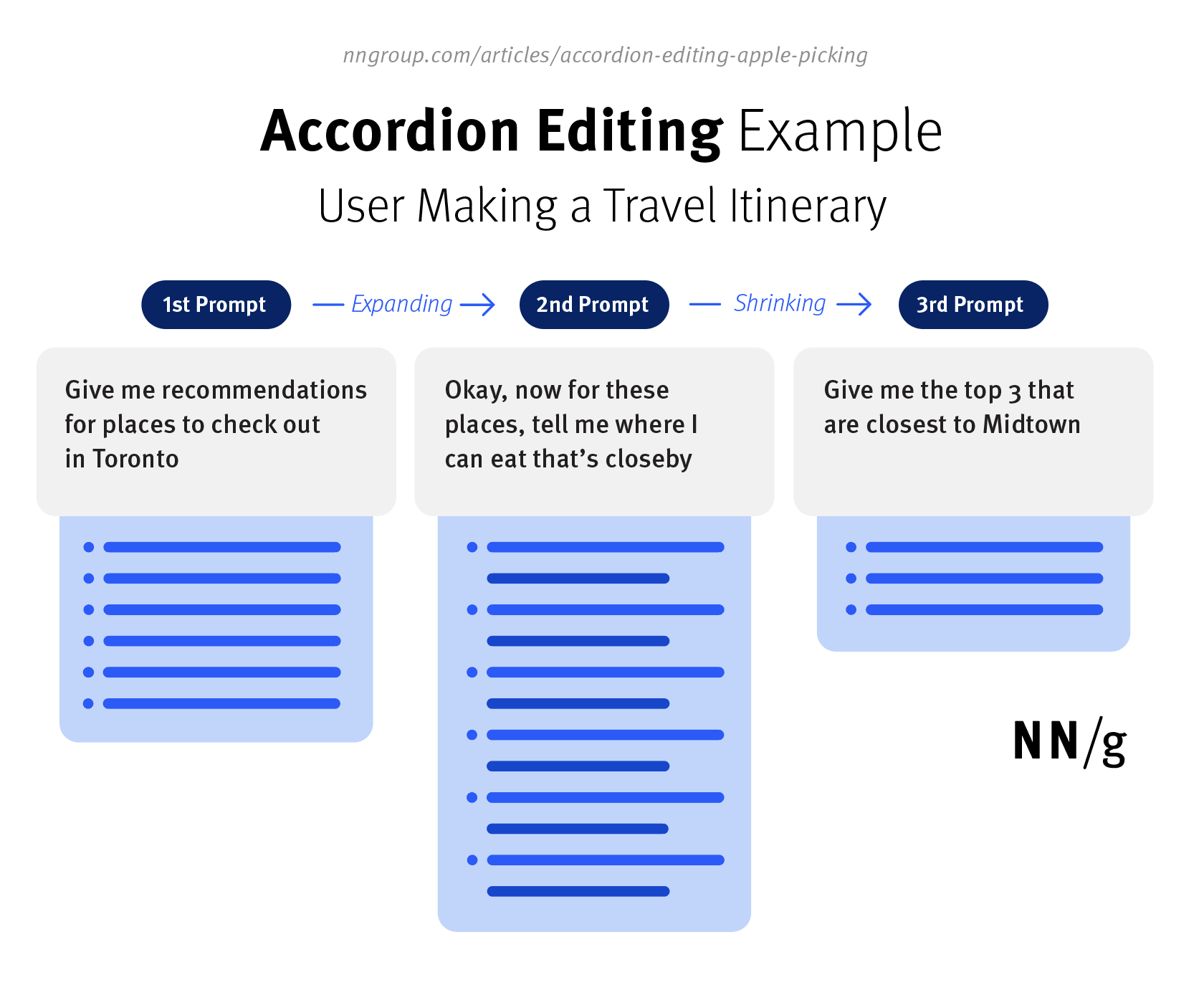
For example, consider a user who wants to create a travel itinerary. They ask the chatbot to first give some recommendations for sightseeing in a new city. Next, they ask for more information on each recommendation by adding a few places to eat near the attraction (expanding the output). Finally, they ask the chatbot to give the top 5 best options in a specific neighborhood (shrinking the output) to complete the travel itinerary.
Shrinking
Users shrink AI outputs with two primary behaviors: forced ranking and word-count reduction.
|
Behavior |
Description |
Use Case |
|
Forced ranking List shortening via a top selection |
Users ask the AI to cut down on the number of items given by the AI, especially in the case of lists or bullet points. The bot often gives users longer lists than they are looking for, and users choose to reduce the number by asking for the ‘top 5’ or ‘top 10’ points. |
Creating low-to-mid fidelity outputs and lists, like generating ideas, plans, or options |
|
Word-count reduction Specifying character or count limits |
When writing text for specific purposes, like emails or social media posts, users have an expected length in mind for the response that ChatGPT frequently exceeds. They often ask the bot to “shorten it” and sometimes specify a desired length in either absolute (“100 words”) or relative terms (“cut it in half”). This behavior may need to be repeated until they reach the desired length. | Writing high-fidelity content like essays, emails, or social media posts |
Expanding
Users expand AI outputs in two primary ways: by expanding upon an idea given by the bot or by adding missing content.
|
Behavior |
Description |
Use Case |
|
Expansion within an idea Adding to an existing idea |
Users expand on a particular paragraph or bullet point to follow up on an idea that ChatGPT gave them. They do so by referencing part(s) of the previous response they want to expand on in the next prompt, alongside an instruction to expand on it. |
Creating text at all levels of fidelity, including ideas, compiled information about a topic, article outlines, plan documents, emails, and social media posts |
|
Addition of missing content Capturing new ideas |
Users often point out that the response is missing some parts they expect to see based on their knowledge and experience. They follow up with a prompt specifying what they want to add to the previous response. | Writing mid-to-high fidelity content like essays, emails, social media posts, plan documents, article outlines |
Shrinking and Expanding Are Used Together
Accordion editing involves the purposeful shrinking or expanding of AI outputs, often back to back. However, in many cases, both shrinking and expanding are used in combination to create the final desired outputs, hence the accordion analogy.
For example, a user may find missing content in their text and request that ChatGPT add it, thus expanding a specific aspect of the output. But then the user follows by shortening the overall response to fit their required format. Both actions require users to write additional prompts to make the desired changes, often repeatedly.
Reducing Unintended Accordion Editing
For some generative-AI goals, accordion editing is intentional and beneficial. With others, it’s the repercussion of not getting the desired output the first few (or several) tries. Some generative-AI tools offer personalized settings and formats to address this issue by allowing users to specify custom preferences that influence all future use. For example, a custom instruction like “Keep it short unless I ask for more detail. Use lists and bold keywords so it’s easy to scan” reduced ChatGPT’s tendency to be verbose.
Some users reduce their amount of back-and-forth accordioning by including a limit (such as the number of points or a word count) in their initial prompts. In many cases, the initial AI output matched the user’s specifications. However, even if the initial specification was satisfied, many users still engaged in other content-related revisions with the AI.
Thus, our established recommendation for chatbot users remains: be as specific as possible to combat the articulation barrier and achieve the output you want.
You are more likely to achieve your goal quickly by specifying:
- An expected content format (bullet points vs. paragraphs)
- An output type (email, social media post, etc.)
- An expected length ( number of words or pages)
Apple Picking
Definition: Apple picking occurs when users reference one or multiple, previous AI-responses in their following prompt to achieve their desired output.
Users frequently want to build on one or more previous responses from ChatGPT by referring to a specific element within one of these previous responses. There’s no easy way to do this. People must type (or copy and paste) text describing or quoting the part of the previous responses that they want to work with. Given the frequency of this behavior, apple picking incurs a significant effort.
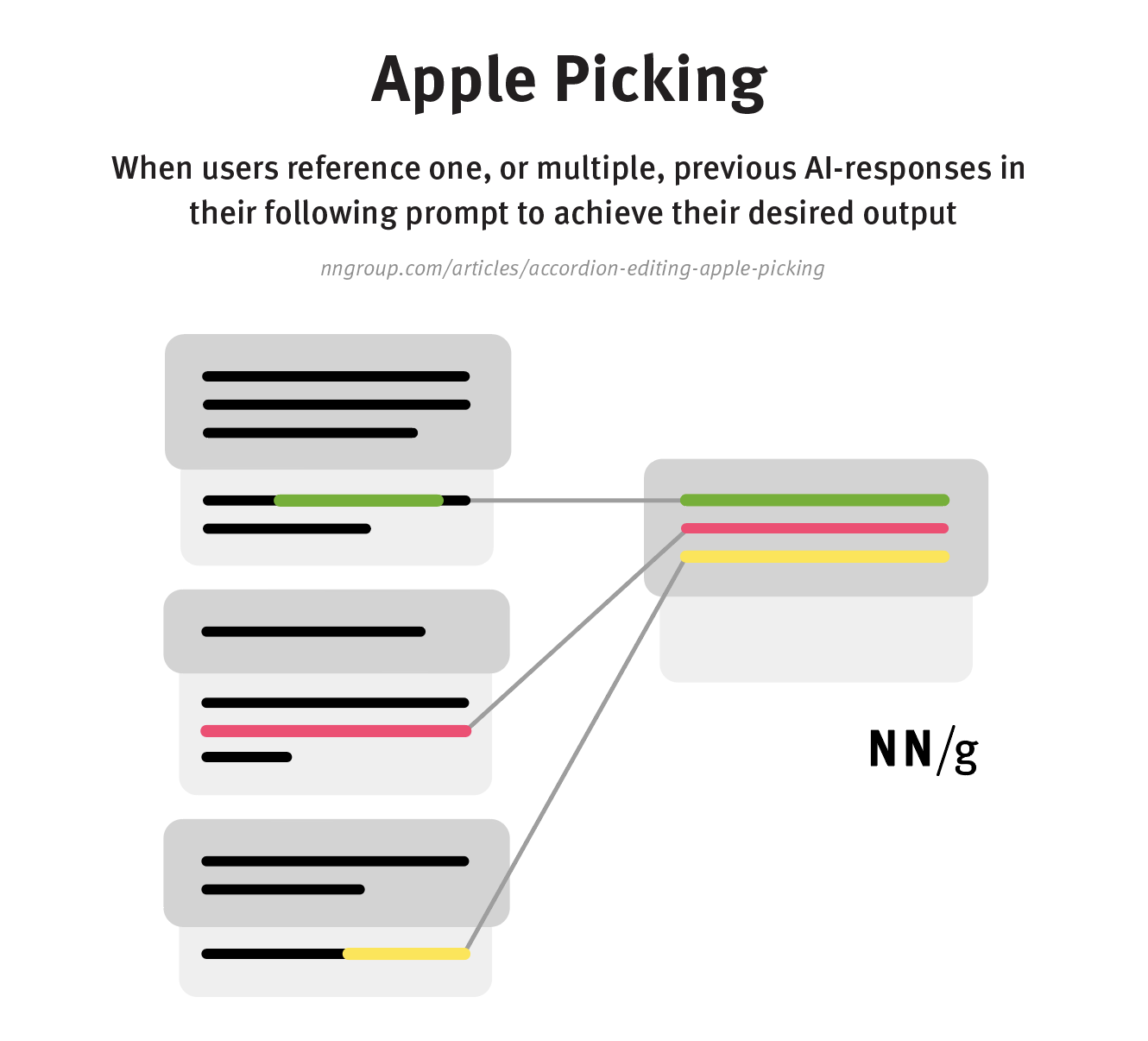
Users apple pick by identifying (calling out) an element they either want to:
- Change, or
- Use as context for their subsequent requests
|
Behavior |
Description |
Use Case |
|
Call out to change |
When users want to edit a specific point or remove part of an existing response, they reference the part they want to change and then ask ChatGPT to generate a new response version that includes that change. |
Writing mid-to-high fidelity content like essays, emails, social media posts, plan documents, or article outlines |
|
Call out as context |
Sometimes, especially during more complex tasks with many steps, users want to build on previous responses by using them as context for their next prompt. They often do so by manually referencing or pasting parts of prior responses. |
Creating text at all levels of fidelity, including ideas, compiled information about a topic, article outlines, plan documents, emails, and social media posts |
Apple-Picking Requires Excessive Scrolling
The process of generating text is iterative, involving the production of many new versions or building on a chain of previous responses. Thus, a large amount of text accumulates within the chat window when using an AI bot. Users cannot hold all this information in their working memory and must often scroll back up to keep track of what the AI tool has generated so far.
Users will frequently need to scroll through a massive wall of text to find points they might want to pick and reference from previous responses. Particularly when each iteration of AI output is long and extends beyond the viewport, they easily get lost when scrolling through multiple variants of their work product. Excessive scrolling is also a problem when users must compare iterations to track the changes between them. This behavior is a significant point of friction, which we observed with all study participants.
Editing Outside of AI Chatbots
Even after iterating and getting a satisfactory answer, most users still edit their final output outside the AI chatbot. This additional step is required because of the limitations of ChatGPT. Currently, ChatGPT struggles to:
- Add real-world information
- Adjust the level of detail
- Add formatting
Adding Up-to-Date Information
When participants asked for time-sensitive information, they were often disappointed because the current iteration of ChatGPT uses a knowledge base that is a few years out of date.
For example, one participant generated a social media post for marketing but called out how ChatGPT doesn’t know what hashtags are trending right now. In another case, a participant added factual information that was not available to ChatGPT.
Adjusting the Level of Detail
Some participants wanted to fine-tune parts of the response to match expectations around tone or level of detail and found it difficult to achieve that goal with ChatGPT.
For example, a participant generating a questionnaire added a few more questions manually by editing ChatGPT’s response in a text editor. Another participant removed greetings from the start of an email draft produced by ChatGPT because it was not how she would usually start the email.
Adding Formatting
Some users were dissatisfied with how ChatGPT formatted a response, especially for high-fidelity outputs. In these cases, we observed participants making changes like formatting text as bullet points or removing unnecessary subheadings.
Conversational User Interfaces Are Not Easy
Many analysts claim that chatbots solve most usability problems through their simple, conversational user interface. You say something, and the computer answers back. You can’t get lost in this linear interaction the way you can on a website. Even better, AI offers intent-based outcome specification: users simply say what they want, and the bot delivers.
In your dreams. In reality, our user study found that users almost always engage in multistep iteration because the AI doesn’t deliver exactly what the user wants — it can only guess at the intent.
At this point, the conversational user interface stops being easy. Users must perform significant extra work to modify the output to suit their needs. Even worse, the current endlessly scrolling chat window offers poor support for the additional behaviors we documented in this study. As we’ve seen, linear or not, people get lost when scrolling.
It should come as no surprise to any UX professional with a minimum awareness of the field’s history that new interaction styles introduce new usability problems, even as they alleviate old ones. Graphical user interfaces (GUI) freed users from having to remember and type command names but at the cost of requiring an information architecture for distributing commands across menus. As a result, poorly designed GUIs made it hard to find known commands and had poor discoverability for new features.
Similarly, AI frees users from the tedious work needed to produce text in a word processor or draw images with visual software. However, current AI tools have many usability problems that could have been avoided through quick-and-simple usability testing like our study.
As we have demonstrated, AI is actively creating new user behaviors. This is very similar to the way the immense growth of online information on the web led to the primacy of search among all information-seeking behaviors. New behaviors require new designs to support users. AI tools are currently metaphorically similar to the websites of 1993 and will need to get much better.
New AI Features Required
Accordion editing and apple picking are behaviors directly caused by existing generative AI tools and their limitations. As generative AI tools evolve, these behaviors are likely also to evolve.
Both behaviors solidify the need for the following improvements to AI systems:
- Compartmentalization of AI responses: Users need to be able to make changes to just a portion of a response. Generative AI tools should, and likely will, eventually, allow users to make changes to a response directly rather than requiring them to write a prompt to produce a whole new response. Thus, they will be able to keep what they like and edit what they don’t. This can be done by letting them easily specify which parts of the prompt should be edited, removed, or expanded. This also addresses some instances of excessive scrolling.
- Direct editing: Users should be able to directly edit text without new prompts. This would allow users to add their own touches manually and remove the need for additional tools.
- Point-to-select: Rather than having to laboriously describe specific locations in past steps of the dialogue, users should be able to directly select such locations by pointing to them. As an interim step, maybe ChatGPT could number each step and each paragraph within a step so that these numbers could be used as designators. But GUI pointing will likely be a better solution when the long-desired hybrid interfaces emerge.