Apple may not need the smartest AI to make the most useful AI assistant. Smartphones already hold much of the context of our everyday lives: our messages, photos, contacts, our location, our schedule, our social media, and all the apps that we use throughout the day. An AI assistant that can access all that context has an important advantage over one that is highly intelligent but requires users to provide it with that information.
Apple’s new Siri AI, which began rolling out in beta in English on September 14, 2026, offers a useful case study. Its successes and failures show why personal context and AI capability belong together in the design of a useful AI personal assistant. They also illustrate some of the UX challenges that follow: what happens when context gets lost between apps and why users need an accurate understanding of what the AI agent can do.
Personal Context and AI Capability Work Together
A useful personal AI assistant needs both:
- Access to relevant information
- The capability to do something useful with it
To see how the two work together, I gave old Siri, Apple’s new Siri AI, and ChatGPT the same ordinary tasks after a weekend trip to New York City: find my photos, look up my brother’s restaurant recommendations, and draft a message to my partner. These tasks call for more than just a clever conversation. Each requires an assistant that can find the right information and understand what I want to do with it, without making me gather everything myself.
Each assistant brought a different mix of the two. Old Siri already had personal-data features, including contextual reminders and photo search introduced in iOS 9, but was not a true generative AI. OpenAI’s ChatGPT had the opposite profile: a capable conversational model but no direct access to the personal messages and photos these tasks required. Siri AI had both. The two Siri versions also differ in how they retrieve context. Apple describes Siri AI’s use of an on-device Spotlight index, and its developer documentation explains how semantic indexing makes app content searchable by meaning and relationships. That index is a large part of what makes Siri AI useful, but the model still has to interpret the request and use what the index returns. My examples show the combined result, not each part’s contribution.
Access to Personal Context Reduces User Effort
Personal context grounds the assistant’s answers in the user’s own information; without it, even a capable model can only guess or ask. An AI agent should answer questions about information that is already on the user’s phone without making them find it and paste it into the conversation.
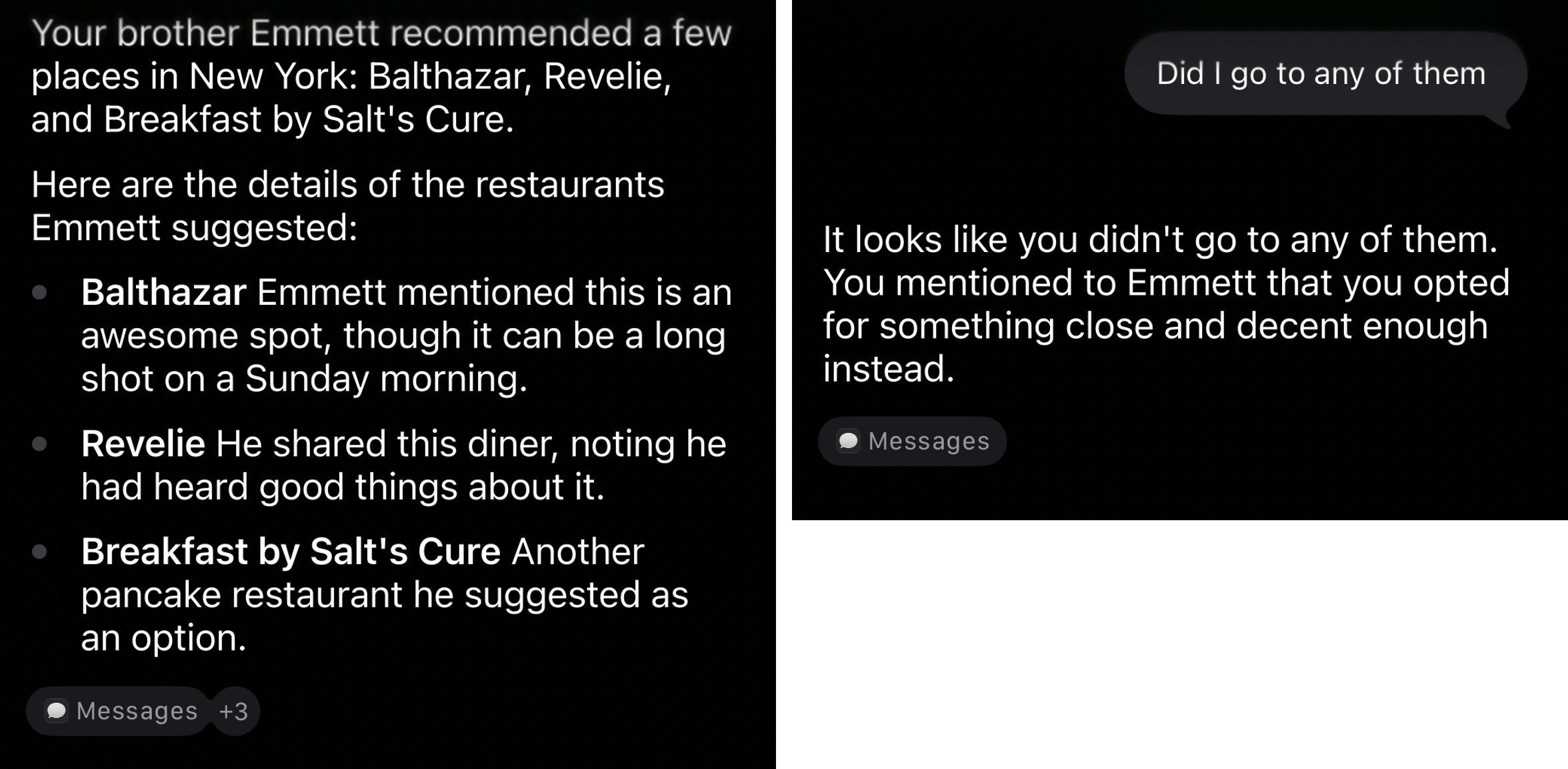
When I asked Siri AI, “What restaurants did my brother Emmett recommend in New York?”, it quickly found the three breakfast spots he had texted me. I then asked, “Did I go to any of them?” It correctly said I had not and referred to my reply telling Emmett I had chosen somewhere else. I could ask about the conversation without remembering where the answer was, digging through my text messages, or pasting them into a chatbot — which would have defeated the purpose of asking in the first place.
On the other hand, ChatGPT searched the work accounts I had connected and found nothing; those accounts gave it information, but not the context my question needed. Connecting more sources helps only when they hold the information users’ tasks require. The design question is which information users need and how the assistant can retrieve it with their permission. Connecting more sources is useful only if it helps an AI agent find relevant information.
The boundaries of that access also matter. When I asked, “What did Peter say about Saturday?”, Siri AI could not find messages or emails from him about that day. It offered related information from a text I had sent Anna about meeting him to watch a Citi Bike race but missed Peter’s Signal message to meet at Olea at 5:30, because Signal (a privacy-focused app) is not available to Siri by default.
The answer should have distinguished Peter’s own messages from someone else’s account of his plans and should have stated which sources were searched. Without that, “I couldn’t find it” sounds like “it doesn’t exist.”
An agentic experience must show the user which sources were searched and explain relevant gaps. Where supported, offer a way to grant access to another source; otherwise, help users supply the missing information. For example, a recovery message could say I searched Messages and Mail but didn’t find Peter’s Saturday plan. If it was shared elsewhere, paste the message here. Users should not have to figure out the assistant’s app connections just to find out what their friend said.
AI Capability Helps Turn Context into Useful Results
Access alone does not guarantee a useful answer. The AI agent must also understand what the user wants, and its answer should make that interpretation transparent enough to allow the user to verify it.
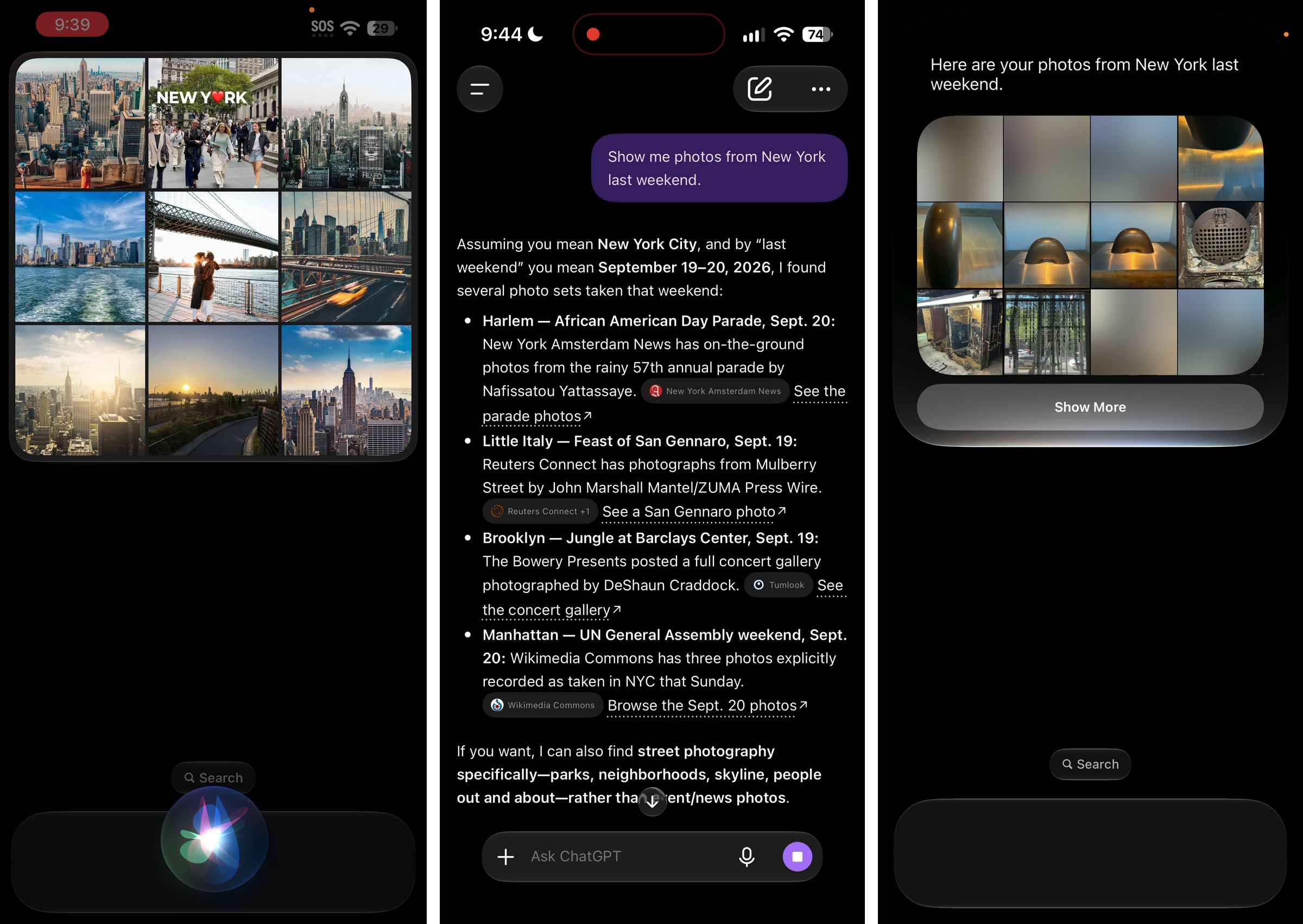
After the trip, I asked each AI assistant (old Siri, new Siri AI, and ChatGPT) to “Show me photos from New York last weekend.” Old Siri showed generic web images; ChatGPT searched the web and offered news-photo links; Siri AI found my trip photos.
When I changed the request to old Siri to “Show me my photos from New York,” it opened the Photos app but showed the entire library. Siri AI returned the trip photos even though the request never said “my photos” — a clear improvement, although this comparison cannot separate the model’s contribution from that of the retrieval system.
The difference also showed up in a message-drafting task. When I asked “Send Anna the list of restaurants Emmett recommended,” Siri AI prepared the right list for my partner. Old Siri chose a different contact and made the message body a literal restatement of the request. Both displayed a draft and asked for confirmation.
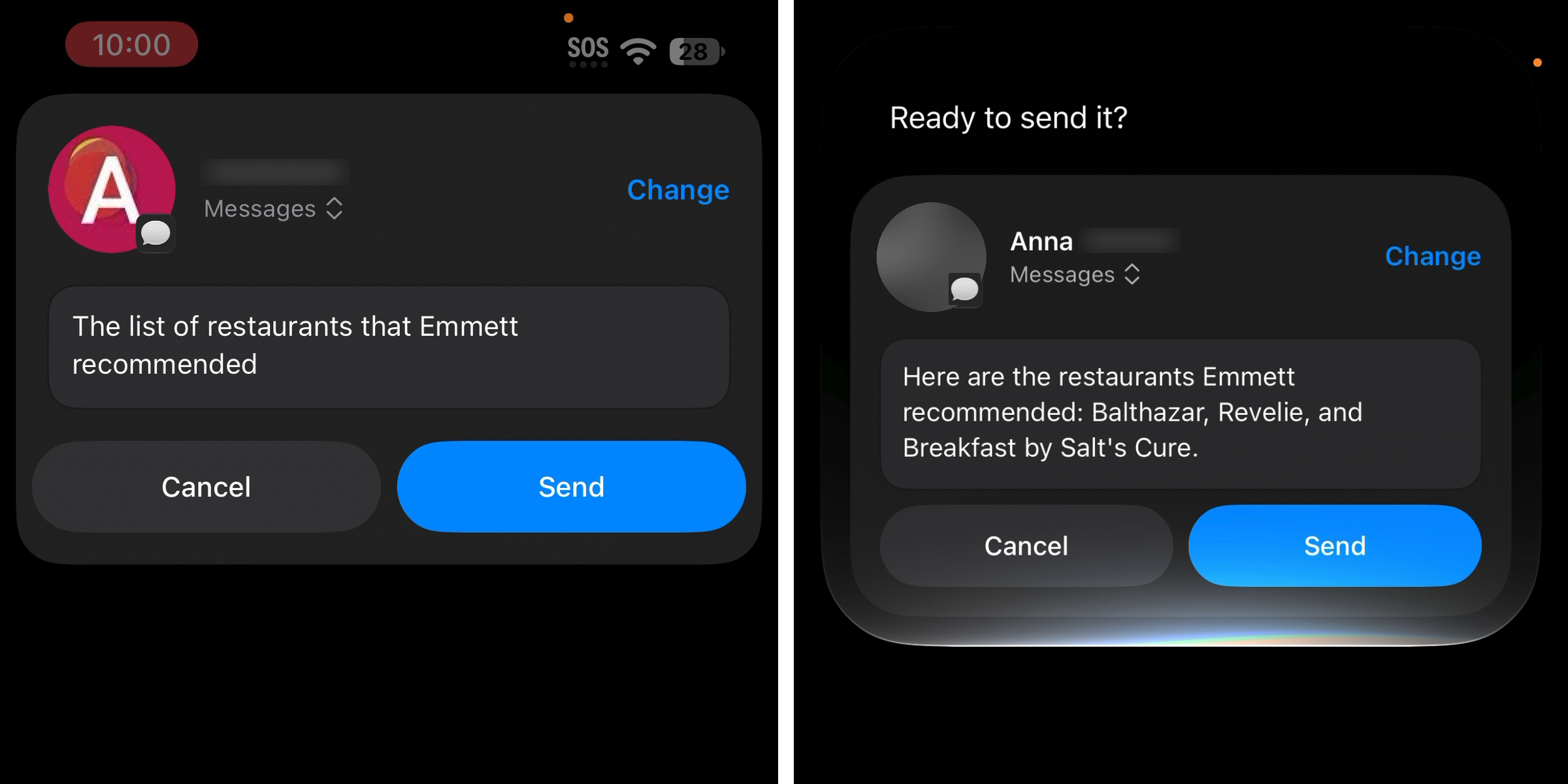
A confirmation is valuable even when the assistant usually gets the request right, especially when the cost of performing the wrong action (i.e., sending a message to the wrong person) is high.
When a request is ambiguous, a short clarification question introduces some friction but avoids a far less useful answer that may ultimately cost the user a lot more.
I asked Siri AI, “Get directions from Emmett’s address to Dimes in Google Maps.” Dimes is a restaurant close to Dimes Square, and Siri AI selected Dimes Square, the neighborhood. Recognizing a plausible place name was not enough. When alternatives lead to different actions, the agent should ask before acting: “Do you mean Dimes the restaurant or Dimes Square, the neighborhood?”
Preserve Context Throughout the Whole Task
Finding the right information is only part of the task. The assistant must also carry the user’s requirements into the app that acts on them.
The same directions request failed in a second way. Siri AI asked whether I meant directions from Emmett’s address, which I was happy to confirm. It then proceeded to open Google Maps with a route from my current location (Durham, NC).
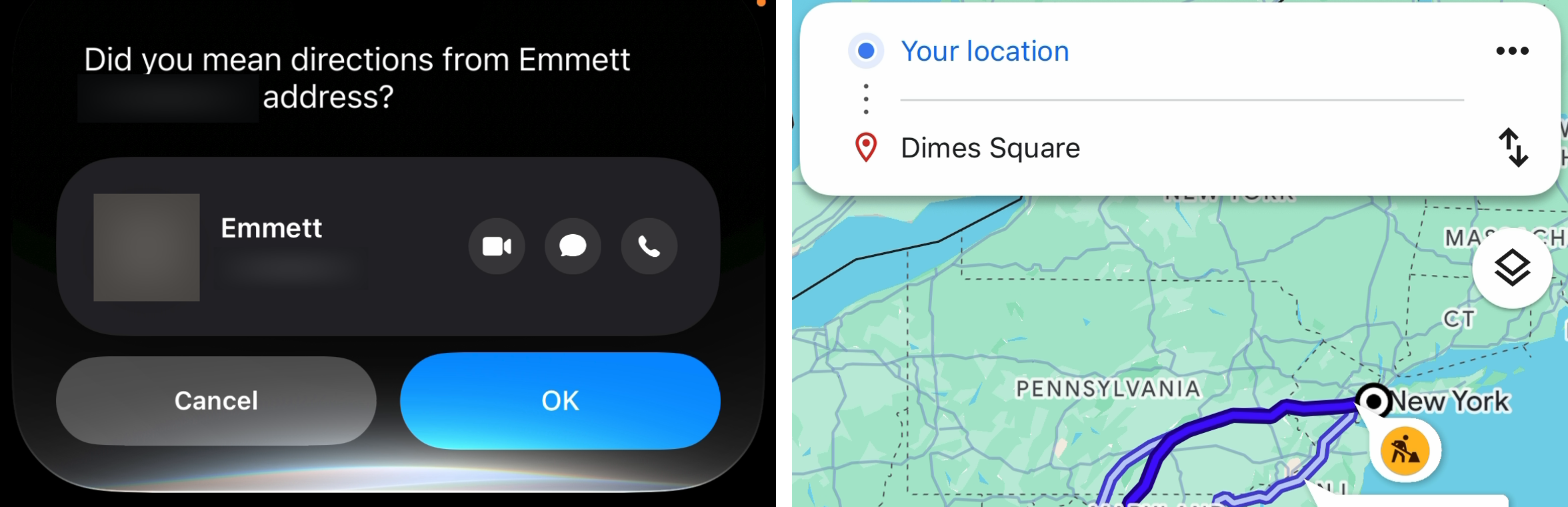
Beyond the wrong destination, the route also had the wrong starting point. A detail confirmed in one step of the interaction must survive into the resulting action. From the user’s perspective, the task failed despite a clarification dialogue and a successful app launch.
When designing multistep agent workflows, evaluate the whole task, including what appears in the destination app. For directions, that means checking the origin and destination, not just whether the assistant found a contact or opened Maps. Give users a way to inspect and correct the route before beginning navigation. Opening the right app is not much help if users still have to notice and fix the wrong route.
Help Users Build an Accurate Mental Model
A more capable assistant still needs to help people discover what they can now ask it to do. Earlier NN/G research on intelligent assistants found that frequent users relied on a small set of simple tasks and warned that people accustomed to limited assistants might not discover improvements.
Suggested example requests help users discover new capabilities, but only when they point to data the assistant can actually search. “Ask about a friend’s restaurant recommendations” is a good suggestion if that chat is in Messages and a misleading one if it is in Signal. Pair every suggestion with a way to recover when the data turns out to be out of reach.
Presentation shapes users’ expectations, too. Siri AI’s interface was sparse and its written answers were short and functional, even though its spoken voice could be expressive. That restraint serves Siri well by keeping the emphasis on answering questions and completing tasks. A richer personality could suggest more understanding than the assistant can reliably deliver. Still, designers should test what users infer from its presentation, rather than assume that a quieter identity alone will keep expectations realistic.
Progress feedback can also shape users’ understanding of how the assistant works. During message drafting, Siri AI displayed Searching contacts and Searching emails, but also Searching websites, without explaining why. A step that does not match users’ mental models of how the assistant should work raises questions and suspicion instead of building confidence.

A progress label shows activity, but transparency is not explainability. That label might not help users understand what’s happening. When a source’s relevance is unclear, explain it, and show where the answer came from. The interface should have explained how searching websites served my request to draft a personal message.
Conclusion
A useful assistant needs more than information somewhere on the device. It needs a way to retrieve relevant context, the capability to interpret it, and an interaction that preserves the user’s intent through the final action. Siri’s examples show why those requirements belong together.
When designing an AI assistant, consider what users should be able to ask about naturally, then build the access, retrieval, and interactions needed to support those requests. Make the limits visible and give users a way to correct mistakes. A capable conversation should lead to a useful result, including when the task continues in another app.
About These Examples
I used old Siri on an iPhone 14, and Siri AI and ChatGPT Plus (using GPT-5.6 Sol with high effort) on an iPhone 18 Pro running iOS 27. ChatGPT had memory off and work Gmail and Slack connected. Standalone requests started fresh; the restaurant follow-up continued the preceding request. ChatGPT’s photos request was dictated into its text box; later requests used Voice Mode. Most requests ran once or twice. Differences in devices, input methods, models, and retrieval systems make this a hands-on exploration, not a controlled comparison of their contributions.