
We surveyed 521 UX practitioners about how they use AI at work and how it’s affecting them. The short answer: AI use is widespread and saves time, but practitioners are far from enthusiastic, and the benefits depend heavily on role, task, and workplace.
TL;DR
- Access was nearly universal (99%), but use of agentic AI ranged from 85% at startups to 36% at nonprofits.
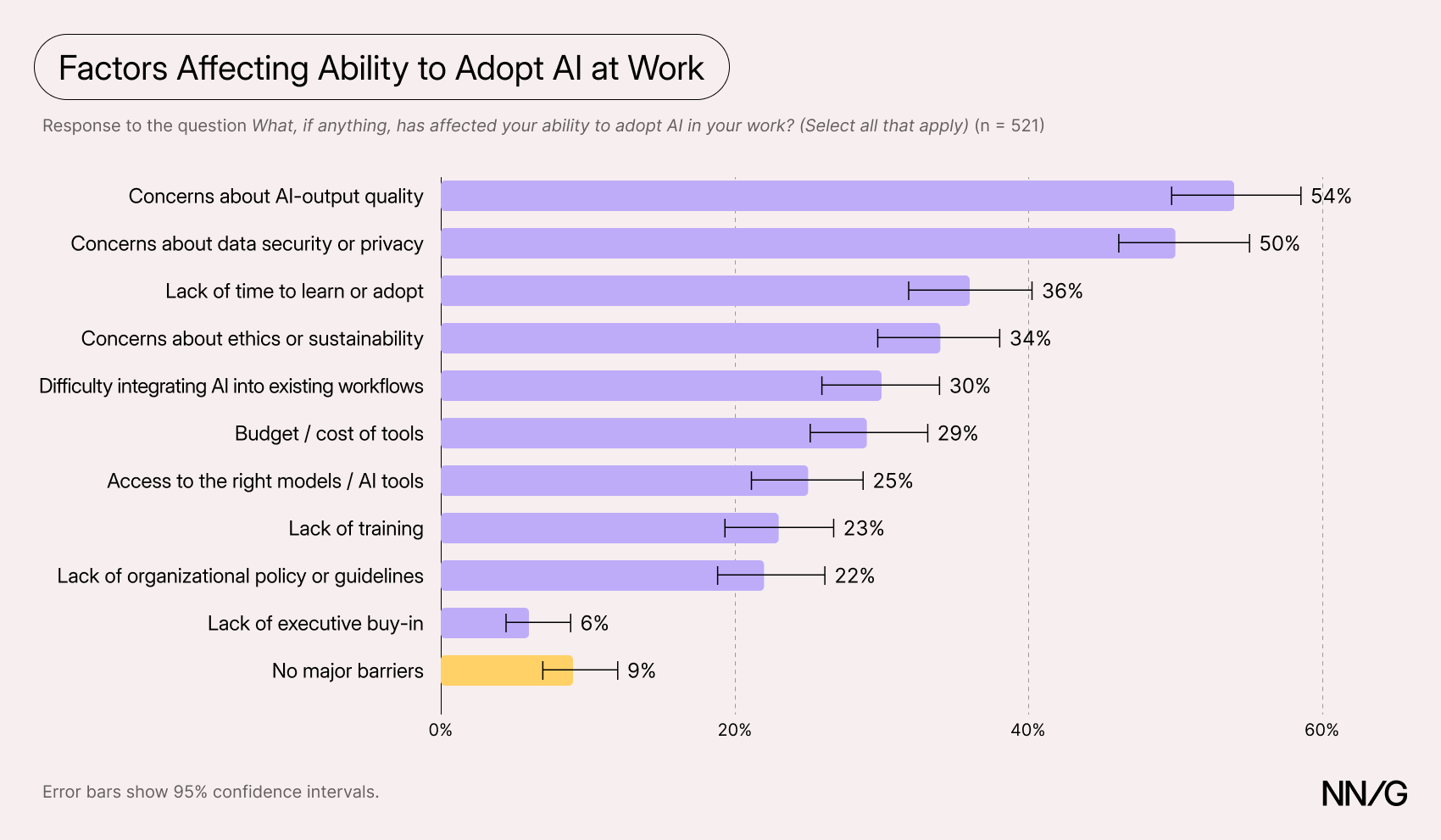
- Output quality (54%) and data privacy and security (50%) were the biggest barriers to AI adoption. Only 9% reported no barriers.
- AI was used most for desk-based work, such as writing code and conducting desk research, and least for work with users.
- The average sentiment rating for feelings about AI at work was mildly positive: 3.57 out of 5. But 69% of those who chose to leave an open-ended comment expressed some negative sentiment, often about mandates and unreliable output.
- Most respondents (65%) expected their roles to remain important or grow, but researchers and designers felt significantly less job-secure than PMs.
In Their Own Words
Explore our interactive dashboard to read a curated selection of respondents’ comments on what’s frustrating about AI at work and what’s working.
- AI Access Is Nearly Universal, but Agentic AI Use Is Uneven
- Barriers to AI Adoption
- AI Was Used Least When Users Were Involved
- Respondents Were Only Moderately Positive About AI
- Most Comments Expressed Some Negative Sentiment
- AI Helps Practitioners Work Faster and Expand Their Capabilities
- Most Respondents Expected Their Role to Change but Remain Important
- Higher Job Security for PMs, Lower for Researchers and Designers
- Survey Methodology
AI Access Is Nearly Universal, but Agentic AI Use Is Uneven
While virtually every respondent (over 99%) had access to generative AI tools at work, most (59%) used only an approved set of tools; only 12% were free to use any tool they chose.
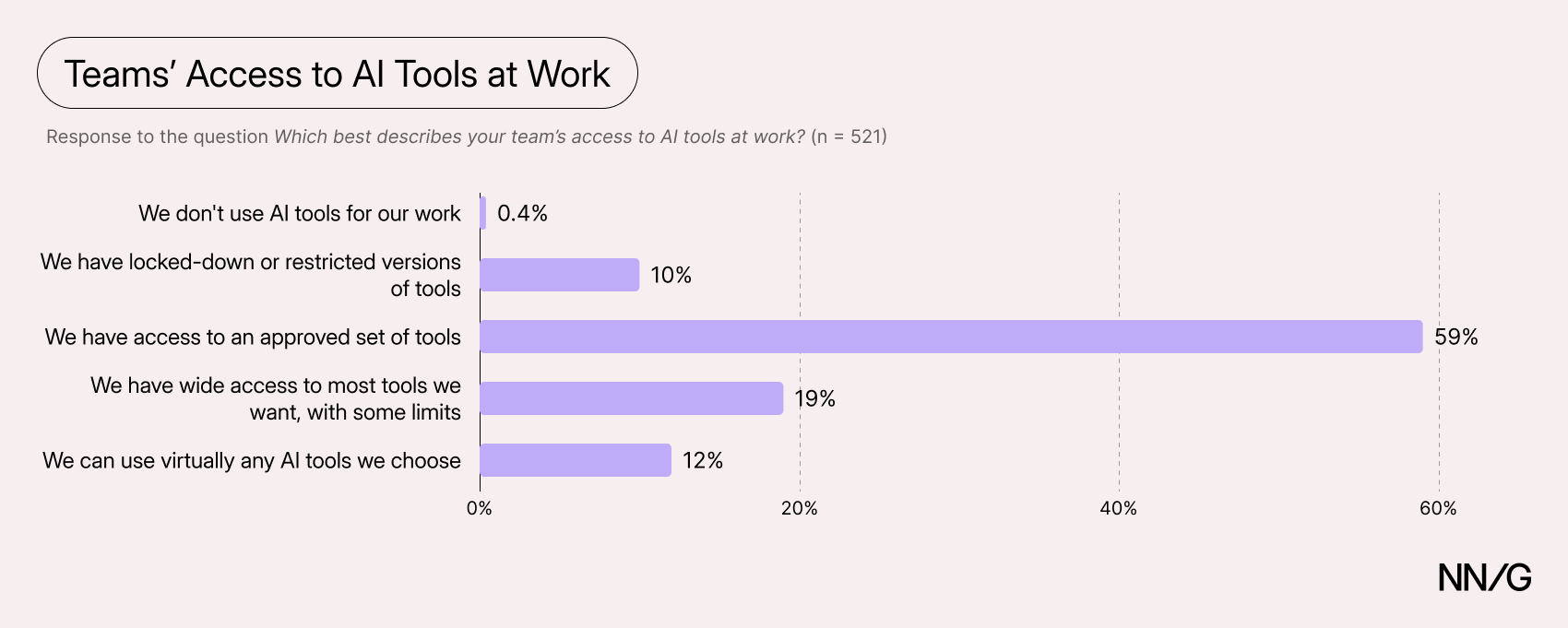
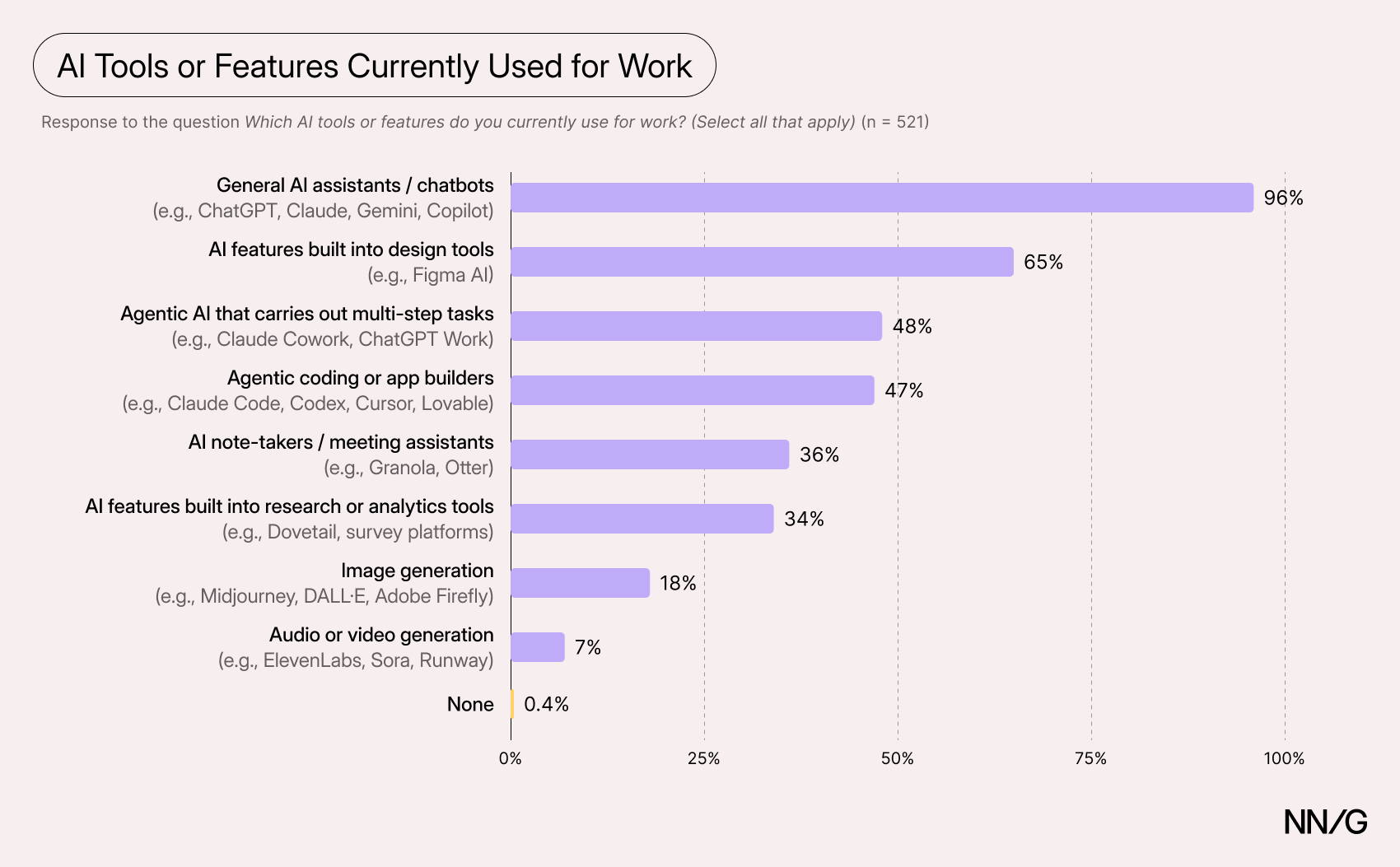
Agentic AI was common but not universal. When we asked which types of AI tools respondents used at work, 66% reported using at least one agentic tool: either an agentic AI product (such as Claude Cowork) or an AI coding agent/app builder (such as Cursor). Each category on its own was used by just under half of respondents (48% and 47%, respectively); roughly 30% of the participants used both categories.
Agentic-AI Adoption Differs by Organization
Agentic-AI use varied considerably by organization type. Startups and small- to mid-sized businesses used agentic AI the most (85% and 75% of the respondents working for these organizations, respectively), while nonprofits and government organizations used agentic AI the least (36% and 42%, respectively).
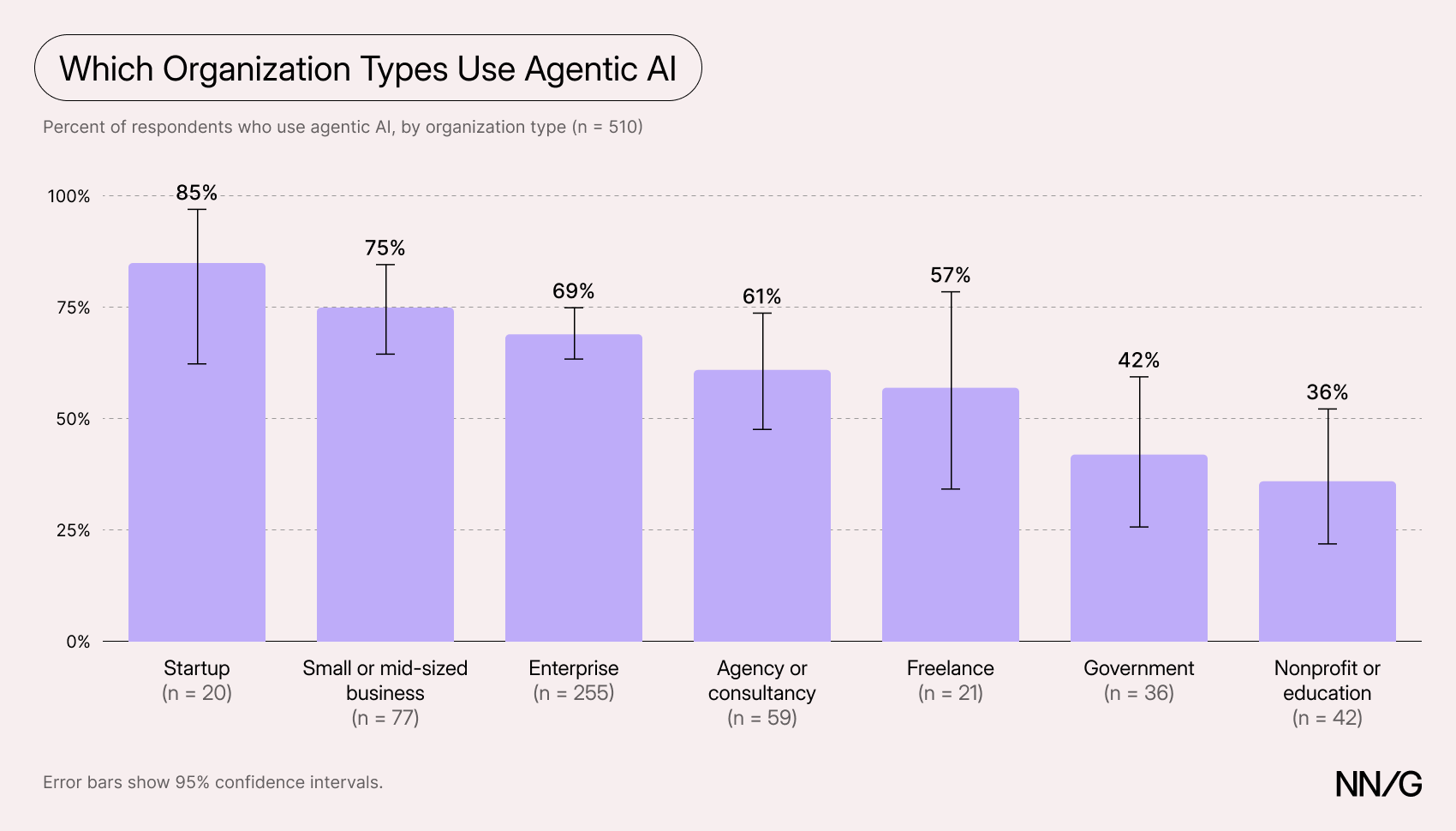
These findings are not surprising; government organizations tend to be especially cautious about privacy and security, which may slow their adoption of new technology. For nonprofits, cost and technical know-how may be bigger barriers. Startups, by contrast, often have few approval processes, so teams can adopt new tools quickly. Smaller headcounts provide more reason to delegate to AI, and some startups may attract people who want to work with AI. One respondent who participated in a followup interview with us told us he joined his current startup specifically because it embraced AI tools.
“I really wanted to go into a company that will be building stuff from the ground up, where AI is embedded everywhere.”
Product and Ops Professionals Reported Using Agentic AI More
Product managers and ops professionals (like DesignOps professionals) reported using agentic AI the most, while content designers and researchers used it the least.
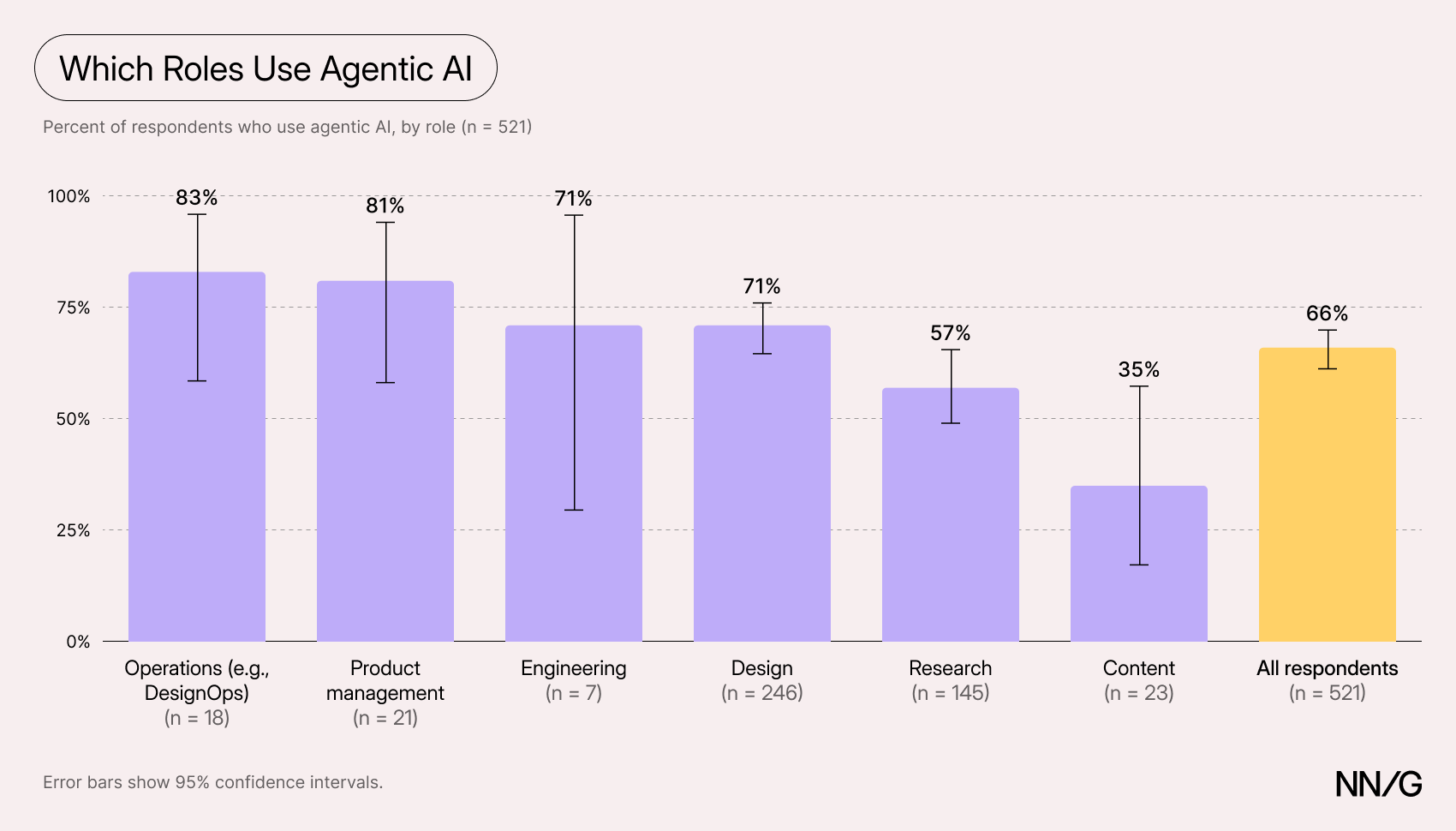
One possible explanation is that product managers and ops roles spend much of their time orchestrating people and data across tools and systems, which is where AI agents are arguably most useful today. Researchers and content designers, on the other hand, focus on producing high-quality artifacts, such as research syntheses or UI copy, for which a general-purpose AI chatbot often suffices.
Technical comfort likely helps, too: PMs and ops professionals tend to be slightly more technical, and agentic tools still require setup and troubleshooting.
Barriers to AI Adoption
We asked respondents which factors affected their ability to adopt AI in their work (multiple answers allowed). Most respondents (80%) chose multiple factors. Only 9% of respondents reported no major barriers to adopting AI in their work.
Top Barriers to Adoption: Output Quality and Data Security
The top two reasons for not adopting AI were concerns about AI’s output quality (54% of respondents) and data security or privacy (50% of respondents). Many respondents told us in open-ended comments at the end of the survey that AI’s outputs were often not good enough or required significant time to check or correct.
“It’s been hard to incorporate AI into our workflows because we design specialty apps, and the quality of generating designs from AI is very poor / immature.”
“Using AI in my job as a UX researcher has been an experiment that’s mostly unfruitful. I tend to find [that AI] tools […] produce untrustworthy results.”
Not surprisingly, lack of executive buy-in was the factor chosen the fewest times: many respondents reported intense pressure from leadership to use the technology. As one respondent noted:
“The biggest change is the constant push from management to use it more and more. I have to actively push against them on things I know AI doesn’t do well yet.”
Many Were Concerned About the Ethical and Environmental Impact
More than a third of respondents (34%) selected ethical or sustainability concerns as a barrier to adopting AI in their work. These concerns also came up in the open-ended comments at the end of the survey, where respondents raised a range of issues: the environmental impact of data centers, AI’s effect on the job market, AI-enabled surveillance, and the use of creators’ work as training data without their consent.
For some respondents, these concerns were reason enough to avoid AI. Others described a kind of cognitive dissonance: their employers require them to use a technology they oppose on moral grounds.
“It’s a strange feeling to be forced to use something that I do not believe in.”
“I hate that I have to use something for work that I have banned my children from using. It feels complicated and gross in a way I’ve never struggled with new tech before.”
Some respondents seemed frustrated by how little these issues are discussed, both within their organizations and across the industry.
“I think as an org they have done better than other orgs with helping us learn AI and giving us tools but have done nothing to address ethical or sustainability concerns.”
“No one is talking about AI’s impact on the environment. Why is that?”
AI Was Used Least When Users Were Involved
We asked respondents which design, research, content, and technical tasks they do, how often they use AI for each, and how AI has changed the time each task takes.
Overall, respondents said AI saved them time. On average, they rated AI’s effect on task time at 4.2 out of 5, where 3 means no difference and 5 means much shorter. (We averaged each respondent’s ratings across the tasks they used AI for, then averaged those scores across respondents.) For every task, most respondents who used AI for it said it made the task faster. But both use and time savings varied considerably by task.
Unsurprisingly, AI adoption was highest when working on artifacts or data and lowest on tasks involving direct interaction with users. Among respondents who did each task, about two thirds said they used AI often or always for writing or editing code (73%), desk research (69%), and analyzing their own research data (67%). These were also among the tasks where AI saved the most time: around 9 in 10 respondents who used AI for them said it made the task faster.
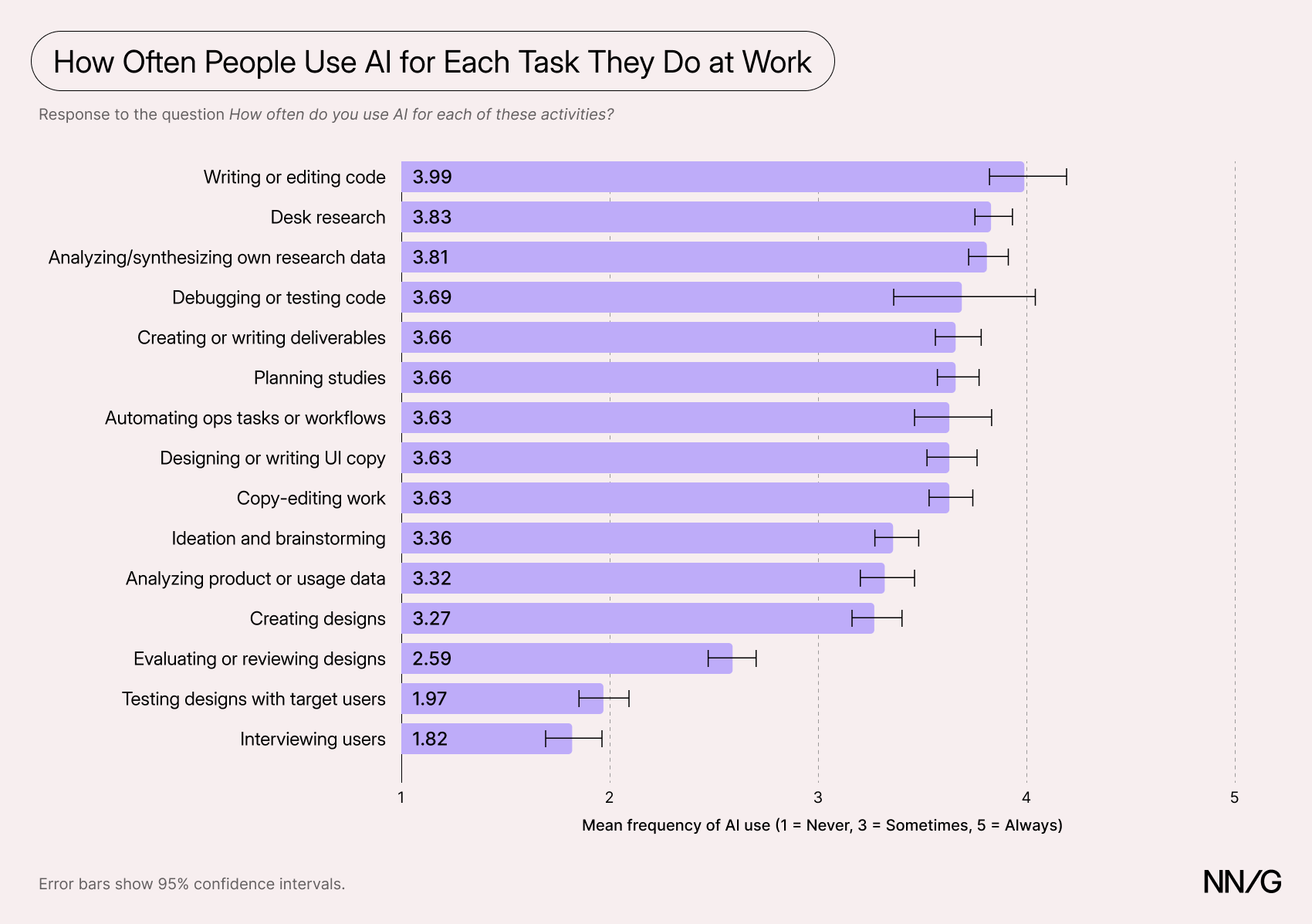
AI use was lowest for tasks involving users. Most respondents never used AI for interviewing users (61%) or testing designs with users (51%), and these tasks, along with evaluating designs, saw the smallest time savings. Sessions still take time to set up and run, and while AI can help with supporting work, like drafting interview guides and test plans, it doesn’t shorten the sessions themselves. Only 11% of respondents reported using AI interviewers, and the same share reported using synthetic users.
Similarly, AI can speed up parts of design evaluation, such as checking a design against accessibility best practices, but critique depends on a solid understanding of human goals and context, which is hard to convey to an AI system fully and reliably.
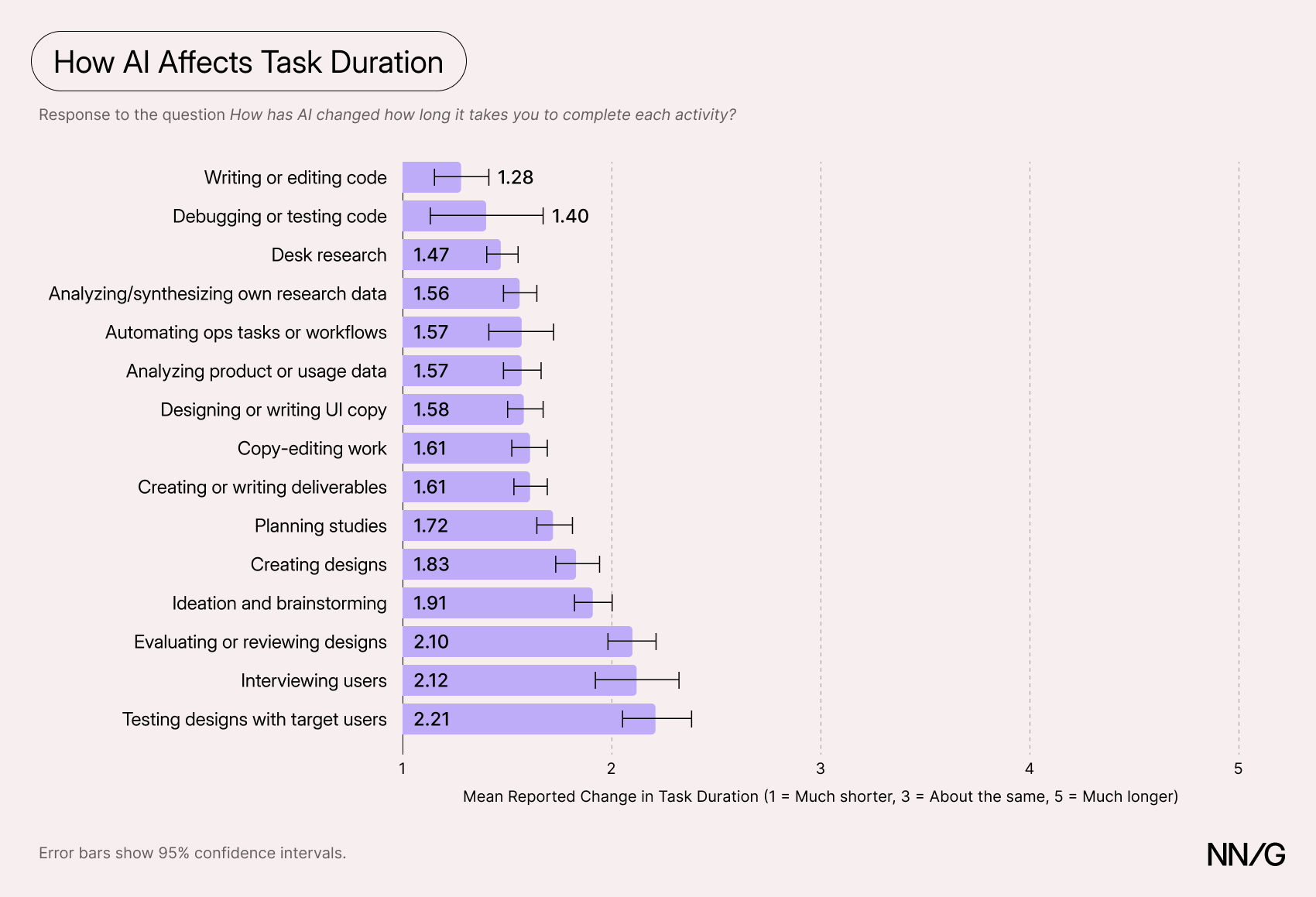
Respondents Were Only Moderately Positive About AI
We asked respondents how they felt about using AI in their work on a 5-point scale, from 1 (very negative) to 5 (very positive). The mean score across all respondents was 3.57, which was significantly above the neutral point of 3 (p < 0.05) but not by much.
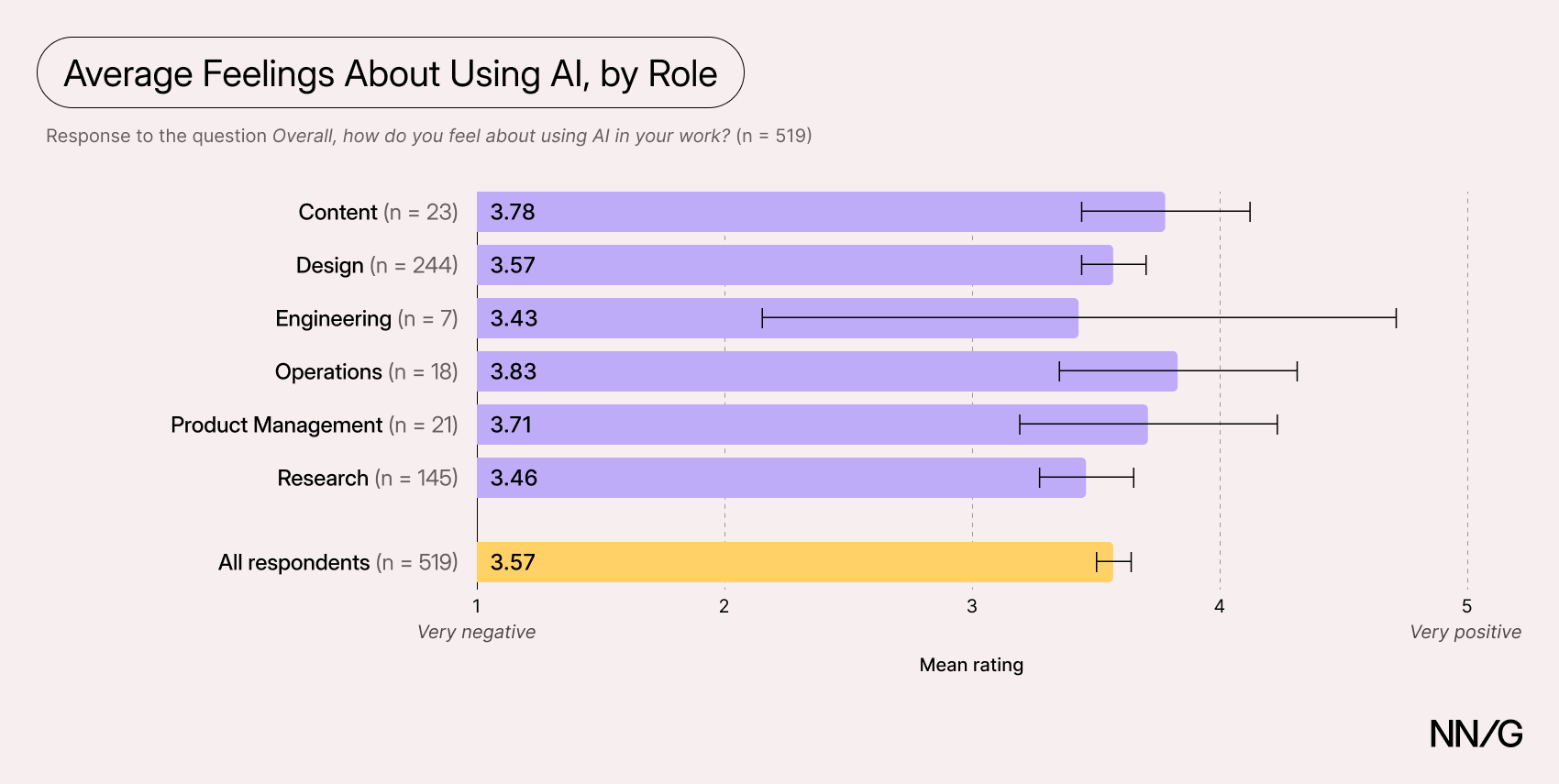
This average rating is somewhat surprising; respondents reported that AI shortened every task they used it for, so we might have expected them to feel more positive about using it. To understand what was tempering respondents’ enthusiasm, we turned to the comments they left at the end of the survey.
Most Comments Expressed Some Negative Sentiment
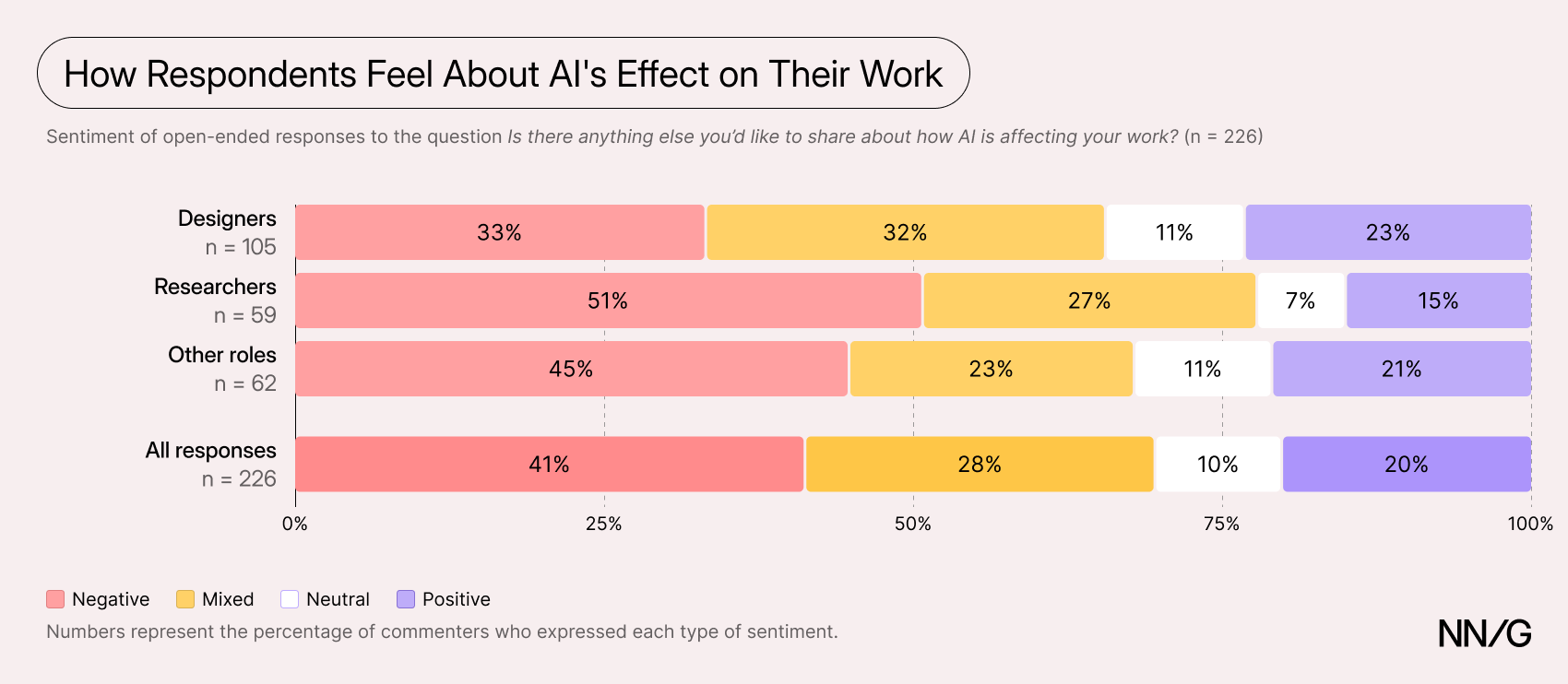
The survey ended with an optional open-ended question: Is there anything else you’d like to share about how AI is affecting your work? Of the 521 respondents, 226 (43%) answered it — a much higher response rate than we expected for an optional question at the end of a survey. This suggests many respondents had views they wanted to share.
A sentiment analysis revealed that these comments skewed negative. Most comments (69%) expressed at least some negative sentiment, and 41% were purely negative, with no positive sentiment. Only 20% were purely positive.
Researchers were significantly more likely than designers to leave a purely negative comment (51% vs. 33%, p < 0.05). But once mixed comments were counted too, the gap narrowed: 78% of researchers and 66% of designers expressed at least some negative sentiment, and that difference was not statistically significant.
These results should be interpreted with some caution. Fewer than half of respondents left a comment, and people with strong views are more likely to do so. Still, the comments suggest that many respondents are dissatisfied with how AI is used in their work or organizations, and that researchers may have more serious concerns about its use.
We coded each comment to identify the reasons behind its sentiment. Not every comment could be coded because some respondents expressed a sentiment without explaining it. Of the 155 comments expressing negative sentiment, we coded 149 with at least one of 12 reasons why they felt negatively about AI’s effect on their work.
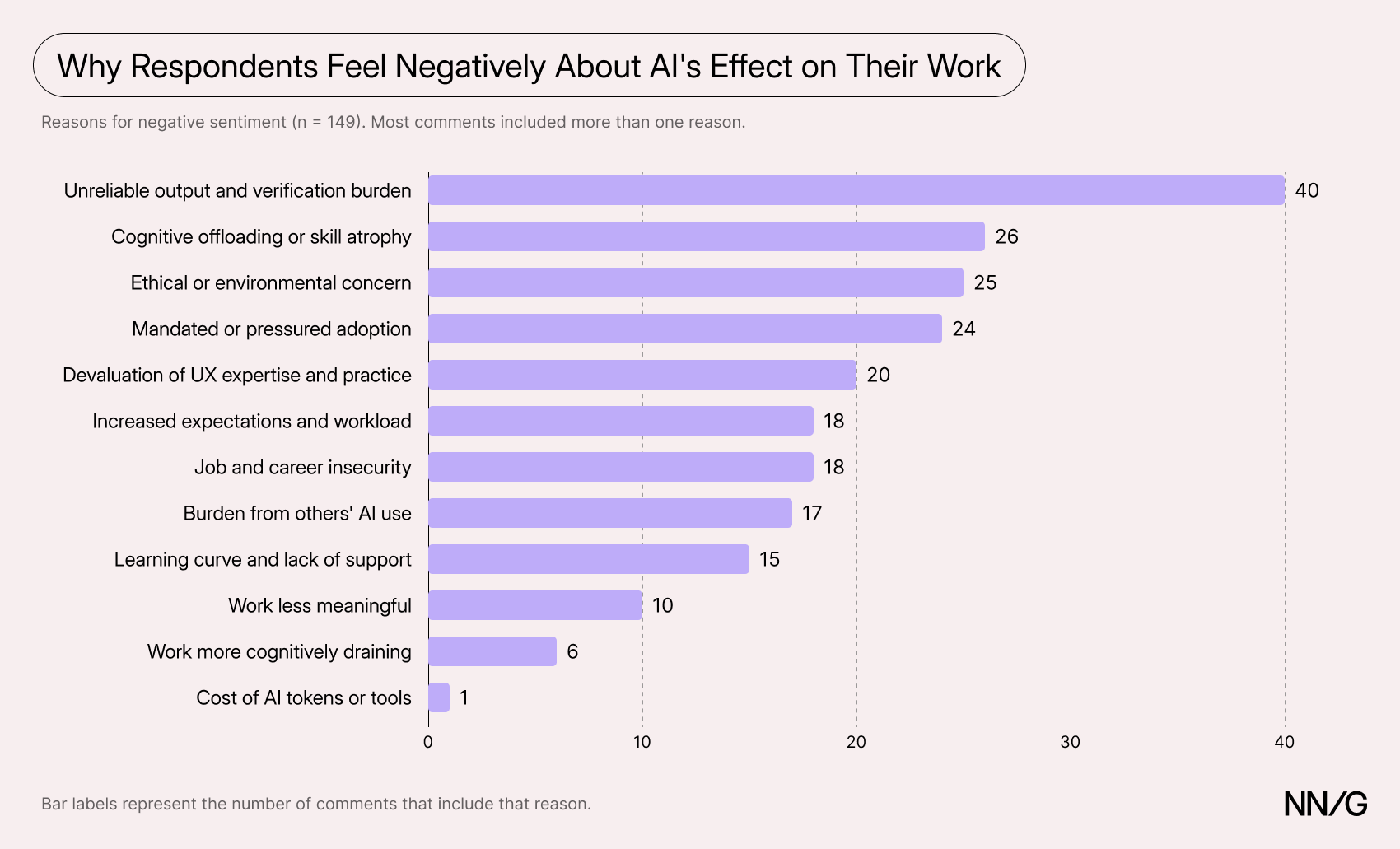
Several of the coded reasons related to how AI is implemented in organizations and the culture around it. However, the most common reason was unreliable AI output and the resulting burden of checking and fixing it.
“AI feedback is long, takes time to read and no instructions, MD file, have ever completely stopped the agent from making wrong assumptions.”
“AI is incredible because it can make 80000 mistakes in the time that it takes for someone to correct 5 of them. It also makes it easier for businesspeople to create complex slop-flows that can take weeks to months to untangle, that would have taken a designer a month to make well without AI.”
Many respondents said that their organizations mandated AI and tracked their usage, which led to performative use. The result was more AI-generated output that someone then had to check and fix. Some respondents described fixing other people’s poor designs or wading through AI “slop.”
“I now sometimes find myself trying to quickly fix completely unusable prototypes made by a product manager. And I’m expected to come up with a solution just as quickly as AI does.”
“The people who actually care about what we make end up doing double work, having to review and fix the slop of others AND do our own work right.”
Some respondents felt that the time-saving expectations put forward by leadership were unreasonable and made their work more stressful.
“Leadership expects faster work and designers to be able to do more, but AI output quality does not support that yet.”
“Expectations from executives are so much higher now (unreasonably inflated), so the work is way more intense without the time to set up the workflows and operational processes first to be AI-enabled, so it’s a complete mess right now.”
Others felt that their expertise and contributions were being devalued in favor of speed.
“The expectation to move faster when the output quality is significantly worse just tells me companies don't actually care about good UX.”
Finally, some respondents reported that, because there was no training or guidance on using AI, the burden of figuring out how to use it and the expectation to move faster both fell to them.
“There’s a general expectation that we use AI as much as possible to make our work more efficient. At the same time, we get little to no guidance on which AI tools to use, or how.”
AI Helps Practitioners Work Faster and Expand Their Capabilities
Not every comment was negative. Nearly half of the comments (49%) expressed at least some positive sentiment. By far the most common reason was that AI made respondents faster or more productive: over half of the comments with positive sentiment mentioned this.
“With AI I can complete work on most days within hours now. This frees up so much more valuable time.”
Speed wasn’t the only benefit. Some respondents said AI improved the quality of their work, often because the time it saved was reinvested in the work itself.
“I’m able to iterate much faster and sunk costs (design hours) doesn’t affect the decision to keep improving. This really improved the quality of my work.”
“A lot of the questions (and conversations) are about the benefits of speed, but using AI in the correct way has also improved quality, completeness, and reassurance, and importantly, empowered my team and I [sic] with new capabilities.”
Many respondents said AI let them do things they couldn’t do before, such as coding or complex data work.
“Stuff that would have taken me years or never, but I knew that I wanted (complex spreadsheet joins, etc.) is now possible in seconds or minutes.”
“AI has also introduced me to new skills that I didn’t (and still don’t) possess. Like coding.”
Practitioners working alone or on small teams may benefit most: of the 7 respondents who mentioned working solo or on a very small team, 5 left purely positive comments. For them, AI had become a thought partner and a stand-in colleague: it helped them take on work outside their expertise, gave them confidence in their decisions, and helped them learn new skills.
“I work as a solo designer in a fintech (startup focused on finance). AI at work allowed me to be a one-man army at work. The quality of my deliverables is not as great if I had a real team supporting decisions and work, but the volume is definitely what's best about AI in my case.”
“Since I work in a very small team where I can’t always discuss things with someone, it gives me more confidence that I’m thinking in the right direction.”
Benefits and frustrations often came from the same people. Of the 61 comments that mentioned AI making them faster or more productive, 26 also expressed negative sentiment. Taken together, the comments suggest that AI’s benefits are real but uneven. They’re clearest for practitioners who can control how they use it, and less clear for those working within mandates, rising expectations, or other people’s AI output.
Most Respondents Expected Their Role to Change but Remain Important
Despite these frustrations, respondents were optimistic about the future of their roles. When asked “Which best describes how you expect your role to change because of AI?” the majority (65%) of respondents said their role would either remain as important or grow to take on more valuable work. Only 18% of respondents felt their role would either shrink or be eliminated.
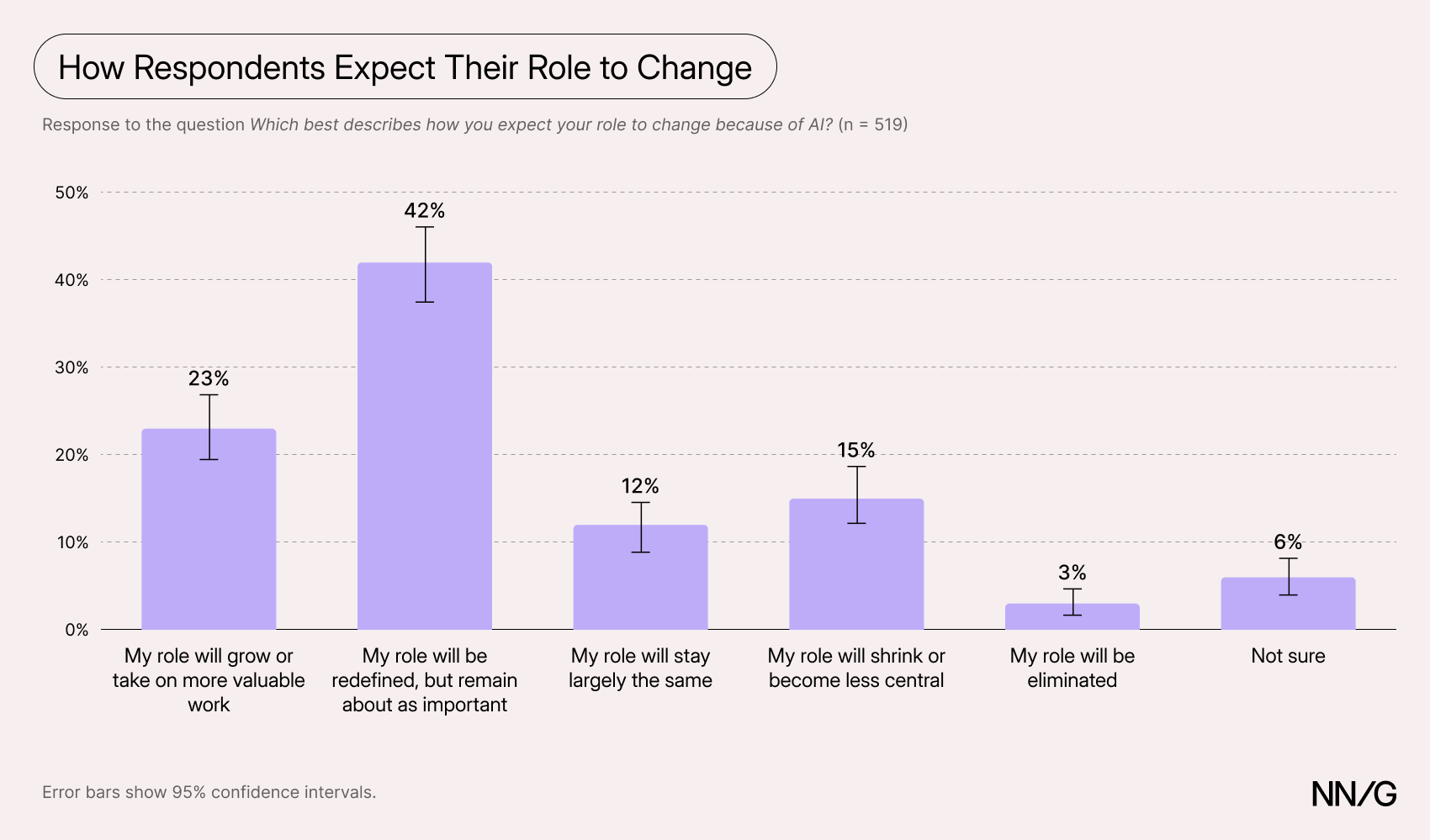
This optimism varied by role.
Researchers Are More Skeptical About Their Role
When we compared the responses from researchers and designers, we found that researchers were statistically less likely to believe their role would be redefined but remain about as important, and statistically more likely to believe their role would shrink or become less central.
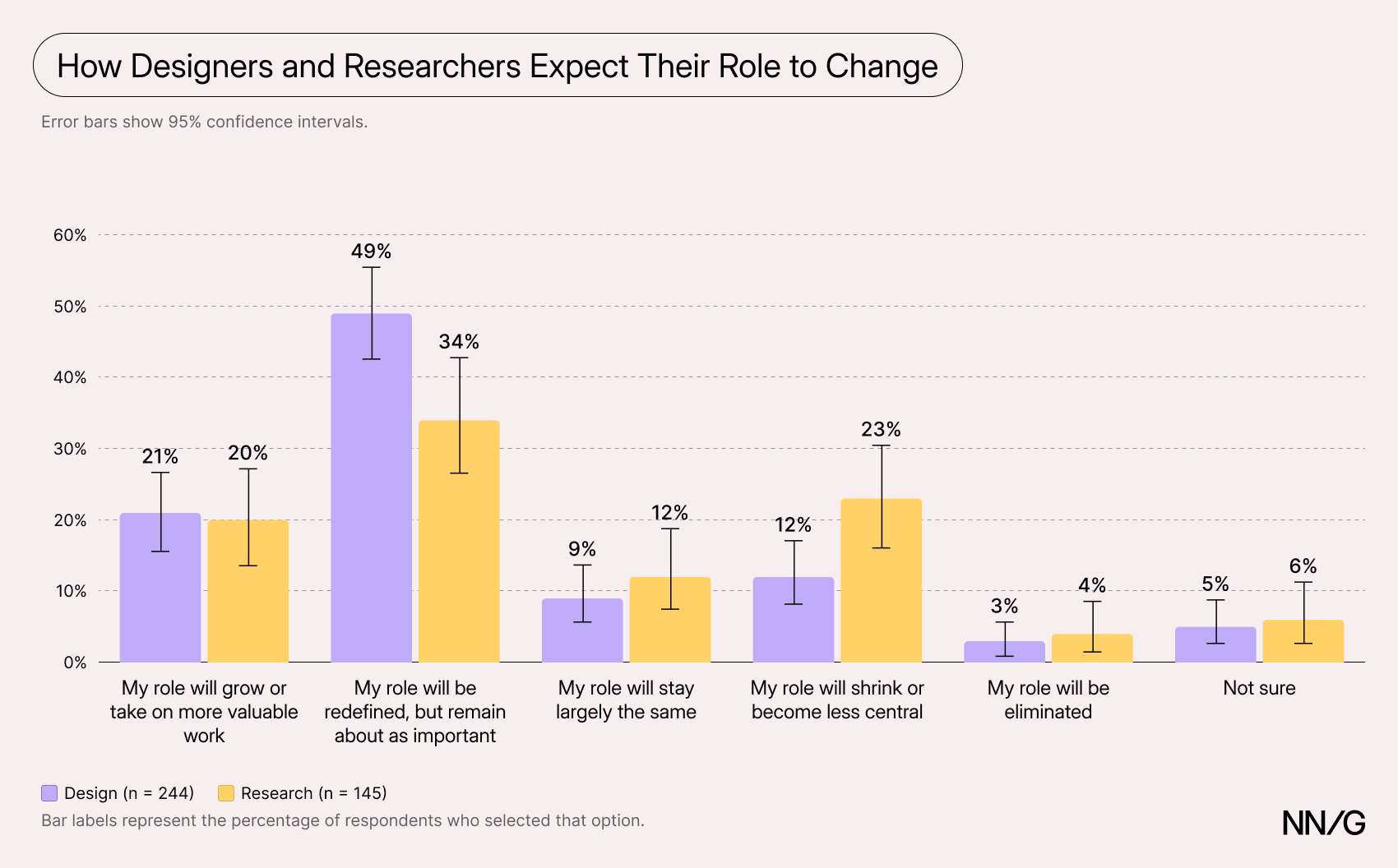
Higher Job Security for PMs, Lower for Researchers and Designers
We also asked respondents to rate their job security on a 5-point scale, from 1 (very insecure) to 5 (very secure). Although product managers accounted for a small proportion of our sample (n=21), they had a significantly higher mean rating than both researchers’ and designers’ ratings (3.81 vs. 2.94 and 2.99, respectively; p <0.05). Researchers’ mean rating was almost a point lower.
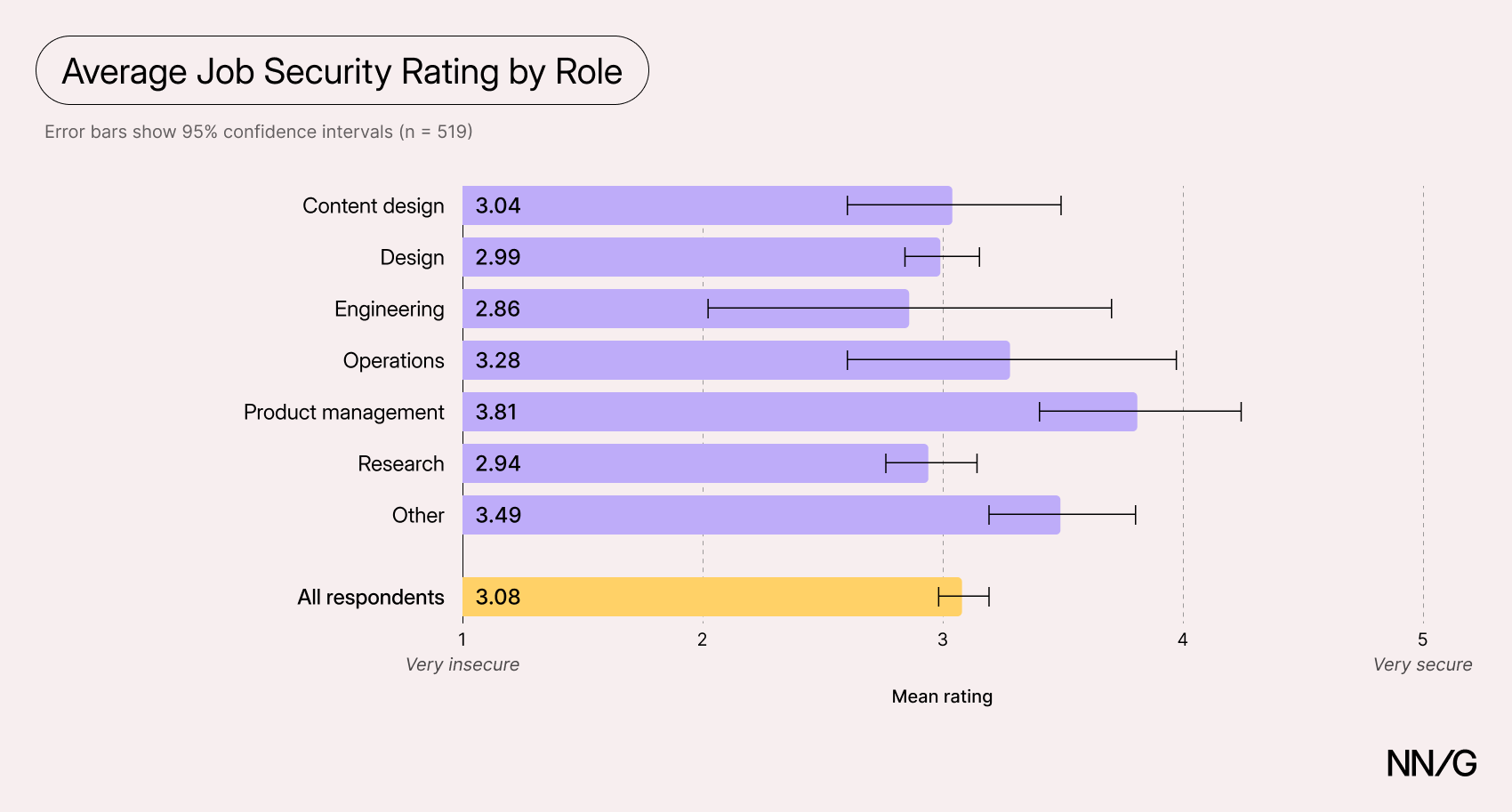
Respondents in the “other” role category (n = 61, 12% of respondents) had the second-highest mean rating (3.49), which was also significantly higher than that of researchers and designers (p < 0.05). This group included people in leadership, strategy, or generalist roles, with titles like UX manager, UX generalist, and strategist. Engineers had the lowest mean rating (2.86), but because so few responded (n = 7), this difference was not statistically significant.
One explanation for the higher scores among PMs and “other” respondents could be that these roles are more generalist in nature. Their work spans more areas, rather than sitting within a single specialty. AI is making UX generalists more valuable, since one person can now take on tasks that once required several specialists. If so, those with broader roles may feel less exposed as AI blurs the boundaries between roles.
It’s also worth noting that the PMs in our sample were likely more knowledgeable about UX than most, since we recruited them through our own channels. (For the same reason, they may not be representative of product managers more broadly.) Two PMs we followed up with in in-depth interviews had previously worked as designers, and others in our sample may share similar backgrounds. This could make them better equipped to take on design and research work themselves.
One of these participants had moved gradually into a product role 5–6 years earlier. He was drawn to the role for the greater decision-making authority. Because of his design background and because AI tools had accelerated his work, he could contribute designs, push code, and create requirements. Reflecting on the future of the profession, he told us:
“I see (...) product managers and UX merging. Because one person can do much more (...) Before, you needed 3/4 people for the same thing.”
Another participant, a former lead designer, moved into a product role at a new company recently because he loved the discovery side of the work:
“I think there's still a level of that that's UX related, but Product seems to be owning more of that, at least from what I see.”
If product managers are taking on more design and research work, it’s understandable that researchers and designers feel less secure by comparison.
Government Employees Felt More Secure Than Private-Sector Workers
Government employees reported the highest mean job-security rating of any organization type (3.86 out of 5), significantly higher than people working at enterprises, small and mid-sized businesses, and startups (p < 0.05). They were more likely than enterprise employees to expect AI to leave their role largely unchanged (31% vs. 8%).
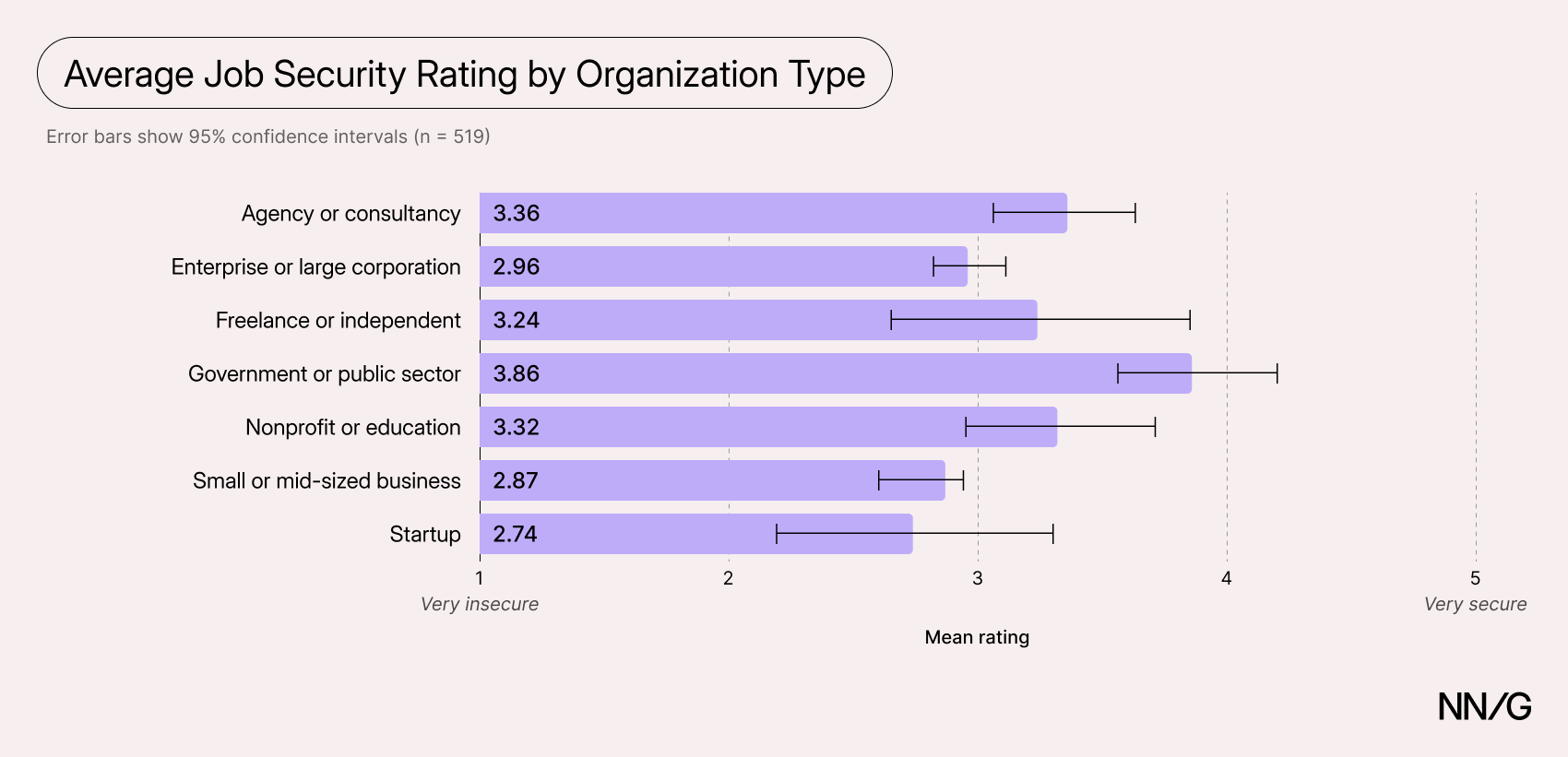
Government jobs may feel more insulated from AI-related disruption. They often come with stronger protections against layoffs, and government agencies tend to adopt new technology more slowly because of security reviews and approval processes. Both could make AI-related change feel more gradual, giving employees more time to adapt.
Conclusion
AI is making individual UX tasks faster, but that hasn’t made UX work better or practitioners happier. We think the difference comes down to productivity at an individual task level versus a broader system level. Respondents reported that AI shortened every task they used it for. Yet the time saved rarely stayed with them: it was absorbed by expectations to produce more or was spent cleaning up other people’s AI-generated work. A task made faster for one person can create work for another.
Most organizations judge AI at the task level: how many people use it and how much faster a deliverable gets produced. Our findings suggest the right unit of analysis should be the system — the total time and effort, across everyone involved, needed to ship work of acceptable quality. By that measure, a prototype generated in minutes that costs a designer days to make usable is a net loss, and the frustration and strain in our respondents’ comments are the symptom.
These findings are a baseline. As tools improve and organizations learn to use them, we expect the picture to change. In the meantime, leaders should not measure whether each individual uses AI, but whether work reaches users faster and better. They should help teams decide which tasks merit AI; not every task benefits equally, and tasks involving users benefit least. And they can treat AI output as a draft rather than finished work: someone still has to check it, and time saved doesn’t have to become more output. The respondents whose work got better, not just faster, were the ones who put that time back into the work — which is what system-level productivity looks like.
System-level thinking also means considering the broader impact beyond short-term wins. A third of respondents named ethical or sustainability concerns as a barrier, and several described being required to use a technology they object to on moral grounds. UX professionals have long argued that technology should serve people, and in Design for a Better World, our cofounder Don Norman argues that designers must also weigh the impact of their work on the environment and on society. Leaders who ask teams to adopt AI should make room to discuss these costs openly, rather than treating the concerns as resistance to change.
Survey Methodology
Our survey ran from August 24, 2026, through September 11, 2026. We used a convenience sample collected through our practitioner-research panel, our newsletter, and selected invite-only professional Slack communities. We also advertised through LinkedIn. The survey received 2,814 responses. We removed incomplete and bot responses (which came exclusively from LinkedIn), as well as responses from practitioners who were not currently working. We were left with 521 complete responses. These responses came from 246 designers, 145 researchers, and 21 product managers. The remaining 109 included roles like content designers, ops practitioners, strategists, and developers. Three-quarters of our sample worked for either an enterprise, small- to mid-sized business, or an agency, with almost half working for enterprise organizations. Fewer respondents worked in nonprofits or education (8%), government (7%), or startups (4%).
Descriptive and inferential statistics were performed in Stata. The open-ended responses were coded by researchers in Dovetail. A sentiment analysis was performed by Claude Opus 5.5 and ChatGPT-6 Astra using the same written rules. A researcher also rated a random sample of 50 comments to check the models’ work and reviewed every comment where the two models disagreed.