In my career as a UX researcher (particularly in civic tech and digital inclusion), I’ve spent years observing how people use the internet. As AI changes how users search for, create, and communicate information in both personal and professional contexts, it’s becoming an essential new dimension of digital literacy — one that introduces new competencies.
Despite the hype, not everyone is using generative AI (genAI) tools, such as ChatGPT and Gemini. And, those who are using it aren’t all using it in the same way. People working in technology often take for granted a level of comfort or sophistication with AI that many users simply don’t have. (Remember, you are not your user!) Understanding how users with low AI literacy interact with generative AI (genAI) is critical in designing inclusive and supportive AI experiences.
AI Literacy and Digital Literacy
As AI increasingly impacts how people search, create, and communicate information online, AI literacy is emerging as a critical new component of digital literacy.
Digital literacy is broadly defined as the ability to find, evaluate, create, and communicate information using digital technologies.
AI introduces new interaction paradigms that require new mental models — ones that don’t always align with users' past experiences with search engines or traditional software.
In our research, two distinct capabilities shaped people’s success when using genAI for information seeking.
- Prompt fluency: The ability to communicate intent, constraints, and context so that genAI can produce useful outputs.
- Output literacy: The ability to evaluate genAI outputs --- for example, spotting gaps or misunderstandings, noticing potential hallucinations, seeking sources, and crosschecking when accuracy matters.
These capabilities don’t always grow together. Prompt fluency often increases quickly with exposure, but output literacy may lag: some people learn to get polished and, what they believe to be, helpful answers without becoming better at judging accuracy or knowing when to verify outputs. That’s why AI literacy can’t be measured along a single continuum. It’s a multidimensional skill set shaped by how people prompt, how they evaluate, and how they choose to engage with AI.
The matrix below highlights the types of AI literacy that we’ve observed in our research. Users can fall into one of four quadrants and can move over time into another quadrant based on their attitudes towards genAI, their exposure to it, or newly acquired AI knowledge.
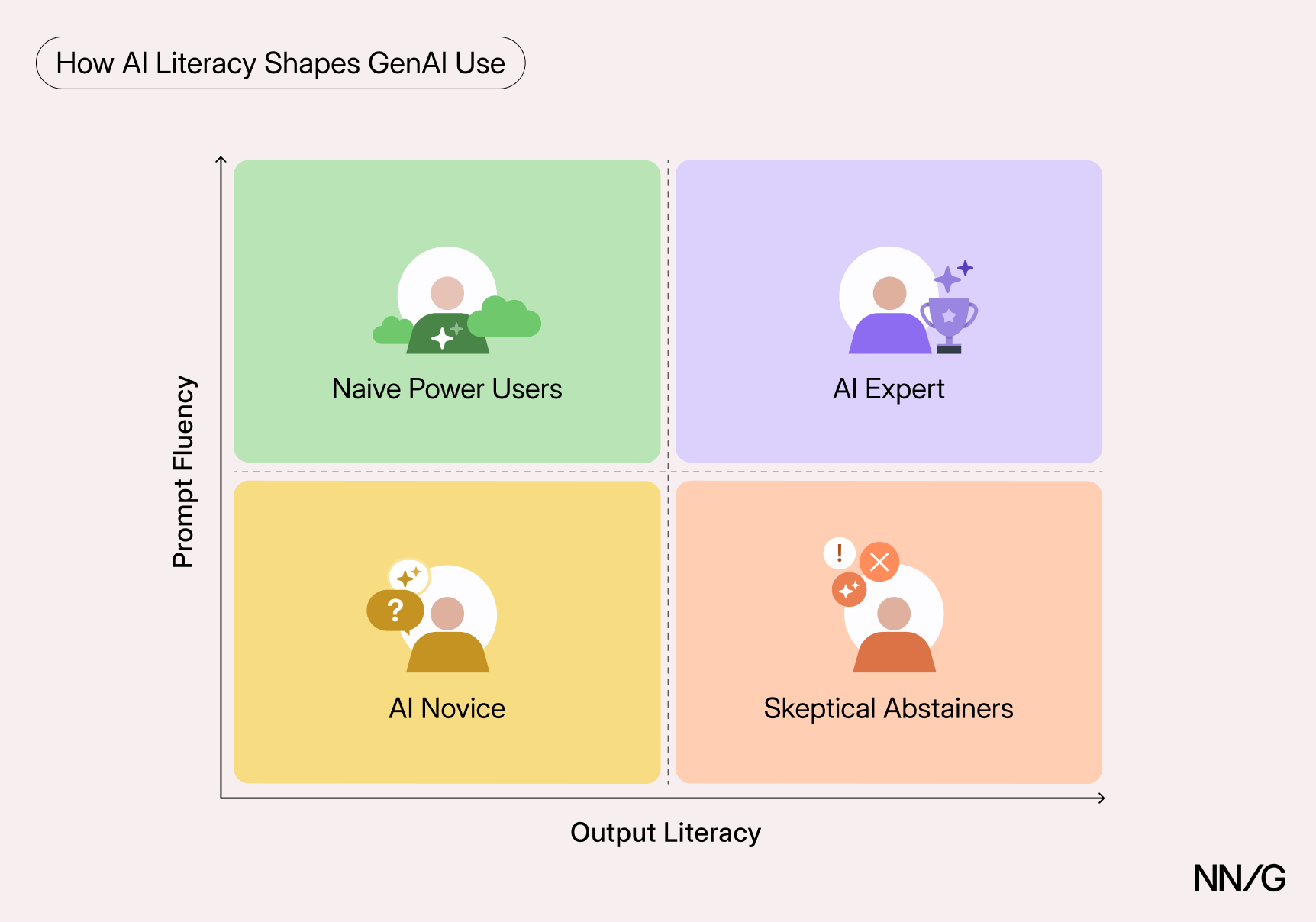
These four quadrants aren’t just theoretical: we encountered examples of each user type in our recent study on information seeking with AI.
- The AI novice: New or inexperienced users who neither understand AI systems well nor use them confidently. They don’t know how to prompt and how to evaluate outputs.
- The naive power user: Users who interact fluently with genAI and appear skilled in prompting but tend to accept outputs at face value and miss errors or gaps.
- The skeptical abstainer: Users who understand how to treat AI outputs but choose not to use genAI often or at all — due to distrust, ethical concerns, or personal preference. Because they don’t engage often, they may not develop much prompt fluency.
- The AI expert: Users who use genAI strategically and selectively, write effective prompts, and demonstrate healthy skepticism, verifying outputs when stakes are high.
In this article, we show how prompt fluency and output literacy shape how people engage with genAI.
Our Study
The best way to learn about digital literacy is not to ask, but to watch.
In a recent study, we watched participants aged 23 to 65 conduct research using both the traditional web and genAI on tasks of their own choice. They were free to use any sites or tools and were unaware that the study focused on AI. If they didn’t use AI initially, we encouraged them to try it later in the session. Participants researched a variety of topics, including vacation destinations, DIY projects, and major purchases. Study participants had varying AI experience: one was new to genAI chatbots, three used AI only for specific work tasks, and five used genAI regularly in both personal and professional settings.
Prompt Fluency: From Keywords to Conversations
To recap, prompt fluency refers to the user’s ability to communicate intent, constraints, and context so that genAI can produce useful outputs.
When writing prompts, prompt-fluent participants explained what they were trying to accomplish and what mattered to them. They included context for their problem and constraints for the expected solution. As a result, their prompts were, on average, longer. As one participant said, while composing a longer prompt, “I’m just trying to provide some context here. It seems like it often improves the results a little bit.”
Example prompt: I want to go Montauk, Long Island in New York. I think the Kirk Park Beach is one of the best spots around, given that it is near the downtown area. Do you have a better recommendation? And which cafe/restaurants are the best in the area?
Participants with low prompt fluency were less likely to include context or constraints. Their prompts often resembled search queries, possibly because they conflated genAI with a search engine.
Example keyword-style prompt: smart refrigerator with bottom freezer
In addition, prompt-fluent participants often made more complex requests, asking multiple questions at once and requesting formats that supported decision making (such as tables or ranked lists).
To illustrate this difference, the following are two prompts from participants with very different levels of prompt fluency. They both used genAI to narrow down on a car model to buy.
| Low prompt fluency |
Which car or suv pick based one hour commute camry xse or crv sports l hybrid |
| High prompt fluency | I've been researching different cars for my family, and one that's stood out in my initial searches is the Toyota Grand Highlander hybrid, which meets my criteria of having 6+ seats, reasonably good gas mileage, and all wheel drive. I've noticed that there are many trims and options between the Highlander hybrid and the Grand Highlander hybrids. Can you help me explore the relative costs and differences between each of the trims, including a table to help summarize the information? |
This difference was typical throughout the study. Prompt-fluent participants were more likely to continue within the same conversation and build on prior context. They often generated followup prompts that added context without asking explicit questions, expecting genAI chatbots to incorporate earlier context.
Example followup prompts
When I go to Kindle eBooks looking for "free kindle store picks" I don't see a top 100 Free page.
You're making good points, but I had really wanted to use these A19 Philips hue bulbs that I already have for the job.
We are likely going to want to be west of the Mississipi [sic] River so anything west of that is good
One expert user had several conversations pinned in their Gemini account and told the facilitator:
“I might go back to a previous conversation if I want it to remember everything that I discussed previously.”
In contrast, some novices restarted conversations unnecessarily. One participant repeatedly used the browser’s Back button to start fresh each time she refined her question, rather than continuing in the same conversation.
Output Literacy: Evaluating and Verifying Outputs
In our study, some users who were skilled at prompting often failed to check error-prone information (such as pricing or instructions for using a user interface). This behavior suggests that they may not have been fully aware of genAI’s limitations. Knowing how genAI works can make its limitations easier to recognize — but users don’t need to be LLM experts to evaluate outputs well. Output literacy is largely behavioral: verifying details that are easy to get wrong, looking for corroboration, and treating confident-sounding answers as provisional when the stakes are high.
The Knowledge–Receptivity Paradox
You might expect that users with a stronger technical understanding of AI would be open to using AI for various tasks, including personal information seeking. This pattern generally holds in tech: Those who understand how a technology works tend to adopt it more. However, research published in the Journal of Marketing found the opposite: lower AI conceptual knowledge predicted higher receptivity to using AI. This counterintuitive finding was replicated across 6 studies with diverse samples, from undergraduates to a nationally representative U.S. sample. Even after controlling for numerous conditions, such as general tech attitudes, general knowledge levels, and beliefs about AI’s capabilities, lower AI conceptual knowledge still correlated with greater receptivity.
The authors found that a sense of awe helped explain the trend: users with lower conceptual knowledge were more likely to see AI as “magical.”
This finding illustrates why adoption (and even enthusiasm) is not a reliable indicator of critical evaluation skill.
“Feels Like Magic”: A Naïve Power User
Our small qualitative study found support for this finding. A naive ChatGPT power user who had started using it a few months prior wasn’t sure where the information he received came from.
“To be honest, Maria, I don't know. It feels like magic.”
This user reported that his search habits had fundamentally shifted of late. Where he used to default to Google, now he starts his personal information-seeking tasks with genAI.
“Taking Away Critical Thinking”: A Skeptical Abstainer
We also observed a skeptical abstainer who, despite our efforts to encourage her, avoided AI for information-seeking tasks. This participant used Gen AI chatbots for coding tasks at work. However, she told us she didn’t use them for personal research. “I just don't feel like I need to. I'd rather just, like, plan things myself,” she said. Later, she complained that genAI was undermining people’s ability to think for themselves.
“I think it's … taking away … critical-thinking skills from people (...) I think it's going to lead to people being less discerning with information.”
Checking AI’s Work
While novices and naive power users were more open to using genAI for their information-seeking tasks, they were also less discerning with the information they received from genAI. We observed that they were more delighted and impressed with the results they received, and more likely to accept them without scrutiny.
On the other hand, expert users in our study often checked AI’s responses by asking clarification questions or crosschecking results on different sites and through search engines.
Example: Car Shopping
An expert AI user in our study spent some time using Gemini to research different trim options for a car model he was considering purchasing. During his conversation, he compared Gemini’s reliability to Wikipedia, saying he wouldn’t make a big purchase decision based on Gemini’s advice alone.
“I wouldn't go off of just the information on here [Gemini] alone. It's not something you can cite in a research paper, but it's still going to have pretty solid information most of the time.”
Because this participant was appropriately skeptical of AI-generated information, he noticed when it contradicted details on other websites. When Gemini incorrectly informed him that a specific trim package, Nightshade, was unavailable for the desired model, he asked multiple times if Gemini was sure that this was the case. “Sometimes, I (…) call out Gemini on certain things,” he said. Finally, he told Gemini what he saw elsewhere.
Prompt: What I'm seeing on the other car rating sites is the the 2025 Toyota Highlander hybrid comes in a LE, XLE, Limited, and Nightshade trims (in the non MAX power train versions). Why did you only compare the XLE and Limited trims?
In the session, Gemini did not back down, and so this expert user went to Google to conduct an independent search to validate the information he received. He finally concluded that the information Gemini was pulling was likely out of date.
Choosing Tools and Models
In our study, participants who had high output literacy tended to use genAI more selectively. They had experience with multiple tools (and, in some cases, paid subscriptions) and chose a specific product or model depending on the task. For example, one participant used NotebookLM for synthesizing work research and Cursor for programming. Another alternated between Gemini Pro’s Flash, Pro, and Deep Research models — using Deep Research for complex tasks where accurate references mattered, Pro for heavier reasoning, and Flash for quick questions.
In contrast, novices and naïve power users often defaulted to the first tool they were introduced to and weren’t sure what differences between tools mattered. One novice asked:
“I know there’s [sic] all different kinds of AI. So, Gemini versus ChatGPT or whatever (....) How do I know which one to use, and are they different, or would they all give me the same thing?”
How Designers Can Help Users on Both Dimensions
GenAI tools should support both prompt fluency (helping users express what they need) and output literacy (helping users evaluate what they get back). Many products already offer prompt tips and accuracy disclaimers, but we found that novice users often ignored them — especially when they appeared as onboarding messages or as small, easy-to-miss text around the interface.
For example, one participant used Gemini and Perplexity for the first time in our study. Both tools displayed welcome text and accuracy disclaimers that she largely ignored. Gemini even showed a large welcome message that covered much of the screen; she worked around it for about 10 minutes before dismissing it, with no indication that she read it.
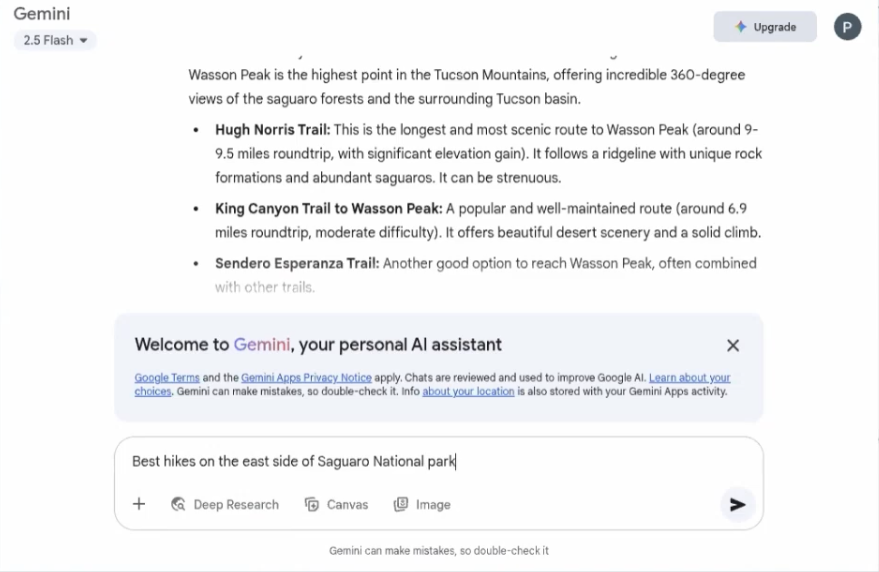
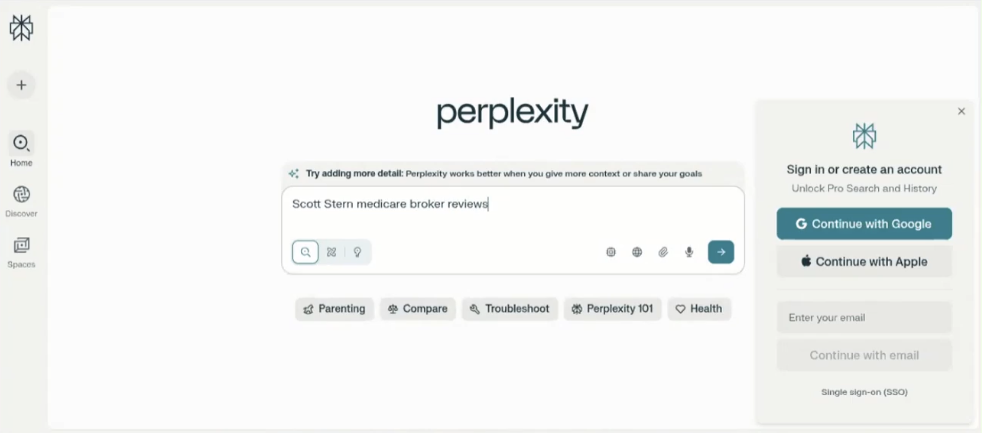
These examples illustrate two common UX problems: users don’t want to read onboarding messages, and helpful guidance is often buried within or beneath long AI-generated responses.
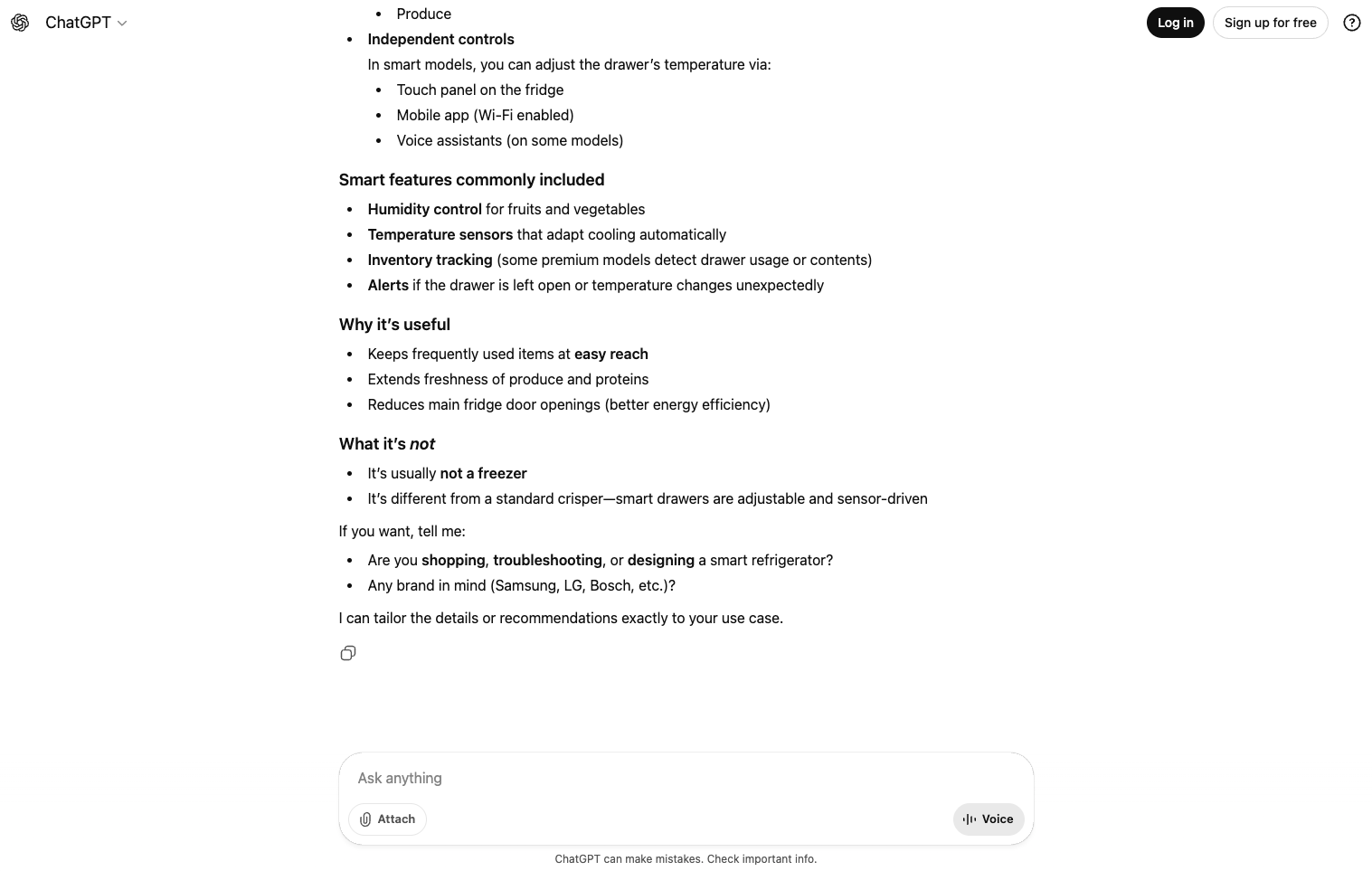
GenAI tools can do more to support users — not just in expressing their intent, but in interpreting what they get back. Prompt fluency and output literacy each call for different UX strategies. To encourage better prompting and better outputs, design interventions might include:
- Turning prompt suggestions into clickable options rather than burying them in long AI-generated text
- Offering quick refinements that users can select on click or tap (such as add constraints, summarize in a table, rank by popularity)
- Asking brief clarifying questions when prompts are vague — rather than guessing and returning overly broad answers
- Providing lightweight controls for common filters or constraints (like budget, location, or timeline in trip planning)
To help users better assess and verify outputs — especially when accuracy matters — designers can also:
- Use intentionally uncertain language when information may be outdated or hard to confirm
- Show contextual warnings for error-prone details (such as prices, availability, or in-product step-by-step guidance)
- Make Verify actions more visible (e.g., Show sources, Check key claims, or Compare with web results)
- Clearly flag when sources are missing or unreliable (e.g., No reliable sources found)
Conclusion
AI literacy isn't a simple continuum; frequent use of genAI doesn’t guarantee effective use. Instead, AI literacy is a composite of two dimensions: prompt fluency and output literacy. These dimensions that don’t always develop together. The combination of these two dimensions influences how people interact with genAI. Designers must meet users where they are, not just in what they know, but in how they use and trust AI.
References
S. M. Tully, C. Longoni, and G. Appel. 2025. Lower Artificial Intelligence Literacy Predicts Greater AI Receptivity. J. Mark. 89, 5 (2025), 1–20 https://doi.org/10.1177/00222429251314491