AI-powered UX tools promise efficiency, but frequently lack transparency about their accuracy or limitations. In this episode of the NN/g UX podcast, Baymard cofounders Christian and Jamie Holst discuss why higher standards are needed for AI in UX and other professional domains and explain Baymard's approach to building its AI-powered ecommerce evaluation tool, UX-Ray.
Meet Christian and Jamie Holst, Cofounders of Baymard Institute
Christian and Jamie Holst are brothers and cofounders of the Baymard Institute, an independent ecommerce-specialized UX organization that has produced hundreds of practical guidelines for ecommerce design. Like NN/G, Baymard has a strong focus on research-backed design guidance, but its work specifically focuses on ecommerce.
Christian is Baymard's research director, overseeing all UX research. Jamie is CTO, responsible for Baymard's technical development and known for his writings at the intersection of technology and UX.
AI Tools for UX Lack Accountability
Many AI-powered UX tools promise heuristic evaluations, UX audits, or instant insights. However, most fail to disclose how accurate those outputs are — or when they should not be used. This trend was particularly egregious in 2023, but even as AI technology has improved, many tools marketed for UX work still lack reliability.
Christian and Jamie pointed out that most AI tools for UX fail to even mention (let alone actually measure and report) how their accuracy compares to human-produced outputs.
"The vast majority of tools don't even publish an accuracy rate. So, we can't even discuss whether it's high enough."
— Christian Holst
As an example, let's consider an AI tool that promises to "scan" your website, identify possible UX problems, and suggest solutions. On the surface, this sounds enticing — particularly to teams that have limited UX expertise or need to quickly evaluate many pages. What most tools like this hypothetical one fail to provide — and what many decision-makers are not even asking for — is transparency about their limitations.
An AI-powered tool designed to scan pages for identifiable UX problems is typically capable of detecting only some types of issues (e.g. poor visual contrast, inconsistent copy, or insufficient white space), rather than addressing all types of UX issues. GenAI-powered systems may struggle to identify deeper, subtler issues, like a fundamental mismatch between the site's information architecture and the expectations of its target audience. But how often have you seen such AI tools transparently acknowledge these kinds of limitations?
"Pretty Good" Isn't Good Enough for Product Design
In many cases, the limitations of AI UX tools are actually quantifiable. In 2023, when ChatGPT's GPT-4 model was released with the ability to process images, it unlocked the ability to use consumer AI tools to "audit" digital interfaces. Baymard's team put the new capability to test by using GPT-4 to conduct a UX audit of 12 webpages and comparing the tool's output to the issues identified by human experts. GPT-4's performance was abysmal — it had a 20% accuracy rate. 80% of the recommendations it made were false positives. It discovered only 14% of the UX issues present in the input screens.
Of course, since then, there have been substantial improvements made in model architecture, training data, and explainability. Some newer AI tools now offer more detailed rationales for their outputs, allowing users to see why a particular recommendation was made. Additionally, advances in finetuning and prompt engineering allow models to be customized for specific domains, potentially increasing relevance and accuracy for specialized UX tasks.
In March 2025, two Microsoft researchers conducted a similar evaluation of four AI tools. They found that the tools had accuracy rates ranging from 50% to 70%. For the sake of the argument, let's say that an AI-powered UX tool may now be capable of around a 70% accuracy rate.
Even this substantially higher accuracy rate could still be dangerous. Christian explained:
"At first glance, this might seem like an acceptable rate. I could easily imagine a CEO or CMO being presented with this and saying, 'Well, here's this cheap tool that is right about 70% of the time, we should just use it!'
The problem is that's actually a horrible value proposition. I think people who have been in the UX space a long time will recognize and understand that."
— Christian Holst
For example, consider that a heuristic-evaluation tool presents you with 10 suggestions to improve the experience. Seven of them are good recommendations… but three of them aren't. They may actively make your experience worse and decrease conversion. But you can't tell which recommendations are the good ones.
Small Details Matter Immensely
Experienced UX professionals know that small design tweaks can have a major user and business impact. Christian and Jamie described how, by replacing dot indicators with thumbnail images in the product-image carousel, a recent client, a Fortune 500 apparel retailer, was able to increase conversion rate by 1%, generating millions of dollars in revenue.
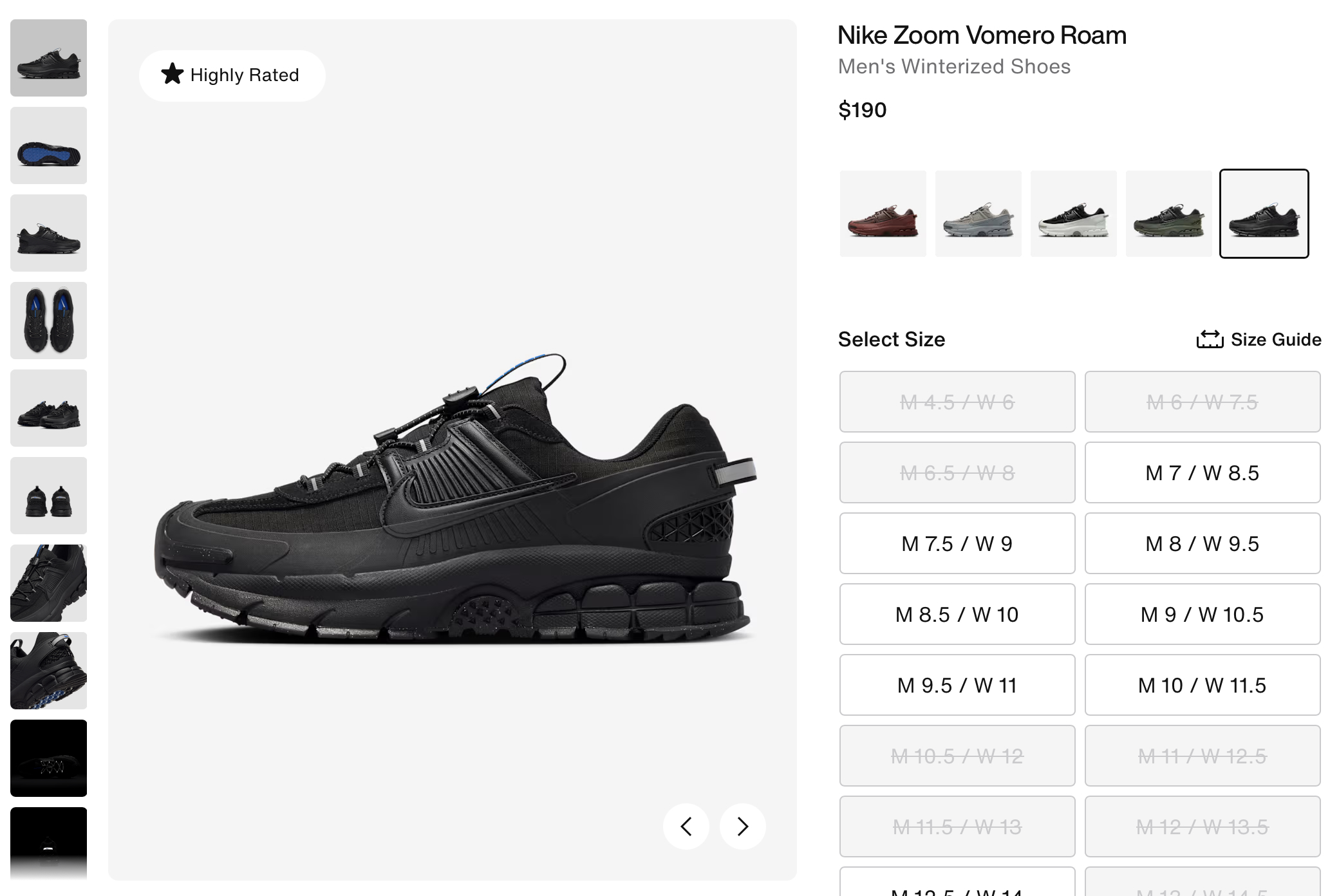
It's easy to imagine a reverse scenario, where a small recommendation might have a huge negative impact. What if the client in this example asked an AI tool to evaluate its product pages? The tool might say something like, "Replace the thumbnails with carousel dots to reduce visual clutter." If the team followed that recommendation unquestioningly, it may inadvertently decrease the conversion rate and not even realize why it happened.
Accuracy Comes First: The UX-Ray Case Study
Frustrated by the proliferation of unreliable AI tools on the market, Christian and Jamie built their own, which they call UX-Ray.
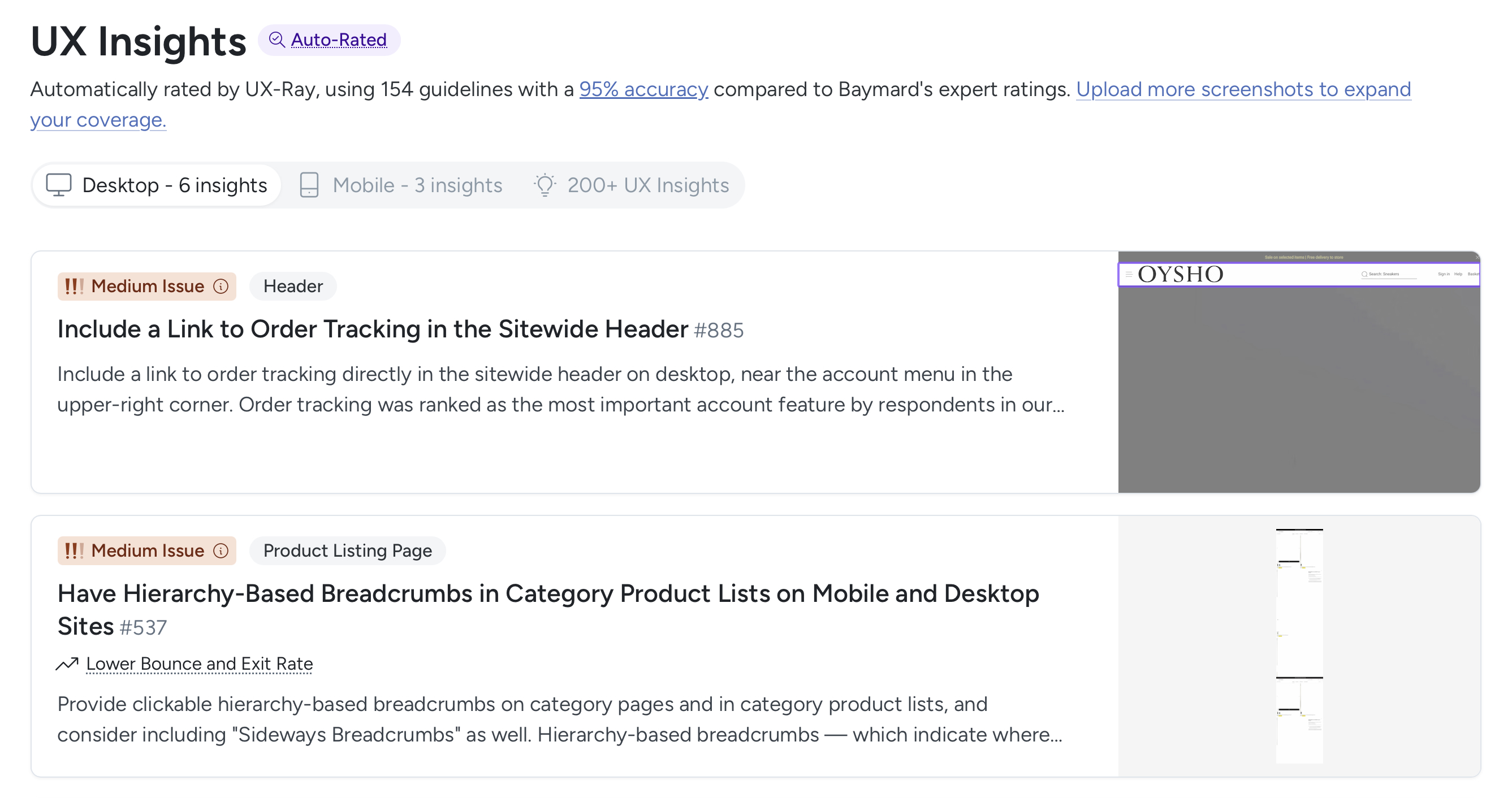
The tool specifically checks ecommerce sites against a subset of Baymard's hundreds of guidelines. (At the time of writing, UX-Ray checks for only 154 guidelines (~20-25% of the full set of 700+ ecommerce guidelines).
Why does Baymard's tool check only for about a quarter of its guidelines? Because the priority is accuracy — Christian and Jamie chose to include only those guidelines for which the AI system can achieve at least 95% accuracy. Accuracy is determined by stress-testing UX-Ray across many different contexts, and comparing its results against human evaluations of the same designs.
Christian acknowledged that he understands why many AI tools for UX fail to assess accuracy rates — because such an evaluation takes a lot of time and resources, it's tempting to avoid it in favor of more attractive (if deceptive) marketing pitches. But Baymard doesn't think that approach is ethical or sustainable in creating long-term satisfied customers.
Use GenAI Only Where It's Reliable
Jamie Holst explained that a breakthrough in building UX-Ray came when they separated the process into two distinct stages: classification and analysis. He noted that machine-learning models excel at classification tasks, such as identifying which design pattern is present in an interface. However, Jamie emphasized that assessing whether a particular design pattern is good or bad — essentially, the quality of the user experience — requires deep understanding of the context and highly specialized knowledge.
"Second step is determining, 'Is that [design pattern] a problem here? Is that good or bad, or somewhere in between?' And we find that, when you ask LLMs to do that, that's where things go off the rails. That's just where accuracy plummets dramatically."
— Jamie Holst
Jamie and his team found that when large language models were asked to both classify and analyze design patterns, error rates compounded and accuracy dropped significantly. For this reason, UX-Ray relies on probabilistic AI only for identifying patterns, while all evaluative analysis is handled deterministically through predefined logic based on Baymard's research. They're putting guardrails around the AI.
This approach uses AI where it is most reliable (pattern matching), while relying on human-defined rules for the actual UX assessment, ultimately leading to much higher accuracy. Jamie concluded that, while future advances in AI might make analysis more feasible, current models are not yet capable of reliably handling that step.
Demand More from AI Tools
While genAI brings great potential to UX research and design, it is not a one-size-fits-all solution. If you're tasked with evaluating, testing, and deploying these AI tools in your team's work, hold vendors to a high standard. It's not enough for them to just say, "it's AI-powered." Ask sales representatives:
- How are you evaluating the accuracy and reliability of your tool's outputs?
- What are the limitations of this tool? Where is it likely to break or provide inaccurate information?
- What guardrails are in place to prevent errors? Exactly what role does genAI play in the process of creating the final results?
Hold these tools accountable for their quality standards before you buy them. If you don't, you'll end up being held responsible by your team.