The models on your site say a lot about who your product is for. You don’t want to inadvertently alienate shoppers because they don’t see themselves represented in your product photos.
In our research for the 5th Edition of our Ecommerce User Experience report series, we noticed increased variety in the types of models used to display and feature products across the web. Many sites have made clear efforts to be inclusive in their choice of models.
When models were diverse, shoppers noticed. Many study participants were happy to see models of different sizes, ages, and races on ecommerce sites.
Diversity Across Site Photography
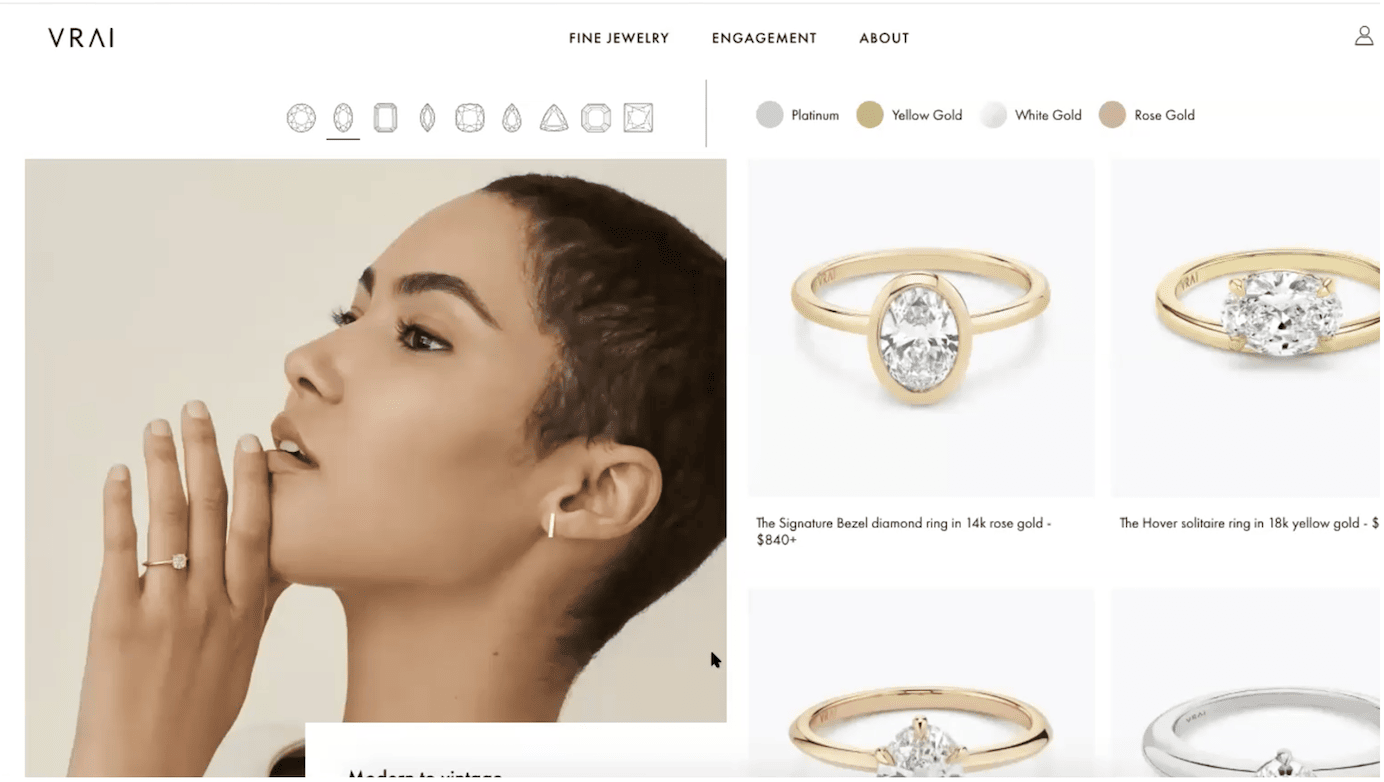
A customer on Vrai.com was shopping for a diamond engagement ring. She thought that the racial diversity of the models on the site was especially refreshing for bridal products:
“Oh, and this has somebody actually wearing it as well. So that’s actually really nice. It’s also nice that they included a diversity element, especially with, like, the current social movements towards showing more diversity within brands like that as well. Because a lot of times when I’ve seen, like, engagements or wedding sites, they’ll just show, like, a traditional, maybe blonde-hair, blue-eyed woman with an engagement ring. But here they’re showing someone that looks like me, which is important.”
Allowing Shoppers to Select Their Model
Ecommerce sites selling clothing and beauty products tended to use diverse models to showcase their products — a trend that did not go unnoticed by our study participants.
Several of these sites went beyond just showing diverse models in site photography — they allowed shoppers to choose the model on which to view the products. Makeup shades can appear very different on different skin tones and clothing fits quite differently across body types. When users could adjust the model, they commented positively and took advantage of this option.
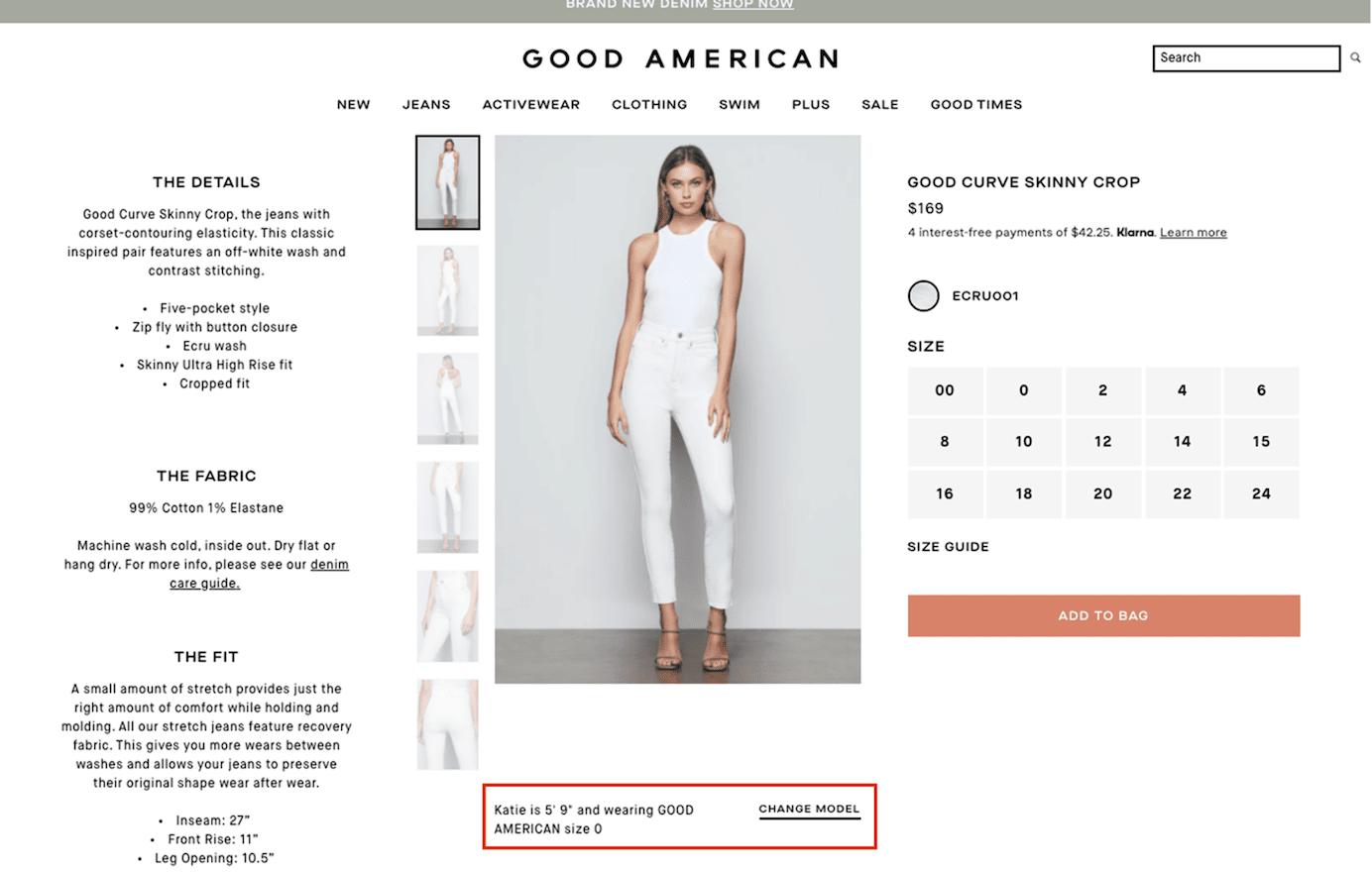
A user shopping for jeans on GoodAmerican.com noticed that she could choose her preferred model early in the shopping journey, on the product-listing page, and again on the product-detail pages. On the product-listing page, she said:
“Oh, you can select your preferred model because they’re different sizes. That’s cool. [She looked at her options.] So, Katie is similar to me. I’ll go with Katie, I guess; she’s more similar to my size than Charlotte and Rachel.”

A different user, who noticed this option on Good American’s product-detail page, said, “I like how the sizes go up to size 24; it’s very diverse and inclusive. So that’s good. And you change the model here if you want to, which is useful for all people.”
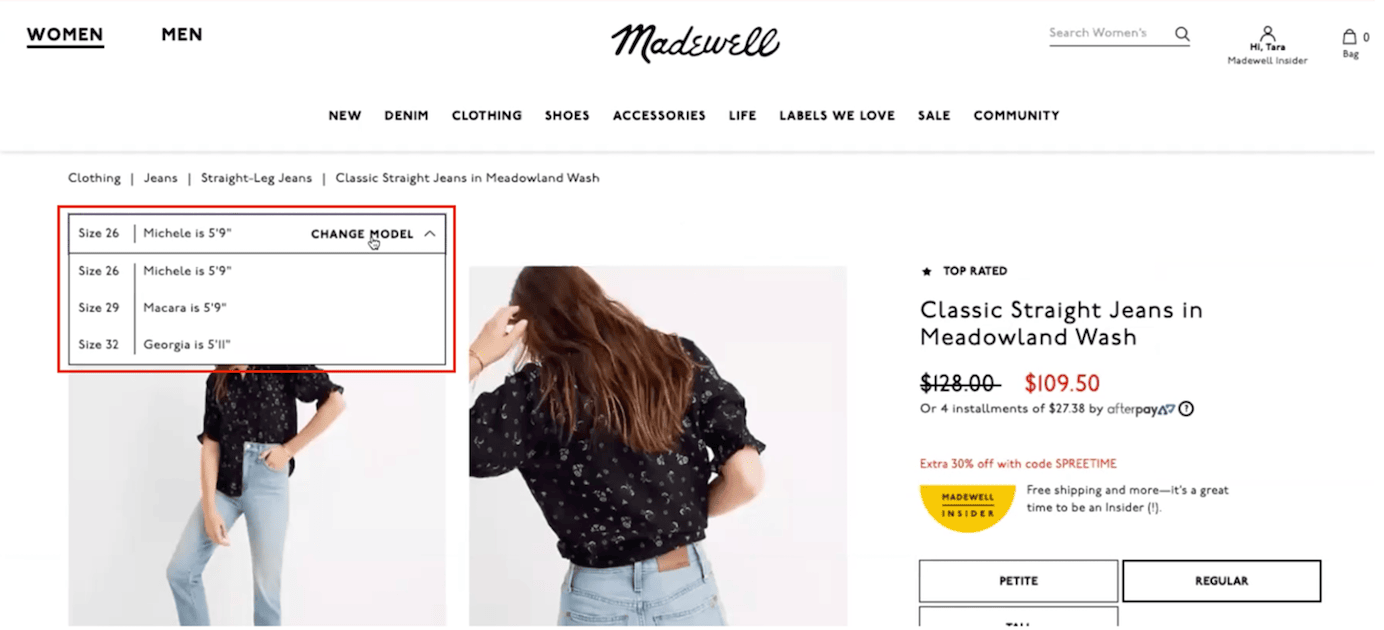
Clothing retailer Madewell also offered users the option to select models by jean size and height. One user appreciated this, but she was disappointed to see that all models were tall. However, knowing their height did help her to determine how the same jeans would fit her based on her own height. She said:
“Okay. It looks like the model is 5’ 9”. I’m only 5’ 4”. So, I’m going to change [the model].”
After realizing that all the model options were 5’ 9” or 5’ 11”, she said:
“Nope, everybody’s tall, but she’s around my size at least. I like the look of these jeans, and it looks like it hits higher up on her ankle.”
Challenges Associated with Model Selection
Walmart’s website and mobile application allowed shoppers to select a model on which to view clothing products. This model-selection feature was accessible on product-detail pages.

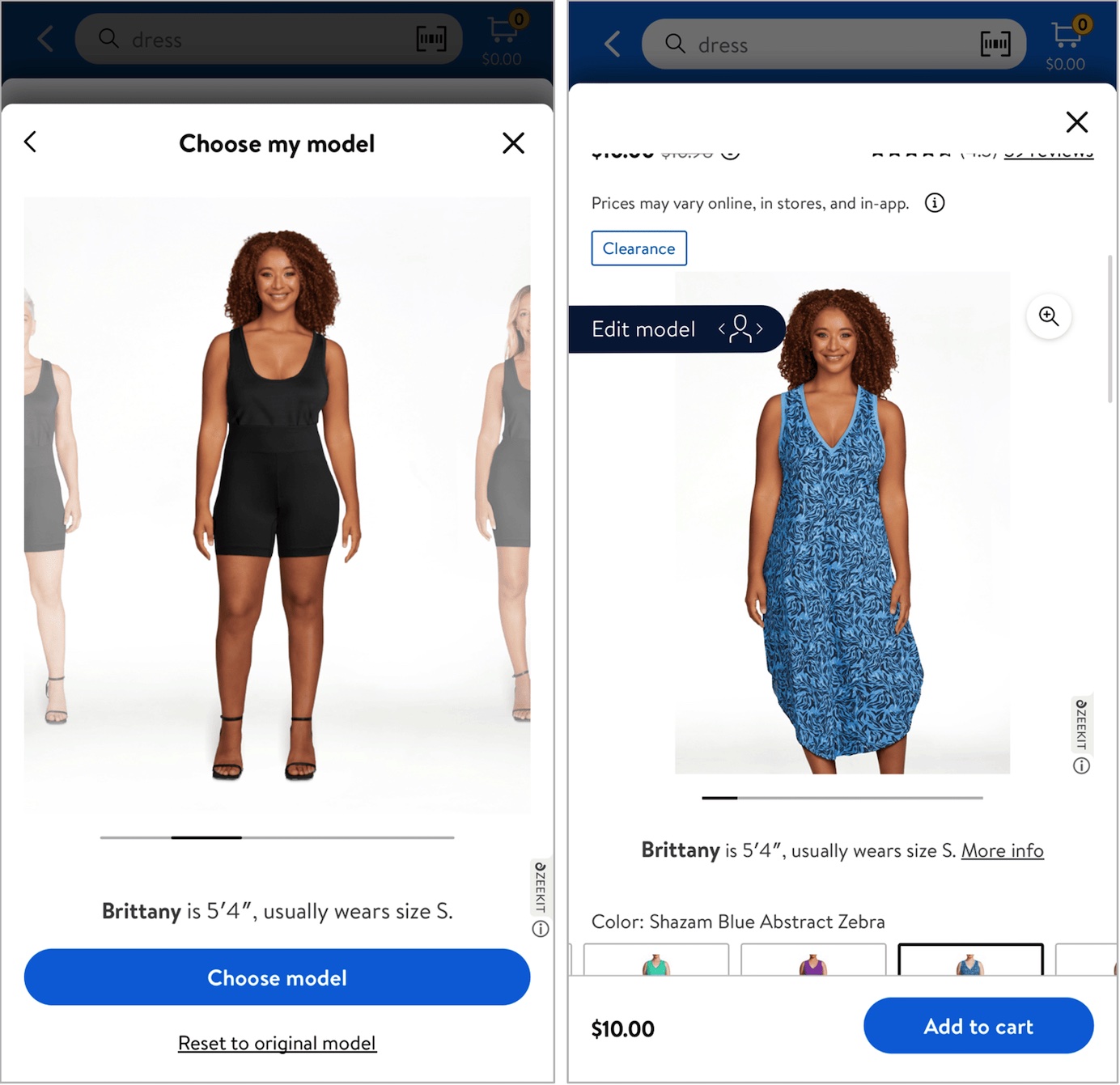
After the user selected a model, that model was used across other products within the same category (e.g., Women’s Dresses). While it was good that users were not required to reselect their model on other products, Walmart’s model-selection feature had several usability issues:
- Not all products within that category were compatible with the model-selection feature. When a product was incompatible with the model-selection feature, the model-selection call to action was not present, and a different model was shown instead.

- The feature did not take into account size categories. For example, the same standard-sized model was shown wearing plus-size products that weren’t even sold in regular sizes.
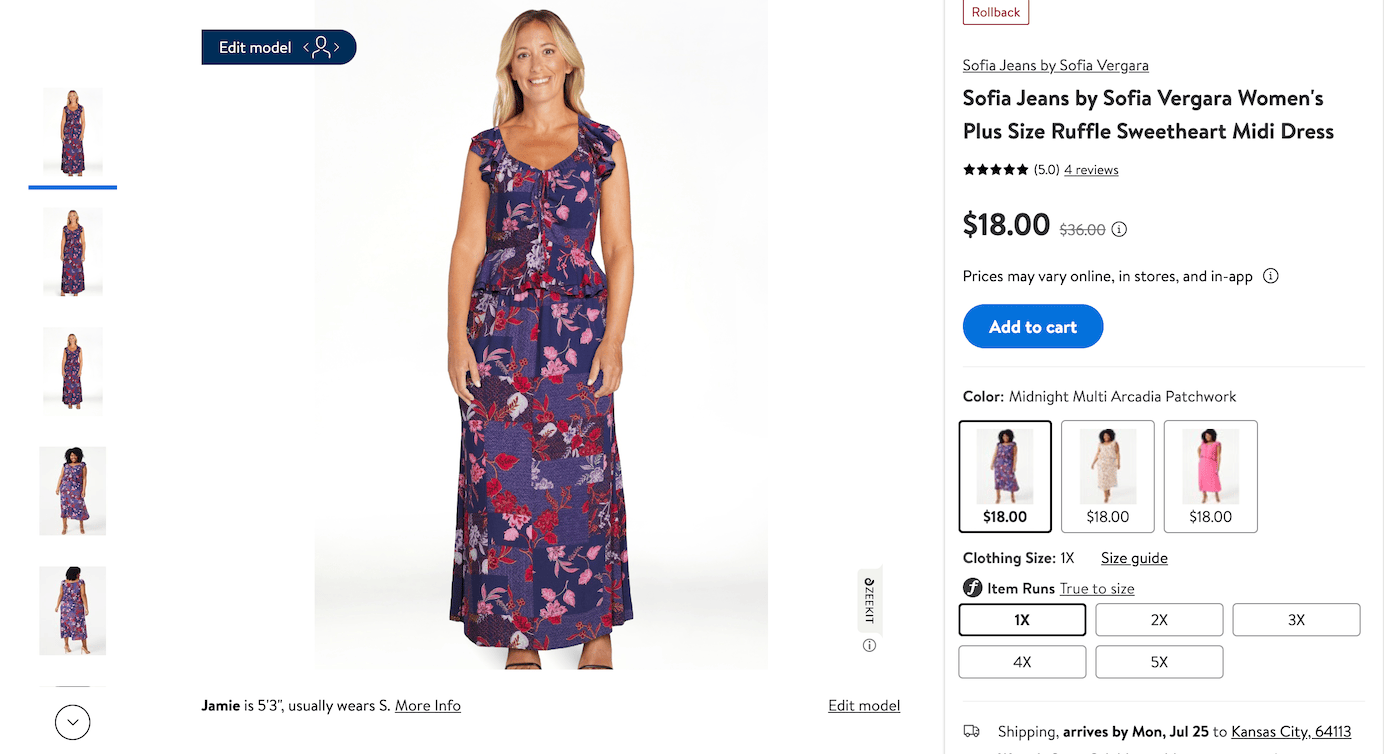
- The model-selection feature didn’t show real photos of the model wearing each piece of clothing. Instead, the clothing was superimposed over the model’s frame. This approach can be misleading and may even defeat the purpose of viewing products on different models, because the feature simply stretches and compresses the image of the clothing to fit over the model’s frame. Real pieces of clothing may not be able to take on the shapes created by this feature.
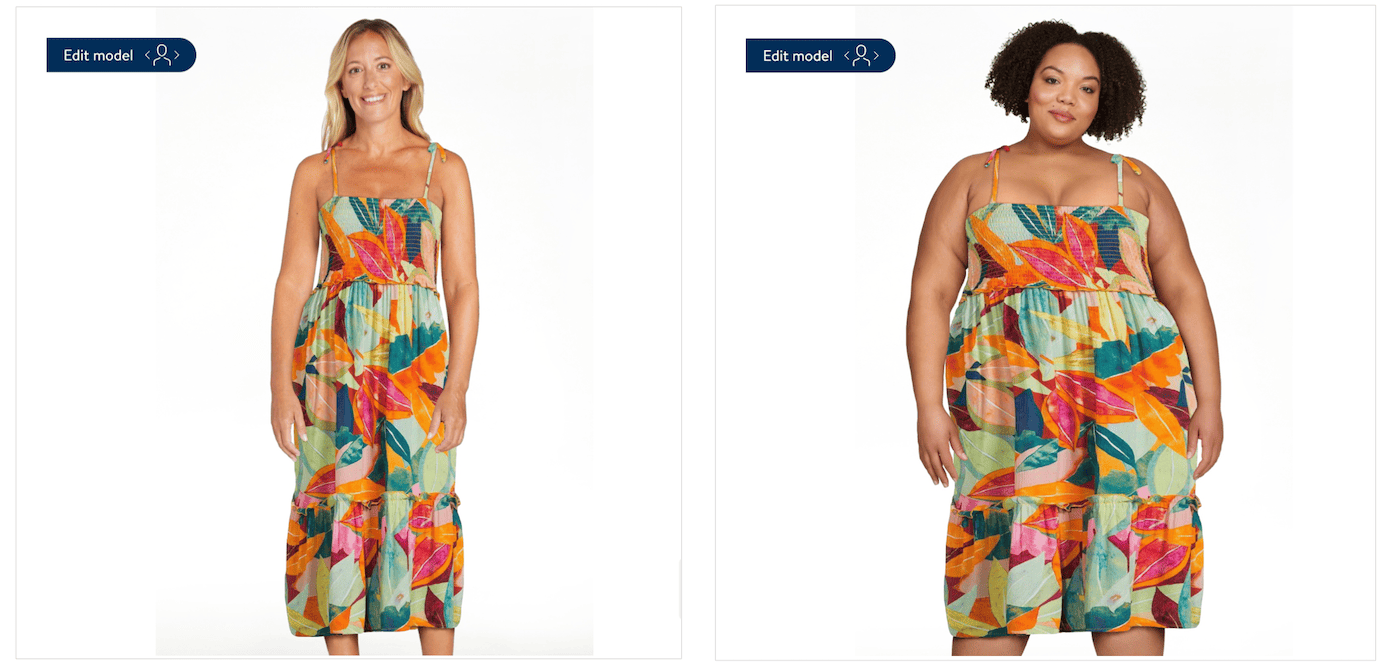
- The product thumbnails on the category listing page did not show the selected model. It would be better if category page images also reflected the users model choice, so these photos could be considered while browsing options.
Where Should Model Selection Be Offered?
If your site uses a model-selection feature, that feature should be easy to discover. Thus, it should be made available both on product pages (like in the Walmart example above) and when the user lands on a product-listing page for that corresponding category (like in the Good American example above).
When Should Model Selection Be Offered?
Model selection is a process with a relatively high interaction cost — users need to either enter their measurements (like in the Walmart example above) or select among a set of models of different sizes. Therefore, they should not be forced to do it for every product. The model-selection cost is justified only if most (if not all) products within a category can be displayed on that model.
That being said, some customers may not understand that their selection will apply only within a specific product category. For instance, customers who have selected a model when shopping for dresses may expect to see the same model when shopping for pants. For that reason, it is a good idea to clearly explain to users to what items their model selection will apply.
If many of your products are, however, not available on the selected models, it is best to not use a model-selection tool and instead, where applicable, to show a product on models of different sizes and skin tones (see the next section).
Multiple Models on Product-Detail Pages
The alternative to using a model-selection feature on a site is to simply show a product on models of different sizes and skin tones. This approach is more flexible and enables sites to deal with situations where they don’t have an equal variety of models available for all products within a category. On the other hand, it also means that thumbnail photos on product-listing pages will not necessarily show people of the same color or size as your user.
For example, since our study, Good American has simplified its approach and now shows pictures of different models on each of its product pages instead of asking users to select a model.

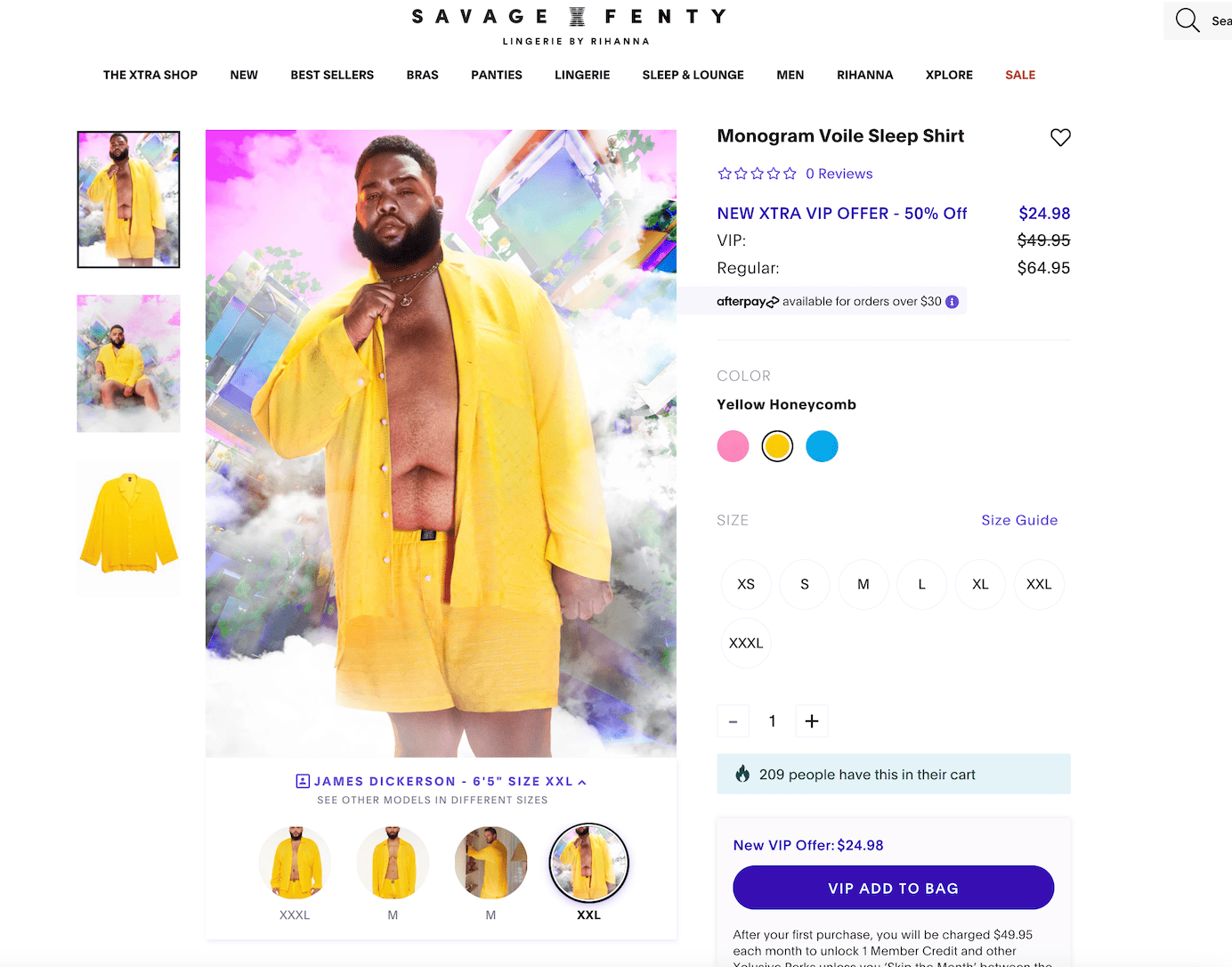
Savage X Fenty took a similar approach and allowed users to select a size below the product photos to view the product on a model of that size. Savage X Fenty was also the only site we identified that included model selection for men’s products.
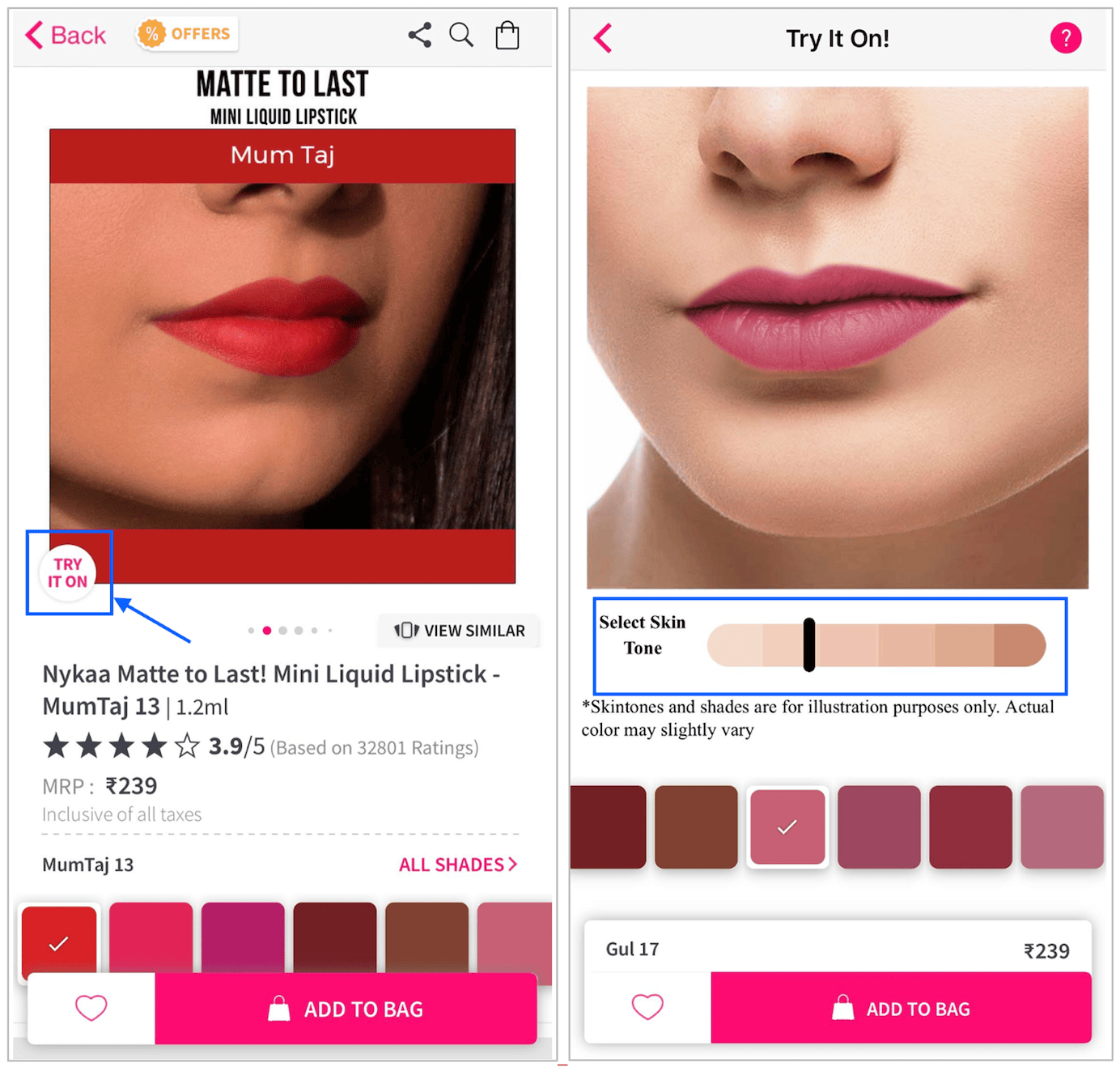
Nykaa.com, a site selling makeup and beauty products, allowed shoppers to see the beauty products on varying skin tones. One study participant who was shopping for a new lipstick noticed the feature. She found it incredibly helpful in picking out the right shade for her skin tone. She said:
“They have this feature to try it on. You have to choose a skin shade. This color I like the most, but it doesn’t look that good on my particular skin color. I’ll go for a little bit darker [. . .]. Yes, that looks better on the lighter skin tone. I find this feature quite amazing. See how you can just change the skin tones and see how it looks with different colors on your skin tone.”
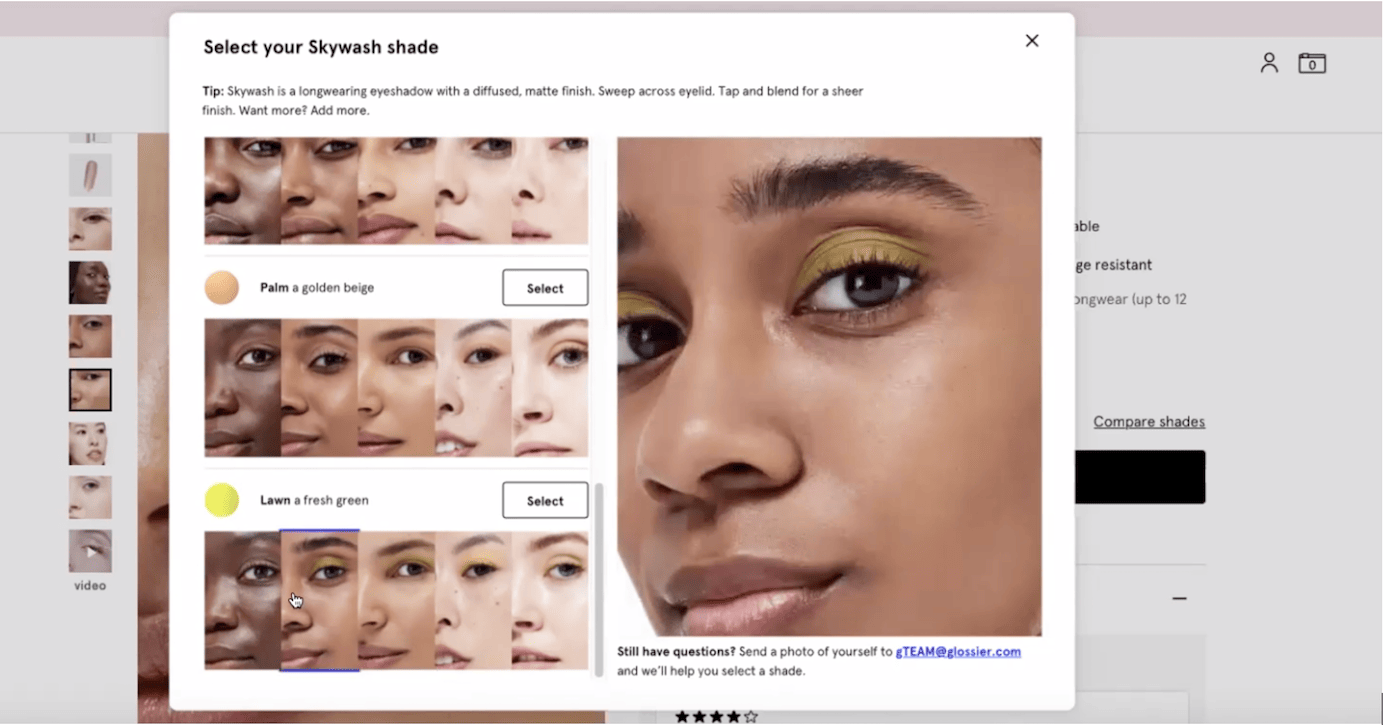
Glossier provided a similar capability. On the eyeshadow product page, users could see how the selected eyeshadow color looked on various models. However, one user found this feature confusing because the makeup was not consistently applied on each model. This caused her to think the images were featuring different shades. It wasn’t until later that she realized the same shade was shown on models with various skin tones.
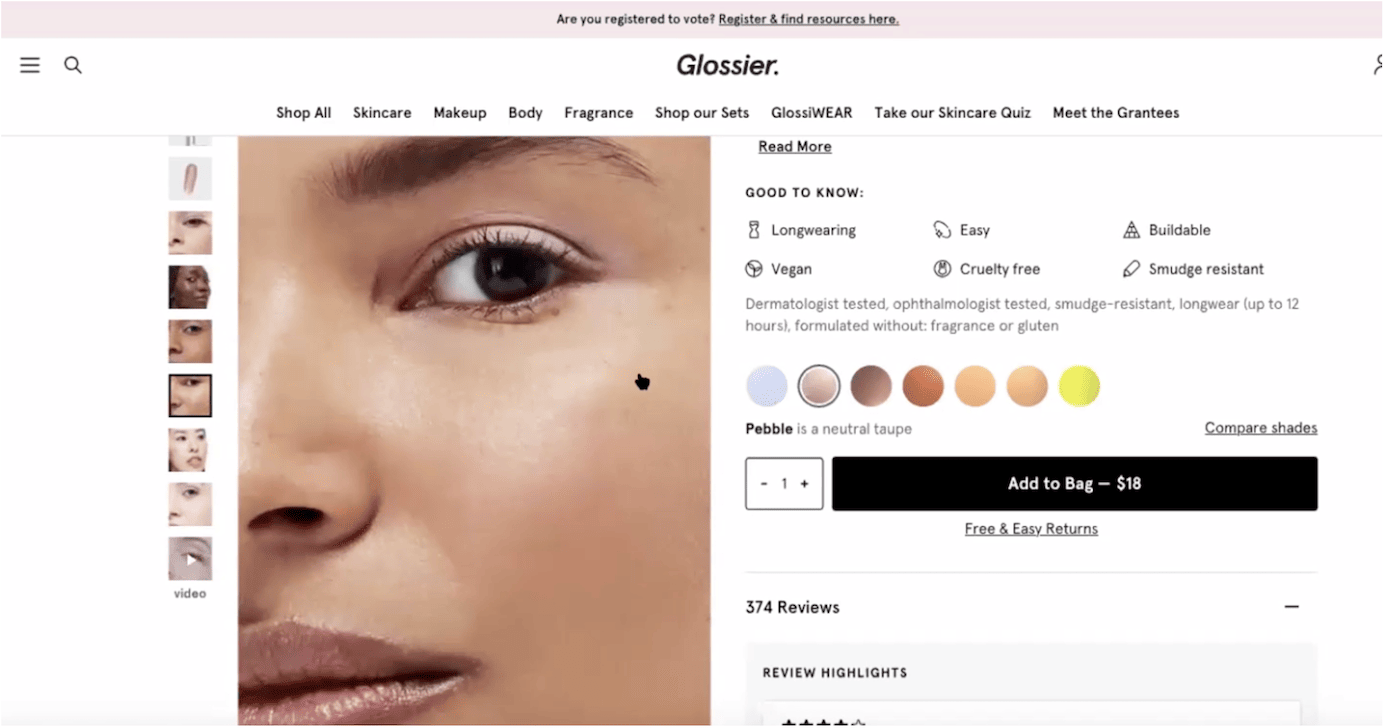
The link labeled Compare shades, just above the Add to Bag button, brought up a modal window that made the color comparison for products across skin tones much clearer. However, the user was not able to discover this feature on her own. (The implementation of the Try it on feature on Nykaa.com was more discoverable.)
Conclusion
Making a purchase online is inherently more difficult than in a traditional brick-and-mortar store, especially when users are shopping for things like clothing, makeup, or other products that need to be tried on to determine fit.
Seeing products displayed on the typical fashion model leaves a lot of questions unanswered for shoppers, as these models’ proportions and skin tones are usually different from their own.
To assist shoppers in deciding whether a product will work for them, retailers need to help them relate to that product. Sites that provide a broader selection of models showcasing products across sizes and skin tones enable shoppers to make informed purchase decisions.
Features that prompt shoppers to select a specific model should persist this selection across all other products within the product category to avoid the interaction cost associated with selecting a model for every product. Selected models should also be featured in the thumbnail images on category and listing pages to support browsing. The selection tool should also clearly communicate which products their selection will be applied to.
If the majority of products within a category cannot support the model-selection feature, it’s better to simply include images of different models on product pages than to ask users to select a model which would only be available for a few products.
Because model-selection features are so valuable to shoppers, they must be easily discoverable and implemented through high-contrast buttons or icons placed in highly visible places on both the category page and the product page.
When users see products on people that look like them, they become more confident in their purchase decisions and, thus, are more likely to purchase and later return to the site.