
Basic site-search suggestions — recommended queries that appear in a dropdown as users type in a search box — are a sign of a thoughtful search design and a feature that users have come to expect as part of website-search features. They have a host of benefits, from helping users avoid typos and misspellings to decreasing interaction cost (because users can type less if they use them).

Some site-search implementations attempt to include more-robust, enriched search suggestions in addition to simple text-autocomplete suggestions.
Enriched search suggestions are expanded recommendations for site content presented to the user during on-site search and shown under the search box, as the user types a query. Examples include:
- Popular, trending, or frequently searched items
- Historical content (e.g., recently searched items)
- Featured results
- Links to related product or category pages
Enriched search suggestions often blend text- and image-based formats and link directly to different types of content. Some enriched search suggestions are based off the user’s query (e.g., related product or category pages) and others — such as featured items — are not, combining search functionality and promotional efforts.
To accommodate the considerable number of enriched search suggestions often displayed, the search container tends to be quite large and modal-like in behavior, often blocking the context and content of the underlying page.

Despite their prominence within site search, users rarely interact with enriched site suggestions. In a recent study of ecommerce websites offering enriched search suggestions, these elements were utilized only 7 times out of 60 instances where they were encountered. Use of enriched site-search suggestions was low for both highly specific tasks such as Find a pair of red, flat shoes and open-ended tasks, such as See if there’s anything that interests you on this site.
Theoretically, enriched search suggestions could be useful for decreasing the mental effort of search tasks, helping users understand the range of products offered and expediting arrival to specific products or categories. So, why aren’t they utilized?
In execution, enriched search suggestions are problematic for several reasons. Often, enriched search suggestions:
- Do not align to a “search” mindset
- Load too slowly to be useful (especially when images are included)
- Contribute to banner blindness
- Are misinterpreted as promotional content
Misalignment to “Search” Mindset
When users choose to interact with a site’s search function, they typically already have a preformulated search query in mind. They use the search feature to bypass navigation and get to that item as quickly as possible. This is akin to the frame of mind you might be in if you make a quick stop at the grocery store to pick up a couple of ingredients to complete your dinner plan. You’re likely not interested in wandering the aisles or checking out the seasonal specials during this trip. You just want to find the items you have in mind as quickly as possible.
Enriched search items that are not directly related to the user’s query (such as trending or popular searches) do not entice users because they are often in a search mindset — not an explore mindset — when they utilize the site search. Users are unlikely to abandon their known-item search to explore other new items — or even notice them — during search tasks. In fact, irrelevant enriched search results are often interpreted as an annoyance and an unwanted distraction.
For example, when a user who was searching for tennis racquets on dickssportinggoods.com was presented with image-based enriched search results of tennis apparel, she commented: “If I’m looking for a tennis racquet, I’m not looking for clothes.”

Slow Loading Times
Searching for a predetermined item is a quick task: Users click within the search bar, type their query, and hit enter on the keyboard (or click the Search button) –- all within the matter of a few seconds. Most of the time, enriched search results cannot load as fast as a user can execute this task.
Often, enriched search results, especially those containing images, are delayed or may not load at all because users are finished typing and submitting their query before they can be displayed. When enriched search results do populate during the search task, they often match an outdated system interpretation of the user’s query. By the time they update to display relevant images, the user has already submitted the search query.
Enriched search results are often not even relevant until after the query is submitted. For example, a study participant searched for “mens cashmere sweater” on saksoff5th.com. As he typed the query, no images of cashmere sweaters populated. Only after he finished typing and hit Enter to submit the search, did any relevant images load.
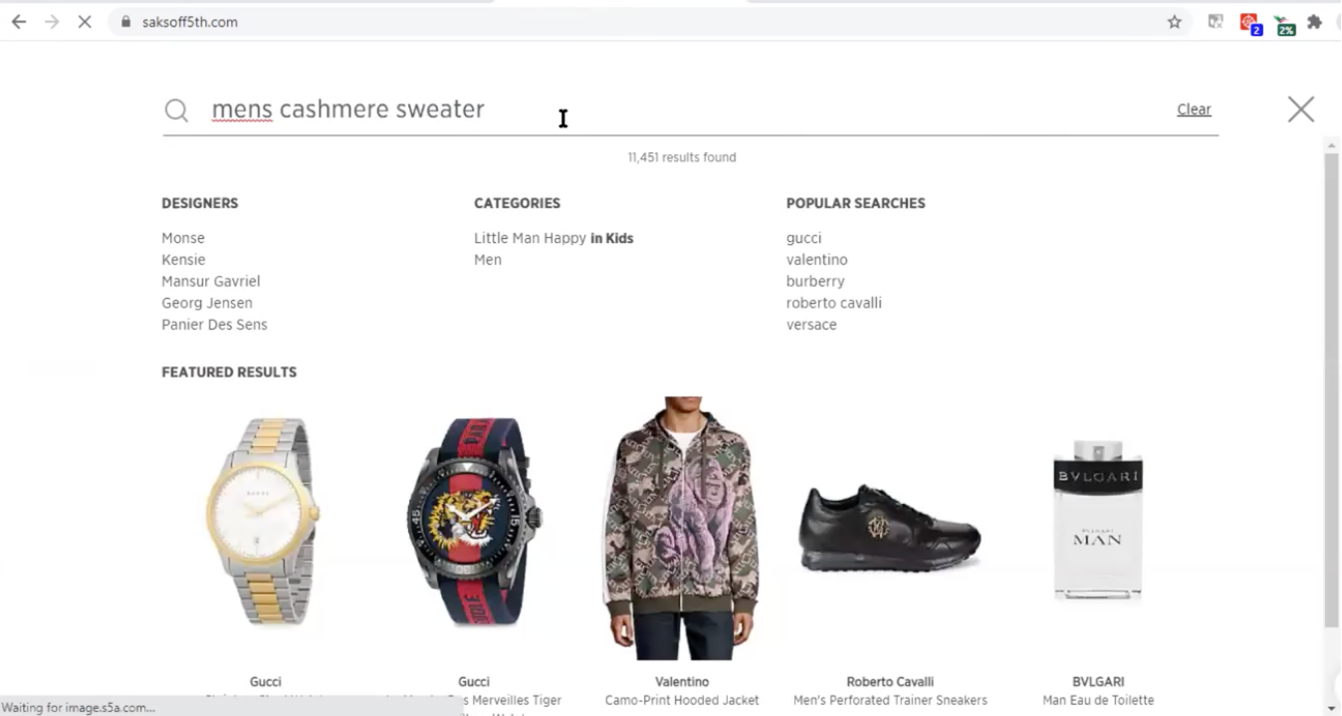

Especially for users with slow connection speeds (i.e., most users), the system’s attempt to keep up with the quickly changing query and present relevant enriched search suggestions results in difficult-to-process noise, such as in the video below.
This issue is exacerbated if the enriched search-content types are variable, changing based on the query, such as in the yankeecandle.com example below.
Contribution to Banner Blindness
Banner blindness is an instance of selective attention: people direct their attention only to a subset of the stimuli in the environment — usually those related to their goals. This behavior is a consequence of humans’ limited attention capacities, and it shows up in search tasks: People fixate on the search bar, because it is the primary UI element relevant to their task of searching.
During search tasks involving enriched search results, users tended to ignore graphical content (e.g., product images), electing not to interact with enriched search results even when they include an exact product match for their query.
For example, in one session, a participant searching for a PlayStation 5 on bestbuy.com ignored the direct product image match for her query and clicked on the search suggestion PlayStation 5 in PS5 consoles. Doing so required navigating an extra page to narrow down her search to the product page, while clicking on the product image to the right would have taken her directly to the product page.

As further evidence, a different participant was looking for a specific hoodie she had encountered earlier during a session on saksoff5th.com. After failed attempts to find it using filters on the search-results page, she resorted to conducting another search. Even though the exact hoodie she was attempting to find was featured prominently as an image result in the Recently viewed section of the enriched search container, she did not notice it. (It is the first hoodie in screenshot below.)
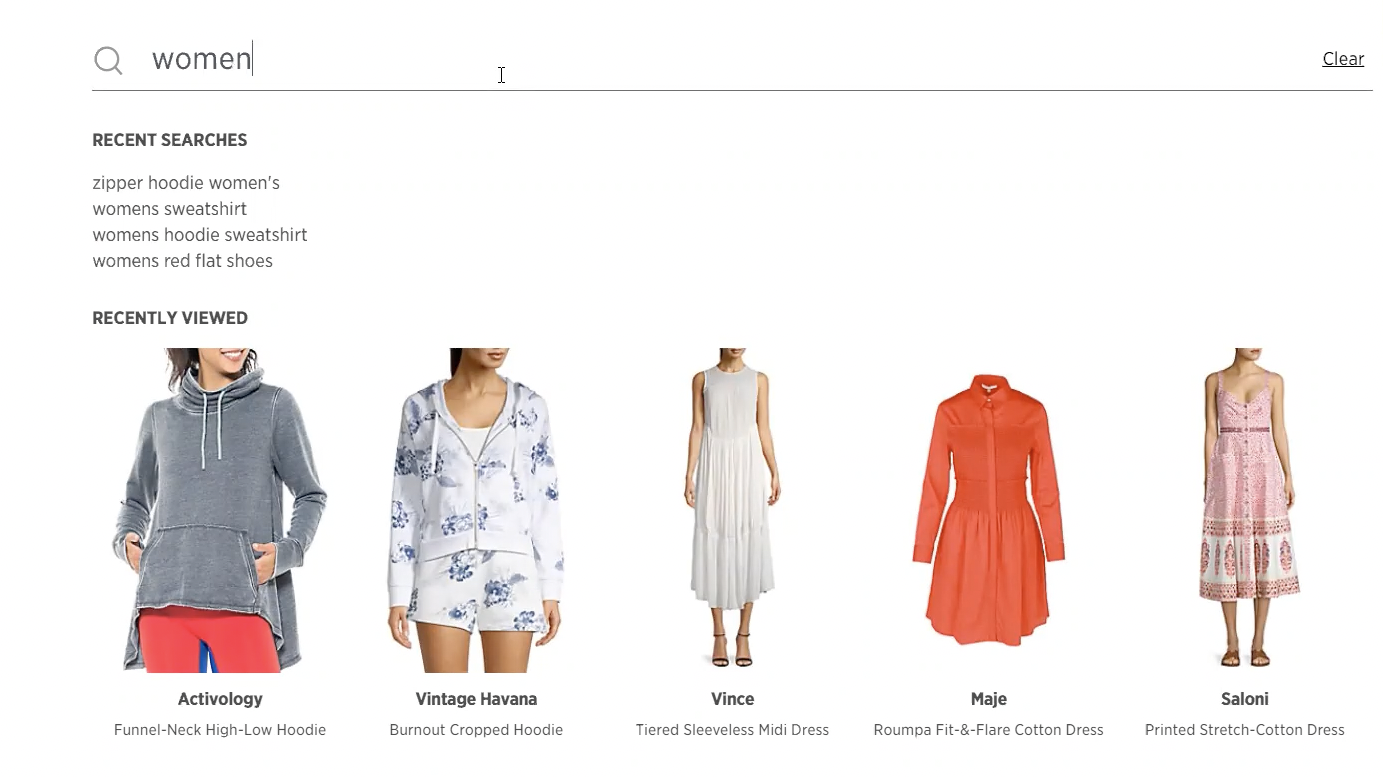
In both of these examples, both the ad-like visual treatment of these enriched search results and the the lack of proximity of these items to the item in primary focus (the search field) likely contributed to them going unnoticed.
Misinterpreted as Promotional Content
During our study, users who did not interact with enriched search results were directed by the researcher to notice and react to them after completing all search tasks. They usually guessed that the recommendations were promotional content.
In one such case, the same participant mentioned above who had been searching for a PlayStation 5 on bestbuy.com was prompted to revisit and consider the enriched search results after ignoring them during her search task. She commented: “I feel like maybe it's just pulling from some of the most popular searches but that doesn't make sense because I didn’t search for...popular items…I searched for PlayStation. So that's a little wonky."
In another example, a user searching for dresses on saksoff5th.com interpreted the enriched search results as upsale attempts. She said: “That’s kind of standard. Websites do that a lot where they say suggested for you…If I would have bought that dress it would probably suggest shoes or a purse to go with it. So, it’s kind of expected, but most of the time I ignore it. Like, I hardly ever buy anything from that “what’s suggested for me” kind of thing.”
Conclusion
People rarely interact with enriched site-search suggestions. While these types of recommendations can provide quick shortcuts and useful validation for users conducting known-item searches, consider whether the investment is worth the effort to do it right. Excessive, slow-to-load, or shifting enriched search suggestions increase task complexity, contribute to a low signal-to-noise ratio, and are largely ignored.
When implementing enriched site-search suggestions, follow these guidelines to ensure that this functionality helps rather than hinders users in their search tasks:
- Do not eliminate simple text autosuggestions. Users heavily utilize these basic site-search suggestions even when enriched search suggestions are present.
- Limit the amount of graphical and dynamic content, which can cause slower loading times and contribute to banner blindness.
- Clearly label the enriched suggestion types (e.g., top sellers, recommended products, recent searches) so that users do not have to guess what they’re seeing or why it’s being displayed. (When left to guess, users interpret these results as promotional content.)
- Maintain dedicated spaces for various content types (as opposed to shifting the location of specific types of enriched site-search suggestions based on queries).
- Do not assume that regular site users will learn to use enriched search suggestions over time. In our study, users did not notice or use enriched search suggestions, even after conducting multiple searches over time on a site.


