Journey maps are a common UX tool. They come in many shapes, sizes, and formats, and serve different purposes depending on the context. This article covers what a journey map is (and is not), its key components, related terminology, and how we can use it.
Definition: Journey Map
A journey map is a visualization of the process that a person goes through in order to accomplish a goal.
In its most basic form, journey mapping starts by compiling a series of user actions into a timeline. Adding users’ thoughts and emotions brings the timeline to life, turning it into a narrative of their experience. This narrative is then condensed and refined into a journey map.
The terms ‘user journey map’ and ‘customer-journey map’ can be used interchangeably. Both refer to a visualization of a person using a product or service.
While the argument can be made that the term ‘customer’ does a disservice to the method (because, especially for certain business-to-business products, not all end users are technically customers, e.g., product buyers), agreeing on what you call the map is far less important than agreeing on the content within the map.
Key Components of a Journey Map
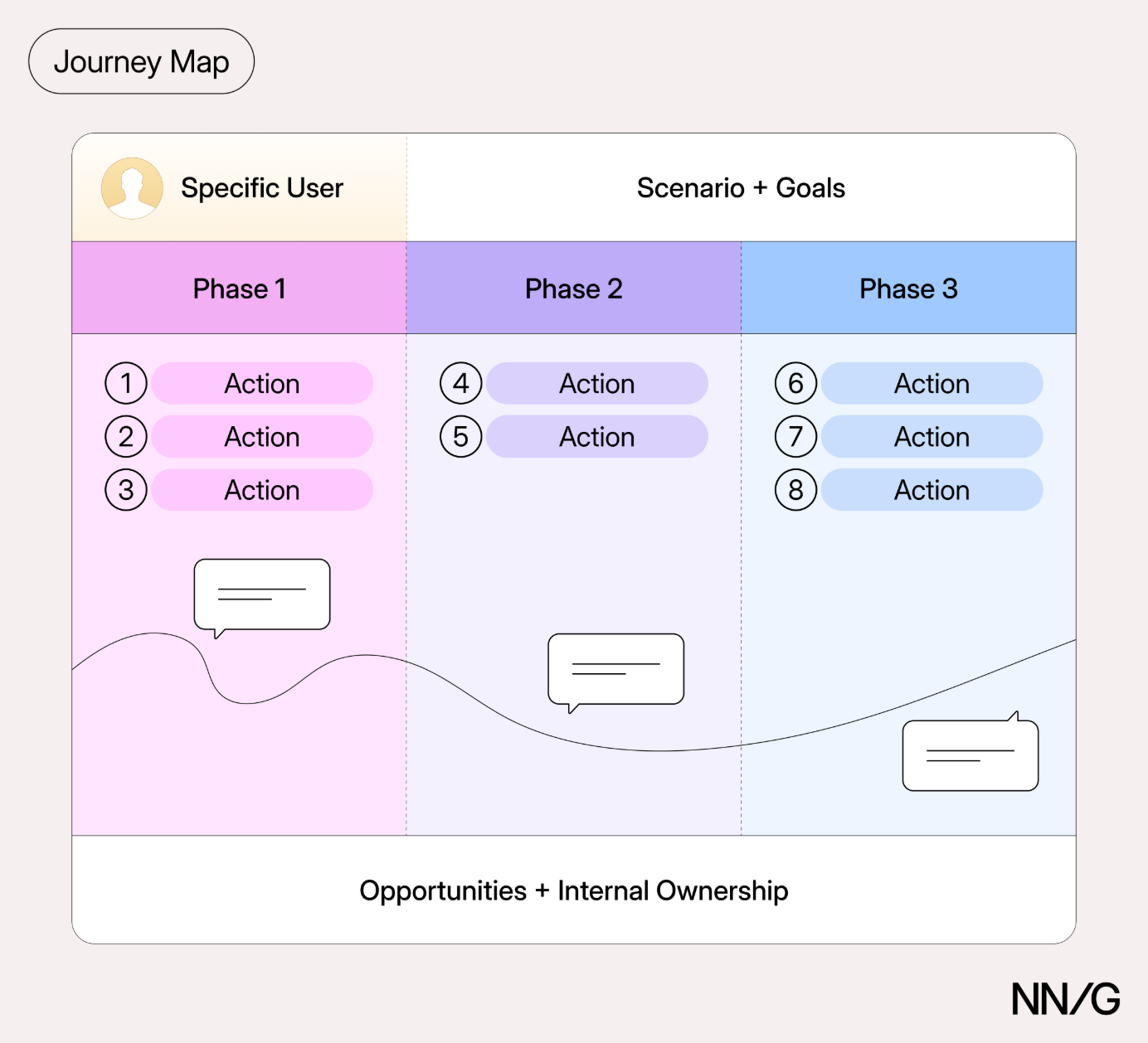
Journey maps come in all shapes and sizes. Regardless of how they look, journey maps commonly include the following 5 elements:
- Actor
- Scenario and expectations
- Journey phases
- Actions, mindsets, and emotions
- Opportunities
Actor
The actor is the persona or user whose experience is being mapped. The actor is who the journey map is about — a point of view of the map. Actors usually align with personas, and their actions throughout the journey should be grounded in research data.
Focus on one actor per map to create a clear, coherent narrative. For example, a university might choose a student or a faculty member as an actor for the map. Because their experiences differ, to capture both points of view, the university will need to create two separate journey maps.
Scenario and Expectations
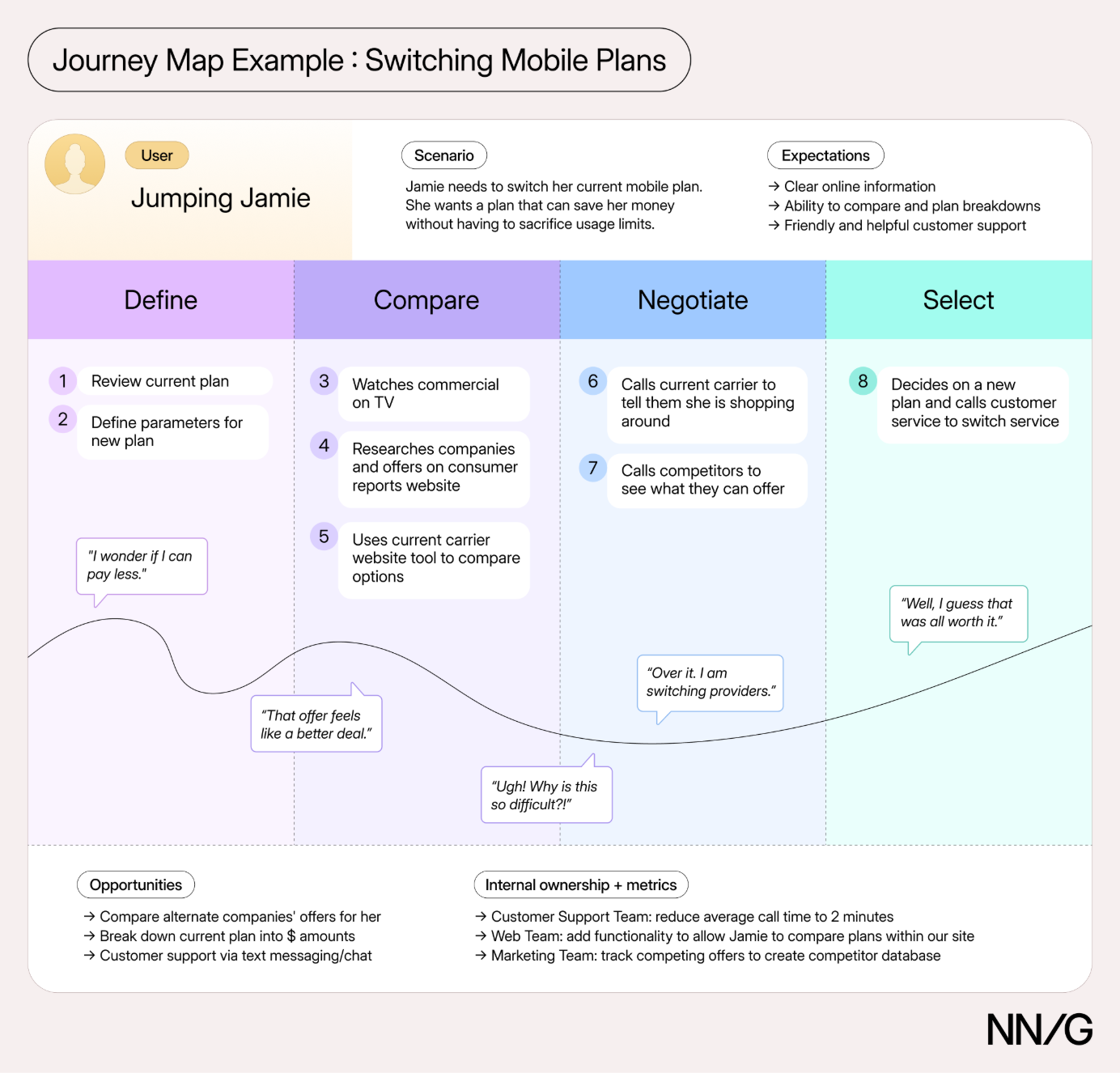
The scenario describes the situation that the journey map addresses and is associated with an actor’s goal or need and specific expectations. For example, one scenario could be switching mobile plans to save money, and the expectations for it include being able to easily find all the information needed to make a decision.
Scenarios can be real (for existing products and services) or anticipated (for products or services still in development). Real scenarios should be grounded in research data; anticipated scenarios can be based on assumptions, but these need to be clearly identified.
Journey maps are best suited for scenarios that unfold over time, involve a sequence of events or steps (such as shopping or taking a trip), or span multiple channels.
Journey Phases
Journey phases are the high-level stages in the journey. They provide a structure for organizing the other elements of the journey map, such as actions, thoughts, and emotions. These phases vary by scenario, and organizations typically have data that helps identify the appropriate phases for each scenario.
Here are some examples of journey phases for different scenarios:
- Ecommerce (e.g., buying Bluetooth speakers): research what products are available, try a few in person, make a purchase, use the product, seek support.
- Healthcare (e.g., seeking treatment for a medical condition): Recognize symptoms, research care options, schedule an appointment, prepare for the visit, receive care, fill a prescription, follow up.
- Travel (e.g., taking a flight): Plan the trip, compare flights, book tickets, pack, check in, travel to the airport, go through security, board the plane, fly to the destination, collect luggage.
Actions, Mindsets, and Emotions
Actions, mindsets, and emotions capture what users do, think, and feel throughout the journey. These elements are mapped within each journey phase.
Actions are the actual behaviors and steps taken by users. This component is not meant to be a granular step-by-step log of every discrete interaction. Rather, it is a narrative of the key steps the actor takes during that phase.
Mindsets correspond to users’ thoughts, questions, motivations, and information needs at different stages in the journey. Ideally, these are expressed as direct quotes from user research.
Emotions are plotted as a single line across the journey phases, signaling the emotional “ups” and “downs” of the experience. Think of this line as a contextual layer of emotion that tells us where the user is delighted, frustrated, or somewhere in between.
Opportunities
Opportunities are actionable insights identified through journey mapping that highlight where and how the user experience can be improved. Along with supporting details, such as ownership and success metrics, they help teams turn insights into action by answering:
- Where are the biggest opportunities for improvement?
- What actions should we take?
- Who is responsible for each change?
- How will we measure the impact of these changes?
Concepts Related to Journey Maps
There are several concepts closely related and thus easily confused with journey maps.
|
|
Journey map |
||||
|
Perspective |
A specific user or customer |
A generic person |
The organization |
The user interacting with a product |
The product |
|
Scope |
One actor and one scenario, across multiple touchpoints and channels over time |
A broad human experience, independent of any specific product or service |
The same journey as the journey map, plus the business operations and support processes behind it |
One common task within a product |
User stories for a product the team plans to build |
|
Key elements |
The user's actions, thoughts and emotions |
A generic person's actions, thoughts and emotions |
Customer actions, frontstage and backstage actions, support processes and evidence |
Key user actions and system responses |
Activities, steps and details users go through in the product |
We explain the differences among these using the example of a ridesharing service.
Example: Ridesharing
An experience map would explore how people get from one place to another using different transportation methods, such as walking, biking, driving, taking public transportation, or using a ridesharing app like Uber. This broader perspective could reveal common pain points across different transportation options, such as unpredictable travel times, uncertain fares, or bad weather.
A journey map would focus on a specific type of customer and scenario, such as a business traveler using a ridesharing service to get to the airport. It would follow the traveler as they decide how to travel, request a ride, find the pickup location, wait for the driver, take the ride, and then rate or tip the driver. At each stage, the map would capture the traveler's actions, thoughts, and emotions. For example, the traveler might weigh cost against waiting time, feel anxious when the driver is delayed, struggle to find the car, and feel relieved upon reaching the airport on time. These details help the team understand how the app, the driver, and the physical environment together shape the customer's experience.
A service blueprint would connect that journey to the people, processes, and systems that support it. When the traveler requests a ride, the system matches them with an available driver. While the traveler waits, location tracking provides pickup estimates and sends notifications when the driver is nearby. When the trip ends, the system charges the traveler’s saved payment method and sends a receipt. The blueprint connects customer-facing interactions to backstage activities and support processes. This helps the team identify operational gaps and dependencies that affect the experience.
A user flow would zoom in on one specific task within the journey, such as requesting a ride in the app. It would show the sequence of interactions needed to complete that task: entering a destination, comparing ride options, selecting the pickup location, and confirming the booking. It would also capture alternative paths based on user choices or system responses, such as what happens when no drivers are available. This detail helps the team design and evaluate the steps and decisions involved in completing the task.
A user-story map would organize potential functionality around users’ activities to help the team prioritize work and plan releases. Suppose the journey map reveals that business travelers worry about finding a ride in time for an early flight. The team might define a user story: “As a business traveler, I want to schedule a ride in advance so that I can plan my departure.” The map would place this story alongside related stories, such as reviewing or changing a scheduled pickup, under broader activities such as planning and booking a ride. Arranging stories by activity and priority helps the team decide which capabilities to include in an initial release and which to add later.
Journey Map vs. Experience Map
A journey map focuses on a specific actor and scenario involving a particular product or service. An experience map examines a broader human experience independent of any particular product or service. Both can capture actions, thoughts, and emotions; the key difference is the scope of the experience they examine.
Journey Map vs. Service Blueprint
A journey map focuses on the customer's experience, while a service blueprint reveals what happens behind the scenes to support that experience.
Think of a service blueprint as an extension of a journey map. It shifts the focus to the business by connecting customer-facing interactions with the people, processes, and systems that make them possible. This additional layer helps teams understand how internal operations shape the customer experience and identify opportunities for improvement.
Journey Map vs. User Flow
Both journey maps and user flows visualize how users accomplish goals, but they differ in scope and level of detail. A journey map captures the broader experience over time across multiple touchpoints and channels. A user flow zooms in on a specific task within a product, showing the sequence of user interactions and system responses needed to complete it.
User flows are typically represented as flowcharts, task diagrams, or wireflows. Unlike journey maps, they focus on product-based interactions rather than the user's emotional experience.
Journey Map vs. User-Story Map
A journey map helps teams understand an experience and identify opportunities to improve it. A user-story map helps teams organize and prioritize the functionality that could support that experience.
Commonly used in Agile development, user stories are brief descriptions of what users want to accomplish and why. They typically follow a simple format: "As a [type of user], I want to [goal], so that [benefit]."
A user-story map organizes these stories around the activities and tasks users perform. Although it may look similar to a journey map, its purpose is different: journey maps are meant for discovery and understanding (think big picture), while user story maps are for planning and implementation (think little picture).
Why Use Journey Maps
The benefits of journey maps (and most other UX mappings) are two-fold.
First, the process of creating a map forces conversation and an aligned mental model for the whole team. Fragmented understanding is a widespread problem in organizations because success metrics are siloed; it is no one’s responsibility to look at the entire experience from the user’s standpoint. Creating a journey map brings different perspectives together, helps teams see the experience from the user's standpoint, and builds alignment on what needs to improve.
Second, the shared artifact resulting from the mapping can be used to communicate an understanding of the user or the service. Journey maps are effective mechanisms for conveying information in a way that is memorable, concise, and creates a shared vision. The maps can also become the basis for decision making as the team moves forward.
AI and Journey Mapping
AI changes the journeys we map and changes how we make the maps.
AI Is Changing the Journey
Traditionally, journey maps have followed one person interacting with a product or service to accomplish a goal. However, AI is changing this assumption. People are no longer the only actors in the journey. AI agents can now act on people's behalf, researching products, completing transactions, or resolving issues. In some cases, people may never interact directly with the company's website or app.
This shift has implications for what we map and whose perspective we represent. There are two ways to incorporate AI agents into journey maps.
- Mapping a person’s journey: When an AI agent acts on behalf of a person, its activities can be represented alongside the person’s experience. For example, the map may show what the agent does, what obstacles it encounters, and when the person needs to approve a decision and intervene. The person’s goals, expectations, and emotions remain central to the map, even though the AI agent may be performing the actions. Emotions such as uncertainty about the agent’s progress or anxiety about its decisions become part of the journey.
- Mapping an AI agent’s journey: In traditional journey maps, the actor is a human. However, the same concept can be extended to AI agents. When the goal is to understand how an AI agent interacts with a system, the AI agent can be the primary actor in the map, and the map can reflect its point of view. In that case, the map might show the tools and systems the agent accesses, its actions and decisions, the obstacles it encounters, and when it needs human approval or assistance. Unlike human-centered journey maps, these maps would not include the actor’s thoughts or emotions.
In both cases, the map should be grounded in evidence; if assumptions are made, they should be explicit. Agent activities can be studied through logs and observation of agent behavior, and people’s actions and feelings should come from user research rather than being inferred solely from what agents do.
At the end of the day, the goal of journey mapping remains the same: understanding how people accomplish the goals and identifying opportunities to improve their experience, whether they interact with a service directly or through AI agents acting on their behalf. What changes is that the journey may involve people, AI agents, or both, and the map should reflect the perspective most relevant to the team’s goals.
Using AI to Support Journey Mapping
Here are a few ways to incorporate AI into the journey-mapping process:
- Draft a hypothesis map: Use AI to synthesize stakeholder knowledge and existing research into a preliminary journey map. Like a proto persona, a hypothesis map makes the team's assumptions explicit and provides a starting point for discussion and alignment.
- Code interview data: Use AI to tag transcript excerpts by journey stage and lane, and group similar observations across participants to identify recurring patterns.
- Identify themes in large-scale feedback: Use AI to categorize large volumes of support tickets, reviews, and survey responses to identify recurring complaints and where problems concentrate along the journey.
- Make the journey map interactive. Use an AI prototyping tool to transform a static journey map into an interactive artifact. For example, allow stakeholders to explore individual stages, expand touchpoints to reveal supporting research, or filter the map by channel. Interactivity can make complex journeys easier to navigate and discuss.
- Brainstorm opportunities: Use AI to generate "how might we" questions and potential solutions for pain points identified in the map. AI can help teams explore more possibilities and evaluate ideas against agreed-upon criteria.
A journey map is only as reliable as the evidence behind it. Treat AI-generated outputs as starting points and clearly distinguish research-backed findings from assumptions and AI-generated inferences. When using AI to analyze research data, ask for supporting quotes and participant IDs, and verify them against the original sources. Be especially cautious about AI-generated interpretations of users’ thoughts and emotions, which often require inferring what participants mean rather than relying on what they explicitly say.
Remember, much of journey mapping’s value comes from the process itself: discussing findings, challenging assumptions, and building a shared understanding. AI can accelerate the creation of a journey map, but it cannot replace the research and team alignment that make the map valuable.
Conclusion
Journey mapping helps teams understand how goals are accomplished across multiple channels, touchpoints, and interactions and uncovers opportunities to improve the experience. As AI agents increasingly act on people’s behalf, journey maps can also serve as tools for understanding how human and agent activities fit together. Whether focused on people, agents, or their interactions, journey mapping provides a shared understanding that teams can use to design better products and services.
Additional articles are available: