This article focuses on how publicly available AI tools can help UX researchers in their studies. You’ll want to use your AI tools more heavily for certain stages of research projects and avoid them for others.
How AI Can Help in Research Projects
Let’s look at the tasks where AI tools are most likely to be helpful.
Planning Studies
AI can accelerate the process of getting studies off the ground — from helping ideate survey questions to creating study collateral, like recruitment emails or test plans.
|
Type of Research Work |
Capability |
Details |
Watch Out For |
|---|---|---|---|
|
Desk research |
✅ |
Starting research and gathering sources |
Inaccurate information and made-up sources |
|
Ideation during planning |
✅ |
Generating possible research goals, method options, interview or survey questions, and usability testing tasks |
Violations of best practices |
|
Documentation |
✅ |
Tailoring research-related documentation for a study, including consent forms, recruitment materials, and facilitation scripts |
Mistakes in filling out templates provided to the system |
Desk Research
We don’t always need to spend our time on primary research. Often, we can find useful guidance in existing findings from inside or outside our own field.
AI can work as a starting point for your desk research, but not as the final source. It can assist in exploring a problem space or topic, but don’t use it as a fact-checker. Gen AI chatbots have gotten better at avoiding hallucinations, but they can still happen.
Tips:
- Always ask AI systems to cite primary sources, and then go check those sources.
- Use tools specifically designed for information seeking (such as Perplexity or ScholarAI), but remember that no generative AI system will be free of misinformation, bias, or hallucinations.
Ideation
Planning studies requires a fair amount of ideation work — thinking up screener questions, exploring ways to set up the study, and drafting tasks. AI can be really useful here.
For example, while planning a diary study on NN/g’s weekly newsletter, we asked ChatGPT to come up with different questions for study participants.
Here’s the prompt we used.
Prompt:
Generate 15 different questions I might ask in the daily respondent survey. Then, review the list, and choose the best 5–10 questions you think would serve my study goals best. Order those questions in a way that will make logical sense to my respondents.
Here are the first 4 questions from the list of 8 that ChatGPT offered.
ChatGPT Response:
1. Which UX newsletters did you receive today?
Starts by setting the context and identifying other newsletters for comparison.
2. Did you open the NN/g newsletter today? Why or why not?
Moves into understanding the decision to engage or not with the NN/g newsletter.
3. What specific elements of the NN/g newsletter caught your attention?
Dives into what worked or didn’t in capturing the respondent’s attention.
4. How much time did you spend reading the NN/g newsletter today?
Assesses the level of engagement and time commitment.
A decent start! These questions aren’t perfect. We’ll want to remove some, rewrite others, and add new ones. But they’re enough to get us started.
AI can also help you generate ideas for usability-testing tasks. However, be careful! AI often writes tasks that can be leading or priming, even when you provide it with good examples or explicit guidance on dos and don’ts.
Tips
- Ask your AI tool to follow established best practices when generating options for tasks or questions. If you don’t like the results, you may need to explicitly list the characteristics you want the output to have.
- Ideally, have a human research expert review your final list of ideas. If you’re an expert, that could be you. If you’re new to research, contact a more experienced researcher for guidance.
Documentation
Research planning requires some (often tedious) documentation preparation: study plans, screeners, consent forms, observer instructions, and so on. AI tools can significantly speed this process up.
However, provide your AI tool with a template to start with. Remember: AI systems can’t always tell good advice from bad. Giving them a solid starting point will help them avoid mistakes.
Let’s say we’re working with ChatGPT to produce documentation for our newsletter study. After communicating important study details (like method, goals, study design, and participant details), we might upload NN/g’s standard consent-form template and provide the following prompt.
Example Prompt:
Based on the study details provided above, customize a consent form for my study. Follow the format of the attached consent-form template. Do you need any additional details before you begin?
Tips
- When asking AI tools to complete research-related documentation, provide them with a template as a starting point.
- Watch out for mistakes in how the system completes the documentation. For example, double-check that the correct data-collection permissions are outlined in your consent form.
Conducting Research
Current AI tools have limited usefulness during moderated studies: they are not currently capable of truly observing or analyzing usability testing.
|
Type of Research Work |
Capability |
Details |
Watch Out For |
|---|---|---|---|
|
Notetaking during interviews and usability tests |
✅ |
Meeting notetakers can document conversations in real time, but they can’t “see” what users are doing. |
Misunderstandings or misattributing comments to the wrong speaker, and missing behavioral notes |
|
Conducting usability testing |
❓ |
Tools like Userology can facilitate a usability test and follow up on comments made, but they can’t observe where users are on the page or what they’re actually doing. |
Misleading claims about the AI’s ability to observe users’ behavior |
|
Conducting interviews |
✅ |
Tools like Marvin, UserFlix, and Outset can follow your interview guide and follow up when responses seem unclear or incomplete. |
Missed opportunities to delve deeper and shallow insights |
Notetaking During Sessions
AI systems can act as a backup notetaker during research sessions. General-purpose meeting notetakers (like Otter.ai) can transcribe conversations in real time and summarize primary points of discussion. However, like every other AI tool, they aren’t perfect. These products can misunderstand the context or, what’s most important, and they can get confused about who’s speaking.
If using a notetaker during usability testing, your notes will miss important behavioral observations because AI notetakers can’t “see” what users are doing.
Conducting Qualitative Behavioral Studies (Like Usability Testing)
Behavioral data is about what users do. While current AI tools are superb at processing text, they cannot understand and interpret users’ actions or nonverbal interactions with an interface.
AI tools that claim to conduct AI-moderated usability tests (like Userology) can sometimes tell what page someone is on or what they clicked on (if it’s a working link), but they’re not actually “watching” what users are doing (such as what part of the page the user is actually looking at or where they’re hovering their cursor).
While AI systems are capable of analyzing video (text and object recognition, facial-expression interpretation, etc.), we have yet to see an AI tool that can properly “watch” usability tests. Beyond technical limitations, observing or facilitating a usability test requires excellent contextual awareness — something that current tools lack.
So, AI tools aren’t truly capable of properly facilitating or even notetaking during usability testing. Some products market themselves as having this capacity. Many of the tools that we’ve tested that make that claim simply analyze a usability-testing transcript — not what the user actually did in the session. That is not good enough. People often say one thing but do another — or do something but not talk about it. Since usability testing is a behavioral method, what people do is more important to us than what they say.
Conducting Interviews
While generative AI tools can’t handle behavioral data yet, they do much better with self-reported or attitudinal data gathered through methods like interviews, diary studies, and surveys. This is because that data is language-based.
AI interviewers, such as Marvin, UserFlix, or Outset can conduct structured interviews at scale. These AI interviewers follow a script and ask some tailored followup questions. However, these tools don’t build rapport to the same extent as a human interviewer. They lack a face and the ability to read facial expressions. They are also not capable of running semistructured interviews, where the interviewer uses a guide flexibly, following interesting new threads and changing the questions in the guide as needed. AI interviewers might be useful for some projects, but for messy problem spaces or complex topics, they are not a great fit.

If you have access to an AI interviewer, they can be a good fit for gathering structured feedback about a new product, feature, or can be useful for screening candidates or doing interviews with users who don’t speak the same language as you.
Tips:
- Consider using an AI assistant for notetaking during interviews, especially if you are a UX team of one. However, live notetaking isn’t necessary if you’re using an analysis tool that provides transcription (covered in the next section).
- Consider using AI interviews if you need to gather structured feedback at scale. Avoid them if you need to conduct interviews on complex or specialized topics, or need flexibility on how questions are asked.
- Avoid using AI tools to moderate usability tests; AI research tools are not (yet) capable of actually knowing what users are doing.
Analyzing Data
This section focuses on analyzing text-based data gathered from methods like interviews, surveys, and diary studies, as well as numerical data.
|
Type of Research Work |
Capability |
Details |
Watch Out For |
|---|---|---|---|
|
Transcribing, translating, and summarizing interviews |
✅ |
AI features transcribe and, in some cases, even translate conversation recordings with identified speakers, linked timestamps, and summaries of key points. |
Higher error rates for some languages or accents Misunderstandings or omissions |
|
Cleaning and sanitizing data |
✅ |
Tools will prepare and scrub any personally identifying information from raw data. |
Mistakes |
|
Preliminary coding and clustering of qualitative data |
✅ |
AI features can take a first pass through your data looking for commonalities or rough themes. |
|
|
Assisting in quantitative analysis |
✅ |
AI can advise on the correct statistical procedures and conduct some steps in the analysis. |
|
Transcriptions and Summaries
Many researchers have been using AI-based video transcription for years. This feature has been improving, particularly in its ability to handle more languages and accents.
Some AI-transcription services or features even offer translation. However, the translation quality varies, and not every language is supported.
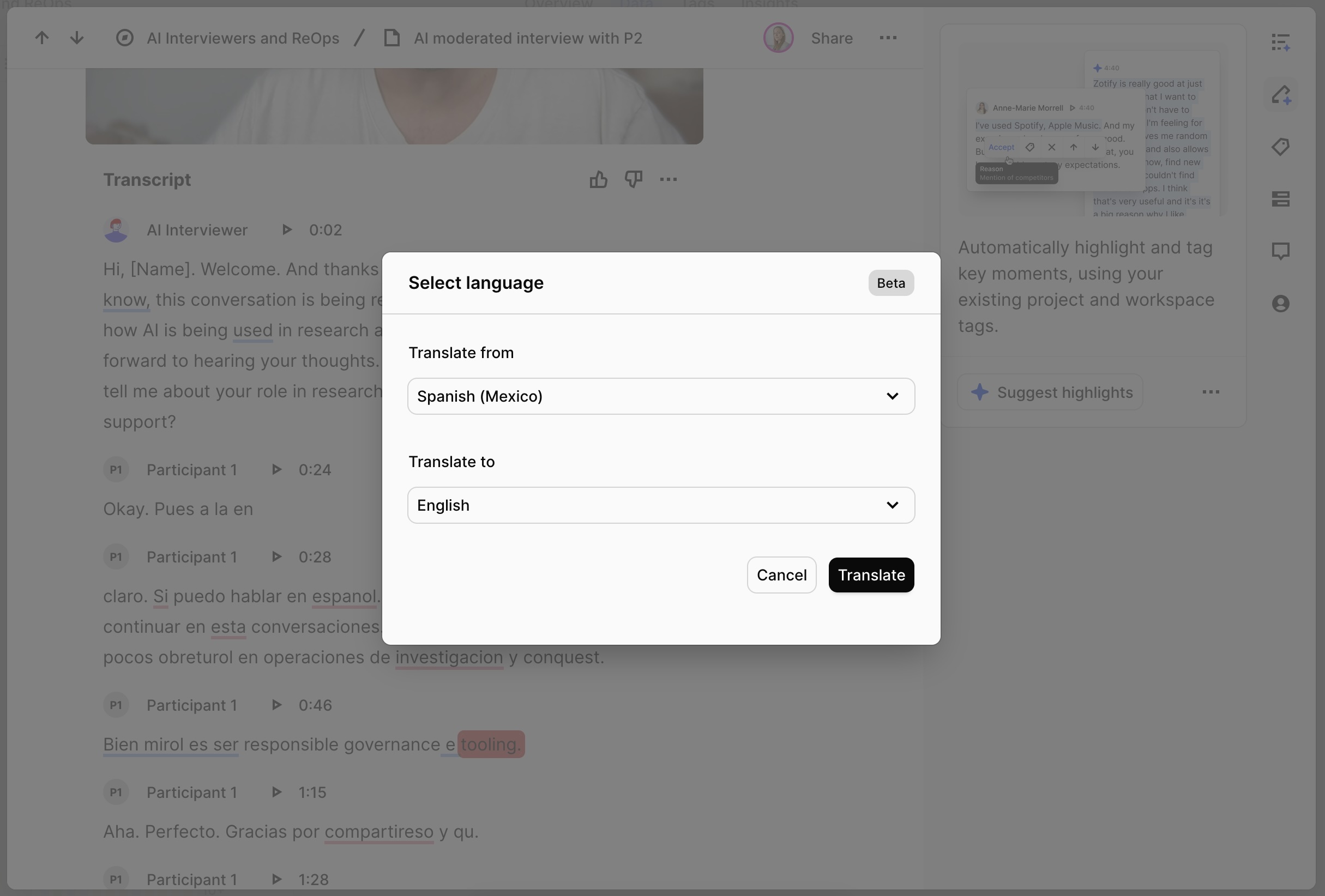
Particularly useful are the timestamps that link the transcript to specific moments in the video recording.
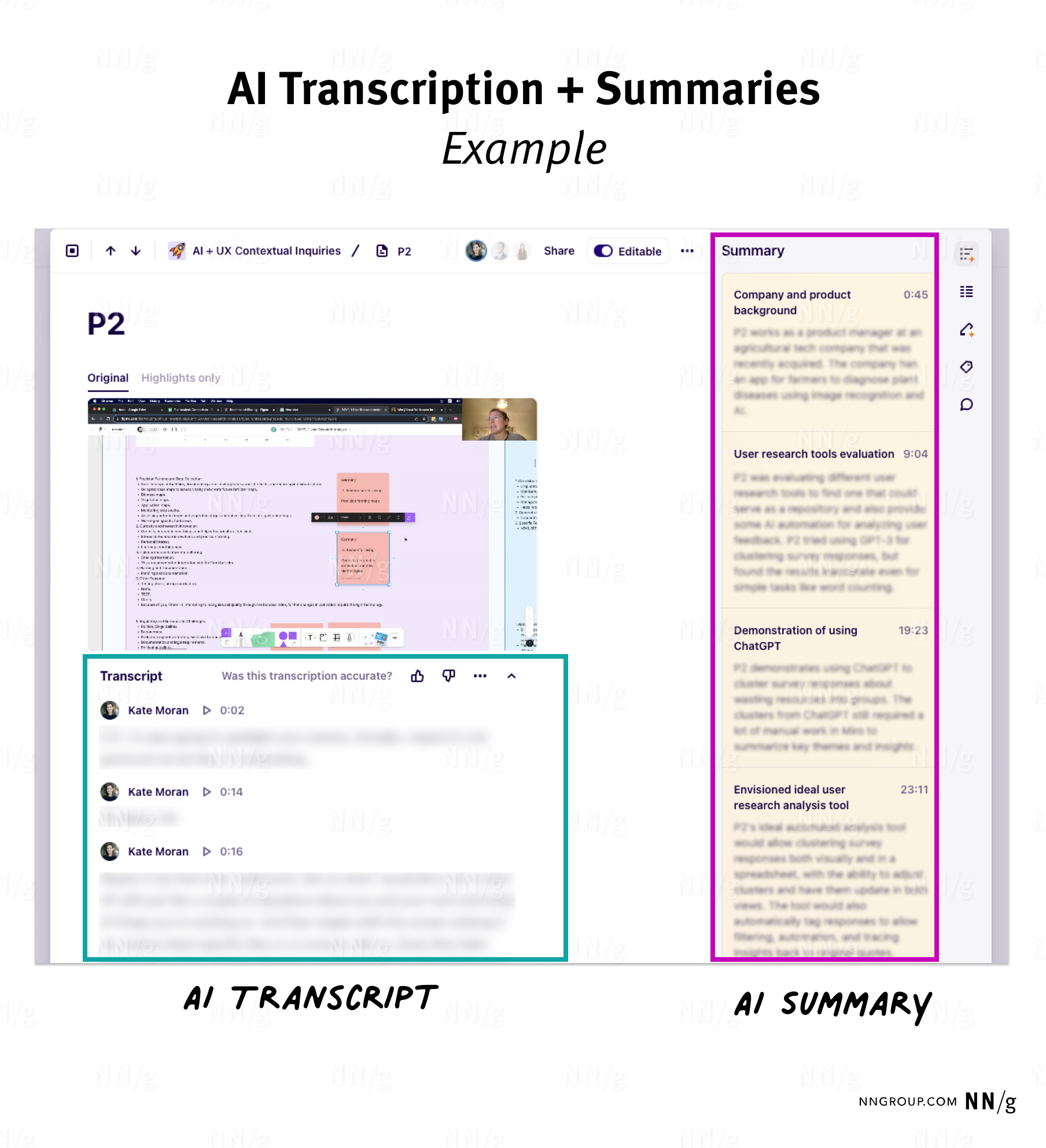
Another AI-based feature that is becoming mainstream in research tools is transcript summarization — an overview of the main discussion points. This feature can be very useful as a reminder or to familiarize yourself with what was discussed before diving into the transcript.
Tips:
- Double-check transcriptions: AI-powered transcription can make mistakes, especially when there are multiple speakers and poor-quality audio.
- Watch out for missing items or misunderstandings in AI summaries.
Sanitizing Data
Some research-analysis tools will scrub any personally identifying information (PII), such as names, email addresses, and credit card numbers, from raw data, thus helping us protect participant data while reducing work during a tedious and time-consuming step of analysis.
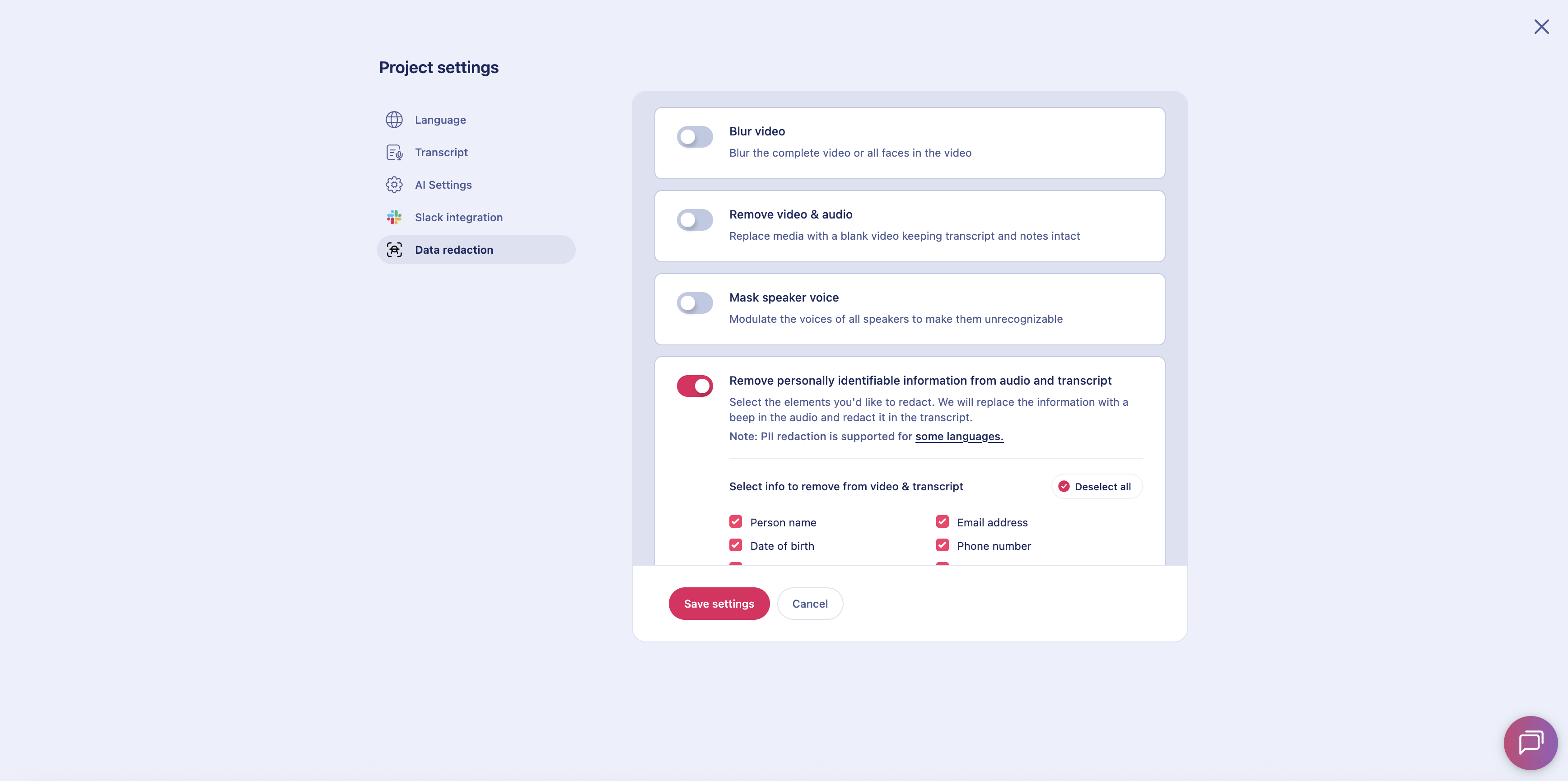
These tools do make mistakes, however. For example, in one study about research tools, an AI feature removed all tool names from an interview. The system mistakenly thought it was protecting the participant’s privacy by removing the name of the company they worked for, but in reality, it removed information about which tool the participant was reviewing.
Preliminary Coding and Clustering of Qualitative Data
If you have transcripts, AI can identify groupings or codes (tags) for your data, by paying attention to common language used in your data set. Not all AI-generated codes will be useful to you, but they may provide a starting point.
If your team takes notes in a white-boarding tool like Miro, you can use AI to cluster your stickies. The accuracy of the clustering depends on the clarity of the text in the stickies.
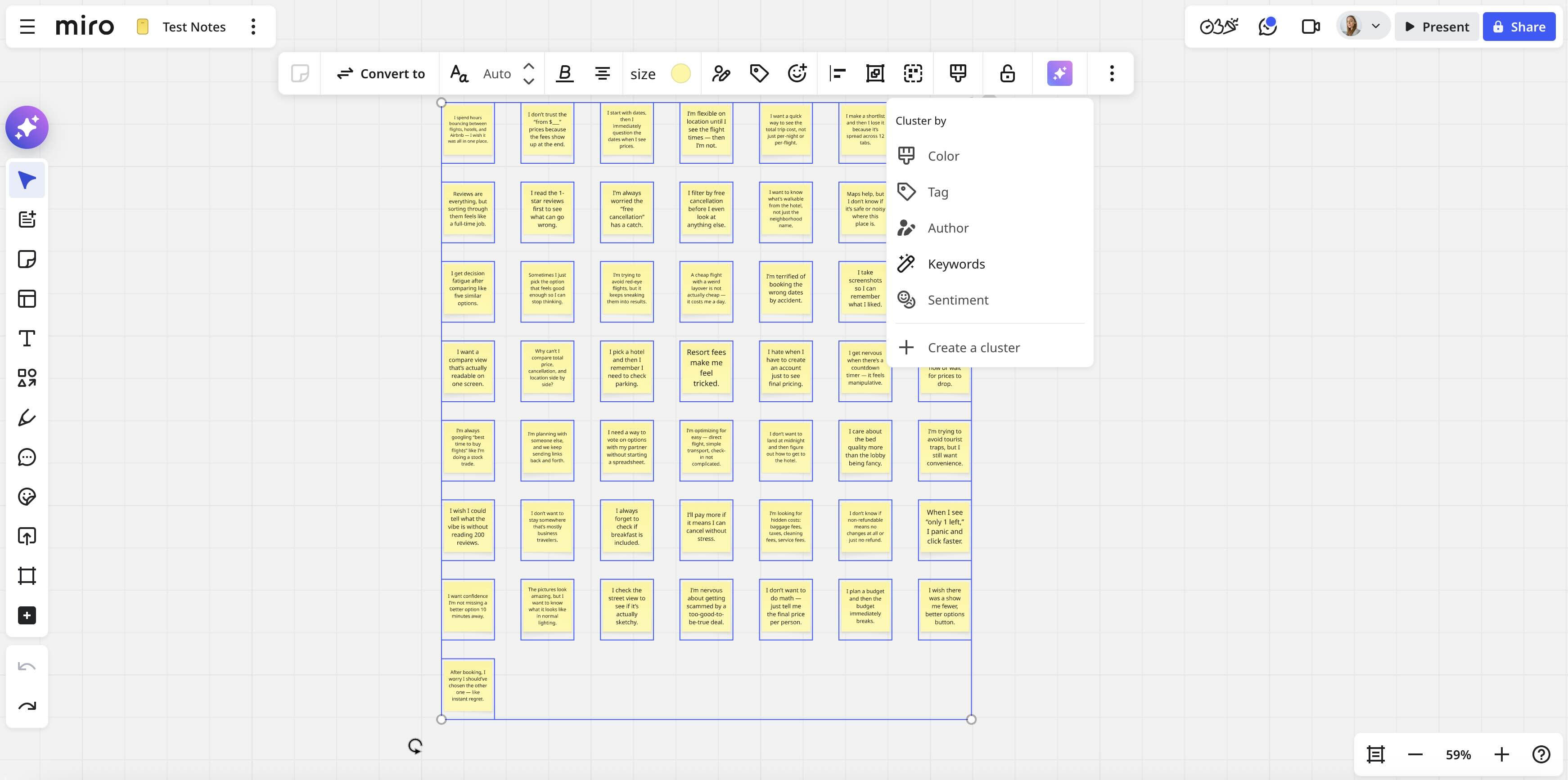
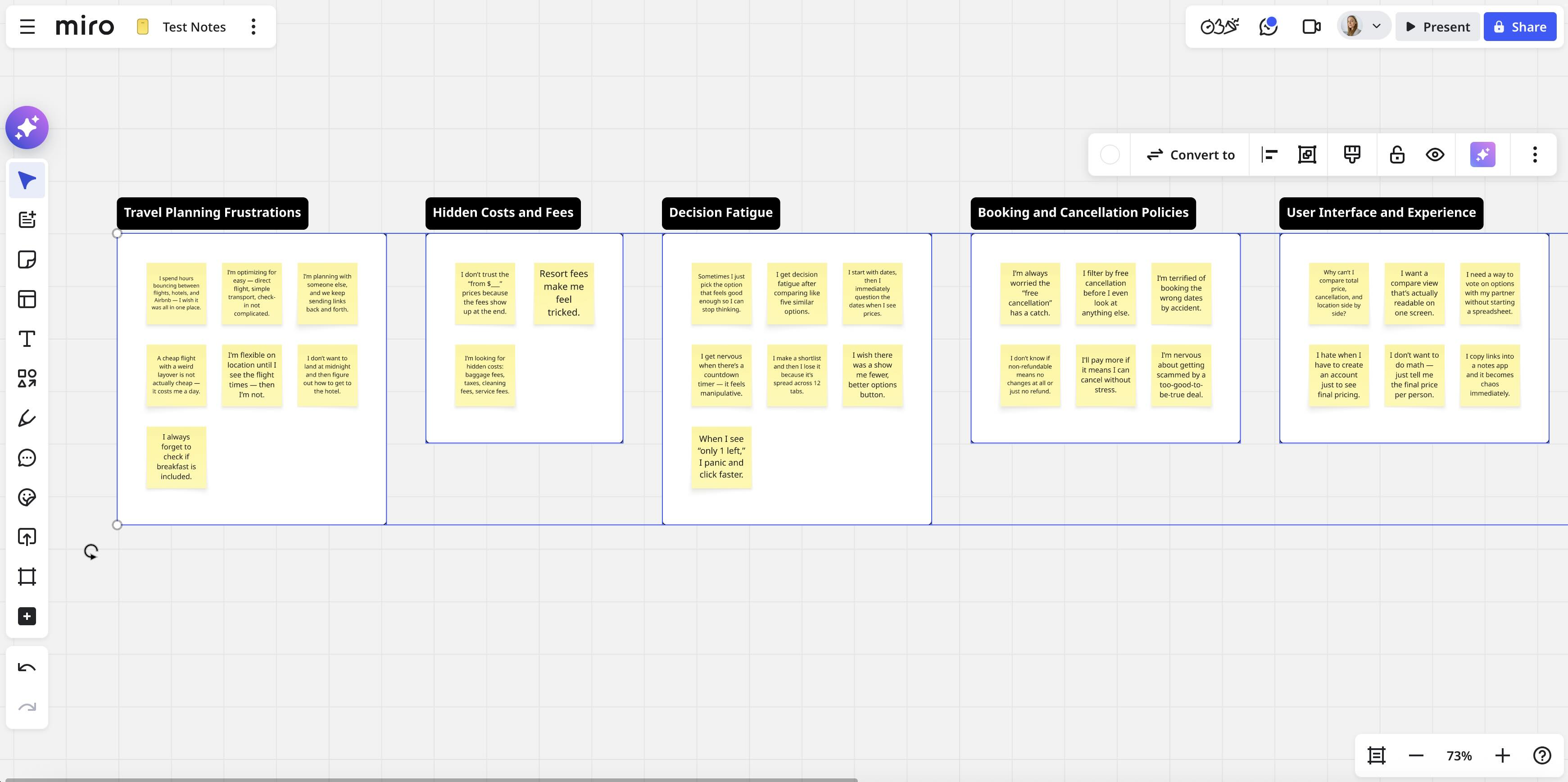
AI-generated clusters are rarely perfect, especially if the content of the stickies is not obvious at first glance. In this case, many stickies will be grouped into an “Other” category. However, having the AI take a first pass through your items can accelerate the analysis process.
Some research platforms, like Dovetail, suggest segments of the text that might be worth highlighting, as well as codes for you to apply to segments of the text.
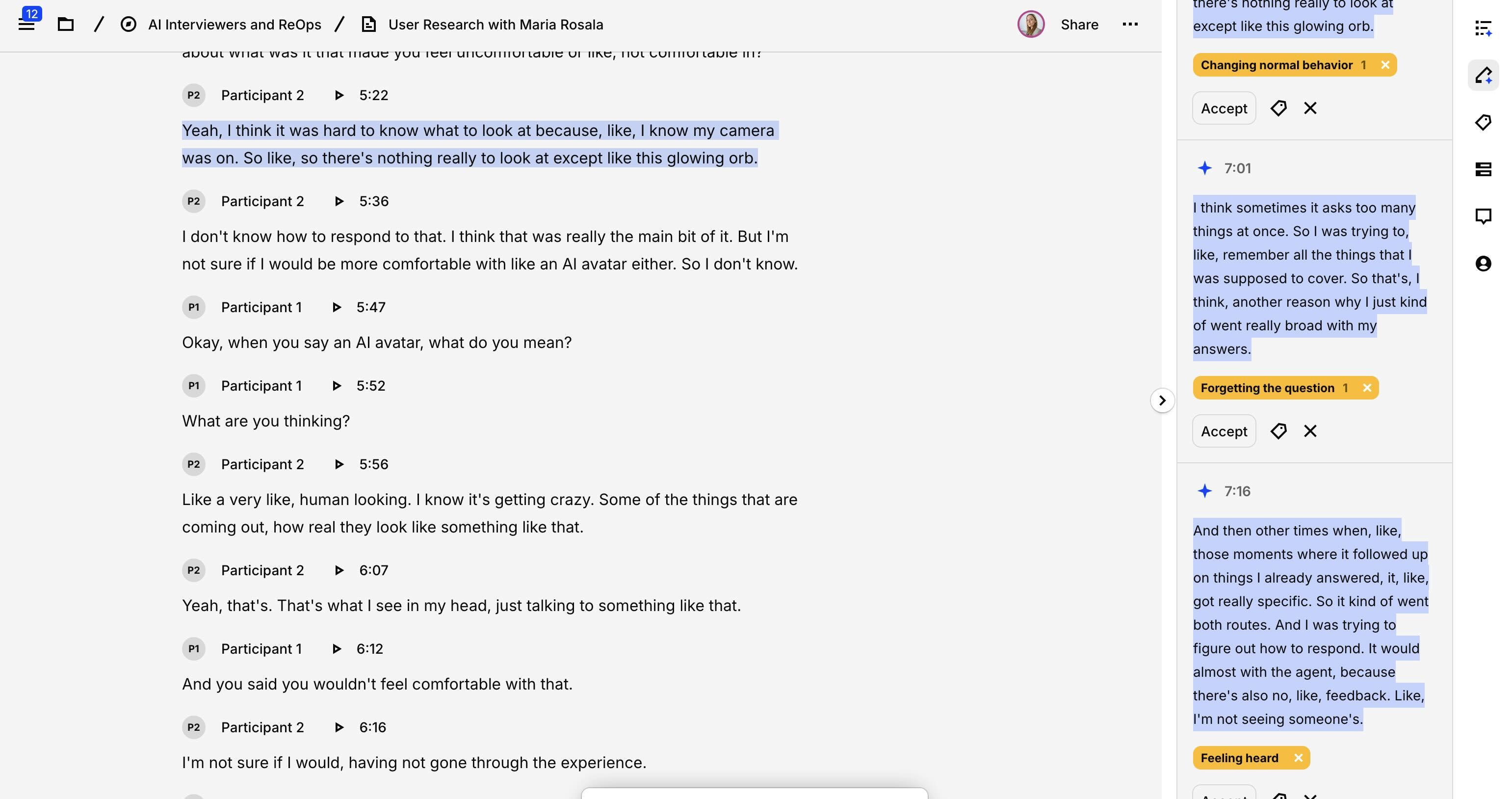
While this feature is helpful as an accelerator, it often misses large sections of the transcript where codes should be applied and can sometimes suggest tags that wouldn’t be a good fit.
If you have access to a general-purpose GenAI chatbot (like Copilot or Gemini), you can feed your sanitized transcripts or notes to it and your research questions; the AI chatbot can then suggest a list of potential codes (or tags). Providing examples of good codes can help. This can save you time thinking up code labels yourself and can be a great starting point for your coding process.
Tips:
- Where AI tools and features allow, provide context (for example, your research goals) to improve the relevancy and quality of the outputs.
- Make sure your notes, stickies, or highlights are complete enough that the feature can make sense of them.
- Review any suggested codes or groupings because AI can sometimes misunderstand the meaning and can organize or tag data incorrectly.
Assisting in Quantitative Analysis
AI tools can speed up quantitative analysis by either advising on the correct statistical procedures or by conducting steps in the analysis, including:
- Handling missing or incomplete data records
- Transforming or sanitizing raw data
- Descriptive or inferential statistics
- Rough sentiment analysis
They can even generate some decent data-visualization charts from your data.
Tips
- Be sure to thoroughly spot-check any analysis or data processing you ask the AI to perform.
- Ask the AI tool to follow data-visualization best practices when creating charts.
Limitations of AI Analysis
Never rely on AI tools to perform all your analysis for you. AI is stochastic — it can choose to pay attention to certain things but disregard others. That might mean it’ll focus on the wrong aspects of your data. It might miss, misinterpret, or even manufacture insights.
For thematic analysis, a human perspective is needed to connect the dots in ways AI (currently) can’t. When analyzing qualitative data, a good human researcher will consider contextual questions like:
- How does this participant’s statement contrast with what else they said?
- How was this data collected? Did the interviewer accidentally prime the participant?
- Might the participant have felt embarrassed to tell the truth?
- Was this participant not a good fit for the study’s recruitment criteria?
That level of complex, context-informed consideration is beyond the capacity of current AI tools.
Tips:
- Use AI transcription, summarization, and coding features to speed up the initial steps in your analysis process.
- Remember that AI systems can handle data from interviews, surveys, and diary studies, but they can’t observe usability testing or watch video clips like a human can.
- Treat AI’s coding as an initial pass. A human still needs to make sense of the data and translate it into insights.
- Don’t attempt to use AI analysis tools for usability testing.
Reporting Research
|
Type of Research Work |
Capability |
Details |
Watch Out For |
|---|---|---|---|
|
Drafting deliverables |
✅ |
AI can generate elements or first drafts of deliverables like personas or journey maps. |
Made-up data or details that are not rooted in research |
|
Copyediting and revision |
✅ |
AI can polish or shorten text. |
Outputs that don’t fit your audience’s communication style |
|
Summarizing research findings |
✅ |
In some research repositories, AI chats can summarize findings and provide quick answers. |
Hallucinations |
AI chatbots can be helpful writing assistants for any kind of communication, including research reports, summaries, or artifacts. Clear communication is essential for building buy-in with stakeholders. Consider asking AI systems (such as Claude, which seems particularly good at this) to help with:
- Grammar and copyediting
- Tailoring communication to your specific audience
- Adjusting tone of voice
- Avoiding UX jargon (especially for a nonUX audience)
You can also use AI tools to get started on deliverables like user personas or journey maps — as long as they’re based on real research.
Finally, we’re excited about the potential for AI tools to improve the dissemination of research findings within organizations. We’re already seeing improvements in findability in many research-repository tools, as well as in general-purpose knowledge tools like Notion.
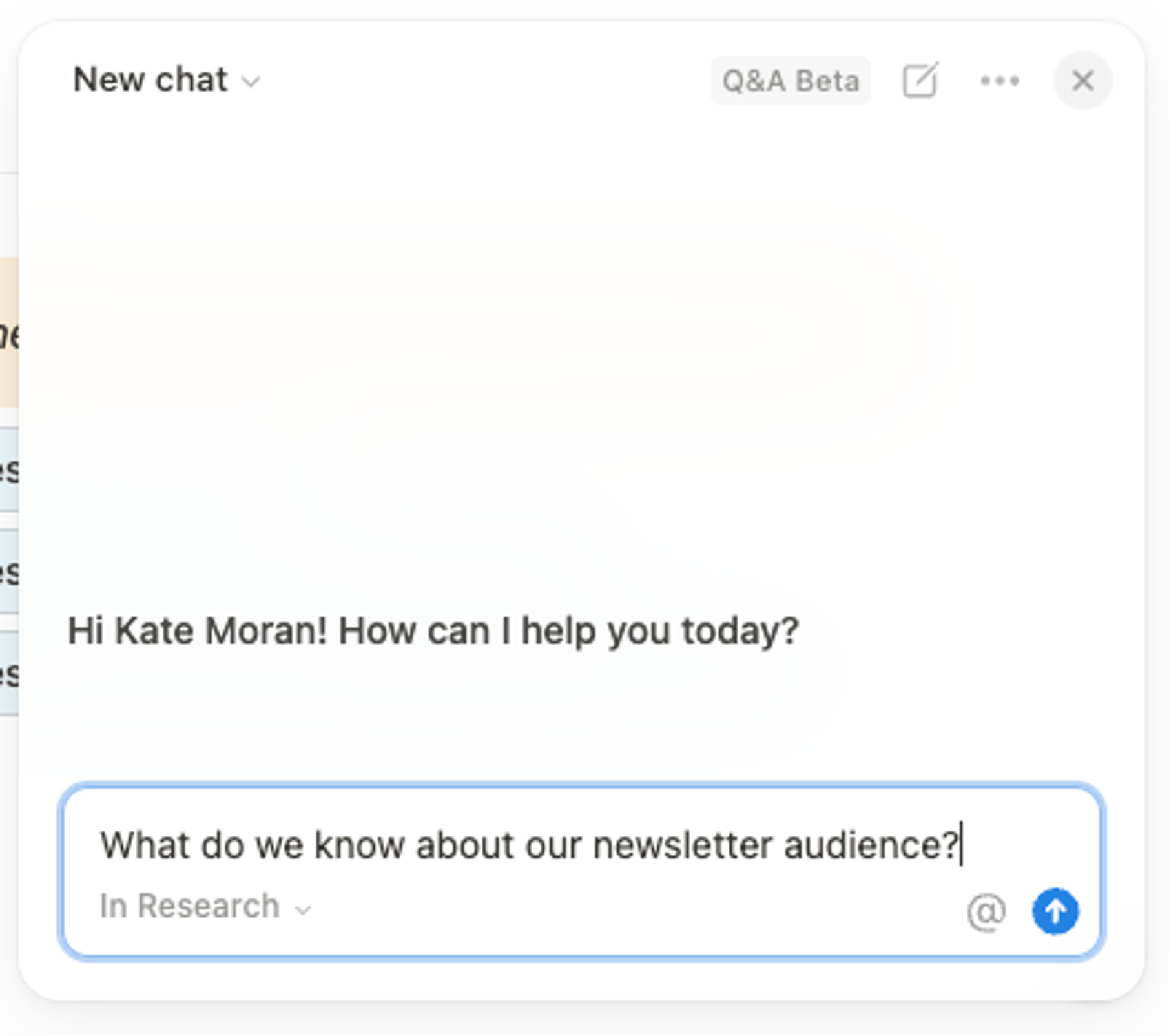
Rather than having to search a research repository only by keywords and then sift through a collection of tags, clips, or highlighted notes, your stakeholders can ask questions. AI tools can search your data, synthesize it, and curate a response that answers a particular question. (This is a case where an AI chatbot is actually a good solution.)
These features can support better adoption, but teams may still need to reach out to researchers for a thorough explanation of what the research means, what its limitations are, and whether further research is needed.
AI Can’t Do Your Job for You
If you want to produce high-quality outputs, don’t expect to be able to have AI tools do your work for you. Human oversight, guidance, and review are still critical.
Current AI tools have many limitations. Like interns, they work best when you provide ample instructions, context, constraints, and corrections.
Despite the annoying need to double-check the output of AI systems, these tools still have the potential to accelerate your UX-research workflows. They are becoming increasingly important in a world where researchers often struggle to keep up with fast-paced work environments.