Course Curriculum

6 Sections
00

Why Good Tasks Matter

2 Lessons 12 min
  • Course Overview & Downloads 3 min
  • Tasks: What Are They and Why Do They Matter? 9 min

Resources Provided

  • 0.1_CheatSheet_Task-Writing-for-Usability-Tests (PDF)
01

Tasks, Scenarios, and Follow-Up Questions

3 Lessons 44 min
  • Writing Action-Oriented Tasks 6 min
  • Using Scenarios to Make Tasks Feel More Realistic 9 min
  • Tasks Versus Questions 7 min

Practice Activities

  • Decide Between Tasks and Follow-up Questions (Instructions) 17 min
  • Decide Between Tasks and Follow-up Questions (Walkthrough) 5 min
02

Identify the Right Task Type for Your Research Goal

5 Lessons 69 min
  • Appropriate Research Goals for Usability Testing 10 min
  • Directed Tasks with Clear Success Criteria 7 min
  • Findability Tasks 5 min
  • Discoverability Tasks 13 min
  • Exploratory or Open-Ended Tasks 11 min

Practice Activities

  • Writing Research Goals (Instructions) 18 min
  • Writing Research Goals (Walkthrough) 5 min
03

Task Writing Best Practices

5 Lessons 78 min
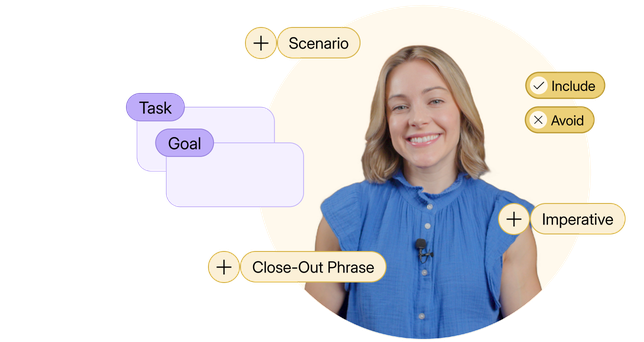
  • The Anatomy of Tasks and Close-Out Phrases 10 min
  • Avoiding Leading or Priming 10 min
  • Make Tasks Realistic and Fair 8 min
  • Keep Tasks Simple 12 min
  • Avoid Discussion and Design Reviews 9 min

Practice Activities

  • Correcting Poor Tasks (Instructions) 19 min
  • Correcting Poor Tasks (Walkthrough) 10 min
04

How to Order Tasks Appropriately

4 Lessons 84 min
  • Four Task Order Mistakes to Avoid 12 min
  • Watch Me Put a Few Tasks in Order 9 min
  • Stepped Tasks 11 min
  • Putting Your Tasks into a Test Plan 8 min

Practice Activities

  • Organize a Set of Tasks (Instructions) 19 min
  • Organize a Set of Tasks (Walkthrough) 5 min
  • Writing Stepped Tasks (Instructions) 17 min
  • Writing Stepped Tasks (Walkthrough) 3 min

Resources Provided

  • 4.8_Template_Test-Plan (Google Docs)
  • 4.8_Template_Test-Plan (Microsoft Word)
  • 4.8_Example_Test-Plan (Google Docs)
  • 4.8_Example_Test-Plan (PDF)
05

Modifying Tasks in Moderated and Unmoderated Sessions

3 Lessons 55 min
  • When to Adapt Tasks in Moderated Sessions 15 min
  • Writing Tasks for Unmoderated Sessions 9 min
  • Conclusion 2 min

Practice Activities

  • Modifying Tasks in the Moment (Instructions) 20 min
  • Modifying Tasks in the Moment (Walkthrough) 9 min

Learning Outcomes

  • Use the right kinds of tasks for the right purposes
  • Identify and avoid task-writing mistakes that generate unreliable data
  • Sequence tasks to answer multiple questions without biasing participants
  • Modify tasks appropriately in the middle of a research session

Course Preview

Tools Used in This Course

All resources can be accessed through a standard PDF reader or a word processor (Google Docs or Microsoft Word).

Turn Problems Into Solutions

Identify different task types and how they connect to your research goals

  • Recognize when your goals are exploratory vs. evaluative
  • Leverage the difference between follow-up questions and tasks
  • Identify meaningful design improvements through findability, discoverability, and usability tasks

Craft and order tasks that improve the quality of user insights

  • Write action-oriented, realistic, and fair tasks that mimic natural user behaviors
  • Avoid the common pitfalls of leading and priming with proven practices
  • Order and sequence tasks to increase participant comfort and insight quality

Know exactly when and how to modify tasks mid-session

  • Identify the three situations when task modification is necessary
  • Write brand new tasks on the fly while maintaining task quality
  • Iterate on your test plans to keep improvements consistent

Frequently Asked Questions

How long will I have access to this course?
Once purchased, your access will never expire. This ensures you can learn at your own pace and return to review content as often as you'd like, whenever you need.
Will I get personalized instructor feedback on course activities?
No, personalized feedback is not provided for activities completed during the course. Most courses provide answer keys to activities that help learners reflect on their progress and understanding of course materials and examples.
What content can I download?
You can download a variety of resources provided with each course, including templates, how-to guides, cheat sheets, posters, reading lists, and more. Video lessons provided in all courses will not be available for download.
Can I access this course offline or on a mobile device?
Offline access isn't available yet, although we plan to add it. Most courses offer downloadable resources for offline reference.

For the best experience, mobile devices are not recommended.
Is this course eligible for the NNGroup UX Certification Program?
Unfortunately, self-paced courses do not count toward UX Certification. However, learners who complete the final exam will receive a “Recognition of Completion” to demonstrate their achievement.

See our Live Online courses for options that count toward UX Certification.
What can I share with my employer to show I’ve completed the training?
Upon completing a course’s final assessment, you will receive a “Recognition of Completion” showcasing your dedication to learning the topic. This document can be shared with your employer or professional network to demonstrate your new skills and commitment to professional development.