
ResearchOps is meant to support people who do research. Support can take so many forms: paving the way for research activities to become commonplace, making it easy for people who do research to increase knowledge, making user recruiting and data management painless and ethical, jump-starting collaborative prioritization exercises, and routinely tagging insights so they may be easily found later. Organizations with advanced ResearchOps teams do all these activities plus many more and provide a solid foundation for sound, effective research.
In December 2021 we conducted a survey with 353 UX professionals in which we asked them about the state of ResearchOps at their organizations. We found that teams do not have the resources or readiness for many ResearchOps elements.
ResearchOps Roles Uncommon Today
One of the survey questions asked respondents about the presence of various ResearchOps roles at their organization.

While many agree that having well-organized operations for research can save time and money, and increase research quality, 46% of organizations surveyed have no dedicated person doing ResearchOps. Among those who do have a ResearchOps role, the most common roles tend to be administrative-support person (25%) or ResearchOps leader (24%). The more specialized roles (research-participant manager and research-repository manager) are present in only 12% and 8% of organizations, respectively.
Lack of ResearchOps Roles Causes Waste
Not having ResearchOps roles tends to become costly in the long run because it forces other roles to take over ResearchOps responsibilities. These people may not do ResearchOps tasks often and, thus, will take more time to do them. They are often also paid more than some ResearchOps roles. For example, a product manager who rarely does discovery studies may take a long time to draft a screener for recruiting, do recruiting, and create an interview guide. They are also likely paid more than a person in a ResearchOps position. Thus, the absolute cost of a PM recruiting and doing operations-related discovery research could be higher than if a research recruiter managed study participants and interview-guide templates were accessible to the PM.
ResearchOps Administrative-Support Role
25% of organizations have a ResearchOps administrative-support person. Such a role makes good sense as a first ResearchOps role. People who do research need support with managing participants, scheduling sessions, tracking findings, and sharing them with others. An all-around, well-organized administrative person can make a considerable impact in these areas.
ResearchOps Leader
Another role that is likely to be among the first dedicated ResearchOps roles is the ResearchOps leader, which 24% of the respondents report having at their organizations. A leader can strategically kick off the operationalizing process.
Recruiting/ Participant Manager
In fewer cases (12%), organizations have a dedicated role for managing research participants. This number may be low partly because there are many external recruiting resources available to suit various needs and budgets.
Repository Owner
In even fewer cases (8%) organizations have a dedicated role for organizing and managing a research repository. A research repository allows teams to track (and reuse) insights from user research. This number is low because organizations often need to commit to a repository before they will hire someone to manage it. Also, they need to have a lot of insights to deem them worthy of being managed. Finally, they need to believe that finding and using insights is important enough to warrant headcount to manage them.
ResearchOps Resources Present Today
We also asked teams what ResearchOps tools and elements were present in their organization.
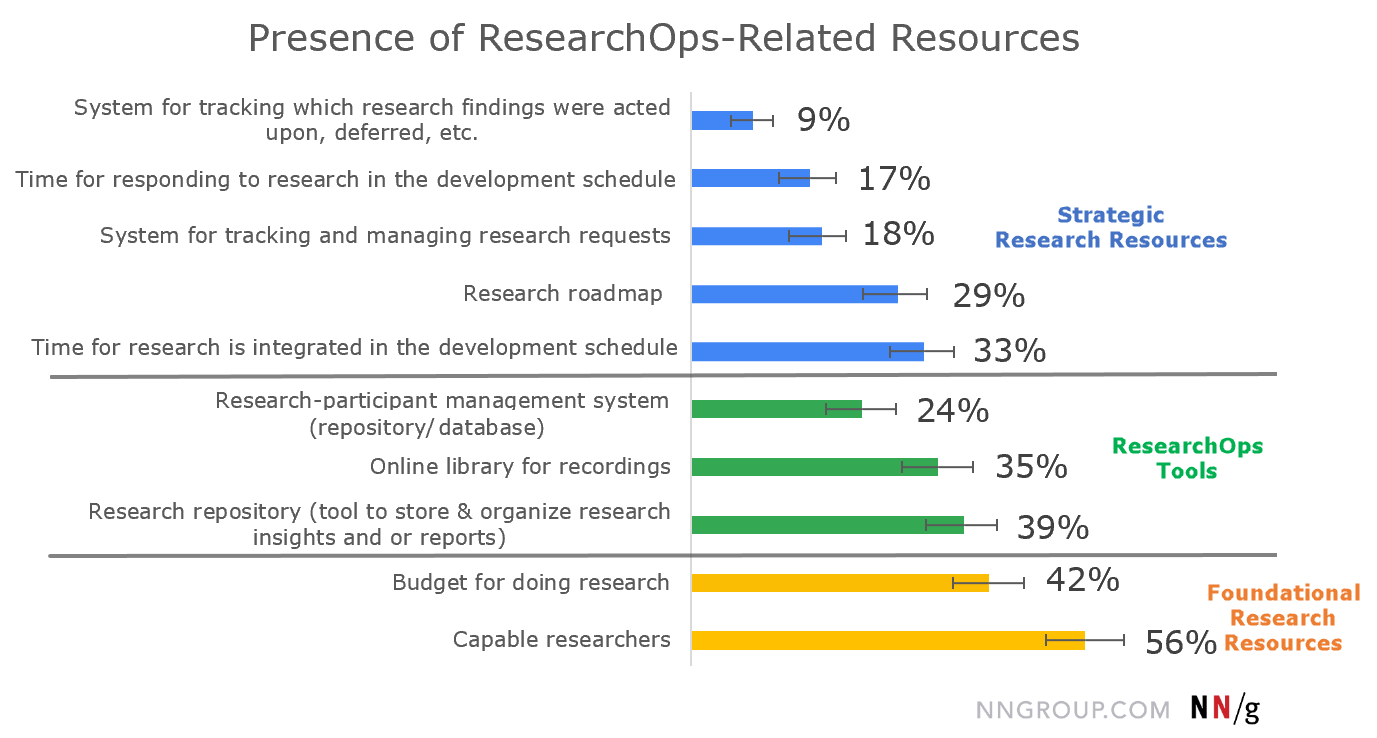
We separately discuss the different types of ResearchOps resources used in organizations.
Tools
ResearchOps software has a limited presence in organizations:
- 39% of respondents reported that their organizations have a repository to organize research insights.
- 35% have an online library of recordings from sessions.
- 24% have a research-participant management system.
The field of cloud-based repository software designed for (or at least marketed to) user researchers is bountiful today, and teams are starting to take advantage of these options. Good tools can help teams make research insights accessible to everyone in the organization.
When they adopt new tools, teams should spend time with the initial planning of the research information architecture. A good taxonomy and thoughtful tagging will scale gracefully with your data and with the repository’s user base. In other words, plan for data and user-base growth. And don’t assume that the tool’s out-of-the-box templates will be perfect for your needs.
Commitment to Research
Subscribing to a cloud-based tool can be a good sign of ResearchOps growth, but it requires a lower level of commitment compared to hiring full-time employees for ResearchOps or allocating ongoing budget for research. It’s concerning that only 56% of respondents feel that their organizations have capable researchers and only 42% have budget allocated to doing research. These percentages should be judged relative to the fact that our respondents were UX professionals: companies without UX specialists on staff will likely have 0% or few capable researchers and close to 0% budget (they could spend a little on consultants), meaning that the percentages across all companies in the world will be lower.
Both numbers should be much higher for good research work to be done effectively. (If I wanted to see the glass half full, I could say that it’s a good thing that more than half of respondents have capable researchers and almost half have a research budget. I’ll leave the optimism or pessimism to you, reader, as well as this important question: do you have capable researchers and money to do research at your organization?)
Planning
A mature, thriving, and viable research practice requires setting aside dedicated time to think about it and the best ways to implement it. As we will discus in a subsequent article, lack of time is the biggest obstacle against doing research. Unfortunately, only relatively few of our respondents reported having in place support for research planning and for tracking how and whether research findings were used:
- 29% of respondents report that their organizations use a research roadmap.
- 33% report that time to do research is allocated in the backlog or schedule.
- 17% report that time to respond to research findings is allocated in the backlog or schedule.
- 18% report that their organizations have a system for managing research requests.
- 9% say that their organizations have a system for tracking what happened with research findings.
What do these responses mean in day-to-day design and research work?
- Most development schedules (67%) do not include doing research.
If people can get research done under these circumstances, bravo! But it probably takes a lot of overtime work and it is challenging to convince others to be involved. In short, research is not sustainable if it’s not part of the planned development schedule.
- Most development schedules (83%) do not account for the time needed for changing designs or plans based on research findings.
One may overcome barriers to get research done. Great. But that is just step one. Then research should be analyzed, findings should be prioritized, and a course of action should be determined. Acting upon research findings may involve small or big swerves in product definition and development. For example, in discovery research, a team might learn that it needs to alter the direction of the initial product concept. If the team and schedule are not prepared for this change, the research findings will not be used. In fact, they may be either ignored or looked upon hostilely.
Or, say a team uses iterative usability testing to determine what in a design works well for users and why. But if there is no time to make appropriate changes to the design based on the study, then those research insights are pointless and the design will not reach its potential.
- Research roadmaps do not exist in most (71%) organizations.
I think about planning user research in two ways: strategic and reactive.
With strategic research, the team deliberately derives a list of items that should be researched, then makes it part of the product plan and schedule. The plan often takes the form of a research roadmap.
With reactive research, during product development, a feature is already designed (or even coded and live) and someone requests for it to be researched.
Both kinds of research can bring value, but teams often gravitate toward reactive research. This is perilous because areas that are important to the business and users may never be researched. Even if a lot of research is done, areas related to top tasks, hard-to-design concepts, and the frequent subject of support calls may be overlooked.
With no research roadmap, 71% of organizations surveyed may be doing only reactive research or no research at all.
- In most (82%) organizations, research requests are not managed and tracked.
Both strategic and reactionary requests can be tracked. Doing so can offer many benefits both before and after research is performed; they include:
- helping researchers prioritize and manage their work
- offering transparency to stakeholders (and research requestors) about the supply and demand of research
- evaluating unmet research demand and better planning for the future
- measuring met demands and assessing the value of research
Tracking and transparency can be especially helpful at organizations in certain situations, like when research capabilities are new at an organization, research is unable to meet demand, or the organization’s research (or design) organization is centralized uses an agency-like model to work with products. The 82% of organizations not tracking requests may be missing out on many benefits.
- Research work results are not tracked in most (91%) organizations.
Many organizations need research to be done quickly. But efficient doesn’t have to equal ephemeral. Taking a beat to track what was learned and how it was acted upon, even if deferred, helps teams to see how much value is being gained from research. For example, imagine a user test uncovers 45 insights: 10 are strengths of the current design, 5 are bugs, and 30 are usability issues of various severity. There are several, complementary ways in which these can be communicated and tracked, as discussed below.
Four Methods for Tracking User Research
Using all four of these methods is recommended:
- Discuss insights with the team.
- Create a report that summarizes all the insights.
- Save each insight (also known as ‘atomic’ insight) with some context as its own item in a research repository.
- For each insight, log the progress the team is making on fixing it.
There are benefits and costs to each of these, summarized in the table below. Ideally, all these actions should be done with research findings.
|
Action |
Example Method |
Benefits |
|
Team discusses insights |
Insights are determined and prioritized through a collaborative sorting and prioritization workshop. |
Stakeholders learn about users, express ideas, ask questions. Team aligns on a shared understanding of users and the subject of the research. |
|
Summarize insights in report |
Research deliverable includes screenshots, callouts, user quotes, stories, prioritized findings, recommendations, study protocol, and participant background (scrubbed). |
Everything about the study is summarized in one place. Anyone at the organization can get the full picture and history of a research effort. Anyone planning a similar research study has all the tools and outcome, consolidated. |
|
Save each atomic insight in a research repository |
List each finding (together with its severity and link to report) in research repository. |
Teams can search and sort by topics and severity. No matter the product iteration, team can see each insight gleaned from research. |
|
Log each insight’s progress in the development cycle |
As findings are dealt with, their progress is updated in the research repository. Their entries include status as well as a link to product backlog, roadmap, or other tracked work plans. |
The team can see how all findings were addressed and solved, track progress and UX debt, and plan (better) for the future. |
Consider the total cost of these tracking methods, calculated simply by multiplying the hours spent per person by the number of people, then multiplied by the average cost per person. Since all employees are not paid that same, it would be more accurate to use actual cost-per-employee data. For our purposes, we assumed a cost of $200,000 per employee per year, 52 work weeks, and 40 hours per week to arrive at $96.15 per hour. The table below uses these numbers to calculate the total cost for each research-tracking activity.
|
Action |
Hours Spent |
People Involved |
Total Cost (average cost $96/hour) $3,744 |
|
Insight discussion |
~1.5
|
10 team members |
$1,440 |
|
Report creation |
~ 6
|
2 Researchers |
$1,152 |
|
Track each atomic insight |
~3
|
~2 administrative support or research repository manager(later automate this) |
$576 |
|
Log each insight’s progress |
~3
|
~2 people (a researcher or designer)
|
$576 |
Also remember the opportunity cost — things the workers are not doing and that the business is giving up in order to carry out these activities.
Conclusion
Roles and resources in ResearchOps can elevate the quality of research work, increase productivity, and reduce work duplication. Most organizations today have little infrastructure for doing research efficiently: they have relatively few
ResearchOps tools and even fewer ResearchOps roles. Moreover, there is little time dedicated to strategic planning of research and tracking of research findings and research-resource allocation.
As the ResearchOps arena continues to gain momentum, I am hopeful that teams will see the value in it and purposefully grow their capabilities.
Learn more about ResearchOps in our full-day course.