Introduction
In recent user research, one of the biggest concerns we heard from international shoppers using global ecommerce sites was whether the size of an apparel item would fit them. Study participants were particularly concerned about sizing when they knew international returns would be challenging or impossible.In recent user research, one of the biggest concerns we heard from international shoppers using global ecommerce sites was whether the size of an apparel item would fit them. Study participants were particularly concerned about sizing when they knew international returns would be challenging or impossible.
We’ve observed many shoppers hesitate when choosing sizes on international retail sites. Some of them had to turn to other websites and communities for comprehensive sizing information and others just left the site — not sure what to purchase.
Helping global users, especially those new to your site, to confidently choose the correct size is the first step in increasing sales. What’s more, a useful size guide can decrease the return rate and reduce unnecessary support tickets, both of which are very expensive.
Unfortunately, in our recent ecommerce research, we found only a few sites that did a good job helping users decide which size to choose. Some sites only provided a size-conversion chart, listing size references for a few main countries, while ignoring people from the rest of the world. Some platforms that sell products all over the world offered only a single size chart for brands and countries.
In this article, we discuss how to design helpful size guides for global ecommerce sites at different levels of localization.
Localized Site Should List Corresponding Local Sizes and Original Sizes
On localized sites, users expect you to show them local sizes as default. They don’t want to get to a size-chart popup and have to decide which size to choose.
For instance, YOOX.com, an Italian fashion retailer, did a nice job of showing the sizing information in the US local format once American users had chosen a shipping destination. The product pages and the shopping cart showed both the original size (as it appeared on the item’s tag) and the corresponding US size.
A study participant said: “OK. That’s a good message [The size indicated on label is 44 (EU)], so I don’t have to worry if I see a 44 on the label.”

Note that, since unfortunately sizing does vary from one brand to the next and sizing conversions are approximate, it is also important to show the original size, like Yoox did, for those international shoppers who are familiar with a particular brand’s specific sizing.
When localized sites failed to present local sizing, customers often became disappointed and even left the site.
For instance, a Chinese user shopping for a pair of pants on the Chinese version of SSENSE was disappointed to see that the product page listed Italian and US sizes (IT 48 – US 32), even though he had chosen to see the Chinese version of the site and had set his shipping destination to China. He stated:
“I wish they had the Chinese size here. I don’t know if this is the same with the Chinese 32 size. I think it should be something like 170/72A for Chinese sizes. It’s adding one more step for me to check the size of this product by myself.”

Comprehensive Size Charts on International Sites
International sites that are adapted to the global market (e.g., supporting global shipping) but not localized to a specific region should include comprehensive size charts that cover as many regions as possible.
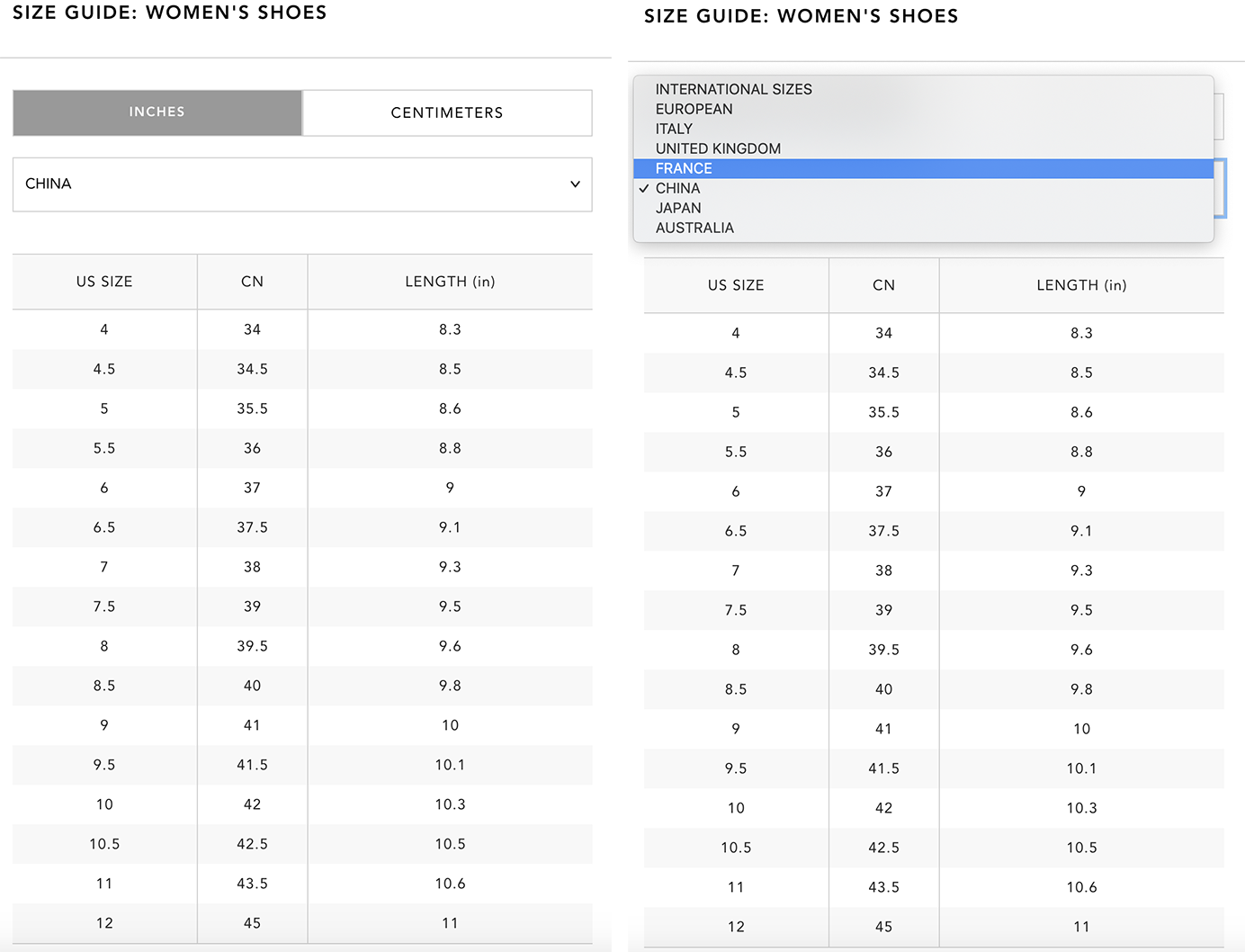
For instance, Bloomingdales provided a comprehensive size chart for shoes. International customers could choose a local size from a dropdown menu to convert the US size to International, European, Italian, British, Chinese, Japanese, and Australian sizes. It also included a Length measurement, allowing users to view the length in different units (inches vs. centimeters). This measurement was meant to serve customers from regions not included in the dropdown, but it was also useful for those wanting to make sure that the size conversion provided by the site was accurate.
The whole size chart was nicely designed with only one exception: it didn’t tell users how the length was measured. One Chinese participant said, “I wish that they would tell you how they measure the length [of shoe] to make it more accurate. Is that inner length or the whole length? I’d have to check the return policies (and make sure it can accept returns from international customers).”
(We discuss explaining product measurements later in this article.)
When One Size Guide Is Not Enough
Some sites use a single size chart for products from different brands. This unique size chart will likely be perceived as not accurate enough (and justly so) since different brands often vary in sizing.
For instance, when a Chinese shopper tried to buy a jacket on Shopbop, a women’s fashion retailer, she was unsure about which size to choose. When she clicked the size guide, a general size-conversion chart popped up, telling her the equivalent international sizing for all products on this site. She wasn't satisfied with the chart.
“I don’t think this is accurate. This is just how we convert the size, but what if the size of this brand or product doesn’t match the standard sizing exactly, like if I need to size up or down?”

In this case, shoppers benefited from measurements specific to that brand or product. Three approaches worked successfully:
- A brand-specific size chart
- Body dimensions corresponding to each size (e.g., bust, waist, and hip ranges for a given size)
- Product measurements for all sizes
Brand-Specific Size Chart
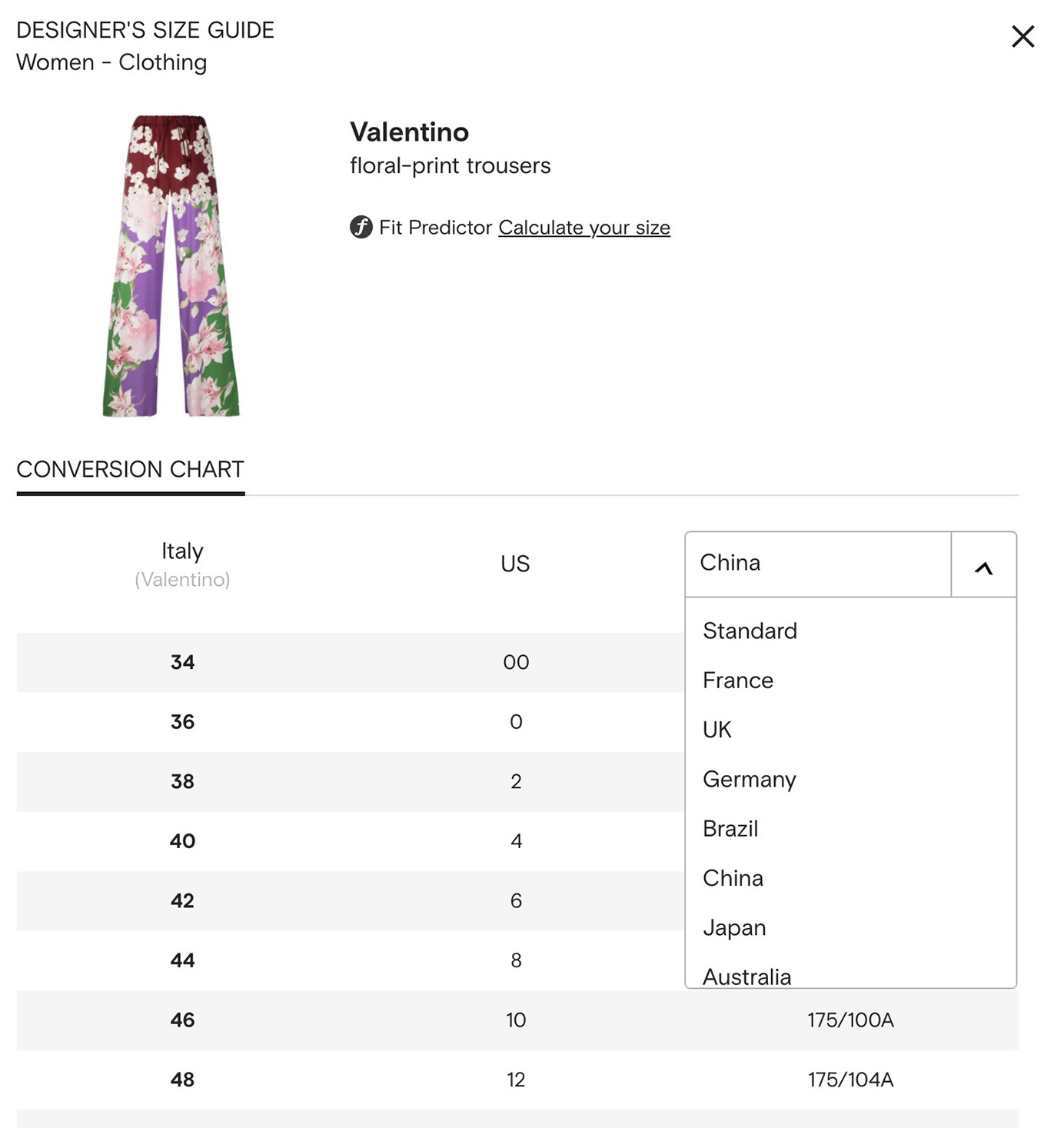
Farfetch, a British fashion retailer that sells designer products from around the world, chose the first approach. On each product’s size chart, users could clearly see that the guide was specifically for that specific brand and item. US shoppers were shown the original brand size in the first column and the converted US size in the second column. In the third column, they could even choose from a list of other countries’ sizes if they were more familiar with another sizing unit.
Body Dimensions that Fit Each Size
Myntra, an Indian clothing retailer, followed the second approach. When a shopper tried to buy a dress, the size chart listed to fit bust, to fit waist, front length, and to fit hip for all sizes. She was able to know which size to buy immediately, because she knew her body measurements. Users could also switch between inches and centimeters easily.

Product Measurements
Product measurements can be a helpful supplement when users want a very specific fit that may be different than the one shown on the model (e.g., an oversized look instead of a fitted one), when their body measurements are not typical (e.g., larger hips but a relatively small waist), or when they wish to doublecheck the site’s size conversion. Precise product measurements could help them make that decision with a lower return risk.
If you do include product measurement, remember the two following tips:
- Do it for all sizes.
- Explain how measurements were obtained.
When you provide product measurements only for certain sizes, users get confused as they won’t know how measurements change across sizes.
For instance, when a Chinese user shopped for a jacket on Shopbop, she only saw the length measurement for the size that the model wore, which was S. She was confused.
“There is only the size for S, but not others. What if I want to buy the size M?”

An explanation of how product measurements were obtained can prevent confusion. This type of information would have helped the Bloomingdales’ shopper who wondered whether the shoe-length measurement was for the inside or outside of the shoe sole.
Yoho Buy, a Chinese male-clothing retailer, provided the measurements for each size, together with a diagram showing how those measurements were obtained. A participant appreciated this information, saying “It’s wonderful that it has the measurement method in case I don’t know which size to buy. Many sites or apps have product measurements, but they don’t tell you how they measure their products. This one is very convenient.”

Size Charts on Mobile
When providing size charts, don’t forget about mobile shoppers. Can they easily check the size information at a glance in their small viewport or do they have to scroll and memorize the product dimensions to get their sizes?
For instance, a Chinese participant who tried to shop for a jacket on Shopbop’s mobile site had a hard time figuring out which size to choose. The site did provide a conversion chart including the international size, which the jacket used, and the Chinese (CN) size. However, the international size was on the very first column of the chart and the CN size was on the right part of the chart. There was no way for her to put these two columns side by side. Thus, she had scroll back and forth to figure out her size. She was unhappy about that.
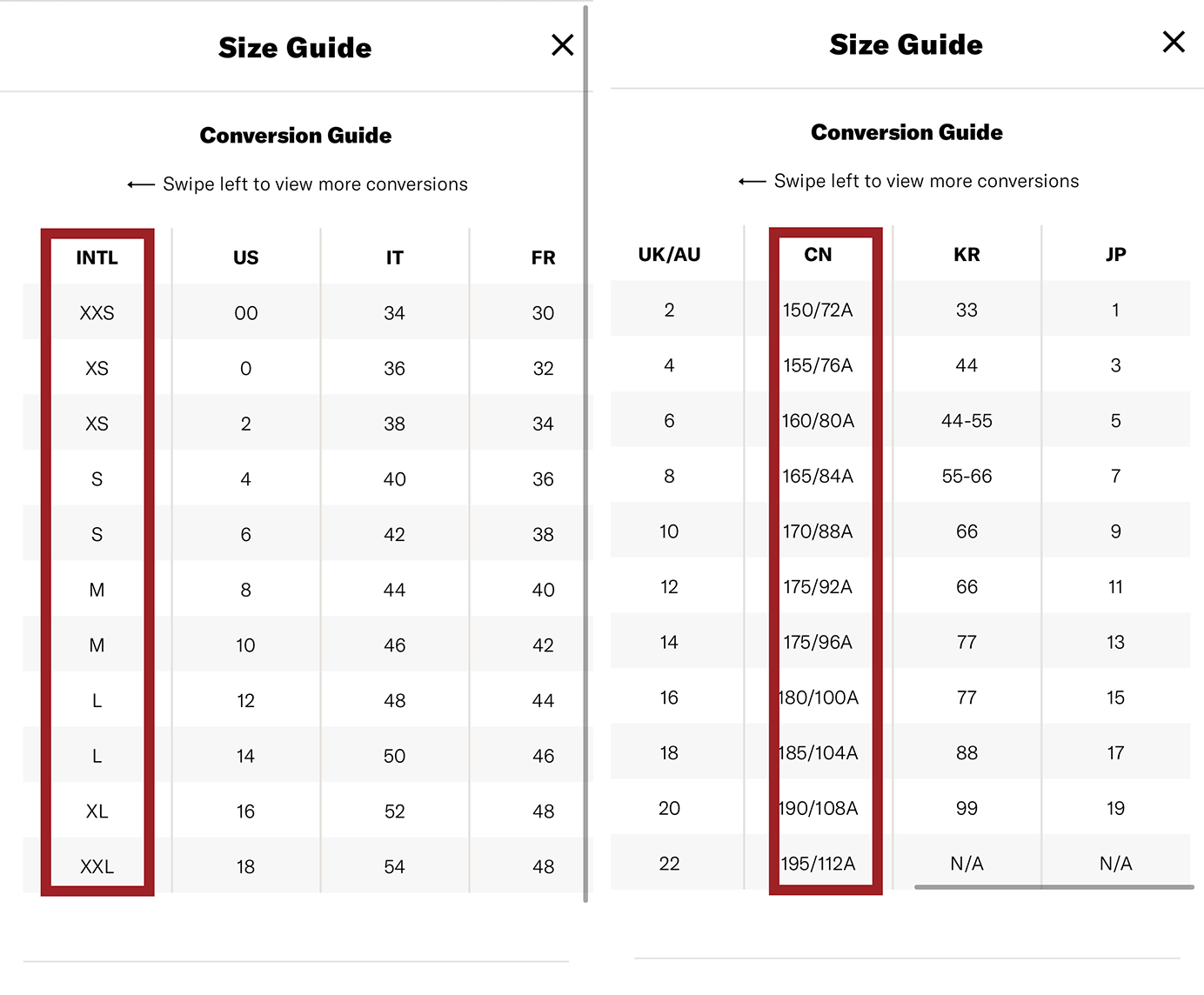
This problem is typical for situations when a table is too big for the screen on which it is displayed. A general solution involves allowing users to hide those columns that are irrelevant. Another one is to prioritize local measurements –- if the shopper’s shipping destination is China, show that size and the product’s original size in adjacent columns.
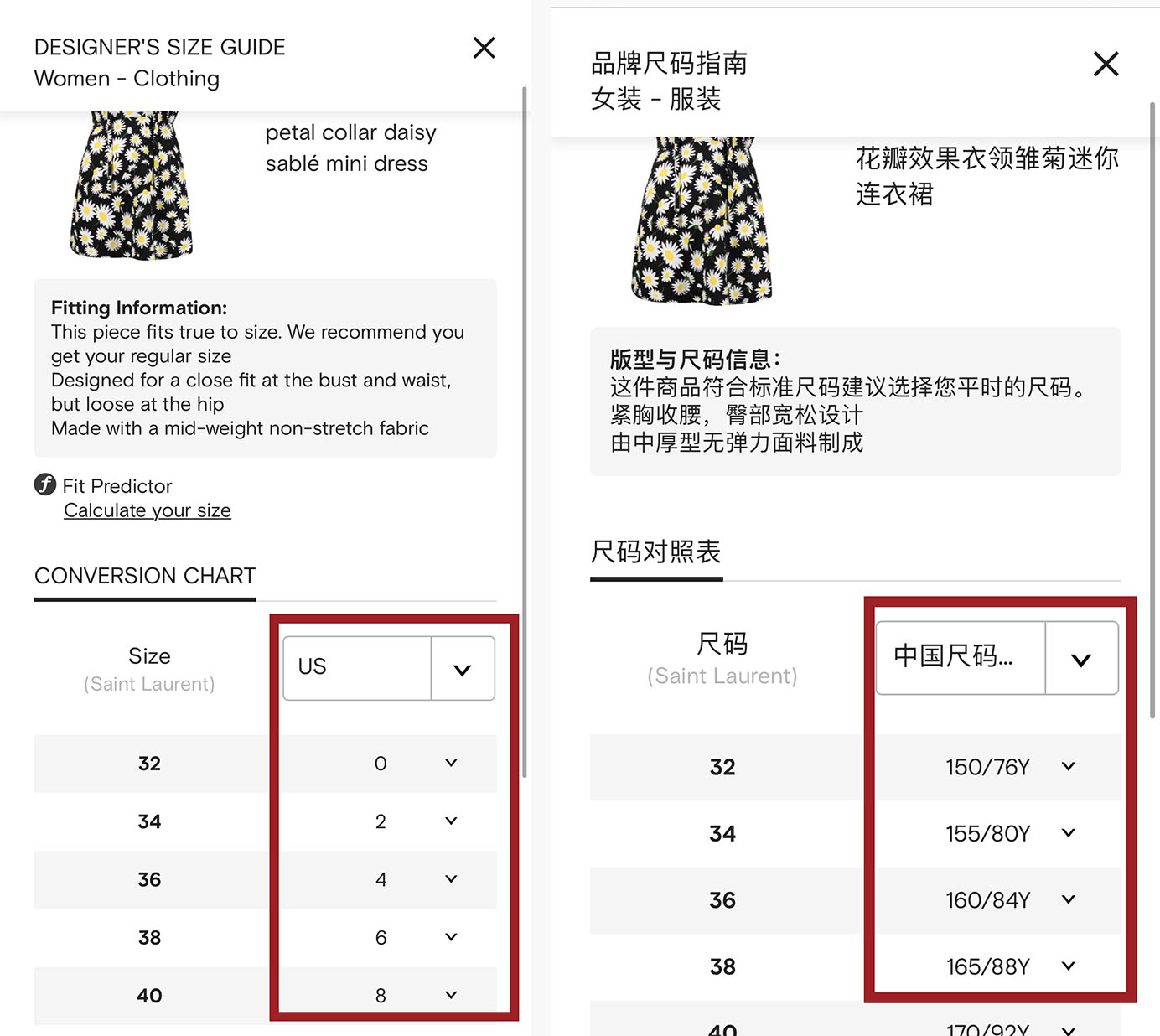
For instance, Farfetch, which provided different versions for over 190 countries and regions, would show local sizes in its size guides. For the same Saint Laurent dress, next to the item’s original size, a Chinese user would see the converted Chinese size, while a US customer would see the converted US size. Users could also easily choose other countries’ sizes from the dropdown menu.
Conclusion
Figuring out which size to buy is a pain point for international shoppers on global sites, especially when they encounter the site or brand for the first time. On localized sites, list corresponding local sizes on product pages directly (next to the original sizes) to save users from looking up the size guide. International sites aiming at serving the global market should provide a comprehensive size chart with supplemental measurements.
Moreover, if you’re relying on size-conversion tables, make sure that these are easy to use by mobile shoppers, especially if mobile traffic makes up a great portion of the visits on your site.
For more advice on how to design for international shoppers, see the International Purchasers volume of our newly updated Ecommerce User Experience report series.