The table of contents has been a standard feature in book publication for centuries, helping readers locate specific chapters by providing an exact page number for each section. With the advent of the digital age, traditional printed tables of contents were adapted to digital formats. Today, they are widely used on websites, in ebooks, and in other digital interfaces to organize information and enable easy navigation.
Definition
Definition: A table of contents is an ordered list of clickable headings corresponding to the content sections on the page. It allows users to navigate directly to any of the sections on the same page.
This article provides comprehensive guidance on effective table-of-contents design by discussing its benefits, different placement and styling considerations, best practices, and common table-of-contents patterns.

Benefits
The benefits of using a table of contents on the page include:
- Scannable overview of the page
- Direct access to specific sections
- Increased discoverability of bottom content
- Ability to share specific page sections
- Increased discoverability on the search-engine-results page
Scannable Overview of the Page
A table of contents allows users to understand what the page has to offer without delving into details. It helps them form a mental model of the page and quickly determine whether the page content satisfies their information needs.
Direct Access to Specific Sections
Each heading in a table of contents is linked to a part of the page, allowing users to jump to sections of interest without having to scroll through irrelevant content.
Increased Discoverability of Bottom Content
Decades of research consistently indicate that people dedicate more attention to the top of the page. Thus, content at the bottom of a long page often suffers from low engagement. A table of contents increases the discoverability of the content that is low on the page.
Ability to Share Specific Page Sections
Each section included in the table of contents has a unique fragmented identifier in its URL, allowing users to precisely share specific sections of the page.

Increased Discoverability on the Search-Engine-Results Page
The search algorithm can detect the section headings and display them as site links, and a table of contents may increase the likelihood of this happening. Because users can get an overview of the page content before accessing the page, the clickthrough rate might increase as a result.

Considerations for Table-of-Contents Design
When deciding what design to use for your table of contents, there are two kinds of considerations:
- Placement considerations
- In rail or in the main body of the text
- At the top of the page or lower in the body
- Sticky or nonsticky
- Styling considerations
- Vertical vs. horizontal vs. multicolumn layout


Placement Considerations
Rail vs. Body
There are 3 placement options for tables of contents:

|
✅ Main Body |
✅ Left Rail |
⚠️ Right Rail |
|
|
|
Main Body
One of the most common locations to place a table of contents is within the main body of the page. Frequently, this placement is utilized when the left or right rail is otherwise occupied, such as by local navigation, or not available (for example, on mobile or 1-column layouts).

In addition to the obvious visibility benefits of placing the table of contents directly above or within the article itself, this placement approach is also the easiest to implement on mobile.

A factor that is necessary to consider with main-body placement is whether the table of contents should be placed at the very top of the page, or further down within the body of the text (see below).
Left Rail
Another common approach is to place the table of contents within a rail on the left side of the page.

This approach provides a visual separation between the main content of the page and the navigational table of contents and allows readers quicker access to the article text.
The left rail placement does lead to some complications when it comes to mobile implementation, as mobile design typically does not allow for a left rail at all. Some common mobile implementations of left-rail table of contents placement include:
✅ Move the table of contents to the main body
The simplest solution is to move the table of contents to the main body of the article. One danger of this strategy is that even a short, 1-paragraph introduction to the page can push the table of contents below the fold.

✅ Convert table-of-contents headings into accordions
This solution uses accordions instead of links to create a table of content, by collapsing each section into an accordion.

⚠️ Convert to a sticky, collapsible table of contents
Some designers choose to collapse the table of contents and make it sticky to the top of the page. In some implementations, this table of contents only appears after scrolling down to a certain point on the page.
However, visibility is often a concern. In testing, many users failed to notice the sticky table of contents in these implementations.

Right Rail
While tables of contents placed in a left rail or main body are most common, right-rail tables of contents are still relatively frequent. Like main-body tables of contents, this approach is particularly appealing when the left rail is occupied by local navigation.

Like left-rail designs, right-rail tables of contents will not translate well to smaller screens or 1-column layouts.
The primary concern with right-rail tables of contents is visibility. Web users have trained themselves to ignore content that resembles advertising in any way, which includes any content placed in a right rail.
A simple, nongraphical design can prevent right-rail blindness.

Additionally, avoid confusion with local navigation or related-content links by including a clear, relevant header, such as Table of Contents or On This Page.
Sticky vs. Nonsticky
Another consideration when designing a table of contents is whether it should be fixed (sticky) to the top of the page.
Sticky Tables of Contents
A sticky table of contents will not be lost after the user scrolls down the page. When the table of contents is in a left or right rail, making it sticky is easy, as the table of contents can remain in the same format (typically, a vertical stack of links).
To increase the usability and benefit of a sticky table of contents, consider highlighting the current section in the table of contents to show users where they are in the article as they scroll down.

Benefits of highlighting the current section include:
- Users get feedback on scrolling progress and learn where they are on the page.
- Animation attracts attention, increasing the discoverability of the table of contents. Additionally, subtle animation can create delightful microinteractions.
Nonsticky Tables of Contents
When dealing with a table of contents placed in the main body of the article, consider a nonsticky implementation. Sticky tables of contents in the main body can lead to a number of complications as they may compete with the site’s global navigation.
While most main nonsticky main-body tables of contents are stacked vertically, designers of sticky main body tables of contents tend to opt instead for a horizontal display of links. When this horizontal bar of links is stuck to the top of the page, it isn’t hard to understand why so many users confuse them with global navigation.


In both of the examples displayed above, the user is likely to confuse the table of contents for either a global or local navigation. As a result, we recommend a nonsticky implementation of a table of contents when placed within the main body.
|
If the table of contents is… |
…then the table of contents should be… |
|
In a left or right rail |
…sticky. |
|
In the main body |
…nonsticky. |
At the Top of the Page vs. In the Body of the Text
Tables of contents are almost always found near the top of the page. Typically, they sit below the heading but above the main body of the article. This placement is the safe choice. However, sometimes tables of contents are embedded within the body of the article itself, sometimes following a brief introduction. This implementation comes with risks, which we outline in the sections below.
At the Top of the Page
Most often, tables of contents are located just below the heading or a short content brief, with some visual separation differentiating it from the body of the text.

This is a time-tested pattern that brings with it some advantages.
- The table of contents will typically sit above the fold, allowing users to easily scan the contents of the page.
- The table of contents is less likely to be confused with other page elements, such as body text, local navigation, or other types of links.
In the Body of the Text
A table of contents placed further down the page within the page body is less discoverable, as it may require scrolling to get to it. As a result, it is less likely to function as an effective page overview. Additionally, when blended into the text body, the anchor links of the table of contents can easily be mistaken for links leading to other pages.

There are a few strategies designers can employ to avoid this potential link confusion:
- Ensure that the table of contents heading is visually salient (e.g., leveraging bolding and capitalization) to prevent the links from mixing with the body of the text.

National Cancer Institute: This page uses the bold and capitalized heading ON THIS PAGE to introduce the table of contents. - Use icons as signifiers to let users know what to expect.
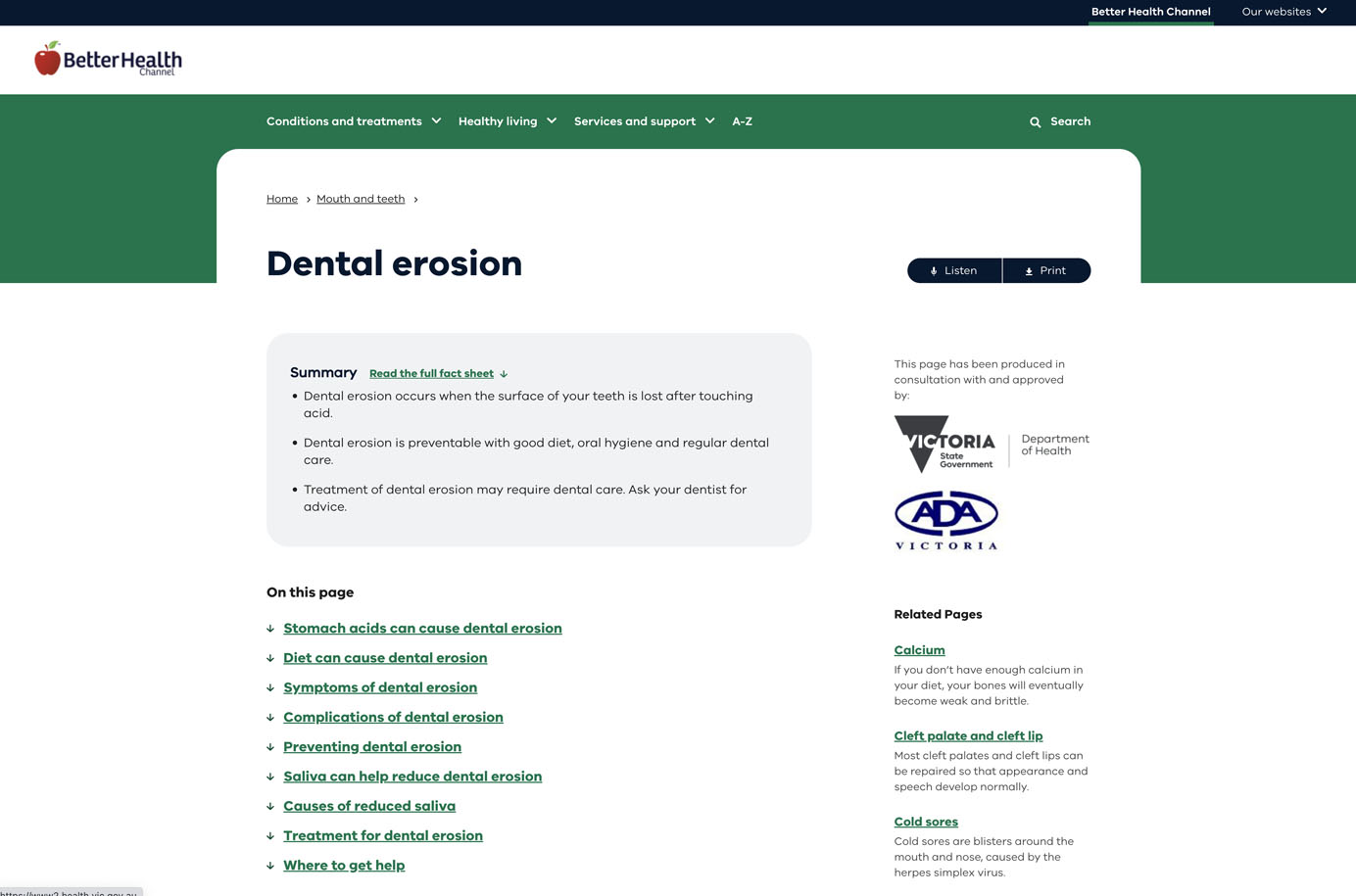
BetterHealth: The down arrows inform the user that the links will take them further down the page, rather than to a new page. - Use visual boundaries around the table of contents in order to separate it from the rest of the text. This approach can easily be taken too far and trigger banner blindness, as users may assume that the table of contents is an ad.
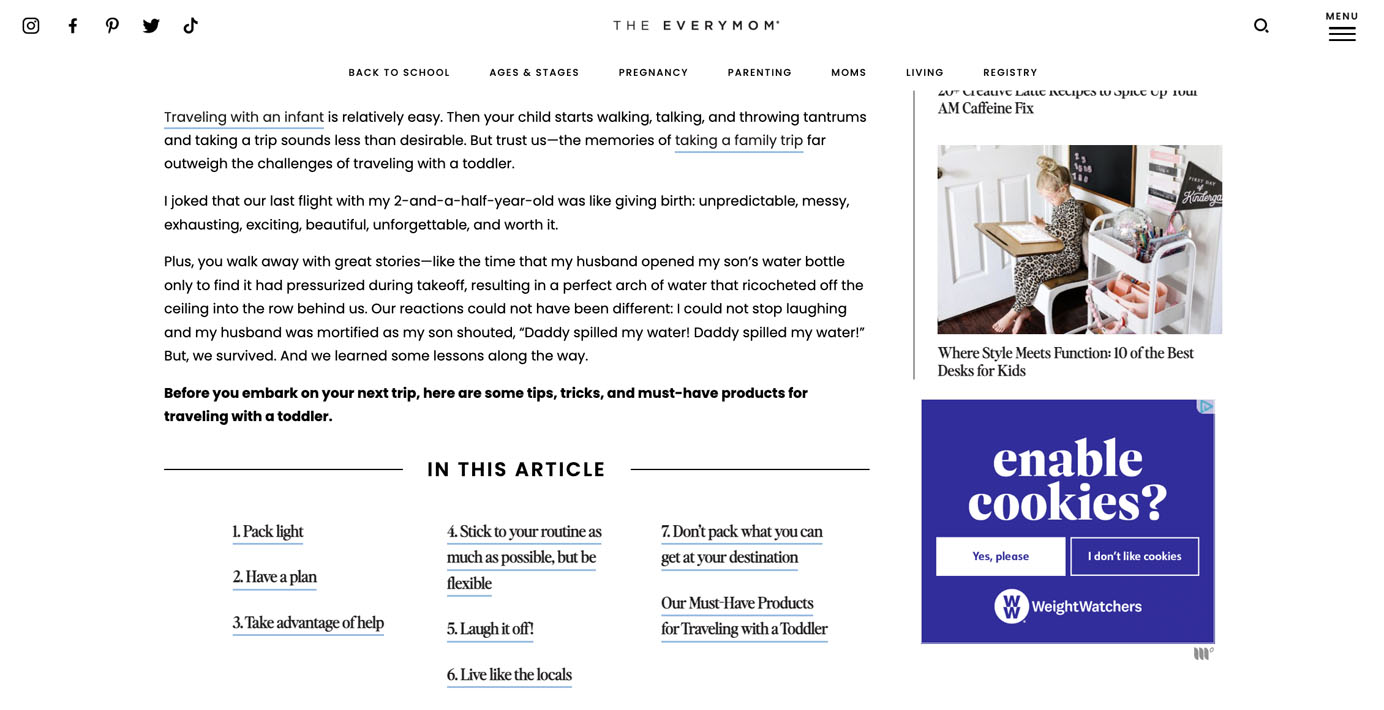
The Everymom: In this example, boundaries are employed, and the table-of-contents links are styled differently from the rest of the article. As a result, users may mistake the table of contents for an ad.
Styling Considerations
Vertical Layout vs. Horizontal Layout vs. Multicolumn Layout
Depending on the makeup of the table of contents and the various links it contains, there are various potential layouts for how to style the table of contents itself.

Vertical Layout
The most common layout for tables of contents is a single-column vertical format. This format is most advantageous when you have few topics with longer headings.
|
Advantages:
|
Disadvantages:
|

Horizontal Layout
Tables of contents can also be formatted in a horizontal layout, to save vertical space. This is best saved for instances with fewer topics and shorter headings.
|
Advantages:
|
Disadvantages:
|

Multicolumn Layout
This is a less common design pattern that, nonetheless, offers the best of both worlds: efficient use of screen space and scannability. This approach is best suited for instances with many listed topics.
|
Advantages:
|
Disadvantages:
|

Visualizing In-page Links
Our research has indicated that web users demonstrate increased familiarity with in-page links. Nevertheless, it remains critical to provide sufficient signifiers of clickability in order to maximize the affordance of the links. In other words, all the standard best practices for link visualization apply here. For example, table-of-contents links should be colored and underlined, as in the below example from the National Institute on Aging.

On the other hand, if links lack sufficient signifiers, they are likely to be overlooked.

Additionally, misuse of signifiers can cause other forms of confusion, as in the example below.

Smooth-Scrolling Effects
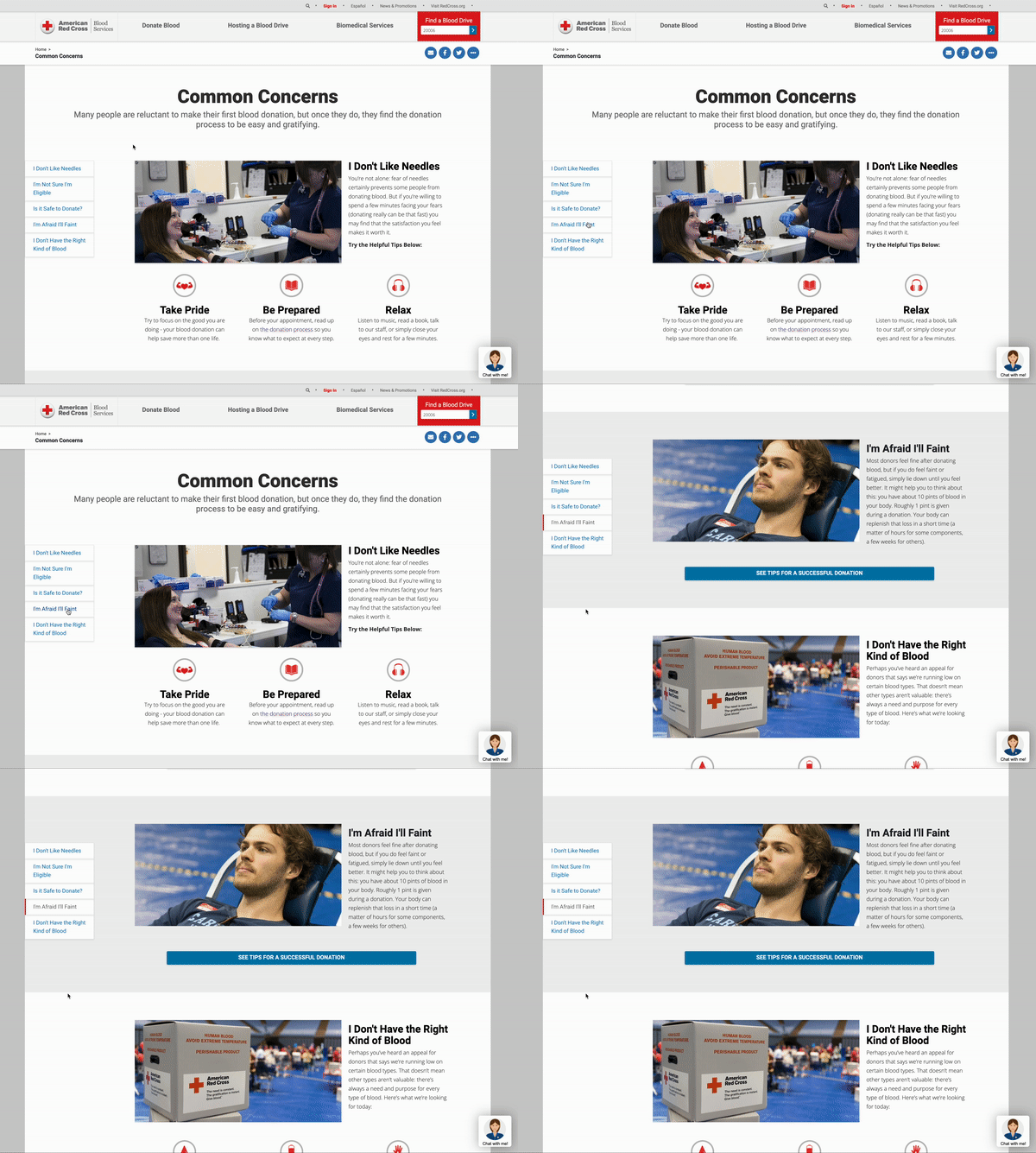
A final styling question to consider is how to facilitate the movement of the page from one section to another after the user clicks on a table-of-contents link. Traditionally, the page would instantly jump the user down the page, providing instant access to the desired content. An alternative approach employs smooth scrolling from one point on the page to another, which can create a seamless experience by showing continuity in transition. This design also eliminates any possible confusion that the user may have been taken to a new page.
Best Practices for Tables of Contents
Below are some best practices to follow when designing a table of contents:
- Use a clear label for the table of contents.
- Avoid discrepancies in link labels.
- Make headings scannable.
- Do not include external links in the table of contents.
- Do not skip content headings (even if they are above the fold).
- Include back-to-top links.
- Ensure consistency across all the tables of contents.
Use a Clear Label for the Table of Contents
As in-page links often share a similar visual style with links that direct users to external pages, it becomes essential to distinguish the table-of-contents section from other links present on the page. Appropriately labeling the section helps clarify how the links will function. It can also provide context for screen-reader users and users who are exposed to a limited amount of content (e.g., screen magnifier users and users on a small screen)
Table of Content, Contents, On This Page, and In This Article are informative and predictable labels for a table of contents. Tell Me More, on the other hand, has poor information scent, and the links in the section can be mistaken for links to related content.

Avoid Discrepancies in Link Labels
Just like any other links existing on the web, the links listed under the table of contents are promises to keep. They should match the section headings they are leading to, to reassure users that they have arrived at the right section on the page. Discrepancies in wording force users to analyze and compare two highly similar headings, adding unnecessary cognitive load.

Make Headings Scannable
The headings in the table of contents should be succinct and easy to scan, allowing users to quickly grasp the essence of the page. A long list of lengthy headings can create a daunting wall of text. Going through a long list of distinct links is like reading a huge paragraph, with each sentence conveying a separate message.

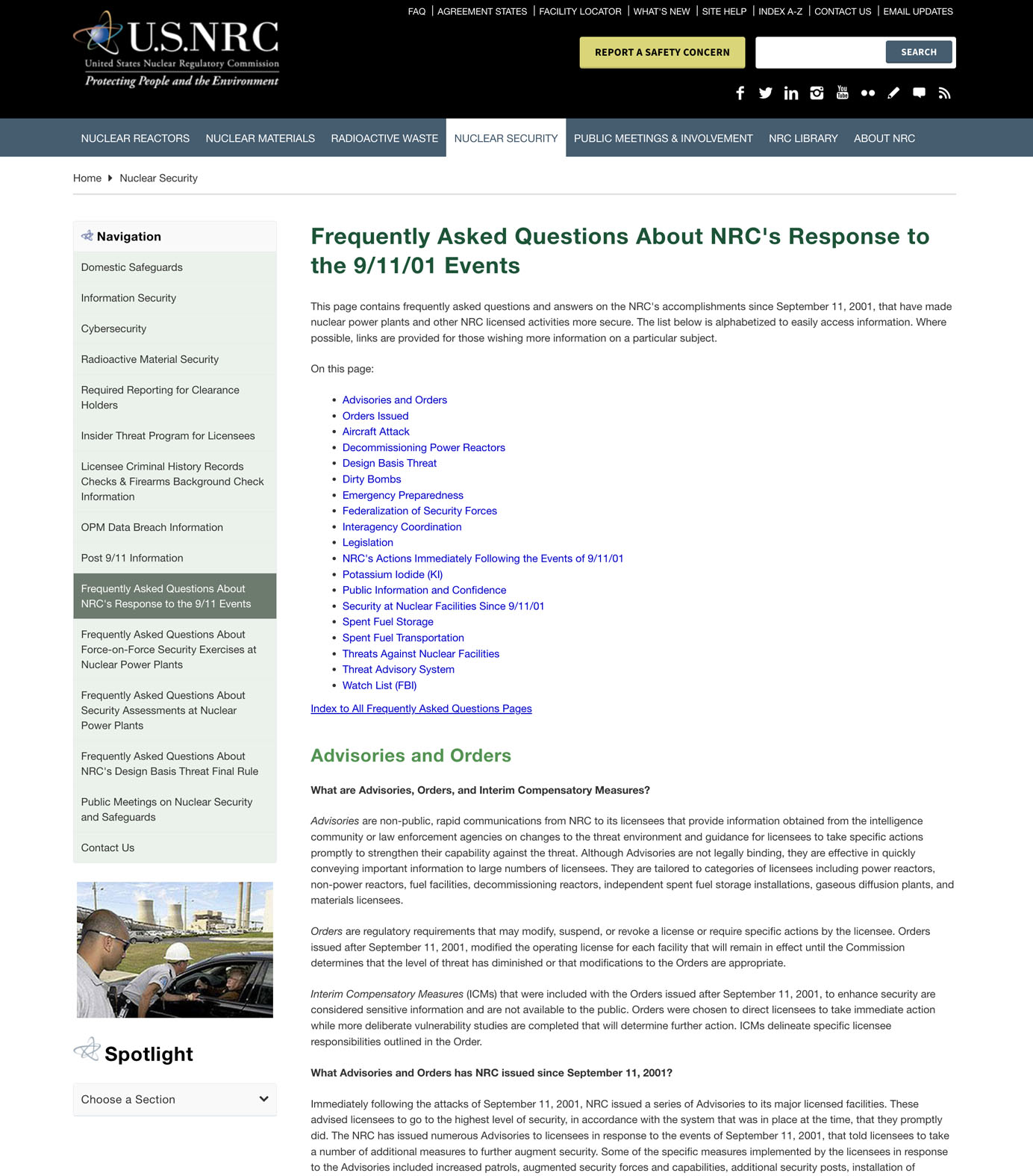
Do Not Include External Links in the Table of Contents
Users expect the links in the table of contents to behave consistently. Mixing external and in-page links in the list will break users’ mental models and cause confusion.
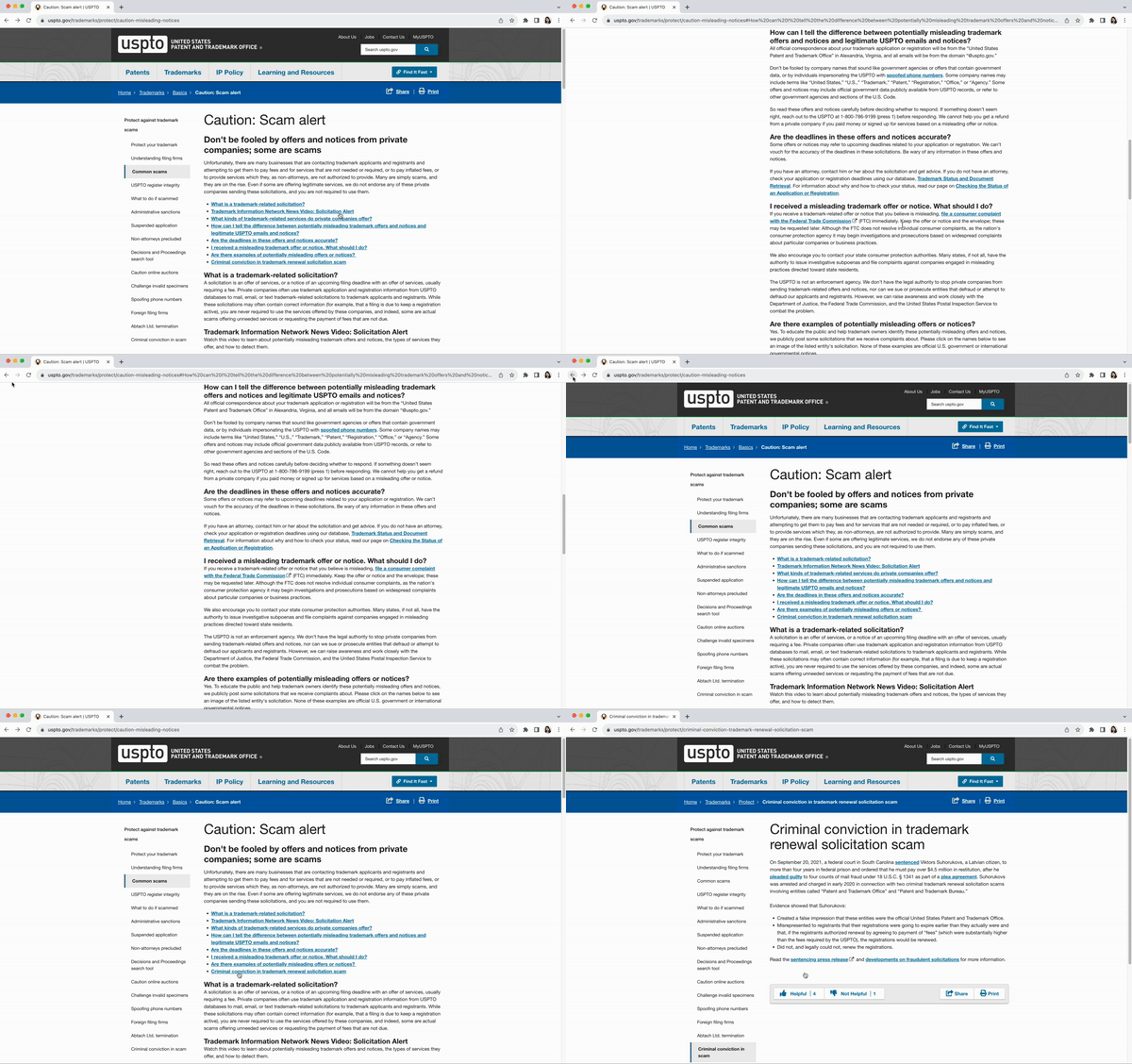
Do Not Skip Content Headings (even if they are above the fold)
A table of contents acts as a comprehensive overview of the page. Leaving out sections or only displaying the sections below the fold can lead to an incomplete understanding of the page content and cause confusion.

Include Back-to-Top Links
When including a table of contents on a long page, consider whether users will access other sections of the page and how they will navigate after finishing the section. Will they keep reading? Or will they want to jump to a different section? Consider providing a back-to-top link to help users return to the top, especially when you have a long page with a nonsticky table of contents.

Ensure Consistency Across All the Tables of Contents
The style and format of the table of contents should be consistent across the website to match users’ expectations. A website without internal consistency forces users to relearn the pattern on each new page, distracting them from accomplishing their intended goals.

Conclusion
A table of contents provides a helpful page overview and facilitates in-page navigation for content pages. A thoughtful implementation should take into consideration different placement and styling options. By carefully weighing the benefits and tradeoffs of each option, you can create table of contents designs that maximize usability and impact.