In August 2026, Anthropic published its vision of an AI-native software development lifecycle (SDLC) following similar, though less prescriptive, publications by Google (May 2026) and OpenAI (November 2025). The three visions differ in details, but all sideline UX, reducing it to behind-the-scenes context that guides AI generation. But this is only part of the value UX offers. UX also discovers what users need, strengthens the team’s shared judgment about what to build, and evaluates what gets built. Organizations that adopt this model as described risk losing the very user insight their AI context depends on. This article examines Anthropic’s playbook to show where it leaves UX out and what UX teams can do about it.
What Is the SDLC?
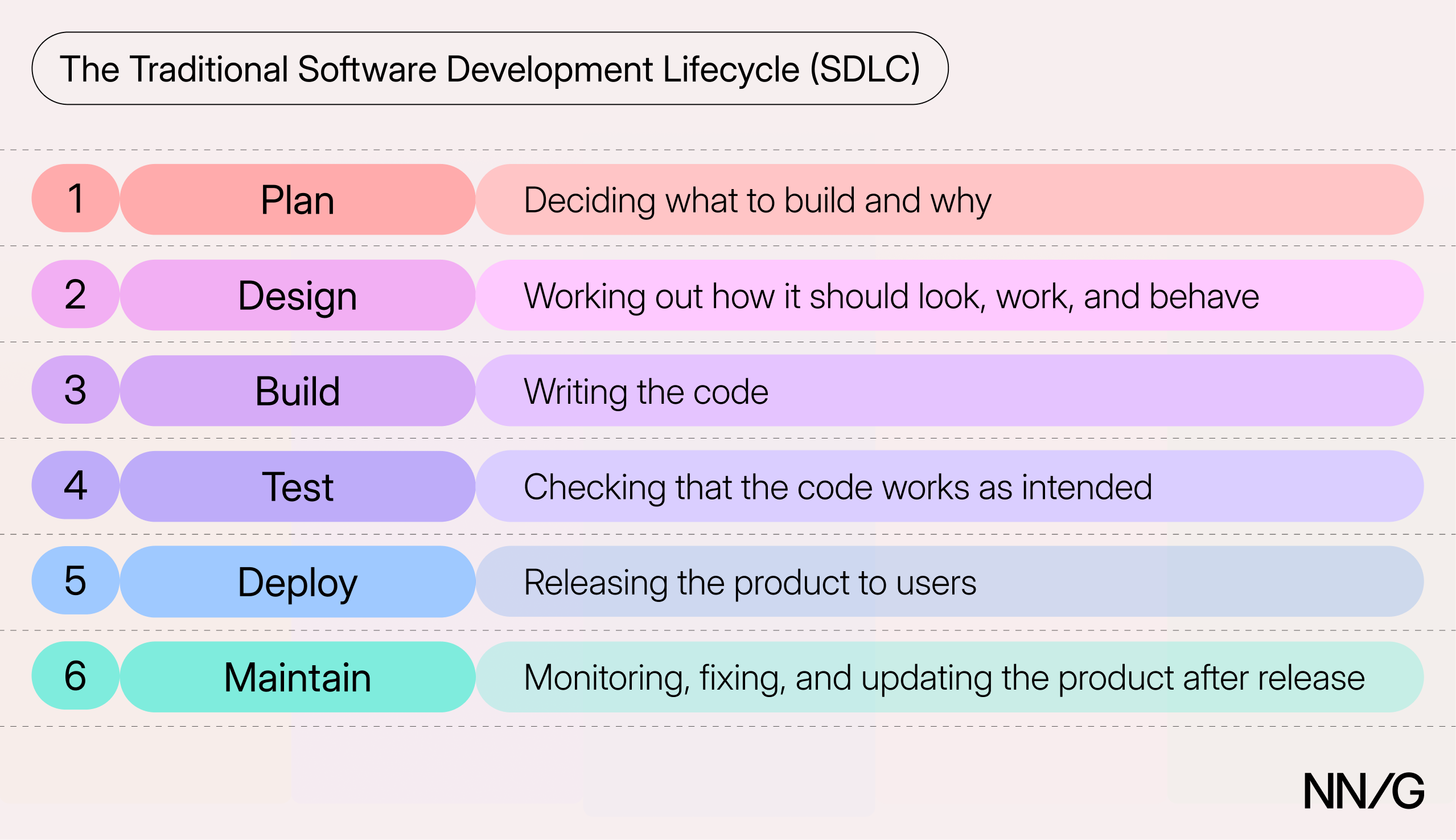
The software development lifecycle (SDLC) is the sequence of stages software goes through as it’s built. The stages typically include:
- Plan: deciding what to build and why
- Design: working out how it should look, work, and behave
- Build: writing the code
- Test: checking that the code works as intended
- Deploy: releasing the product to users
- Maintain: monitoring, fixing, and updating the product after release
Early versions of the SDLC emerged in the 1960s, often referred to as "waterfall," before the Agile movement of the early 2000s reworked them into short, repeated cycles.
Anyone working on software is likely familiar with elements of the SDLC, whether they call it that or not. But it’s important to recognize that the SDLC framework primarily describes an engineering perspective. UX has long fought to defend its place in the traditional SDLC.
The AI-Native SDLC
Anthropic, Google, and OpenAI’s publications all make a simple argument: AI agents make writing code (the Build stage) fast and cheap, so the other stages must also adapt to maximize productivity gains. Deliverable creation, human approvals, and governing policies must be redesigned to keep pace with AI agents without lowering quality standards. Google summarizes the main argument of all three well:
"The most profound shift in software engineering isn't a new language, framework, or cloud service. It's the transition from writing code to expressing intent, and trusting intelligent systems to translate that intent into working software.”
What Anthropic’s AI-Native SDLC Playbook Looks Like
Anthropic’s playbook retains the six traditional SDLC stages, but AI becomes the primary executor, and humans monitor quality along the way. The stages revolve around a chain of version-controlled artifacts generated by AI agents in Markdown and reviewed by the individuals who control each approval gate, serving as an audit trail of what was decided and by whom.
What guides the AI’s work is context: curated instructions that tell the AI how the organization does things and that constrain its work. Context can include coding conventions, brand guidelines, security rules, and UX standards. In theory, the better the context, the more likely the AI’s output will meet the organization’s standards without human correction — the ultimate goal. This is a significant departure from the traditional SDLC, in which a person both creates and evaluates all the work.
|
Stage |
Traditional SDLC |
Anthropic’s AI-Native SDLC |
|---|---|---|
|
Plan |
The product owner gathers (research-informed) requirements and decides what gets built. |
Anyone can submit an idea by generating an intent.md with AI. The product owner approves or rejects it. |
|
Design |
Designers parse the documented requirements to create, iterate on, and test designs. |
AI turns an approved intent.md into a spec.md, using the company’s standards as context. The product owner mocks up and iterates on the interface with an AI-design tool, then approves the spec. |
|
Build |
Engineers write the code. |
AI uses the spec.md to create a plan.md file outlining instructions for the AI coding agent. Once an engineer approves the plan, an agent writes the code. |
|
Test |
QA specialists check that the software works properly. |
AI checks its own work against the intent.md, spec.md, plan.md, and mockup, overseen by engineers. |
|
Deploy |
Engineers review and release the code. |
AI reviews the code for bugs, security risks, and compliance with the organization’s standards, before a technical lead approves each release. |
|
Maintain |
Engineers monitor the product and fix problems. |
Automated checks monitor the product’s health. When something breaks, AI diagnoses it and writes a new intent.md to restart the cycle. |
Versions of this new SDLC are already happening — perhaps you’re right in the middle of it. But it’s too early to tell how well this SDLC suits companies of all kinds, since it’s so heavily oriented to software production. It’s also important to recognize the conflict of interest: AI labs want companies to make this shift because it drives greater use of their products.
UX Context Is Necessary, but Not Sufficient
UX does not own a stage or approval gate in Anthropic’s playbook. It assumes that UX knowledge, codified as context and skills, will help the AI create high-quality, user-centric products. However, it does not define space for UX professionals to get directly involved. Let’s unpack some of these assumptions.
Plan-Stage Assumptions
The lifecycle starts with the creation of an intent.md in the Plan stage. It assumes the author will independently honor user needs rather than just fixating on favorite solutions. What’s to stop the submission of an intent.md that’s not linked to any clear user need? Even a well-intentioned author working with detailed UX context is limited by what they or their organization already knows, and the playbook does not create space to discover new user needs.
The individual creation of intent.mds also encourages silos over collaboration. It becomes easy for individuals (or the system itself) to create these artifacts in isolation without the perspectives of other team members, relying solely on the product owner’s judgment to approve, edit, or reject the proposals. This is a recipe for low buy-in across the team, unchallenged biases, and a flood of intent.md files from every direction.
Product owners, engineering, and UX have long represented three balancing perspectives: business viability, technical feasibility, and user desirability, respectively. But if AI-coding agents dissolve many technical constraints and UX is reduced to context in Markdown files, then all the cards are in the product owner’s hands, and the approval gate is guarded primarily by business needs.
Design-Stage Assumptions
The Design stage assumes that AI will adequately incorporate the organization’s design standards into the spec.md and mockup it creates. It’s true that machine-readable design systems can constrain these outputs to many of the organization’s standards, but someone must curate, manage, and maintain this context just as design-system managers have always done. Is this done by UX? The Playbook is unclear. And what happens when a design need extends beyond the documented context? This is where UX’s judgment has always been crucial for deciding what to build.
The playbook names the product owner as responsible for creating and iterating on AI-generated mockups of the spec.md for front-end work. It’s helpful that AI makes it easier for any team member to visually communicate their ideas as mockups or prototypes, but these sophisticated sketches are not necessarily ready for production. AI-generated mockups that haven’t been tested are mainly UI work: honing the visuals, interface, and aesthetics. This is not the same thing as UX: meeting the customer's exact needs in a simple and elegant way.
Building an exemplary user experience is still very difficult — even with the help of AI — because it requires understanding people, not just pixels. This means we must still understand what people need to accomplish (exploratory research) and test the design to ensure it does an excellent job of delivering on that need (evaluative research). This is not the same thing as a product owner iterating a quick mockup based on a simple intent.md and passing it to a coding agent for production planning. In fact, the playbook makes no mention of user research whatsoever. It seems to rely on the AI to anticipate what real humans will struggle with. UX context might help with that, but this is a hypothesis yet to be tested.
Test-Stage Assumptions
In the Test stage, the AI compares screenshots of the new interface with the product owner’s mockup from the Design stage. This comparison is important for ensuring the build matches the team’s vision of the interface, but it does not guarantee good usability or accessibility. The team that builds a product is generally too biased to see everything users might struggle with, which is why we’ve long said: “you are not the user.” Yet in the playbook, the AI’s standard for quality is the artifacts that the team and AI created themselves without research, so any blind spot introduced early passes right through the Test stage, unchallenged.
Maintain-Stage Assumptions
The Maintain stage assumes that monitoring system-health metrics after the product launches will surface the important problems that still need to be solved. But technical metrics, such as system crashes or security weaknesses, are not the same thing as usability metrics.
Imagine a scenario where a company launches a set of new features developed using the AI-native SDLC. After launch, business stakeholders notice that the features have poor adoption and are quickly abandoned. Yet the autonomously monitored signals show no signs of distress, because the code is functioning fine. The true source of the problem turns out to be poor labeling and user confusion. But how is the team to know this? There are no usability-focused signals built into the monitoring system, and the team never tested the design with real people before launch.
Even if an AI-native system can generate its own intent.mds from signals that the system is struggling, it will underrepresent user needs if it primarily monitors technical metrics.
An AI-Native SDLC Needs All 3 UX Roles
As we’ve argued elsewhere, UX has 3 important roles as AI accelerates software production:
- Deciding what’s worth building and strengthening shared UX judgment
- Evaluating what gets built
- Adding context to the AI-generation process
Anthropic’s Playbook provides a mechanism for the 3rd role only, but it does not adequately account for the first two. UX context will become an increasingly important part of an AI-native SDLC, but this is not UX’s only contribution to software development. Context can encode only what we already know.
Organizations with high and low UX maturity both risk losing ground they’ve spent years gaining if they adopt this playbook wholesale, but avoiding AI is not the answer. We must instead turn our attention to how UX can remain involved.
6 Things You Can Start Doing Today
In organizations that begin adopting the AI labs’ visions, proactive UX practitioners can be among those shaping the process and deciding who gets a seat at each stage. If your organization were to adopt Anthropic’s playbook (or something like it) today, here are a few things to start discussing, deciding, and curating immediately.
Deciding What’s Worth Building and Strengthening Shared UX Judgment
Focus the intent.md template and documentation process on user needs. Anyone creating an intent.md should use an AI agent built to carefully assist them. This agent needs to ask the author the same questions a researcher or analyst would: What is the user trying to do? What would their life look like if this problem were solved? It must focus on intent and user needs, not just solutions. The intent.md template should require answers to questions like these, and researchers should be able to submit their own intent.md files that document a problem before anyone has even proposed a solution. Even Anthropic’s own example slides toward a solution captured in the same breath as the problem.
Help define user-centric intent.md acceptance criteria. Since fast and cheap building makes technical feasibility less of a constraint, business and user priorities now define what we should build. It will be a sign of UX maturity when design and product share the responsibility for approving work entering the production pipeline to reflect these two priorities. At the very least, work with product owners to contribute a few user-value criteria for acceptance, such as evidence that the problem is real, that solving it maximizes user benefit, and that the team understands why it occurs.
Evaluating What Gets Built
Define when work needs a UX professional’s review. AI agents flag what they’re told to watch for. Your UX context should specify when a human with UX design or research expertise must review the mockup or run a quick usability test with a few users. This mirrors the “high-risk” situations that escalate to an architect in development. For example, changes to navigation or information architecture, or flows that depart from established conventions. If early specs and mockups become sources of truth in subsequent stages, then you risk the AI waving through unnoticed design problems it didn’t know you wanted to oversee.
Add user signals to the monitoring loop of deployed software. A drop in user success should get the same automated response as a spike in server errors. Work with engineering to define UX distress signals and baselines, such as task abandonment, conversion-rate drops, or spikes in support tickets, that merit deeper research. An AI agent autonomously generating a new intent.md from identified issues can describe only what it sees, but many UX issues stem from deeper problems, such as mismatched mental models. These situations warrant further investigation before reentering the pipeline, and the findings could improve the overall UX-context library.
Adding UX Context to the Generation Process
Claim ownership of the UX context. The playbook recommends that, as product owners apply organizational constraints to the work AI produces, they should resolve any concerns or conflicts with the policy owners. UX people need to own the UX context and skills to be automatically involved whenever a spec raises a UX concern without letting this become their only role. The best way to claim this ownership is to take a first pass at drafting your organization’s UX skills and attaching your name to them, even if you know they’re not perfect. If you don’t, somebody else might — or worse, nobody will.
Make research insights and the design system machine-readable. Agents that can't easily find your research insights or design components will carve their own path instead. Machine-readable assets are stored in formats AI agents can easily draw upon as context to surface relevant supporting or contradictory evidence very early in the process, as originators create intent.md files. This is an opportunity for research to make a direct impact on every feature request — something that’s always been difficult at scale. Agents that pull from an AI-accessible design system require less wrestling to align with the company’s brand and existing designs, regardless of who generates the initial mockups.
What Comes Next
An SDLC that natively integrates AI is an intriguing concept to engineering and business stakeholders because it’s clear that well-managed AI can write powerful code, and who doesn’t want to ship good work faster? But while an agentic software factory might be capable of making many small changes at incredible speeds, UX is responsible for the overall experience people have with a product. If the loop never stops, it risks allowing agents to slowly erode the experience through many well-intentioned incremental changes.
A thoughtful UX practitioner today will be quick to experiment with and learn about AI’s role in this work, but should still have some questions before embracing the AI labs’ visions wholesale:
- How can we strengthen the entire team’s ability to decide what’s worth building from a user’s perspective?
- How can we evaluate the UX of AI-produced products as fast as AI coding agents can build them?
- What UX knowledge can be codified as context, and what still requires human judgment?
We are working on answers to these questions, and you should be, too. But one thing is clear: AI may change how we build software, but faster production does not eliminate the need to discover the right problems or determine whether the resulting products work for people.