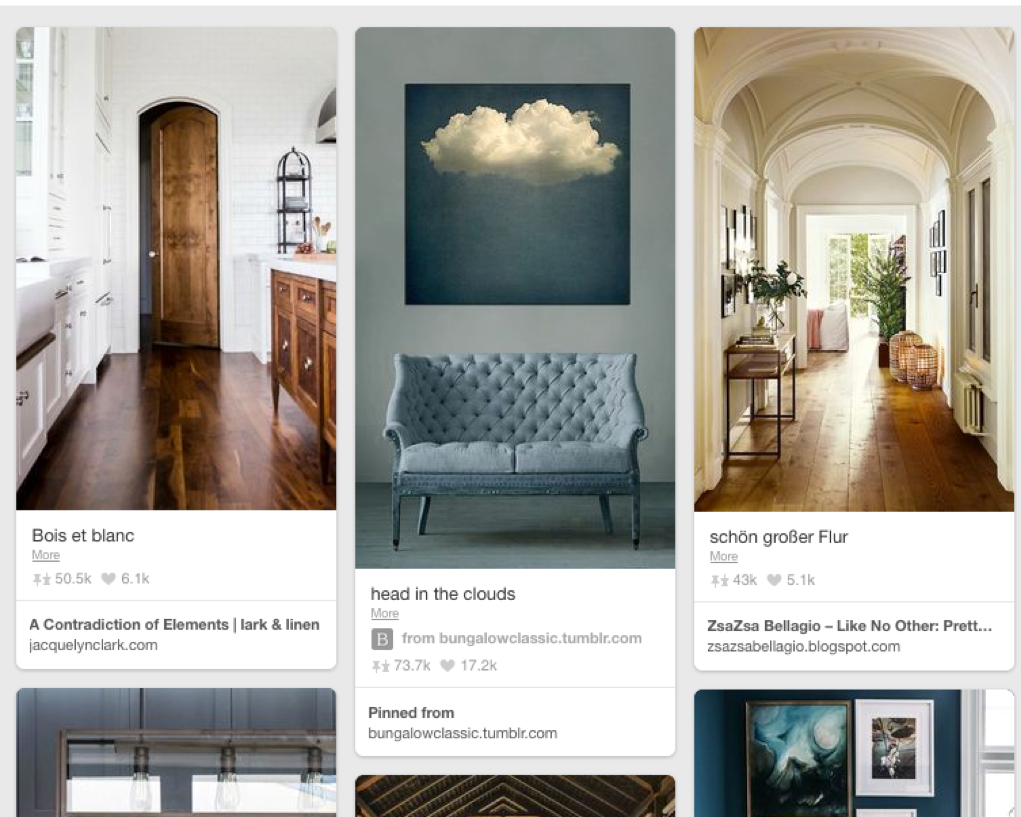
In recent years, we’ve seen a lot of interest towards creating modular UI patterns that work well across a variety of screens and window sizes. One such new UI component is the card — a snapshot-like display intended to encourage users to click or tap to view more details.
Card: A container for a few short, related pieces of information. It roughly resembles a playing card in size and shape, and is intended as a linked, short representation of a conceptual unit.

Cards are often associated with flat design 2.0: they retain some aspects of the aesthetic of flat design, but reintroduce visual depth as a signifier of clickability. Though the basic concept is older, in the last few years, cards have received a lot of attention in the software-design world, with many high-profile sites and companies (e.g., Google’s Material Design, Twitter's card component) embracing them.
Cards have 4 key properties:
1. Cards are used for grouping information.
A card chunks several different (but related) pieces of information into one digestible unit — be it an article on a news website, a product on an ecommerce site, or a post on a social app. A single card will typically include a few different types of media, such as an image, a title, a synopsis, sharing icons, or a call-to-action button — all associated with the same concept.
2. Cards present a summary and link to additional details..
A card is usually short and offers a linked entry point to further details, rather than the full details themselves. It is intended as a high–information-scent outline used to entice users to click through to further details contained on a separate page.
3. Cards resemble physical cards.
Cards use a border around the grouped content, and the background color within the card that differs from background color of the underlying canvas. These visual-design elements create a strong sense that the different bits of information contained within the border are grouped together.
Quite often, cards use a slight drop shadow to show depth, which is a clickability signifier. For most implementations, clicking or tapping anywhere on the card link to a details page (though some cards, like the one in our previous example, also include some secondary call-to-action buttons or links in addition to the main link available). This larger touch zone substantially improves usability on both touchscreen devices and mouse-based devices (due to Fitts’ Law).
4. Cards allow for flexible layouts.
When multiple cards are used together in a layout, they often do not all have the same type of information — some cards might include a text summary, hashtags, or an image whereas other cards on the same page may include totally different details. Cards allow for varying height to accommodate differing amounts or types of content, but typically the width is fixed from one card to the next.
UI Cards vs. Hypertext Card Model
Seasoned UX pros may recognize the card concept as being related (both in name and in concept) to the card (or deck-of-cards) model of presenting linked information from the dawn of hypertext, in the 1990s. This model refers to splitting content into discrete pages of fixed size and is an alternative to vertical scrolling: navigating through carded content is similar to turning the pages of a book as opposed to unfurling a long paper scroll. This card model saw a revival when the iPad first came out, when many apps were trying to control the look of each page presented to the user. You are probably familiar with the deck-of-cards paradigm from mobile weather apps — most of them employ it for displaying the weather in different cities.

The contemporary card pattern is based on the same idea of grouping content into discrete, completely visible units with controlled information layout and appearance. However, the contemporary card that this article is focused on is not a full-screen item (as in the older card model), but takes up just a small region of the screen, and contemporary cards are often used in a layout with multiple cards per screen.
This goes to remind us two critical things about interface design: 1) everything old is new again, meaning that new design trends are often not so revolutionary after all, and may be revived with slight variations, and 2) because history repeats itself, usability guidelines and interaction design principles are durable and remain relevant for a long time, even in the rapidly innovating world of user-experience design.
Principle of Common Regions Creates Visual Groups
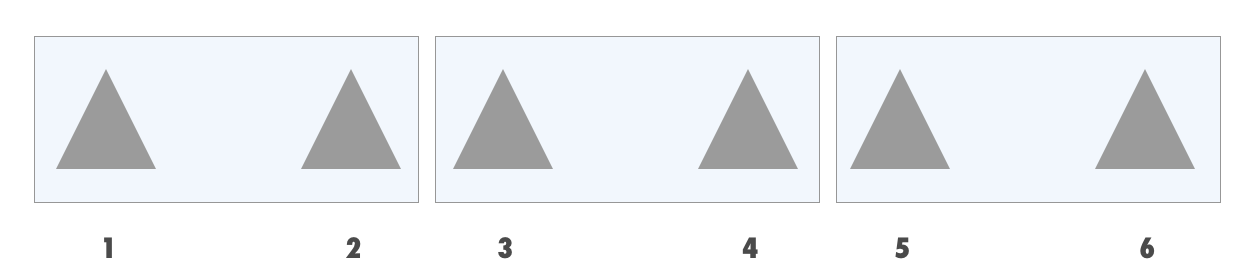
Cards take advantage of one of the common-regions principles in cognitive psychology:multiple items contained together within a boundary are more likely to be perceived as being grouped. This principle can supersede the powerful Gestalt law of proximity (where items placed near each are perceived as grouped), allowing items that are further away to be more explicitly visually grouped. The principle of common regions frees designers from using negative space to create explicit connections among several items. 

When Cards Are Useful
- Cards are better suited when users browse for information than when they search.
Multiple-card layouts are frequently used instead of list views of content. Cards are, however, less appropriate than lists when people search for information for three major reasons, all related to their variable size:
1. Card layouts typically deemphasize the ranking of content. (However, even though they lack the strong hierarchy signals of list views, multicard displays still obey typical page-hierarchy laws: content at the top and on the left of the page is more discoverable and perceived as more important.)
2. Card layouts are less scannable than lists. A standard vertical list view (in which each item occupies a new row in the layout, and may still contain mixed media such as an image, title, summary, and so forth) is more scannable than cards because the positioning of the individual elements is fixed in size and more predictable for the eye. Thus, cards are not appropriate when users search for a specific item from a list or look for a particular piece of content.
3. Cards take more space. Because cards are bigger than a line of text, any given screen size can’t show as many cards in a single view as would be possible in a list view. The more things are viewable without scrolling, the less demand is placed on users’ short-term memory.

Right: A vertical list easily supports scanning for price from one product to the next, as this information is placed in a predictable location on each item in the list.
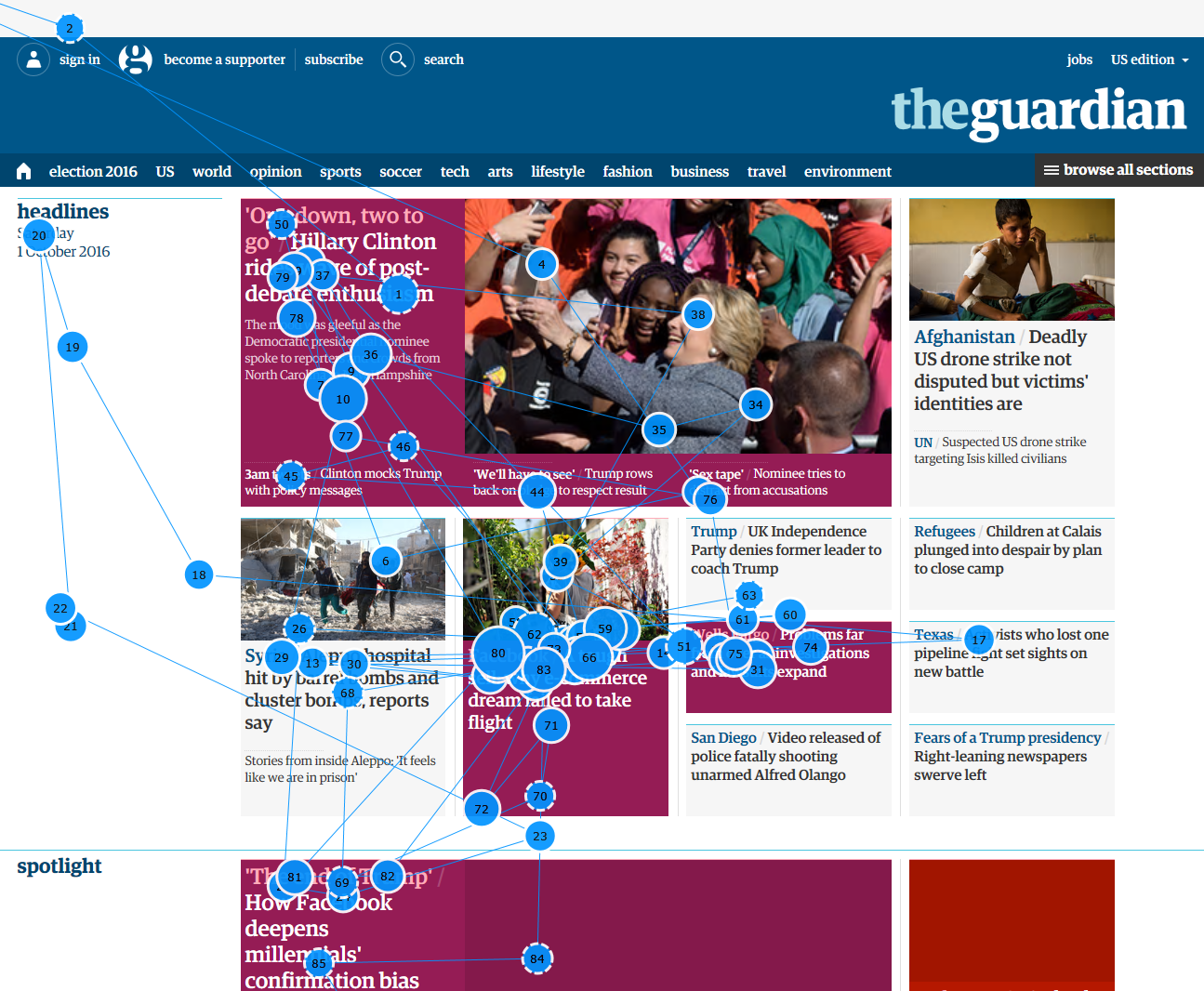
Cards are also a poor choice when users need to compare between multiple options, since cards often aren't structured in a predictable way from item to item; our eyetracking research revealed that users look back and forth multiple times between items when they compare them, so you should facilitate this process by using a consistent visual treatment of items that will be compared.
- Cards work best for collections of heterogeneous items (i.e. not all the content is of the same basic type).
Cards are an excellent choice for dashboard applications and for social or aggregation sites that display a variety of content types at the same time on the same page. In such situations, the card metaphor can help create more obvious differences between items, and each card can accommodate different ingredients, if, for example, not all cards on a page need to include a title, byline, or other specific bit of information.

When presenting very homogenous items (such as a list of similar blog posts, products, or news stories), consider using a standard vertical list of items (or, in certain cases where the items are similar and are all from a narrowly defined category, grids of images) instead of cards to support scannability and also comparisons among items.
For example, placing all the photos in an online photo album on separate cards is not necessary, since they are all of a similar type, are clearly self-contained without the border, background, and shadow, and you don't get additional details when you click on it (you simply get a larger version of the same image). A gallery of photos is the type of content better served by a regular grid.
Conclusion
Cards are a useful UI component for grouping several related pieces of information together for providing a linked entry point to further details on that content. Cards work especially well in contexts where they provide summaries of many different kinds of content, rather than when simply used as a modern-looking replacement for a list of content.