AI agents have made curating context as important as writing prompts. The agent can do the typing, but deciding what context to keep, where to put it, and when to update it is left entirely to the user — and even the experts are struggling. This is true for UX professionals as much as for the Claude power users from various industries in our recent study. Our participants spent more effort engineering context libraries than crafting prompts (most of which they casually dictated). Yet each had improvised a bespoke process, files went stale or missing, and many suspected that someone else was surely doing it better.
What Is a Context Library?
A context library is a collection of institutional and procedural knowledge, contained within markdown files or external software, that AI agents may reference and edit.
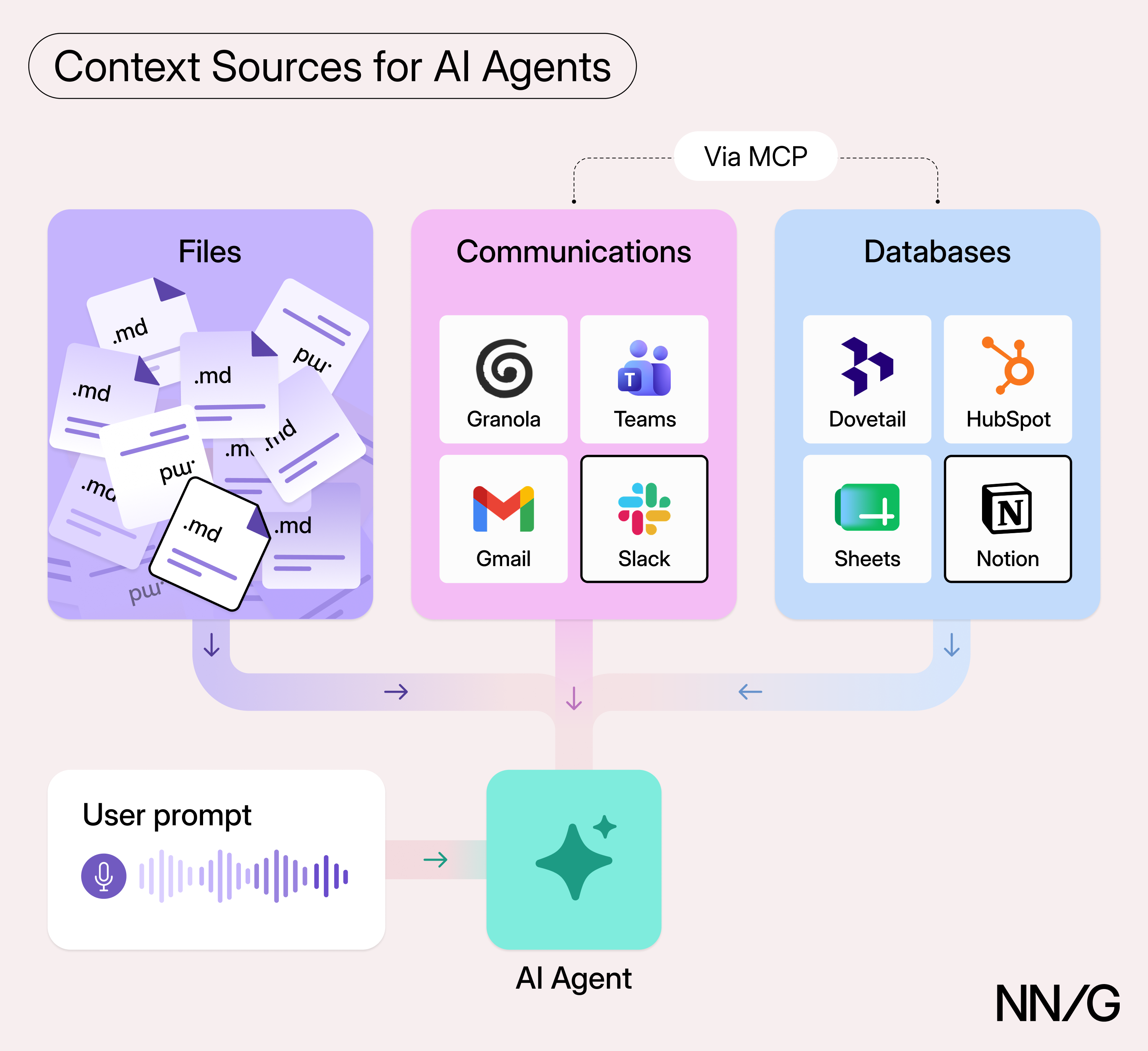
A context library does not live solely within markdown files, though this was certainly the prevailing file type used to store context by our participants. MCP and API connections expand the library to include external sources such as Notion databases, Slack histories, or Granola transcripts. Some context in the library is actively updated and maintained; some is merely referenced. The context within the library generally plays one of three roles (which we discuss in greater detail in another article):
- Global: information that rarely changes and shapes the agent’s actions across interactions
- Local: information intentionally scoped only to a specific task or project
- Ambient: the raw, uncurated information streams (e.g., email messages, meeting transcripts) that have not been scoped in advance and through which the agents sift for relevant information
AI Systems Force Users to Figure Out Context Engineering on Their Own
AI agents are designed to work with context libraries, but the AI systems themselves do little to help users learn how to curate and manage them. Users in our study had learned how to use context mainly from X and Reddit posts and from their own experimentation.
Figuring out how to build a context library should not require extensive reading of Anthropic’s developer-oriented support pages.
Our study highlighted several helpful lessons for ensuring that a context library delivers value over time. These lessons come from issues encountered by our study participants, all of whom were expert users working with Claude daily and who had built extensive context libraries. Users in nontechnical domains or with lower AI literacy will likely encounter the same problems, amplified: they will have fewer workarounds and less ability to notice when the library is failing them.
Lesson 1: Context Needs Ongoing Maintenance
A context file was often written once but used for months, and much of what participants had written no longer matched how they worked. Some had created pieces of context for their library but never returned to them to ensure they still added value; others kept running scheduled routines they had gradually stopped trusting, or that depended on brittle connections to external sources that kept failing.
Update Context as Priorities and Processes Shift
Context libraries must evolve to remain useful, but unlike humans, they can’t adapt on their own. A colleague senses when instructions have gone stale — say, when everyone else has quit using an old template — and moves on. AI isn’t yet sensitive to these signals. More ambient context, such as MCP connections to recent meeting transcripts in Granola, might seem to fill the gap, but it didn’t for our participants.
For example, one participant’s daily automation for summarizing tasks became less useful as his working style slowly evolved. Yet, even though Claude had sweeping access to his email, messages, and meeting transcripts, the automation’s instructions were too insulated to adapt. The participant had started ignoring the useless parts of the automation without providing any explicit feedback to the system.
To keep your library up to date:
- Ask the AI to audit relevant global or local context through the lens of recent ambient context. For example, if you’ve recently attended a meeting discussing a shift in a specific project’s priorities, have the AI compare the meeting transcript with context relevant to that project and suggest updates. Verify whether the changes seem appropriate, then have the AI make them for you.
- Give the AI explicit feedback when your current way of working has drifted from an established routine. Multiple participants could articulate exactly what they didn’t like about ongoing scheduled tasks and routines, but they’d just never take the time to tell the AI. Dictating that feedback and having the AI make the updates takes a few minutes — time well spent on something you use frequently.
Expect Your External Connections to Break
Much of the context our study participants relied on was retrieved from external databases such as Notion or HubSpot via MCP or API connections. Maintaining these connections frustrated several participants; one called it “system decay.” His Todoist connection kept expiring, cutting Claude off from his to-do list until he reconnected it by hand. He had even considered building a separate agent just to keep connections alive. While this issue might seem a minor inconvenience, it undercuts the main reason these users adopted agents in the first place: to save time.
Lesson 2: Let the Agent Update Context for You
Almost nobody in our study typed directly into their context files. Even with the markdown file open in front of them, they would usually ask Claude to make the change. This wasn’t laziness. Asking Claude was faster than navigating a file it had written in the first place and working out exactly what to say — and it kept style and structure consistent across the library. It allowed participants to specify their intent and let the AI handle execution. Some updates were requested manually; others were triggered automatically by workflows or other context files.
Participants also commonly asked Claude to make sweeping changes across many library files at once. For example, if a project picked up a new constraint, they might ask Claude to work it into every file related to that project. They didn’t always know exactly which files needed changes or where they lived, and they rarely checked what Claude had changed. Instead, they trusted it to understand their intent and judged its work by the quality of the subsequent outputs. If the output was consistently poor, they simply asked Claude to make another round of updates wherever needed.
Lesson 3: Structure the Library for Findability
Because participants let Claude create and maintain most of their files, the library’s structure seemed to happen to them rather than exist as something they designed. Yet where files live and how folders are organized determines whether both the user and the agent can find the right context and what the agent loads.
Keep Track of Important Context
Many of our study participants struggled to find context in their own libraries during our sessions. They would tell us how important a particular manifesto or boundaries document was, then come up empty in their folders and end up asking Claude to retrieve it. One participant even discovered a piece of global context governing much of what Claude was and wasn’t allowed to do — a file he hadn’t known existed. Most likely, Claude had created it on its own, or he had simply forgotten about it.
Few seemed bothered if Claude could find a file, and they didn’t need to. But a poor understanding of the library’s structure means an AI agent might either miss important context you didn’t think to explicitly point toward, or overload unnecessary context you didn’t realize it was accessing.
Manage Context Locally and Back It Up Online
Several participants preferred working with their agents directly in the terminal, where the context files on their hard drives were easy to see and open. Those who shared a library with collaborators typically backed it up to Google Drive so the others could read and edit it. A few had considered GitHub for version control, but none had adopted it.
Claude’s own cloud storage for context was unpopular and confusing. One participant had created several agent skills in the Claude desktop app but, when we asked to see them, could not find where they were stored. Another had tried relying on Claude’s cloud storage but felt like it always failed, so he fell back to Google Drive.
Keep Context Organized
How much effort participants put into organizing their libraries varied widely. One made no effort at all, leaving his Google Drive littered with “disposable” files Claude had created; another maintained a fairly meticulous hierarchy of over 2,700 context files; a third kept what looked like hundreds of nested folders in the Downloads folder on his hard drive — organized, but loosely. The level of organization reflected each user’s personality and habits, not anything the agent imposed — even though, for many of them, Claude created, maintained, and located their context files.
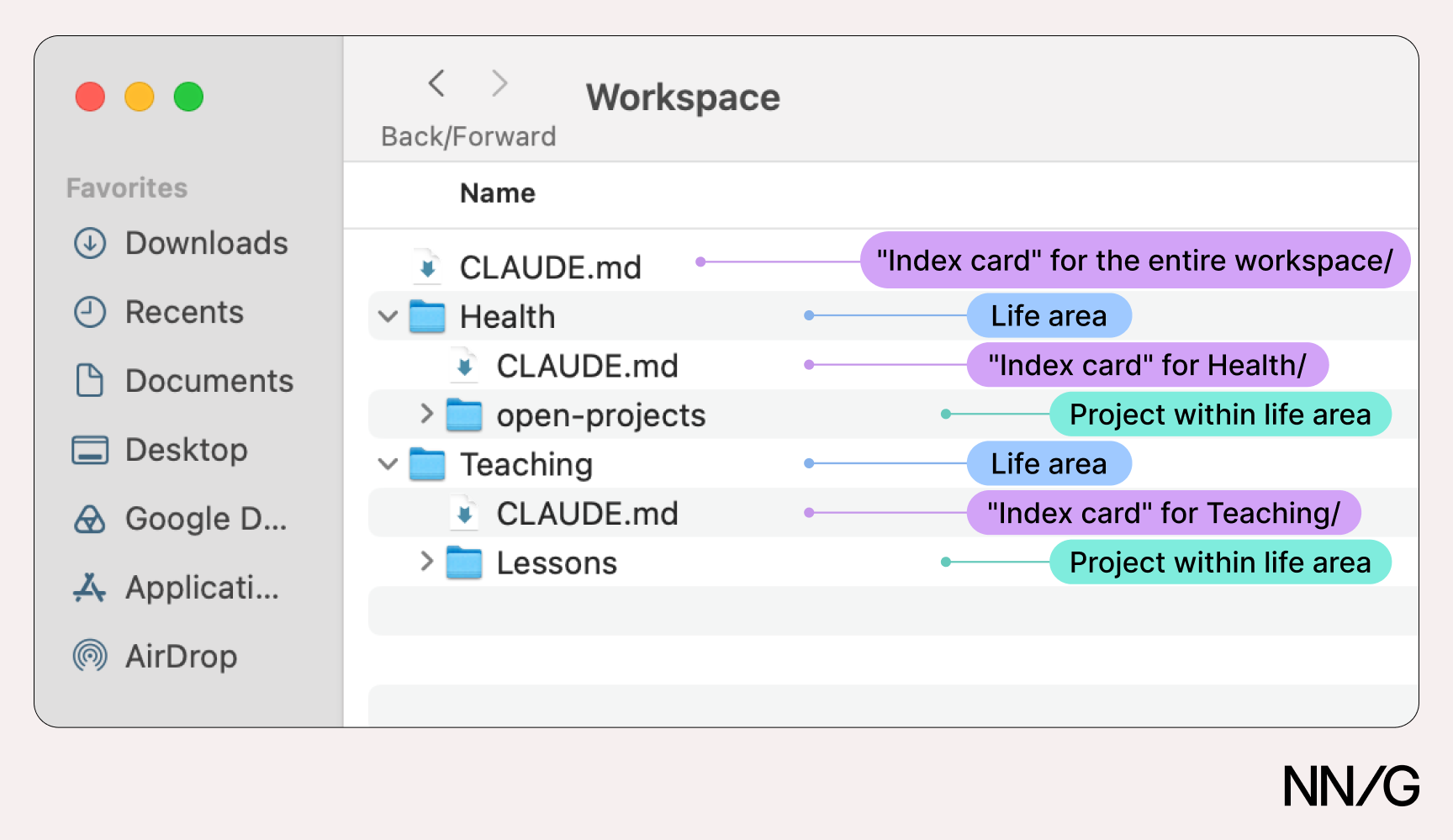
One established way to keep a library organized (well documented by the AI labs themselves) is to put an “index card” file in each folder describing what the folder contains and when and how it should be used. In Claude’s ecosystem, these files should be named CLAUDE.md.
Here is how our most fastidious participant structured his context files:
Lesson 4: Give Agents Only the Context They Need
Models now accept millions of tokens, and power users pay for high usage limits, but LLM performance still depends on how much is in the context window. Giving the AI access to tangential context does not necessarily improve its performance, any more than a firehose of information improves a colleague’s. This is particularly true of ambient context: many users likely grant access to far more than the agent needs.
Notably, the most elaborate context library we saw was engineered to load as little as possible. Its owner explained that the folder in which he started a session determined what the agent could know. Starting at the top of the folder hierarchy gave it the whole map and let it pull in whatever it needed; starting inside a single project confined it to that project’s folders and subfolders. He enforced this with one rule: “It must move up or down before it can move sideways.”
In the image above, for example, a session started inside the open-projects/ folder is theoretically blind to the rest of the library. To reach something in the Teaching/ folder, the agent must climb first to Health/, then to Workspace/, and read the top-level CLAUDE.md index card to find out where to go next. Along the way, it never loads the contents of the folders it passes by.
Bleeding Across Use Cases
Because the AI can’t judge which context is relevant to a task, it can apply context where it doesn’t belong — especially when users are sloppy about what they give it access to, or when the context comes from a messy source. For example, one participant was frustrated that, when reading client calls and emails, Claude sometimes couldn’t tell whether he or his business partner had done certain work, because the ambient context sources didn’t clearly distinguish between the two people.
Another was surprised that the visual-design guidelines he’d provided for his podcast work somehow got applied to a book-tracking app he was building.
These misfires did not stop participants from using the context they had, but they are an argument for scoping context locally — keeping podcast design guidelines inside the podcast project — rather than making everything global.
Keep Files Short
There’s no magical word count, but most participants kept files under a few hundred lines. Anything much longer probably contains material that doesn’t need to load every time Claude references the file.
Conclusion
Best practices in context-library curation will continue to evolve, but a few basic practices already help: let the agent maintain the library, organize it around index-card files, and load only what each task needs. If the pioneers in our study are any indication, most of us have a long way to go — and until the platforms take on curation strategy themselves, that work falls to users.