
Data dashboards are a common tool used in web apps, intranets, and other business intelligence contexts to show regularly updated information that users must frequently monitor.
Definition: Dashboards are collections of data visualizations, presented in a single-page view that imparts at-a-glance information on which users can act quickly.
The term “dashboard” is a metaphor for a car dashboard, which provides essential information that the driver can absorb quickly, without having to think. Thus, dashboards are not intended as expansive views of complex data: Their goal is not to facilitate exploration; instead, they provide information that can be consumed fast, with a minimum of interaction or cognitive processing. Users can glance at the dashboard and immediately see answers to questions like, “Am I speeding?” and “Am I about to run out of gas?” (in the case of an actual car dashboard), or “Are sales up?” and “Is this week’s email newsletter driving as much traffic as recent newsletters?” (in the case of a data dashboard).
Dashboards are distinct from portals, which provide a combination of resources, information, tools, or access to web-based applications, and are a single-point gateway for a variety of tasks. Dashboards are focused on a single task: communicating critical information.
Operational Dashboards vs. Analytical Dashboards
Data dashboards generally exist in two forms:
- Operational dashboards aim to impart critical information quickly to users as they are engaged in time-sensitive tasks.
- Analytical dashboards provide the user with at-a-glance information used for analysis and decision making, but don’t have the same level of time sensitivity as operational dashboards.
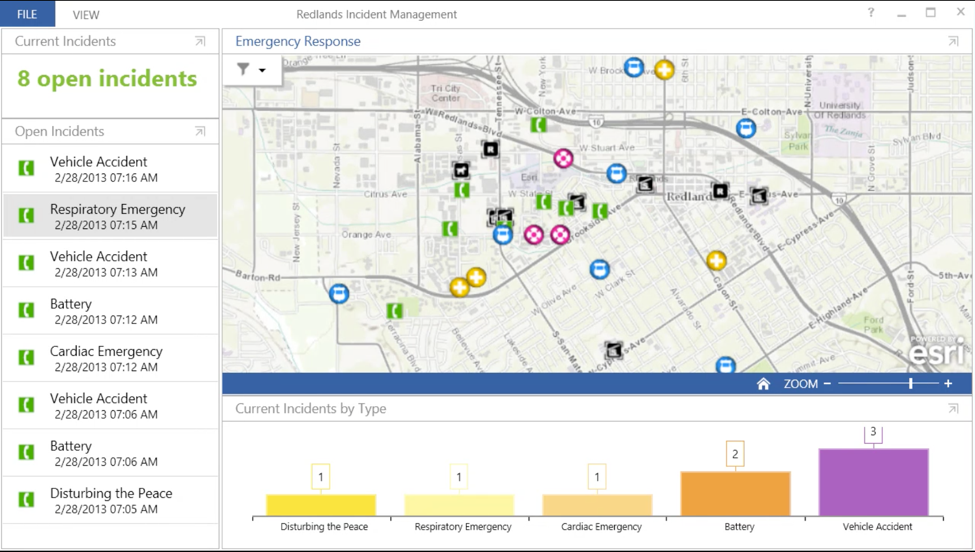
Operational dashboards exist to provide information quickly to users that are making immediate decisions and carrying out time-sensitive tasks, such as monitoring server availability, patient vitals during surgery, customer-service calls, or flight traffic. Operational dashboards typically present data that is continuously updating and changing. While not all operational dashboards are used in high-consequence environments like hospitals and emergency management, they all do need to present data quickly to users to help identify unacceptable deviations in parameters or, visualize available resources.
Unlike operational dashboards, which are intended to support time-sensitive decision making and immediate action, analytical dashboards help users identify the need for further thought, investigation, research, or analysis. A sales dashboard (which is usually an instance of analytical dashboard) that is updated once a day won’t show information that requires an immediate emergency intervention from a sales manager, but it can keep the manager aware of fluctuating sales data that will later demand a thoughtful analysis.
Like operational dashboards, analytical dashboards also require an at-a-glance, single-screen view of the data that they monitor, and must quickly communicate important information to a user.
Preattentive Processing and Quantitative Representation
In order to make it easiest for users to quickly understand the relationships between data, it’s useful to leverage the properties of human visual perception. There are a variety of visual attributes that people perceive very quickly, without fully engaging their attention, in a process known as preattentive processing. For example, in a display containing many lines of the same size, the one line that is longer will “pop out,” without the user having to engage in a visual search to locate it. Beside length, other preattentive features include area, angle, 2D position, and color.

Although all preattentive features stand out easily, not all of them are equal. With some, people simply perceive a difference without being able to exactly pinpoint the size of the difference: for example, although we can effortlessly notice a large rectangle in a display containing many small rectangles, we are not good at judging how much bigger the large rectangle is, compared with the others.
In contrast, we are quite adept at estimating how lengths compare, and we can also accurately estimate position in a 2D space. (See the classical 1985 paper referenced at the end of the article for more detail on this finding.) This fact makes these two preattentive attributes ideal for quantitative representation; charts and graphs taking advantage of these features will generally be easy to understand.

Another powerful preattentive attribute is color: a red dot will easily stand out in a conglomerate of blue dots. However, unlike length, people do not perceive different colors as being in a particular order, so color should not be used to communicate information about quantitative values or magnitude. (Additionally, up to 4.5% of the general population suffers from some form of color blindness; also notable is the fact that many more men suffer from colorblindness than women — around 8% vs. 0.5%; though exact numbers vary by ethnicity.)
Linear vs. Area-Based Graphs
As we mentioned above, 2D position and length are the two preattentive attributes that can be naturally mapped onto quantity and support quick data comparisons and inferences. Thus, visualizations based on them will generally be effective and easy to understand.
Bar charts are a reliable means of representing quantitative data: we pre-attentively process the length of each bar efficiently, allowing for easy comparison of values (especially if they are ordered in an ascending or descending pattern). Graphs that use 2D position like scatter plots or line graphs capitalize on the preattentive 2D attribute.

Circular and Area-Based Graphs Are Difficult to Interpret Quickly or Accurately
Circular graphs like pie charts, gauges, and radar charts do not convey well quantitative relationships between data, as they rely on area and angle to communicate quantitative information. Although area and angle are preattentive features, it’s harder for people to say how much bigger one area is than another.
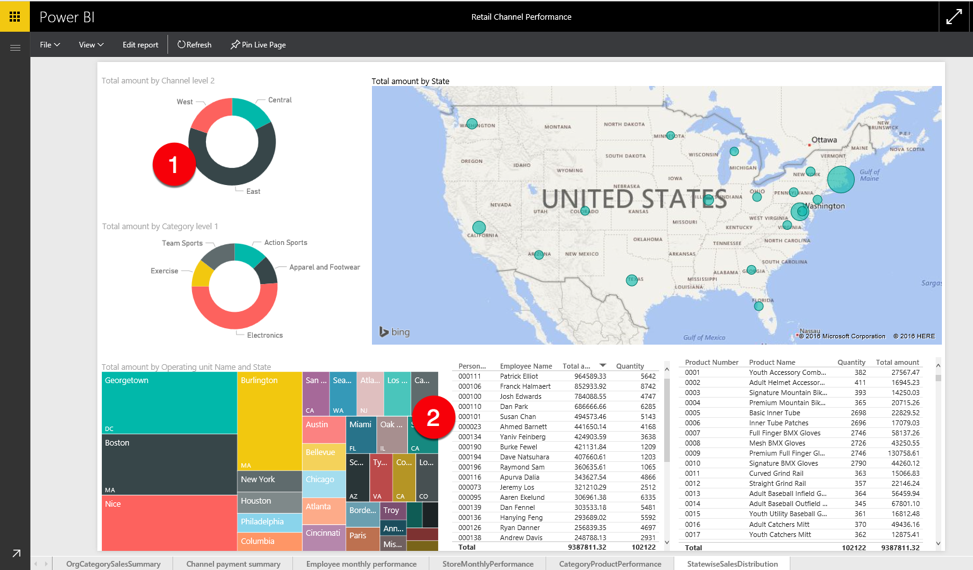
Because charts based on area are not terribly efficient as a means of comparing quantities, visualizations like pie charts and tree maps are generally not recommended for quickly communicating complex quantitative relationships among items in a data set. Pie charts (and their even less helpful cousin, donut charts) are notoriously poor at most information-communication tasks (other than simply showing overwhelming disparities in percentage shares, such as a single source of revenue that represents the vast majority of a company’s profits), and should be avoided most of the time.
Tree maps (which show a hierarchical data set as a series of nested rectangles of different sizes, where the size of each rectangle corresponds to a numeric value) can be useful at representing a complex data space in a compact overview, when there is opportunity for users to leisurely explore the data set and seek out additional detail. However, treemaps are not appropriate for simple, actionable dashboards.
Angle, too, communicates quantitative information poorly — gauges that mimic the analog gauges found in car dashboards simultaneously consume a lot of precious space on a dashboard and are also harder to interpret than linear graphs.

3D Graphics
Plotting a 2-variable chart in 3D is often done to (arguably) improve aesthetics, but will make the chart much more difficult to interpret quickly and accurately, as it distorts the shapes and alignment of the visual features showing data. While area-based graphs (such as pie charts and tree maps) are most susceptible to the distorting effects of 3D visualizations (as placing them in a 3D projection skews the quantitative meaning of the area), 3D bar charts are also more difficult to properly interpret than their 2D counterparts, as they can make it much harder to see which value the top of a bar represents, and how it aligns with the gridlines.


In a pie chart (which uses area to show percentage), the visualization is therefore skewed and potentially misrepresenting the data. Considering that area-based visualizations are already poor at conveying quantitative relationships, this 3D representation makes the user’s job much more difficult.
Use Color, Shape, and Grouping to Show Categories
While color and shape are preattentive cues that do not easily communicate quantitative relationships, they can be used to convey categorical information — that is, which items in a visualization belong together. (According to the Gestalt psychology principle of similarity, items that have similar shape or color are usually perceived as related.) Moreover, spatial proximity can also indicate semantic grouping.
Due to the prevalence of people with impaired color vision, color properties such as hue or saturation are helpful as a secondary grouping cue, rather than as the main way of showing groups or categories. Shape or clear visual grouping are more reliable signals for relatedness, and using color properties can help reinforce those relationships. Color can add visual weight to relationships, but, in most cases, should only be used to reinforce information that is already communicated in a different way (such as using proximity or similar shapes), since the combination of color and shape together make for a more noticeable signal than either alone.

Conclusion
Data dashboards are intended to quickly communicate important information without requiring large amounts of time or cognitive resources to interpret. As a result, encoding the most important information in linear charts and graphs enables users to perceive the critical relationships between data before they even fully pay attention to the visualization.
Learn more about data dashboards in our full-day Application Design for Web and Desktop seminar, and more about human cognition and its impacts on UX in our Human Mind and Usability seminar.
References
William S. Cleveland and Robert McGill: “Graphical Perception and Graphical Methods for Analyzing Scientific Data,” Science, Vol. 229, No. 4716 (Aug. 30, 1985)
Perceptual Edge, “Tapping the Power of Visual Perception,” September 4, 2004 (link)


