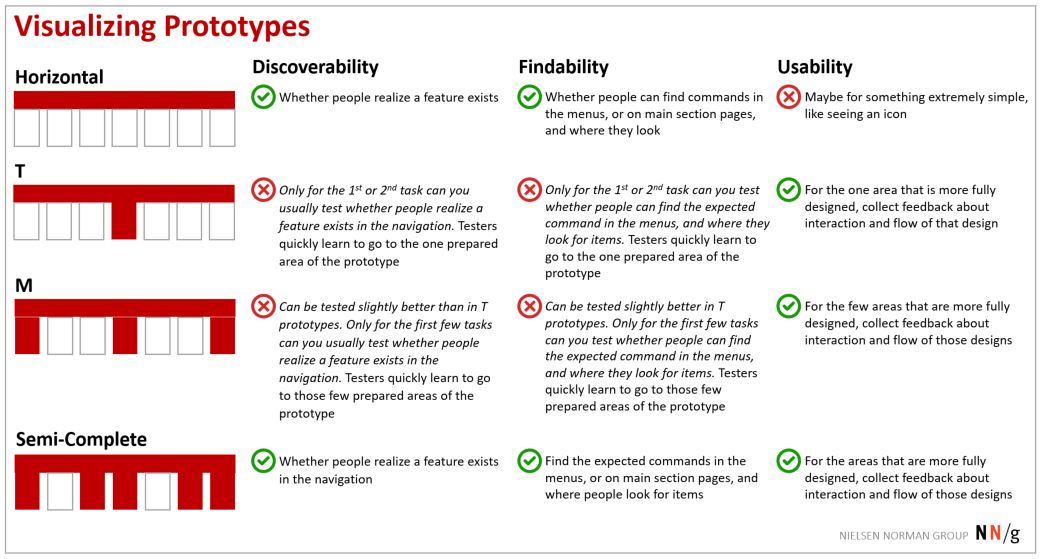
Sometimes it’s easy to visualize and discuss with your team the fidelity of prototypes by mapping them onto your site hierarchy. Think of a site as a tree, with the root at the homepage. The first-level nodes are the main sections — pages corresponding to your global-navigation categories. The second-level nodes are the subsections accessed from each of the main sections, and so on.

Depending on how many of the site-hierarchy link are actually working in a prototype, we can talk about 4 different prototypes:
- Horizontal: All menus open, and some or all of the links lead to main-section pages, but none of the rest of the design is there.
- T: All menus open, and some or all of the links lead to main-section pages. Screens are prepared so users can use one feature or complete tasks related to one area in the design. For example, they may be able to review products and compare them, and look at details. But they can’t look at services, check out, look at investor relations, search, or follow links from the homepage.
- M: All menus open, and some or all of the links lead to main-section pages. Screens are prepared so users can use a few features or complete tasks related to the few areas in the design. For example, they may be able to review products, compare them, and look at details; they can look at services, compare those, and look at details; and they can check out. But they can’t look at investor relations, search, or follow links from the homepage.
M prototypes can be helpful when you have areas that would often be used together, or areas that could potentially be confused with one another. For example, on an intranet, there is a Policies section, and a Benefits section. The types of resources, information, and interaction available can make it difficult to distinguish between the two areas. So giving users multiple tasks that relate to both areas can help you learn about potential confusions and how to fix the related issues. - Semi-Complete: All menus open, and most or all of the links lead to main-section pages. Screens are prepared so the user can use most features throughout the interface and complete tasks.
When testing any prototype with one or few complete sections, always include distractor tasks in the test protocol. Distractor tasks are tasks that purposefully lead users to areas in the UI other than those that are the point of the test. In the case of a T or M prototype, these distractor tasks would lead to the areas which are not yet designed. These tasks take the users’ mind off the fact that you keep asking them to go to the same few menu items. For example, if the Policies and Benefits areas are most completely designed in your intranet’s prototype and are the areas you really want to test, still add tasks that lead users to other areas, such as the homepage and the news. Thus, after a task about pay for jury-duty time off, give a task such as What’s the most interesting corporate news item today and why? And after a task about how to report a down wireless connection, add a task such as: When and where is the next all-hands corporate meeting?
Read the companion article: UX Prototypes: Low Fidelity vs. High Fidelity.