Generative AI tools have sparked widespread interest in the United States. However, this technology remains unfamiliar to many people. Appropriate contextual help provided during the onboarding process will be critical as gen-AI usage expands beyond developers and early adopters.
The Study
In a qualitative usability study with 6 Chinese participants, I studied 3 Chinese AI chatbots:
- Baidu’s Ernie bot (the most advanced of the 3)
- ChatGLM
- SparkDesk
3 out of 6 participants had no prior experience with AI tools of any kind. The rest had limited awareness of AI tools.
Users with Low AI Literacy Need Extra Help
Users with no previous experience with generative AI may have a basic understanding that AI tools can create images and videos. However, they have no idea about how the tools work and what they can be used for.
For instance, when asked if they knew anything about generative AI or large language models, a participant said,
“Is it similar to AI? My initial understanding of AI involves things like AI-generated images and videos widely shared online. Also, AI like robots in banks and hospitals that help the elderly or answer queries. My impression mostly revolves around these aspects; I haven’t had much exposure to others.”
As a result, participants felt confused when these tools assumed users knew how they worked.
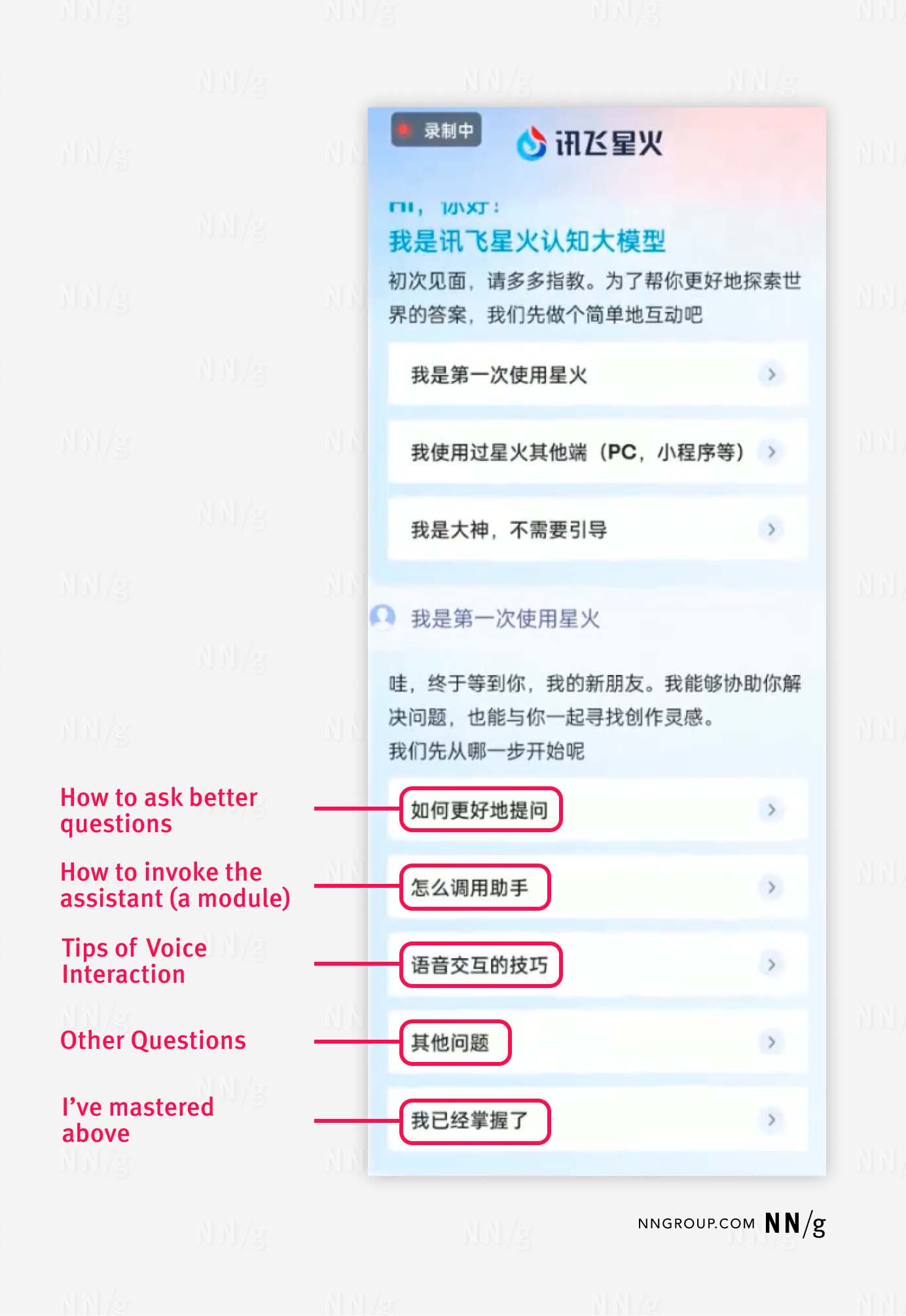
The SparkDesk app welcomed new users by providing a long tutorial but assumed that users knew it was a conversational chatbot. One FAQ provided during the onboarding process was titled How to ask questions.
One participant commented,
“How to ask questions… Why should I ask questions? […] Use @ in the input field to choose from 2000+ roles. Where is the input field? Can I get it to work while I’m in another app like QQ? What is a role?”
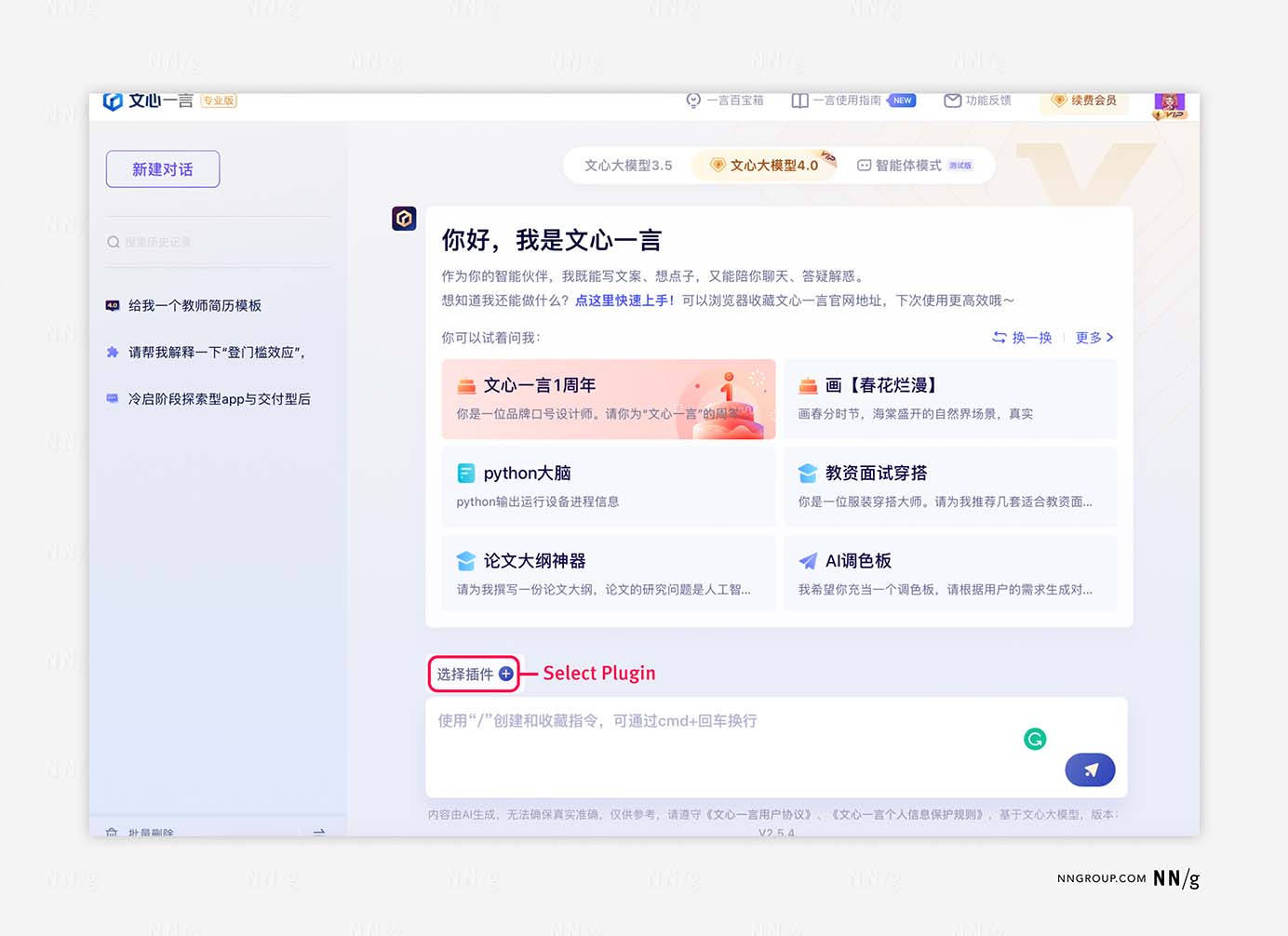
Inexperienced users also had difficulty grasping the full range of the tool’s functionality, such as whether it could create and process text, images, and videos.
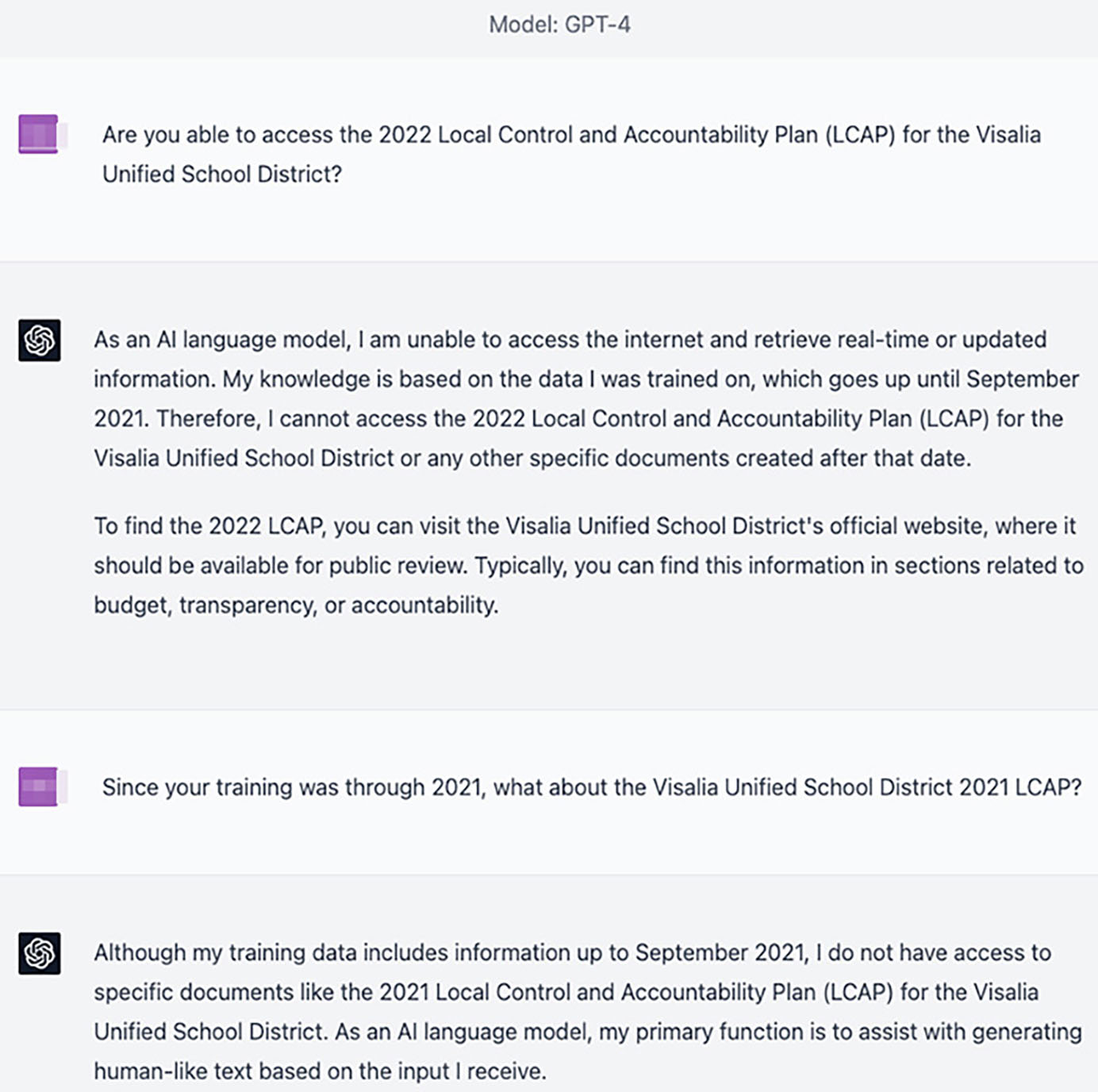
When this happened, they directly asked the bot about its capabilities if the answer wasn’t obvious from the interface. It’s reasonable to guess that a conversational chatbot could answer questions about itself. However, when the bot failed to provide accurate answers, users’ understanding of the tool’s capabilities was negatively impacted.
This behavior isn’t limited to Chinese users of AI chatbots. In our study with early ChatGPT users in the US, we also observed Can You prompts, where new users were asking the bot about its capabilities. For example, they directly inquired whether the bot could access the internet or process a 100-page PDF document for them, instead of using search engines or reviewing the company's support documentation. Therefore, the bot should possess a comprehensive self-awareness of its own capabilities and be prepared to assist users when they inquire about its abilities.
Onboarding Should Help Users Learn the Tool
Effective onboarding is crucial for introducing users to new technologies, including AI chatbots. Even though users had many questions, the tools we evaluated often failed to provide the answer at the right time point with the appropriate medium.
Despite the novelty of these tools, the fundamental principles of interaction design remain
unchanged. Good design practices are still applicable and necessary. Here are 3 recommendations that not only help users understand AI chatbots but can also be universally applied to the design of new tech products.
#1: Use the Tool Name to Indicate Functionality
The tool’s name should effectively communicate its function. For example, the name “ChatGPT” clearly suggests a chat function.
In contrast, many Chinese AI bots lack this clarity. Ernie’s Chinese name means “summarizing the article’s essence with one word” and is rooted in classical rather than modern Chinese. New users struggled to identify or remember the app based on its name alone.
While UX often has little influence on branding decisions, the app-store description offers a chance to clarify the tool’s purpose. Ernie’s uninformative description in the Apple App Store fails to guide users. In contrast, EF Hello, an AI language-learning app, successfully utilizes its name and a succinct tagline – Speak German & English with AI – to convey its functionality.
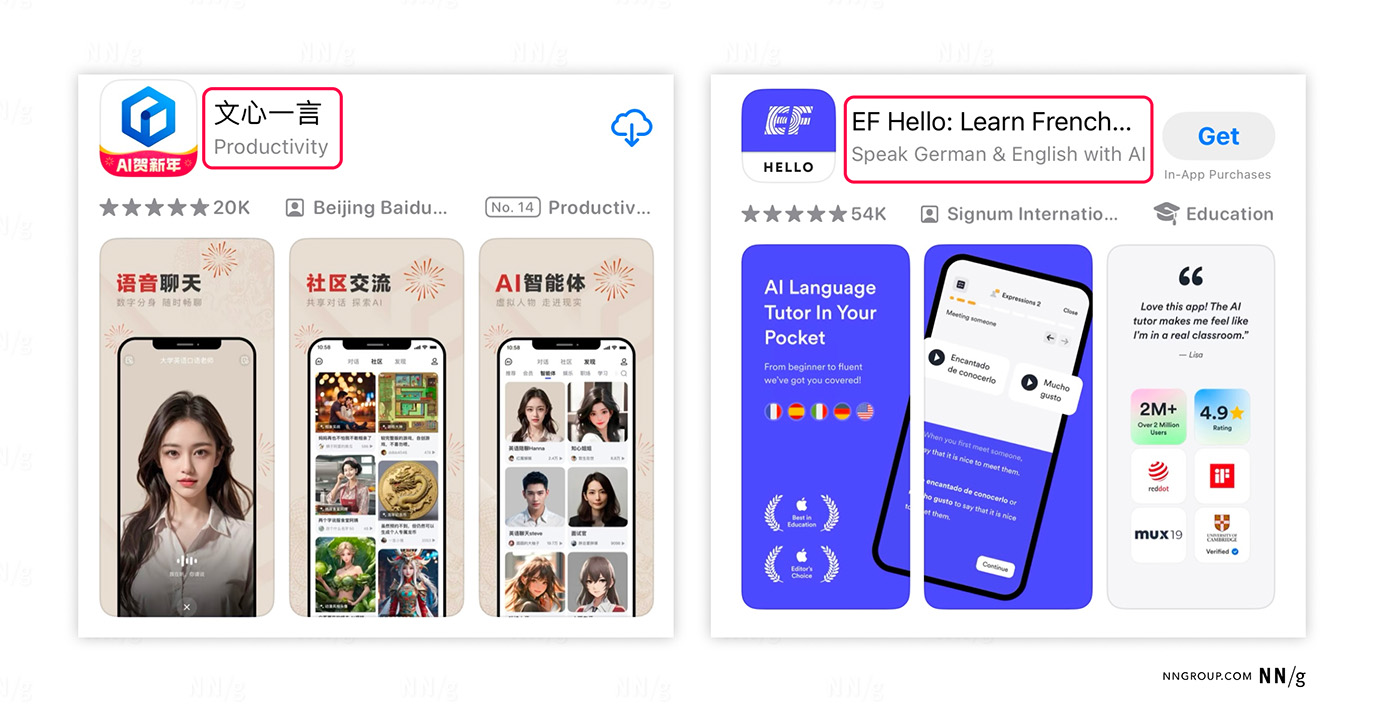
✅ (Right) The mobile app EF Hello clearly communicated its purpose through both the extra explanation text (Learn French…) after the app name and the tagline Speak German & English with AI.
#2: Follow Best Practices for Onboarding Tutorials
Avoid Long Onboarding Tutorials
People don’t want to read a long list of instructions before they can try something out. That’s why we recommend skipping onboarding when possible. This applies to generative AI tools as much as to any other product.
The SparkDesk mobile app provided 4 FAQs during the onboarding process, including:
- How to ask better questions
- How to invoke the assistant (a module of the app)
- Tips for voice interaction
Still, none of the FAQs answered the fundamental questions new users have: “What does this do?” and “How does it work?” Users tend to skip information that doesn’t seem immediately relevant.
One of the tips in SparkDesk’s tutorial was about how to ask better questions. This tip is useful, but it was presented too early in the user journey.
The first step to interact with me is to learn to ask questions. Asking me questions requires some thought!
To get satisfying answers, I recommend asking me like this:
First, ensure the question is simple, straightforward, and clear.
Second, we summarized a formula that is easy to memorize:
Context + Specific Request + Output Specifications
For instance, we need to prepare a speech script
- Context: at a college graduation ceremony
- Specific Request: The theme is ‘Chase Your Dream’
- Output Specifications: Use some quotes, examples, and data
The final prompt would be: Please write a speech script for a graduation ceremony, the theme is ‘Chase Your Dream,’ and use quotes, specific examples, and data.
The prompt formula it provided was comprehensive and matched the AI prompt structure we observed in a previous diary study. However, it wasn’t provided at the right time: our study participants were not aware of the bot’s conversational UI at that point. A better approach would be to offer these detailed instructions after users have seen the conversational interface, just before they begin their first chat session.
Generative AI tools can be complex. Instead of showing all tips at one time and overwhelming users, provide contextual help. For instance, voice-interaction tips should appear when the user is about to use the voice-command feature for the first time.
As a positive example, Perplexity.ai used a hover tooltip to explain its Pro feature instead of flooding users with a tutorial about all its features.
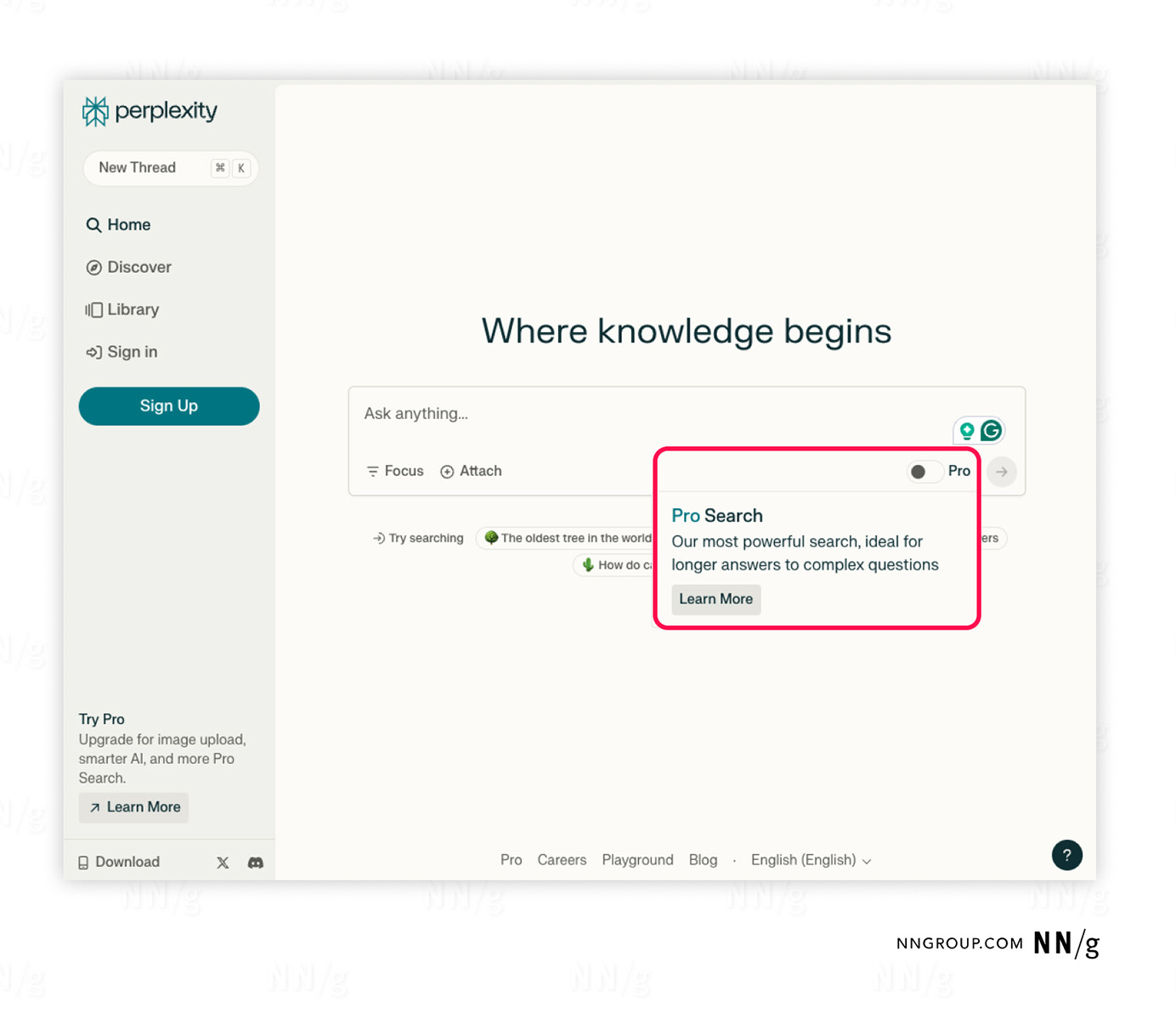
Unnecessary steps in the onboarding process can prolong it and potentially mislead users about the app’s capabilities.
In the case of the Ernie mobile app, users were prompted to select from three characters with different personalities during onboarding. This feature, although intended to add a playful element, led at least one user to believe it might affect the type of content generated by the app. When evaluating the tool’s output later, she thought it was too “cartoonish” because of the character she had chosen.
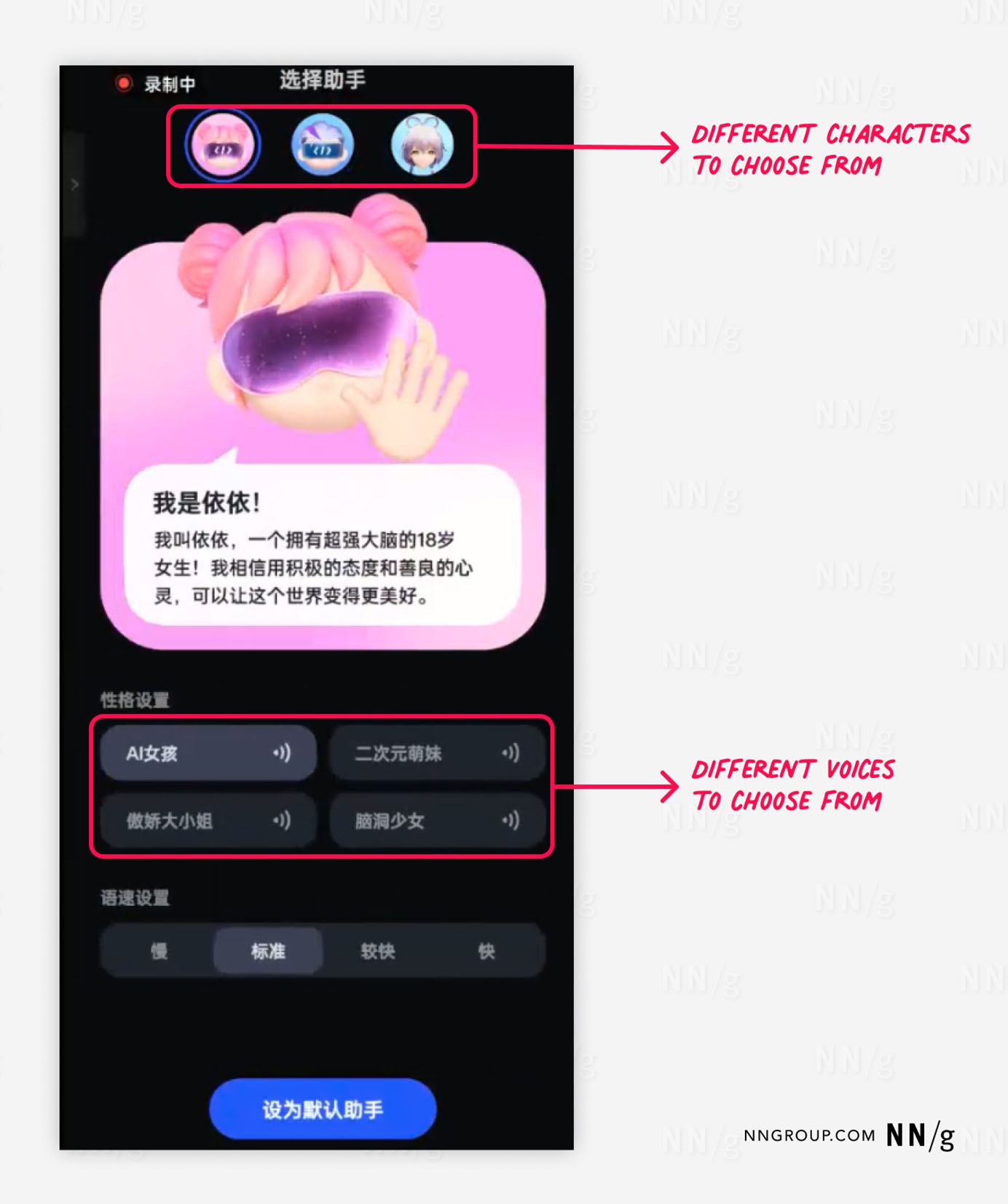
This design did have one positive impact on the participants’ mental models: by asking users to choose a voice, the design implicitly told them that they could interact with the bot by speaking.
Most people are new to AI tools, and, as a result, they’re actively forming mental models to help them understand how they work. Even small details can change the way people understand the technology.
Avoid Popups
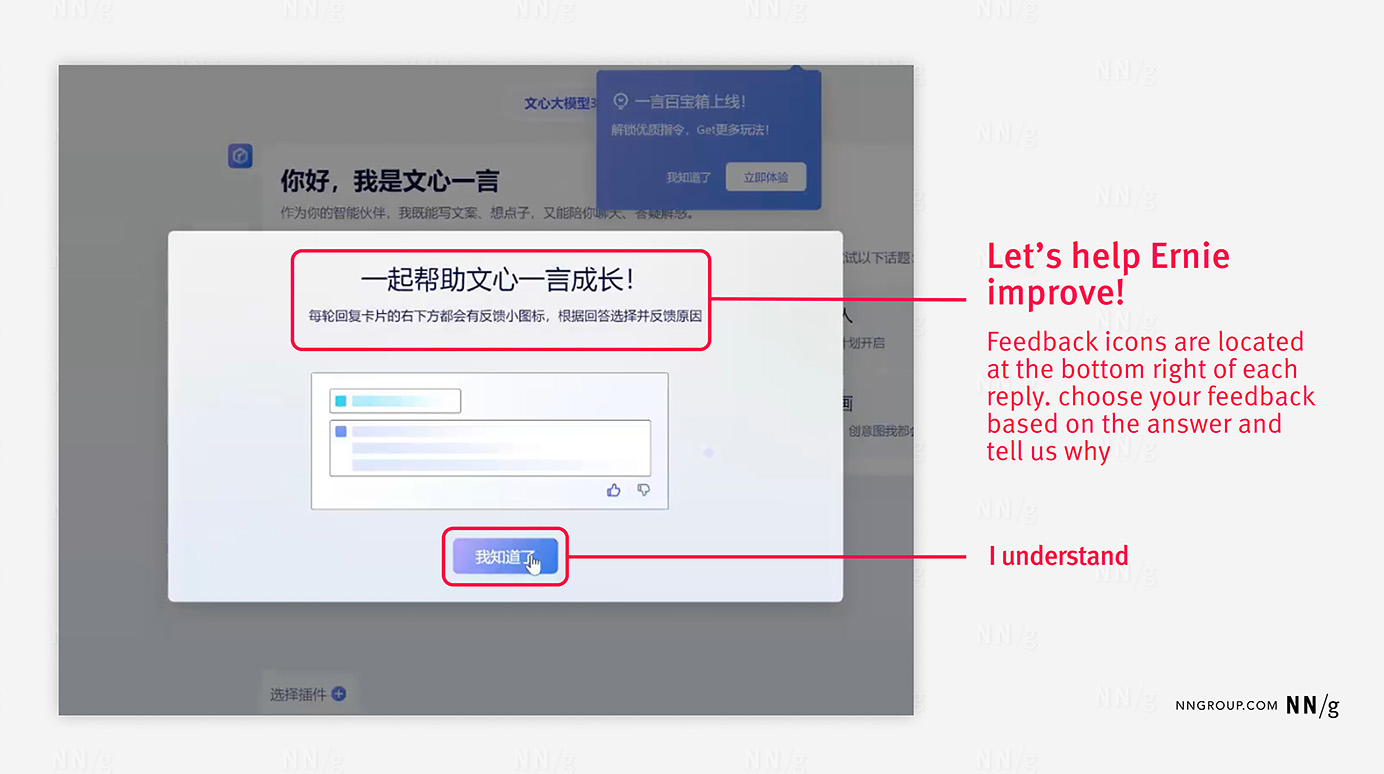
Avoid popups during onboarding since they can be confused with unwanted advertisements. Ernie’s desktop version displayed a popup to instruct people on using thumbs-up or thumbs-down icons to provide feedback, buts most users dismissed it quickly. Such instructions are often unnecessary when icons are self-explanatory.
#3: Provide General Task Examples Instead of Specific Ones
New users often start their journey with a generative AI chatbot by following the examples it offers, which help them understand what it’s capable of. However, they tend to be ignored if these examples are overly niche — like Horoscope Matching (e.g., which zodiac sign makes the best romantic partner for an Aries).
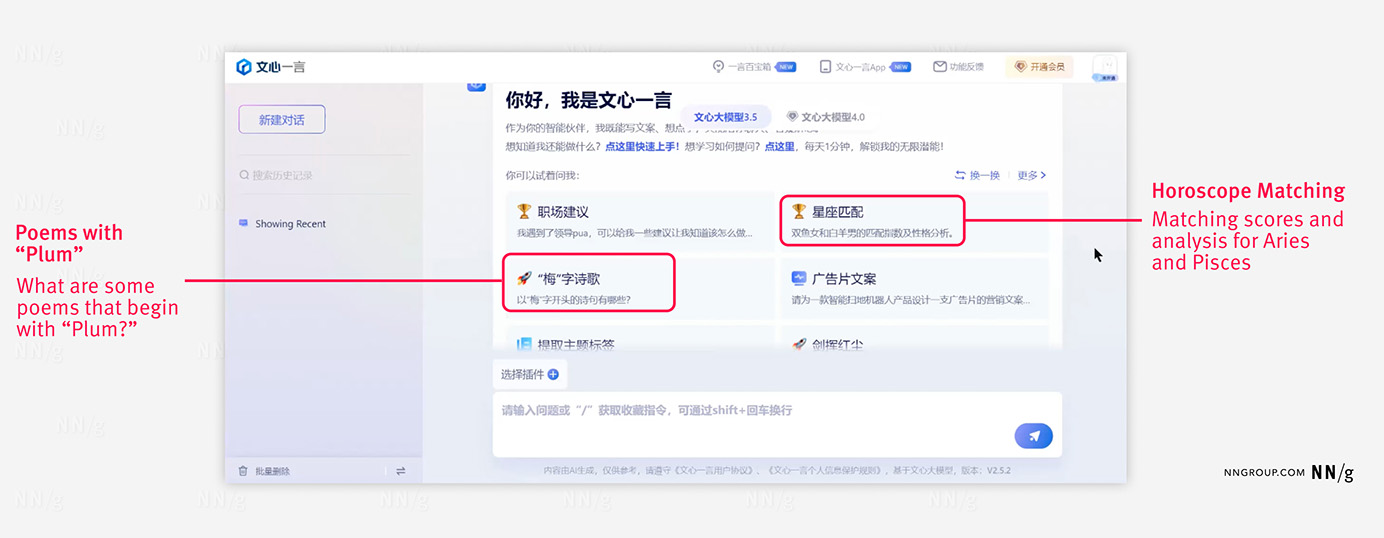
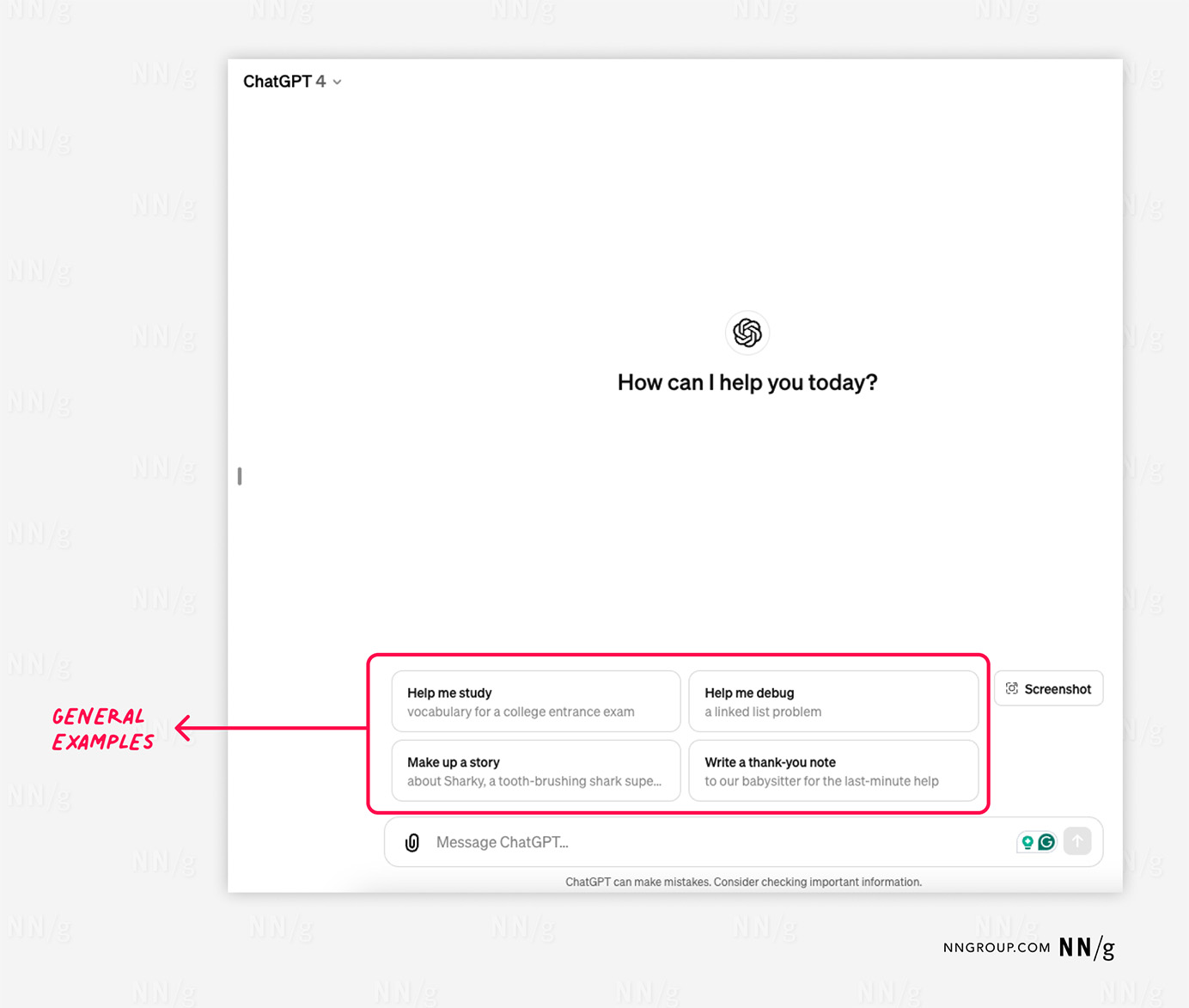
In our study, broader prompts such as Help me generate text or Help me generate images were more effective. These general examples were not only more inviting for newcomers but were also the ones they returned to after their initial interaction with the chatbot. In contrast, overly niche examples seemed to be less beneficial, as users need to work to make them applicable to their situation.
ChatGPT provided helpful general examples above its input field. These examples showcased the types of tasks the bot could perform, highlighted in bold, with additional details offering example context.
Design Recommendations for Onboarding
Innovative technologies and the possibilities they bring often excite practitioners. However, without a user-centric design approach, these products can overwhelm and confuse those who are new to the technology or lack specialized knowledge. Our role as designers is to close the gap between a tool’s capabilities and the user’s proficiency in harnessing its full potential.
The onboarding process presents a prime opportunity to introduce the product's capabilities in manageable portions rather than overwhelming users from the start. To craft an effective onboarding experience, especially for products that incorporate new and complex technologies, consider the following guidelines:
- Simplify the onboarding process: Onboarding tutorials should be brief yet informative, addressing users’ key questions and stating the tool’s purpose.
- Provide contextual help: Rather than displaying all features at once, introduce them as users engage with each specific feature. This targeted approach can reduce cognitive overload and increase the likelihood that the information will be retained.
- Employ broad examples: For conversational chatbots, use general examples to showcase their capabilities and ensure that users grasp what the tool can do at first glance. Broad examples invite exploration and are more approachable than niche or trendy prompts.
- Ready to help users: The bot should have a comprehensive self-awareness of its capabilities, and provide help upon user request instead of directing them to search for information on other platforms.
- Communicate clearly: The initial impression of your product starts in the app store. The name, tagline, and images should accurately convey the product's function and set correct user expectations.
- Eliminate complexity: Learning a new tool can be scary and time-consuming. We should minimize user effort and cognitive load by removing unnecessary items like popups and extra steps. This applies to the number of features as well; too many features lacking clear organization can backfire and harm the experience.
In the realm of emerging technologies, while the products may be novel, the principles of interaction design and user research remain constant. Test with real users to gain first-hand insights into their pain points. Also, consider recruiting diverse user groups to ensure the tool is accessible and useful to a wide audience. By adhering to these principles, designers can create products that not only fascinate but also empower users.