

It feels like every site or app has introduced an AI chatbot over the last couple of years. But most users don’t know what to do with them, and it's not clear that the companies building them do, either.
These chatbots sit on homepages and product pages without a well-defined role — somewhere between a search bar and a human sales assistant — and users can't tell what unique value they provide.
In our research, participants told us they rarely used site AI chatbots, often didn't notice them, and when they did try them, struggled to see what they offered beyond what search, filters, or tools like ChatGPT already provide.
Many Chatbots Aren’t Discoverable
Many AI chat features have been around for at least a year. One of the big issues a year ago was that users simply didn't notice them. We expected that, with time, users would come to learn about and expect these features. That still seems not to be the case.
Many of our participants had accounts or were regular customers on the sites we tested, yet they had never noticed or used the chat features. And some designers still haven't addressed the basics: chatbot icons were small, lacked text labels, or blended into busy backgrounds.
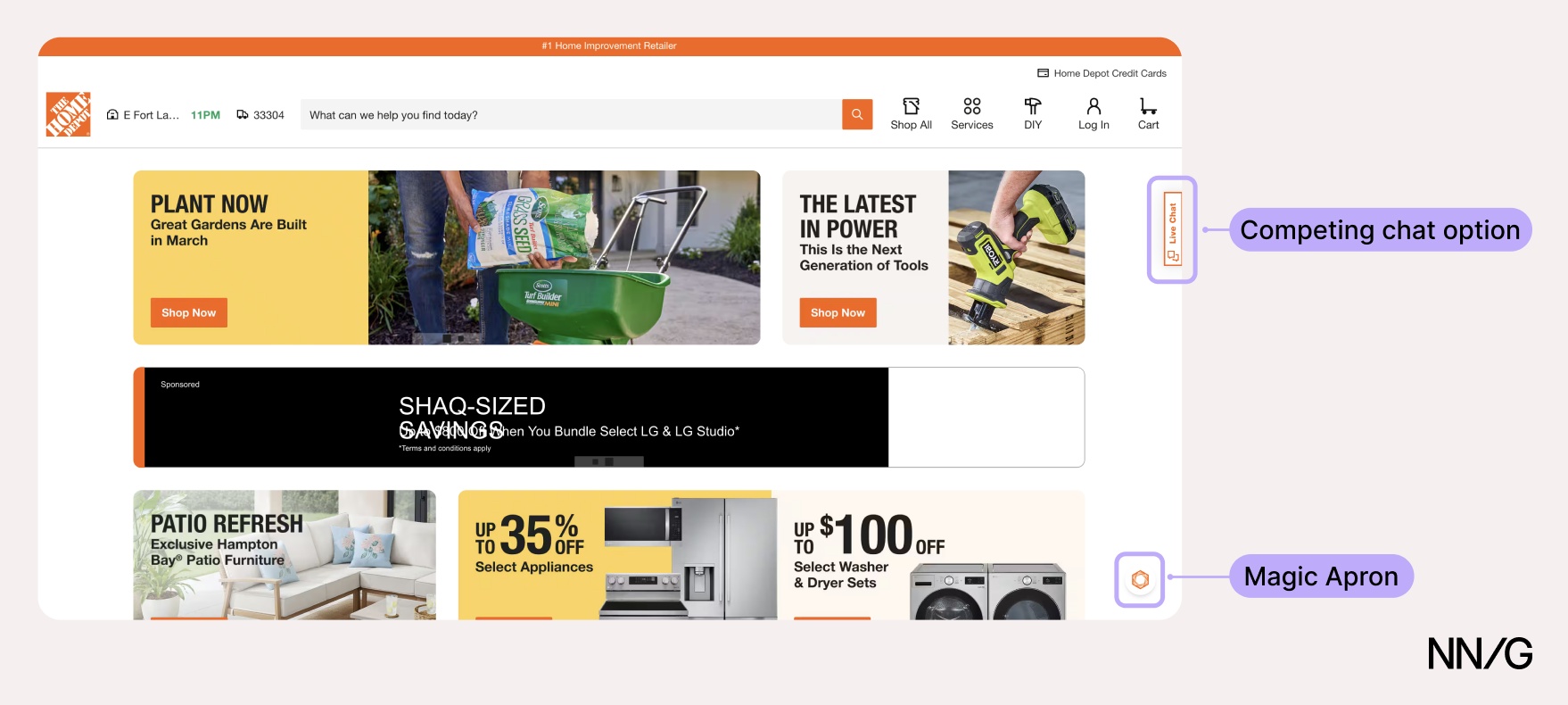
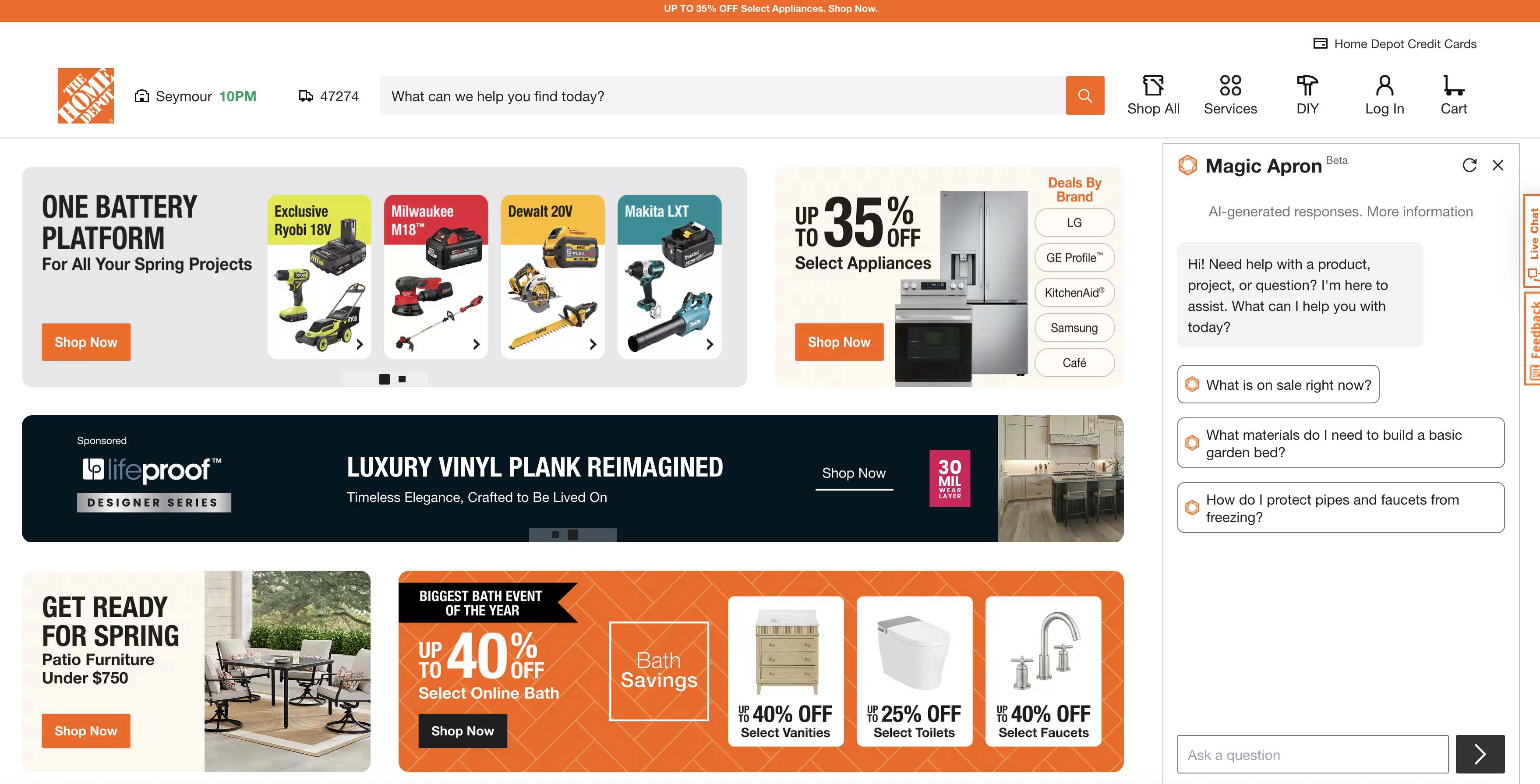
Even regular Home Depot shoppers didn't know Magic Apron, the AI chatbot, existed.
“I just thought that was just a graphic. I'll be honest with you.” (....) “If you didn't say nothing [sic] about that little circle that was on the bottom right, I would have never known that's there”
Making these features more discoverable doesn’t mean making them disruptive. Participants appreciated that the AI chatbots stayed out of their way — the issue was that they were too easy to ignore.
“I think surfacing it to the user a little bit more clearly would be helpful. I appreciate that they keep it out of the way when it's down there in the bottom, but it doesn't come to (...) mind when I hit the site.”
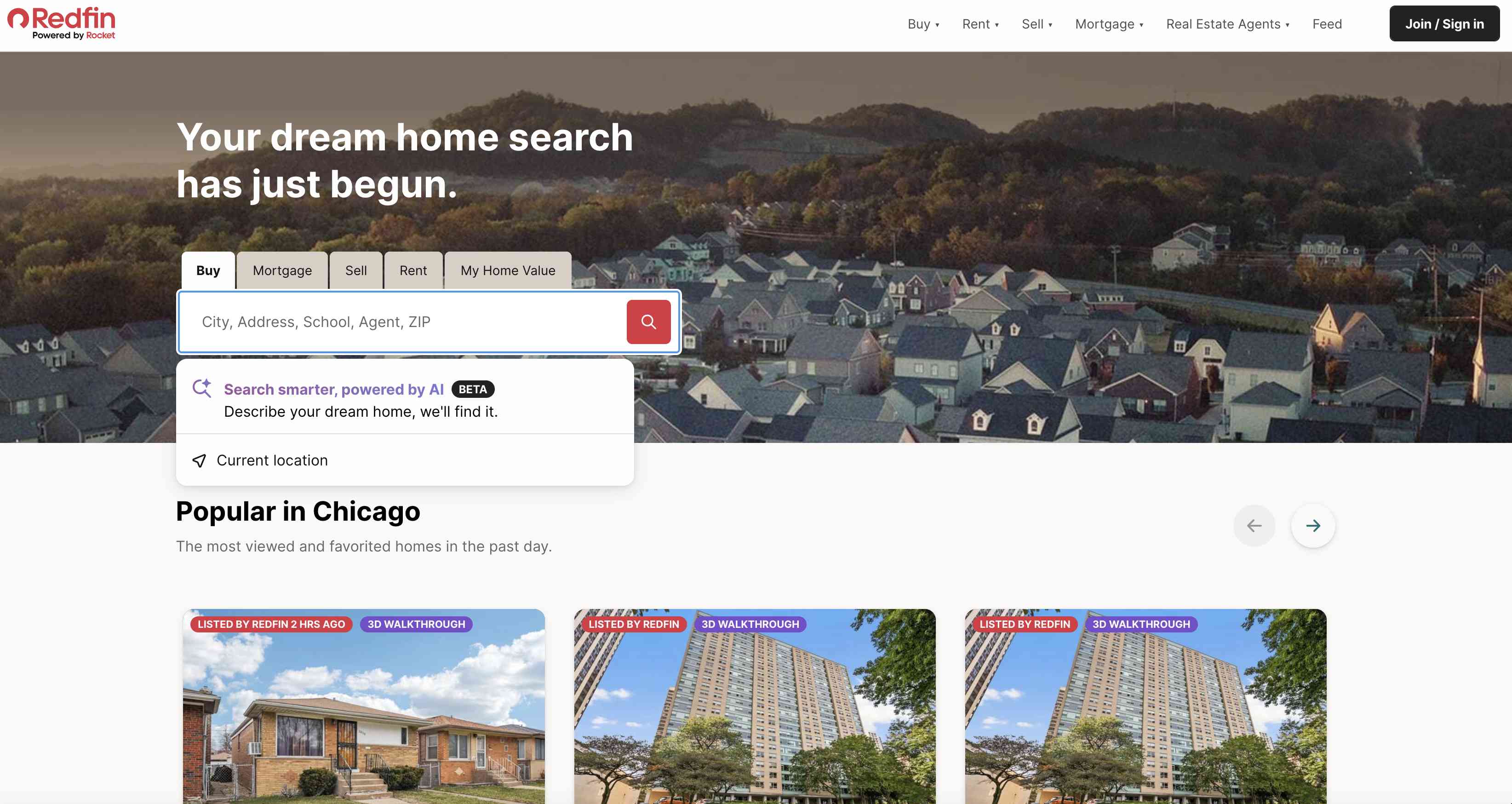
Discoverability is also made harder by inconsistency across sites. These chatbots are placed in different locations — sometimes near the search bar, sometimes in the main navigation, or as floating icons in the corner — so users haven’t developed a reliable expectation of where to look.
Past Experiences Make Users Skeptical
Even when users notice a chatbot, many won’t try it. Chatbots have been around for a while — well before modern LLMs — and they have historically been pretty unhelpful. Many web users have been burned by bots that asked irrelevant clarifying questions, steered them down rigid preset paths, and failed to surface what they were looking for.
“Most people have been exposed to the bad version of these (...) those really unhelpful customer-service bots, which don't answer your question at all. It just gives you, like, stuff the website tells you. So, I personally have a bias against these things right now because I've had so many bad experiences.”
Another participant, when directed to use a site’s AI chatbot for a task, told us she instantly got a “bad taste” in her mouth.
“I just get turned off by it because (...) you go through the AI or the chatbot and you ask the question and (...) I feel like a hamster [in a] wheel, kind of spinning around and around, and I'm not really getting anywhere. Or they say, ‘I'm sorry, but we can't help you with that. Call this number.’”
Some of our participants didn’t think to use these chatbots because they didn’t expect they’d be smart enough to help. Some were genuinely surprised when the chatbots knew what page they were on or had access to information they didn’t expect. One participant, noticing that the chat had followed him to a product-details page, decided to ask Magic Apron for the product’s dimensions, not expecting it to work:
“Does this [the chatbot] know that I'm on this page? I don't think it does (....) I feel like it's living in its own sidebar and doesn't know what I'm looking at. (....) I don't think it's gonna work, but I'll give it a try. Okay, that's cool. That worked.”
He crosschecked the dimensions and found them to be correct.
“I think I got everything right. That's kind of nice. So maybe, you know, Home Depot could do a better job of letting me know that I could ask questions about products.”
However, these discoveries didn’t occur naturally — as part of the study, we asked users to engage with the chatbot longer than they would have done on their own.
Chatbots Don’t Communicate What They Can Do
Even when users are willing to try a chatbot, most do a poor job of communicating what they can actually help with. Many of the chatbots we tested didn't clearly explain their capabilities, leaving participants unsure and confused. This is a new form of an old problem: weak information scent. Just like with vague link labels, users won’t click on things for fun. They explore what promises them value.
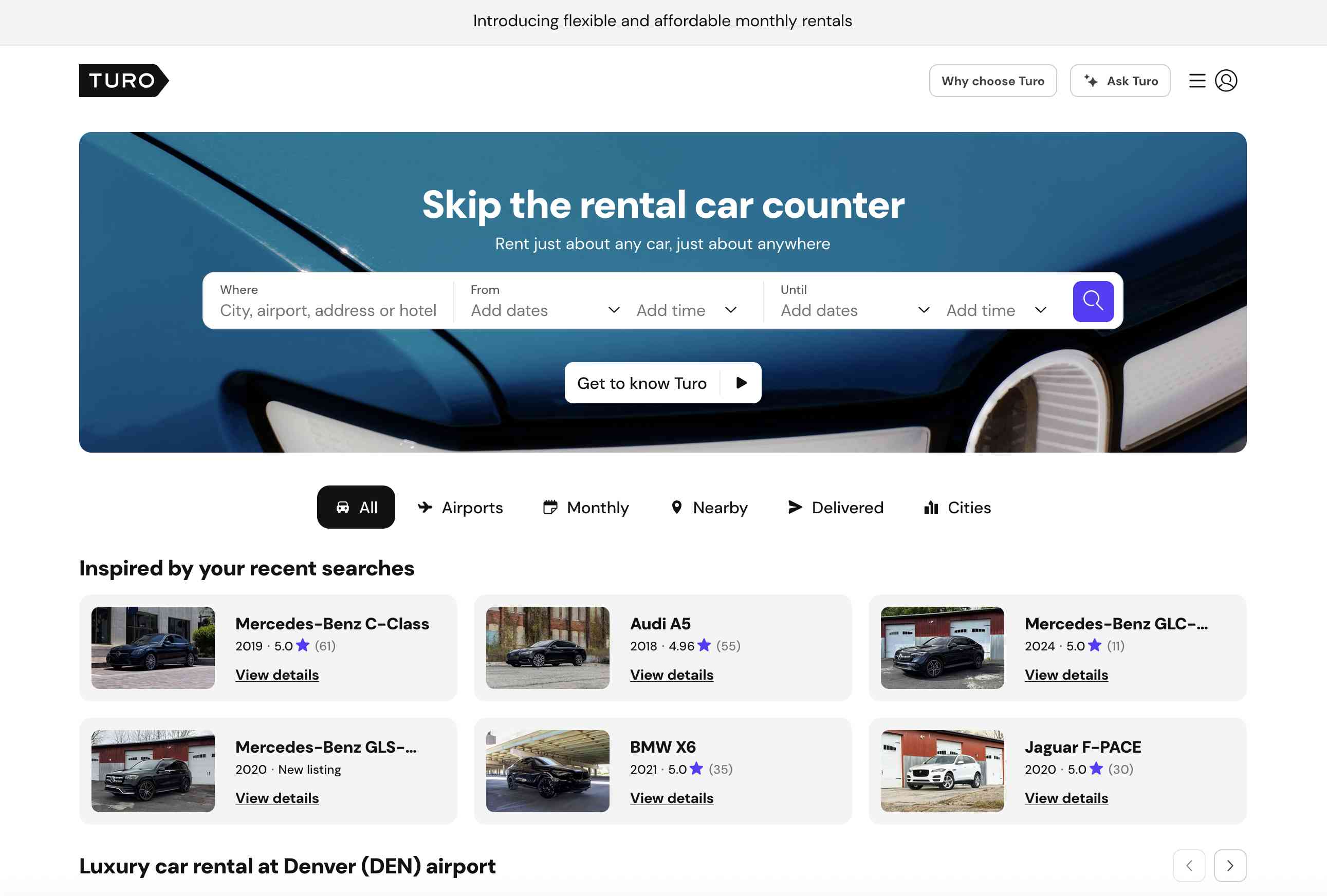
Turo, a peer-to-peer car-rental marketplace, had an AI chatbot that promised to help users find any info they need — a vague opening that gave our study participants no real sense of what it could do.
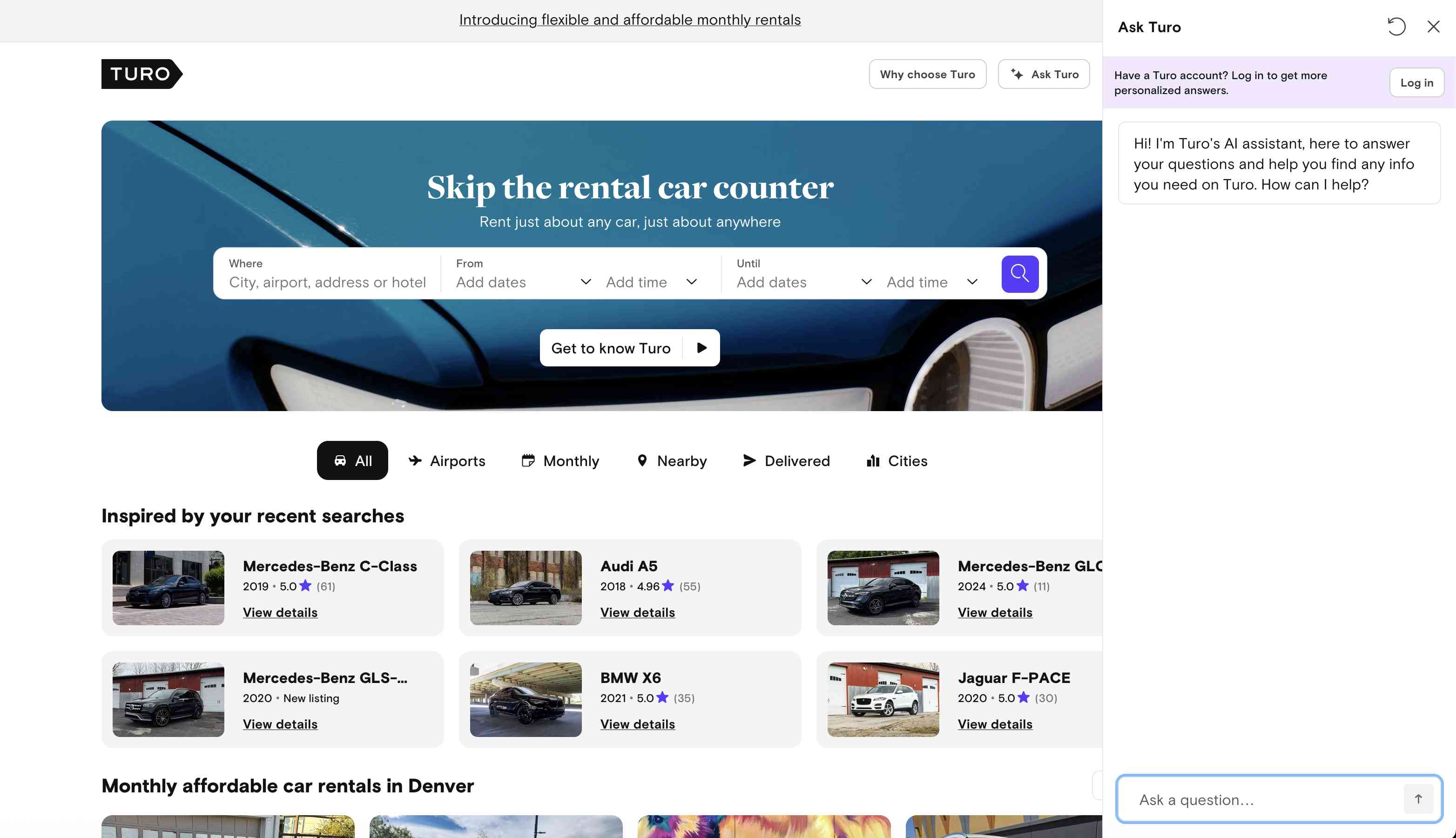
Given that vague messaging, one participant assumed it could recommend vehicles for an upcoming vacation. He submitted his request and received a lengthy response with instructions on how to use the site’s search and filters — something he didn’t need to be told! The chatbot’s response ended with What dates are you planning to travel?, which implied a tailored experience was coming.
He began typing his requirements, expecting to see pictures of cars that matched. Instead, he received a similar message directing him to search the site. He finally realized the chatbot couldn’t help him and began questioning its utility.
“Why am I going through all this here? [...] Like, I could have done that [used the search] already, instead of (...) me wasting my time typing with [Ask] Turo.”
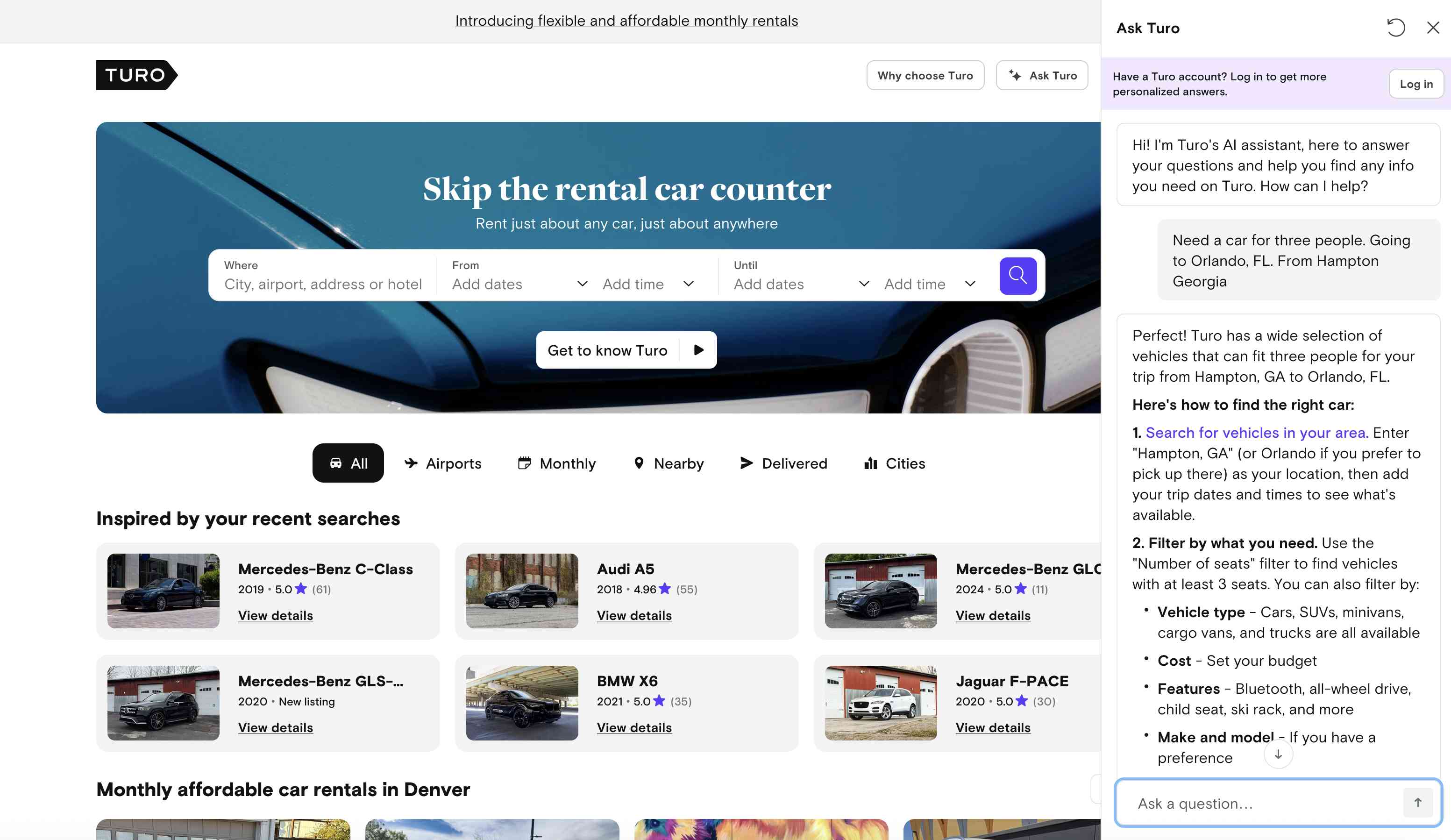
Since Turo wasn't clear about its chatbot's abilities, the burden of figuring out what the bot can and can't do fell on the user. The cost of that ambiguity wasn't just confusion; it was wasted time.
Users will not experiment to discover a chatbot’s value. If its benefit is not obvious immediately, they will move on.
Some Chatbots Offer Help that Users Seek Elsewhere
Some chatbots offered capabilities that, while useful in theory, didn’t match why users visit these sites.
Williams Sonoma, an upscale kitchenware and home-goods retailer, had an AI chatbot — confusingly named both Olive and AI Sous Chef. The chatbot was fairly upfront about what it could do: help plan dinner parties, suggest table decorations, and find recipes.
But that’s not what most people come to Williams Sonoma for. They come to buy cookware.
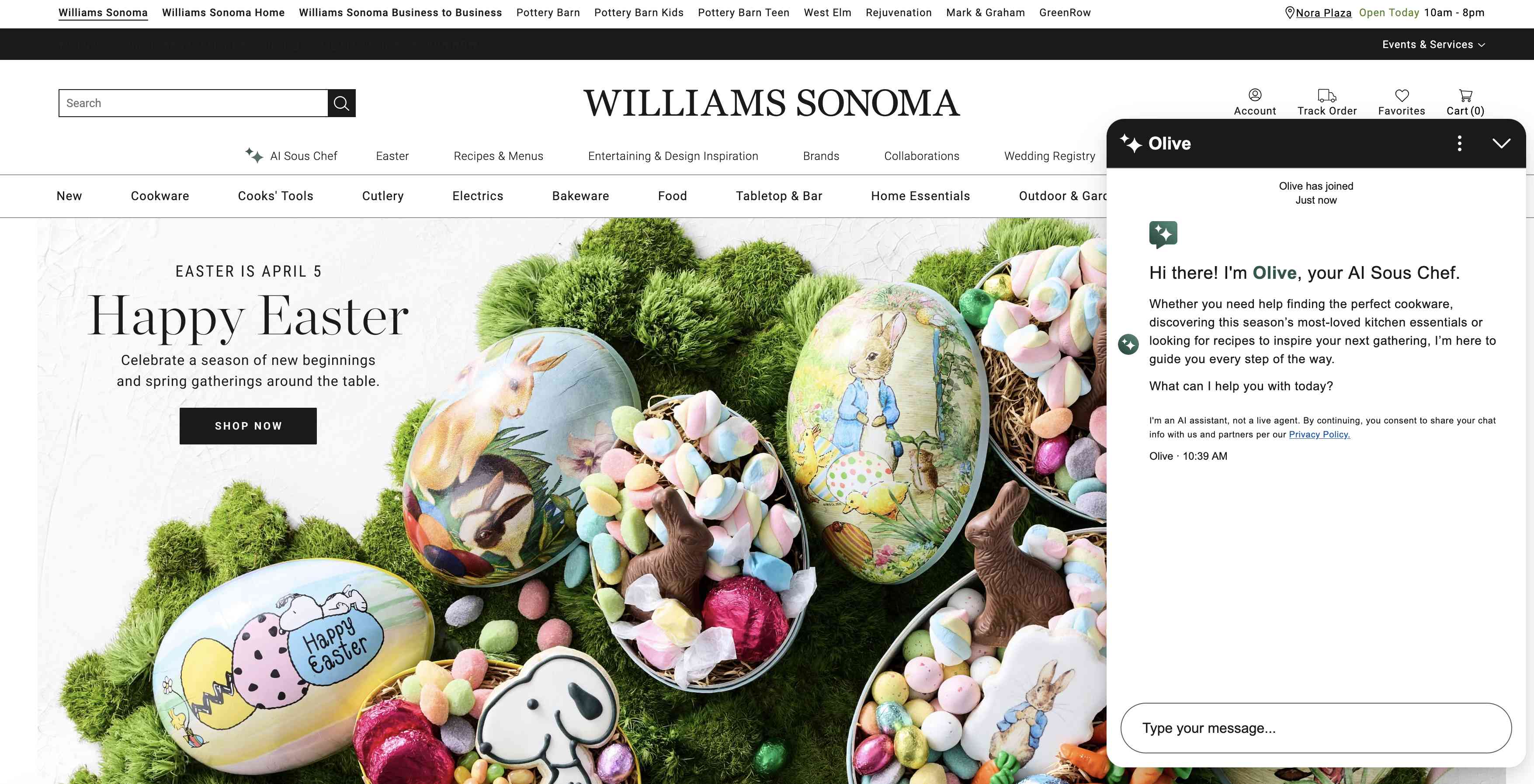
Even after spending time with the chatbot, one participant still couldn’t connect its capabilities to her needs:
“What is this AI Sous Chef feature and what could I use it [for]?”
Even if a chatbot clearly articulates its purpose, that purpose still must align with what users actually want to accomplish on the site. (All this boils down to the same old advice: don’t start with AI, start with the problem.)
Users have other go-to places for information-seeking tasks (like search engines or general-purpose genAI chatbots such as ChatGPT or Gemini), and they provide much more comprehensive answers.
For example, one participant had multiple DIY projects he wanted to do around his home, such as replacing a bathroom sink. When encouraged to use Home Depot’s AI chatbot, Magic Apron, for advice, he told us he would usually start on YouTube to learn if it’s something he could do himself, before working with Gemini for step-by-step instructions. He visited Home Depot’s site only after he already knew what tools he needed.
“Home Depot would be my last stop after I kind of decided the game plan.”
Williams Sonoma's chatbot provided recipes and help on how to maintain appliances, but users didn’t think to use it for that kind of information. Users come to retailers when they wish to buy something. When asked how to care for and maintain an espresso machine, one participant admitted she'd probably use Google.
Most people start an information-seeking task by using a search engine or a general-purpose AI chatbot, rather than a specific retailer’s website.
And when a site’s AI chatbot's advice feels more like a sales pitch than genuine help, it makes things worse. When one participant asked how to replace a bathroom sink, Magic Apron's response led with an advertisement for Home Depot's installation services:
“It feels much more like a way to buy stuff from Home Depot. So, I come at it with some skepticism because it's clearly not just trying to give me pure information for the joy of it but trying to sell me things. So that makes me feel like, how useful is it?”
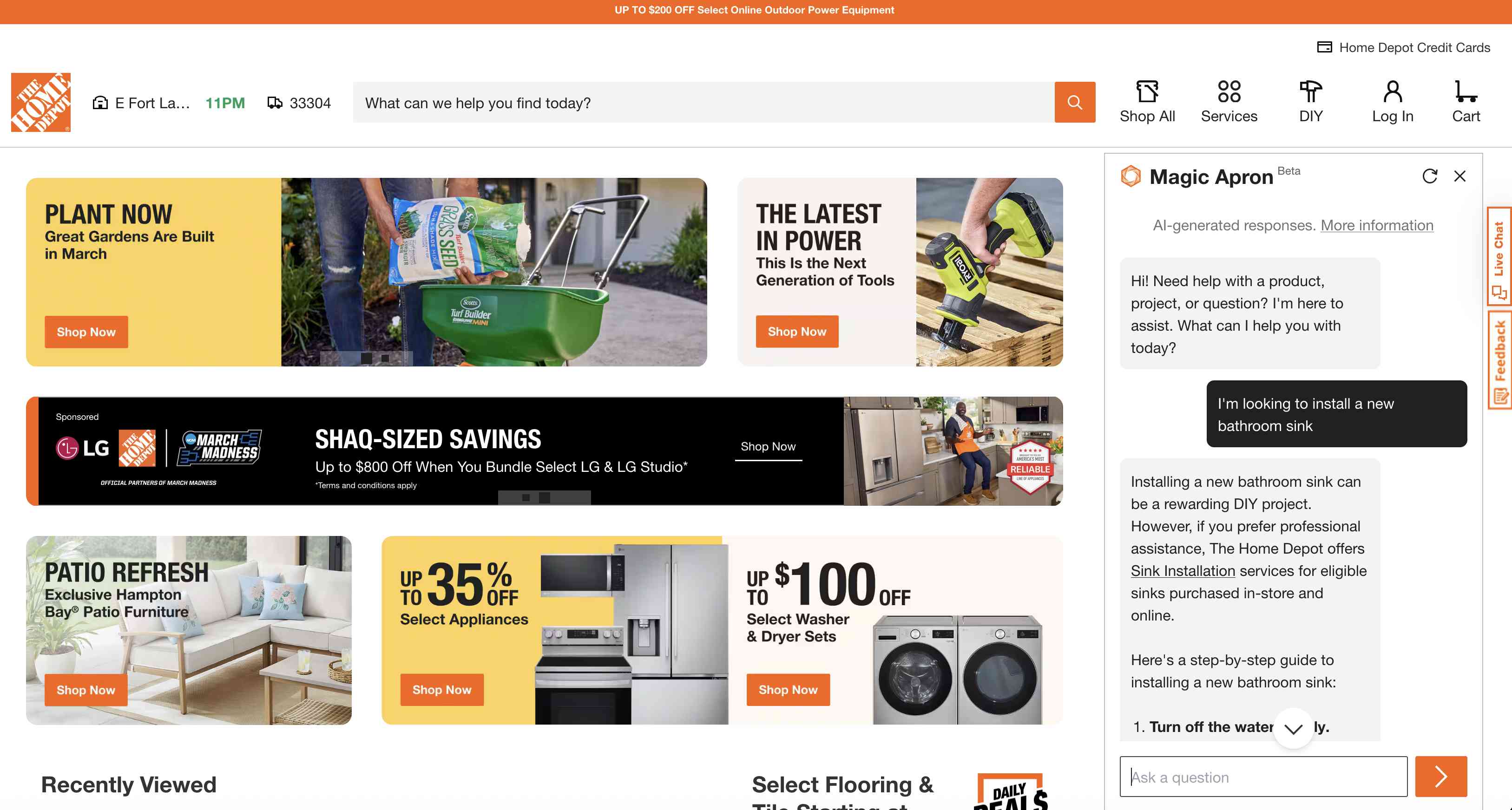
When designers prioritize business goals over user goals, the result is an experience that feels salesy and less useful.
AI Can Be Less Efficient than Traditional Search Methods
Some chatbots tried to help with the core task — finding products or information. However, several participants questioned why they would use a chatbot for this when the sites already included well-established features such as site search, filters, and navigation.
In these situations, using a chatbot is often slower and more effortful than using a standard feature, and the chatbot’s outputs often have less information density and poorer support for comparison.
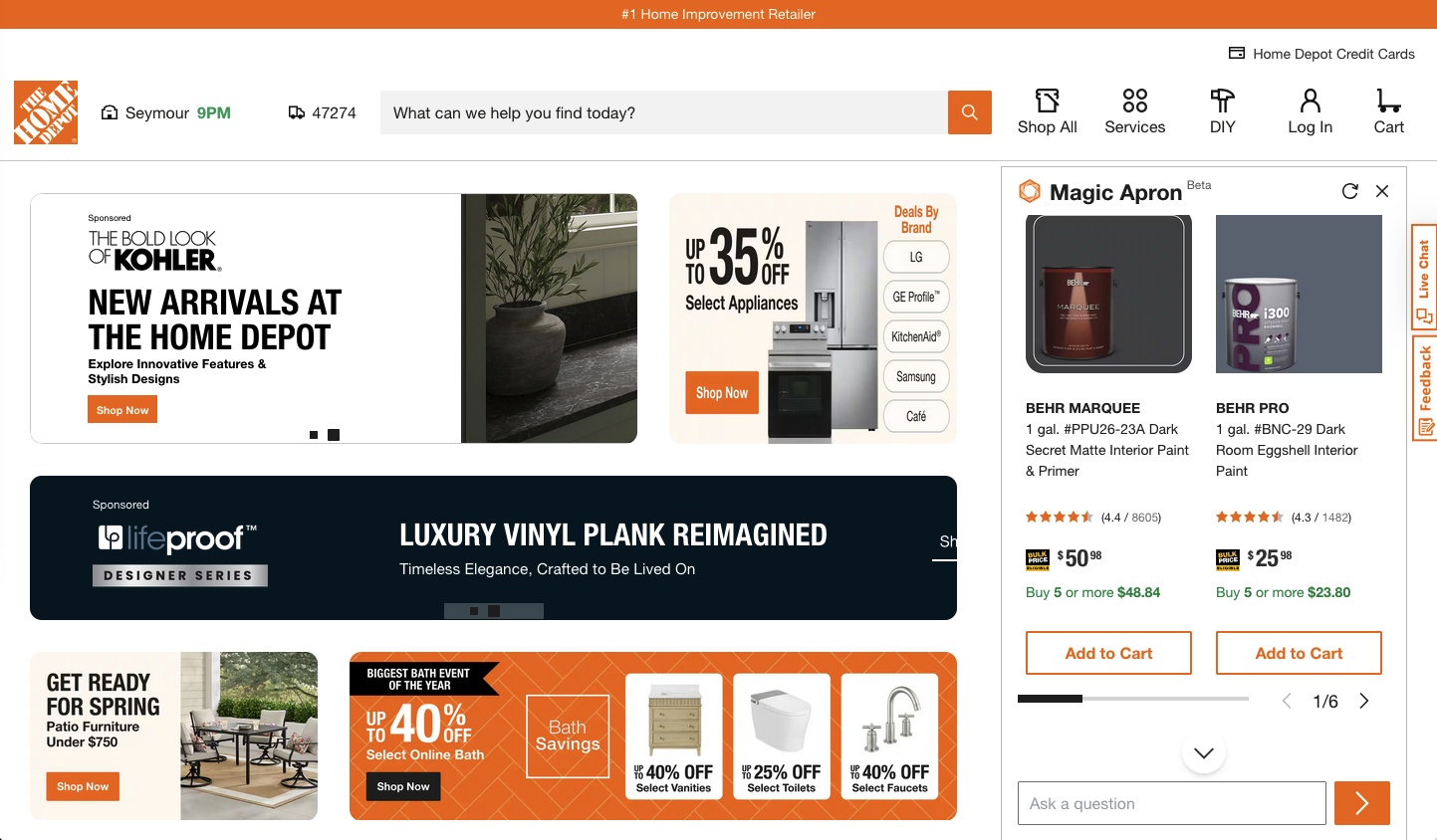
For example, the number of products that can be viewed in a chatbot viewport is limited. Users had to scroll through small carousels and issue multiple prompts to see more or different results.
“I would prefer [if] (...) I could see the paint, instead of just me clicking on this here [arrow in the carousel]. That's just me. It’s just a pet peeve (...) I'm so used to scrolling down instead of clicking left and right.”
One participant was asked to use Amazon's Rufus to find products. After a while, she turned to Amazon's regular search and found many more options without the extra typing or clicks:
“To be honest, I would just use the regular search box because I would see all of the variety better. Because [Rufus], it gave me like five to 10 [options], I think. And then I would have to search again, and then search again. But if I would have just typed it in the regular search, I could just keep scrolling to see all of the options.”
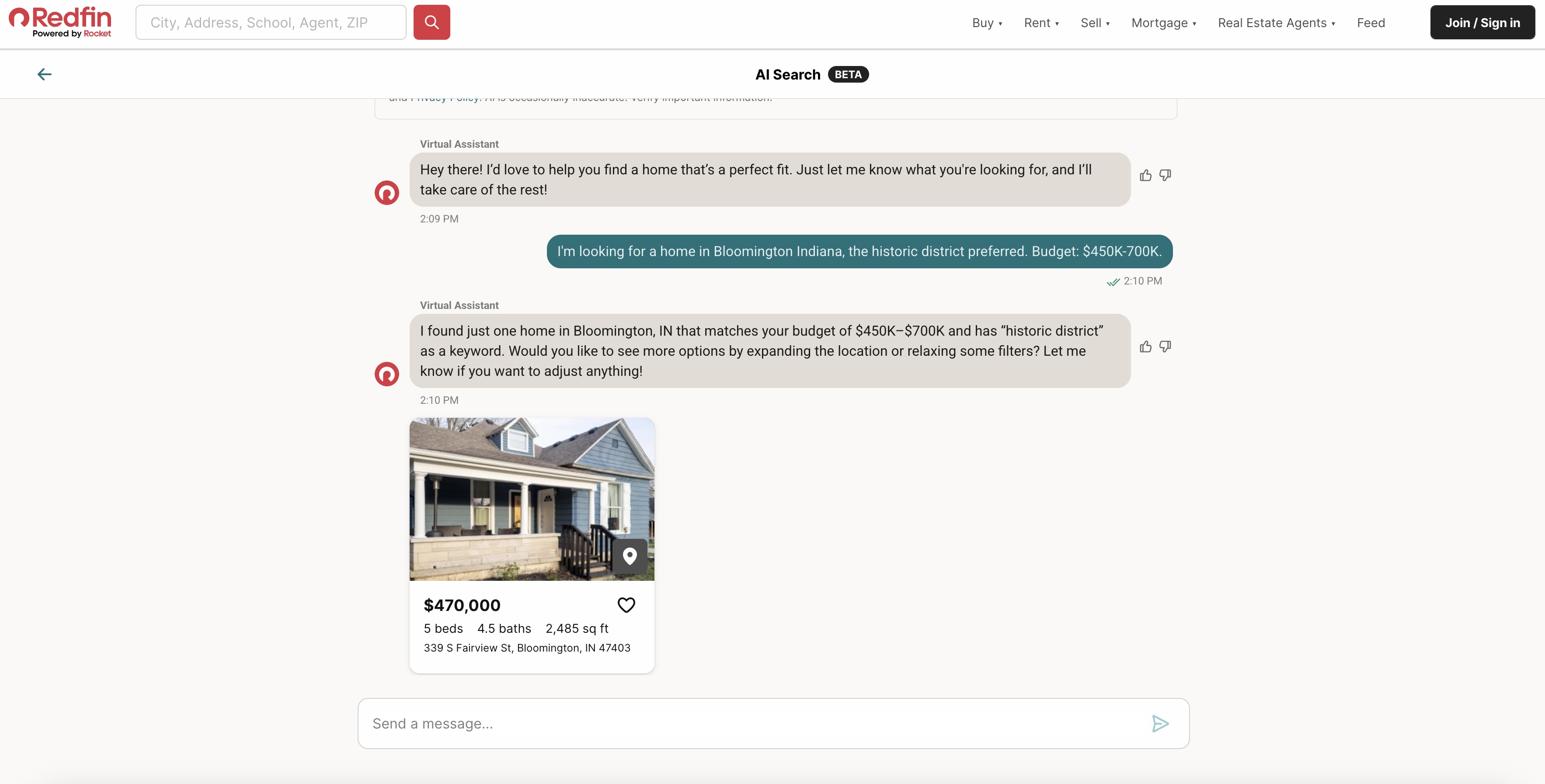
Another participant using Redfin’s AI Search chatbot to look for a home reached a similar conclusion:
“I'm not trying to be very critical and rude, but (...) typing and asking for options is much more a waste of time for me [than] (...) just going to the Redfin homepage and choosing the home filter options. I think those things kind of save much more time than these [AI chatbots], so I don't see the point.”
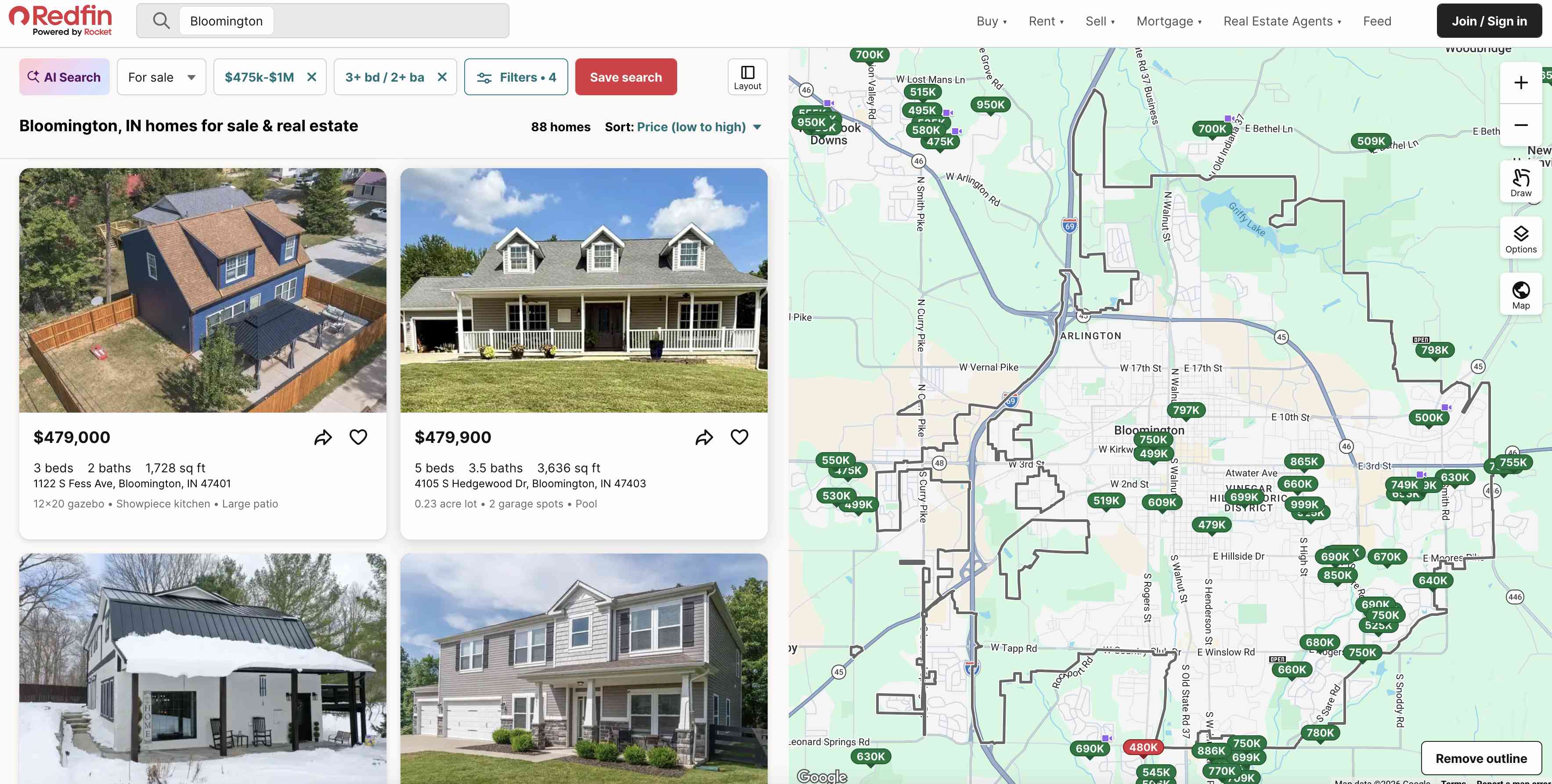
Search-results pages let users scan and compare at a glance without forgetting what they’ve already seen. When common filters are visible, users can rely on recognition rather than recall.
Chatbots, on the other hand, offer a much more limited set of results and force users to hold more information in working memory or scroll back to find earlier results. Also, unless a chatbot prompts for all the relevant filters, users have to remember to apply them, and that process is more effortful — usually requiring typing rather than clicking.
This issue wasn't limited to ecommerce. On informational sites, some chatbots offered to help users find content that was one or two clicks away in the navigation. One participant on Scouting America's website (formerly Boy Scouts of America) had to make two prompts and wait several seconds for each response before getting information he found himself in five seconds:
“[Using the navigation] is just so much easier than talking to a chatbot. Look, that's exactly what I need to know. That was a five-second interaction, so [the chatbot] feels a bit of a roundabout way to get your information”
In short, the interaction cost of using an AI chatbot to find products or information is often higher. Users want to be efficient and are always performing a mental cost-benefit analysis when using your site. If the chatbot is slower, shows less information, and requires more work, the calculation is straightforward.
“You saw the [long] wait times. I'm [a] pretty savvy Internet user. I could have gotten all that information in like 30 seconds on my own. So, for me, who uses computers a lot, this is like one of the slowest ways to get the information I need.”
Users Don’t Always Take AI Recommendations
Users making decisions often want to be sure they’re picking the best possible option out those available (this behavior is called “maximizing”). Traditional filters and search facilitate maximizing by allowing users to start with all options and narrow in on what applies best to them.
However, many AI chatbots seem to be built with the assumption that users will take the first option that seems reasonable enough (a behavior called “satisficing”). The chatbots frequently surface only a handful of recommended options based on the details users have provided and use language implying that they expect the user to select one and move forward (e.g., Would you like me to share more details about this option?).
However, users were rarely satisfied with the AI recommendations, especially when making important decisions like renting a car or purchasing a house. This was because they often did not understand the rationale for the AI recommendations and couldn’t easily tell whether the suggested options are optimal.
Where Chatbots Can Help
Despite these challenges, users reported that chatbot responses did help them in some decision-making scenarios.
Some participants appreciated when the bots followed them to a product page and either answered quick questions or offered clarifications about a product.
“The most useful thing I've seen so far is being able to ask questions about the product here (....) This is useful because it saves me from having to read all this [product specs]. That's quite a lot of data to absorb (...) and same over here [Home Depot], because with the houseware stuff, you got to know exactly dimensions and everything. That is useful.”
Although our participants said they’d prefer to go elsewhere for advice on how to start a DIY project, they did find Home Depot’s Magic Apron useful for learning detailed information about unfamiliar products.
This finding makes sense when we consider the typical in-store experience at Home Depot. Employees don’t stand by the front door waiting to help customers plan projects and suggest shopping lists. Instead, employees are most useful when they’re available throughout the aisles, ready to assist with specific product decisions.
Asking a plain-language question about a product can be significantly faster than having to parse through a long list of features, product specifications, or fine print.
Additionally, users found it helpful when the AI chatbot offered information that they hadn’t considered before. For example, one participant who was using Williams Sonoma’s chatbot to look for a dough mixer was asked whether she wanted a corded or cordless device and had any weight preferences.
“I really like their followup questions (...) I probably wouldn't have thought (...) I want lighter, I want high power. I like how they suggest that for me (....) and the corded and the cordless – wouldn't have thought of that either. So that's a great suggestion, too.”
On information-sites, users valued AI chatbots that could handle complex questions specific to their personal context, saving them from having to visit multiple pages to arrive at the answer. One participant called these "multivariate" questions.
“So where chatbots excel, I think we all know, is that it can take one of those weird, hard to ask questions and (...) [give you] an answer”
On Scouting America’s site, he shared such a question with the AI chatbot:
Prompt: “My daughter is 14. Is she too old to be a scout?”
Another participant found a recipe on Williams Sonoma and asked the chatbot how to modify it for her toddler:
“AI telling me the best ways in which this could be modified into a toddler meal was something that was very attractive as something I did not expect to hear it from an AI…”
Although users may not typically visit Williams Sonoma to find recipes, this example illustrates a key advantage of AI chatbots: they can provide expert advice that goes beyond the information available on the website.
In general, chatbots were most valuable when they functioned as experts — asking clarifying questions, highlighting relevant considerations, and tailoring recommendations to individual user needs.
Takeaways for AI Chatbot Designers
Our research highlights that AI chatbots are being added to sites without enough consideration of what problems they solve for users. Designers can do better. Here's how.
Start with the User's Unsolved Problems, Not with the Technology
Don't expect to plug an AI chatbot onto your site and learn how it can be useful from what people query. If people have low expectations, they won't try it. If they try it and get poor answers, they may never try again. Do your research first. Understand what unsolved problems your users have and whether a chatbot is the right way to address them.
Don't Replicate What Already Works
Search, filters, and navigation are well-established patterns that users are efficient with after years of practice. A chatbot that repackages product browsing into a conversational interface isn't solving a problem — it's adding friction to one that's already been solved.
Don't Let Business Goals Drive the Experience
When chatbots lead with product promotions or steer users toward services, users notice and it erodes trust. If the chatbot feels like a sales channel rather than a helpful tool, users will approach it with skepticism. Chatbots earn users' trust by highlighting information or reasoning that the rest of the UI doesn't provide.
A Chatbot Doesn't Have to Do Everything
A chatbot doesn't need to sit at the highest level of your site or try to handle every task. It could support users in one specific area where existing features fall short.
For example, Turo's chatbot couldn't recommend cars — but it could have answered questions about leasing policies and protection plans, making coverage decisions easier. That's a better-scoped, valuable role.
Surface the Chatbot Where Users Need It, and Make Its Value Clear
When designing an AI chatbot, consider the situations where an expert is needed: choosing the best option for a particular context, figuring out whether a project is within your skill level, learning how to adapt something to a specific circumstance.
Once you've identified a real use case for a chatbot, don't undermine it with poor discoverability. Make it visible where it's relevant — not just as a floating icon in the corner. Instead, clearly surface the chat contextually: for example, when a user has been browsing for some time without clicking, or on a page with dense, complex information (e.g., policy pages). The chat’s prompt and intro message should be specific to the situation — rather than a generic How can I help you? or Ask me anything, consider Not sure which plan covers you? I can help you compare.
Conclusion
AI chatbots do not earn their place on a website simply by being new, conversational, or powered by a large language model. On most sites, users already have faster, more familiar ways to find products and information. When chatbots are hard to notice, vague about their purpose, or used to recreate search in a slower format, people don’t engage.
However, our study also found that chatbots can be genuinely useful when they answer context-specific questions, clarify complex information, and offer tailored guidance that helps users make decisions. The opportunity is not to make every experience more conversational. It is to use chatbots where they add value.
Our Study
We conducted qualitative moderated usability tests with 9 users of varying digital skill levels and AI competency. All our participants had used at least one general-purpose AI chatbot (e.g., ChatGPT, Gemini, Claude). In each 60-minute session participants interacted with 2 to 3 sites with AI chatbots relevant to their interests and goals.
We tested the following 8 chatbots:
- Amazon’s Rufus
- Turo’s Ask Turo
- Home Depot’s Magic Apron
- Williams Sonoma’s AI Sous Chef, Olive
- Scouting America’s Scoutly
- Mississippi’s State Government’s Ask MISSI
- Redfin’s Smarter Search
- Winter Olympic Games website's AI chatbot (now retired)