It is common for usability studies to focus on a particular design detail, and it’s tempting to start the session by asking the test user to go straight to the page you want to test. After all, why spend time watching the user navigate to this location in a study that doesn’t aim to research your site’s navigation design?
Some common examples of this situation:
- A new feature on your site
- The product page for a new product
- A competitive study where you don’t care about the overall design of the competing sites but only about how they do one particular thing, such as specifying what lot of shares to sell in a stock trade
- A measurement study of how long it takes users to accomplish a certain task, such as checking out from an ecommerce site after they already placed something in their shopping cart
Why You Shouldn’t Take Users to Target Pages
In cases like these, why not take the user directly to the feature you want to test or to the first page of the workflow in question? There are three main reasons why this is usually a bad idea:
- Users behave differently when they are explicitly sent to a target page. How users think about something (here: the feature you want to test) is primed by what they’ve seen recently. (Each prior experience changes the state of a person’s brain.) Participants who don’t see all the pages leading to your new feature will interpret this feature differently than real-life users.
- Getting to something is a major part of using that thing. Quite often, navigation problems can be the biggest hindrance to the use of a feature.
- In real life, there’s no silver bell that rings when users finally arrive at the right page. Users treat every page with a healthy dose of skepticism: job #1 upon arrival at any page is for the user to judge whether it’s even worth the time to stay on the page and engage with it more deeply. If the study facilitator designates a particular page as the right one, you will never observe the common scenario of users arriving at the right page only to reject it because it doesn’t immediately communicate its purpose.
A common mistake in usability testing is to define the study scope too narrowly. You usually gain invaluable lessons from broader tasks and having users approach the problem from scratch instead of taking them to an artificial starting point.
As an example, we once tested a group of embedded small applications on websites. Each of these apps performed a narrowly targeted function, such as calculating the amount of laminated flooring needed for redecorating a kitchen. We didn’t care about the websites themselves (let’s say, whether the site was good at describing the difference between various types of floor covering), we only cared about the apps. This would seem like a case where it would be best to take users straight to each of the applications we wanted to study. Luckily we didn’t do so; we started each task at the homepage. As it turns out, users failed 36% of the tasks for the simple reason that they never got to the applications. Those uses who did get to an app certainly faced various usability problems and sometimes failed the task. Even so, the single biggest problem with these applications was the way they were presented on the websites, not the interaction with the features themselves. We would have missed this big insight if we had taken the study participants directly to each application.
When You May Take Users to Target Pages
After spending 440 words convincing you not to take test users directly to specific locations, let me spell out for you the legitimate reasons for leading users to a specific page in some studies:
- You know for sure that you have search and navigation problems (so you don't need more data about those issues), and you want to identify other in-depth problems related to specific pages.
- You are in the process of (re)designing your site and certain functionality either does not work yet or will (later) be significantly redesigned. You want to bypass these design elements and go straight to the stuff that's currently available in the design you care about.
- Navigation and search design are beyond your control.
For instance, one of our clients was interested in the design of article pages and knew already that the company’s website had huge navigation and search problems (these problems, however, were outside the scope and budget of the project we were involved in). In user testing, after confirming these problems with 1–2 users and noticing that people spent the majority of the precious session time locating the article of interest, we decided to lead people to a specific article to get more feedback about the design of the article page and understand how it could be improved.
Shortcut to Target Pages
What’s the best way to lead people to a specific location in those tests where you do want to take a narrow view of an individual feature?
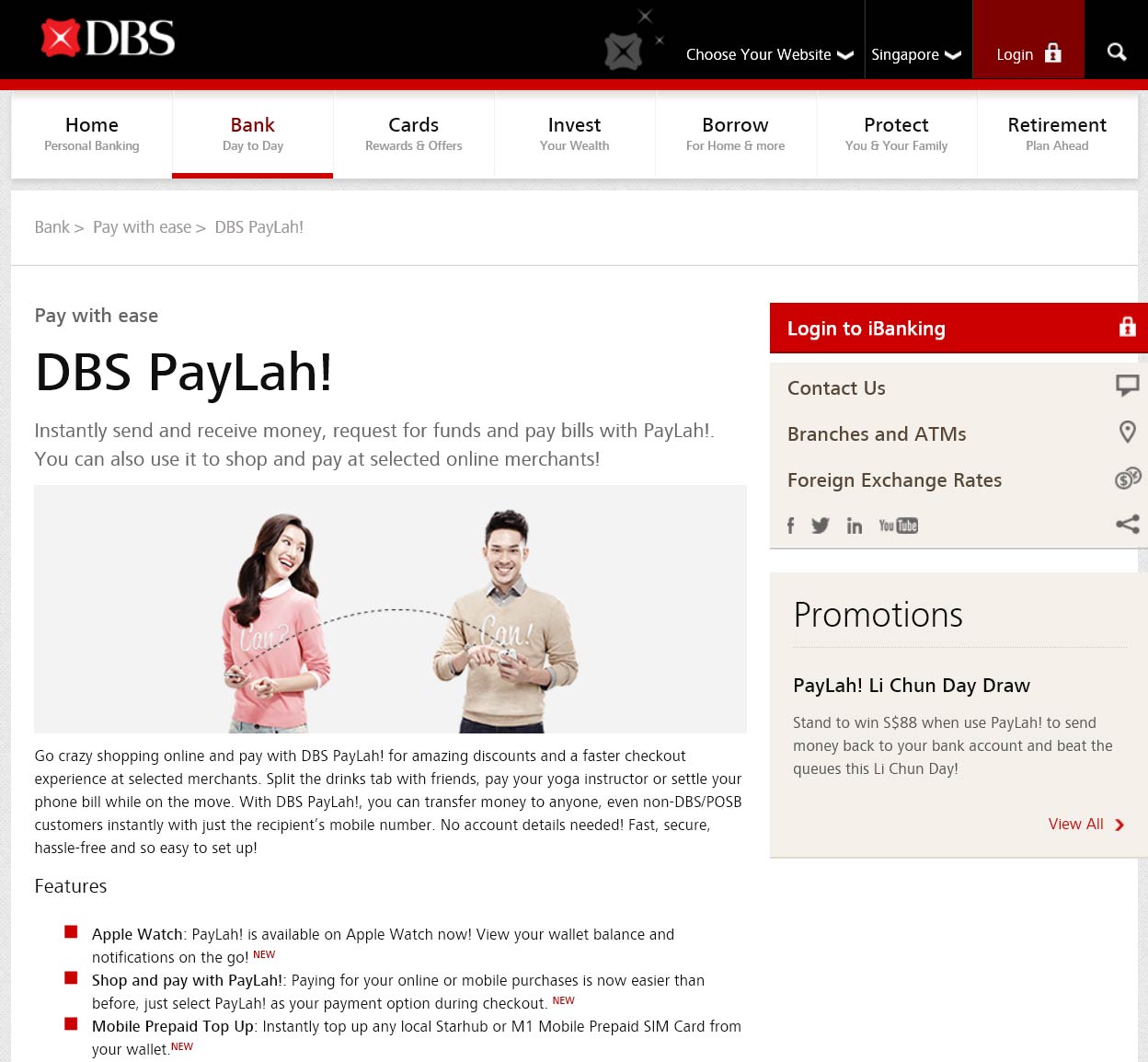
As an example, last month we ran a test of the PayLah! individual-payment service from Singapore’s DBS Bank. If we had done this as a consulting project with DBS as our client, we definitely should have taken a broader view, to find out how customers view the service in the context of the entire website. Or, if we had been doing a competitive study for another bank, we would also have wanted to understand how people viewed PayLay! as part of DBS. But we were conducting independent research (for our courses on Persuasive Design and Compelling Digital Copy) on how to best explain a complex new service. We didn’t care about the bank, only about the service description.
Furthermore, we had many other things to test and limited research time available in Singapore. So we decided to take a shortcut and bring the study participants directly to the PayLah! page, at http://www.dbs.com.sg/personal/deposits/pay-with-ease/dbs-paylah (shown above).
It’s a bad idea to ask users to input such a long URL: typing is error-prone (especially on mobile) and takes a long time during which you don’t learn anything except for observing the user’s typing skills. It’s also a bad idea to have users locate the page through search. While search is usually the way people find stuff on the Internet, it’s also error-prone and risks having users select a different search hit than the one you want to study. (Having users search as they please is great when you take the recommended broader research view, but not when you have chosen a narrow study.)
On the web (or on an intranet), the best way to get users directly to the destination is simply to bookmark it in the browser. Then, as the first part of the task description, ask users to “Please use the browser’s bookmark menu and select the entry called Bookmark A.”
If you want to test multiple destinations, bookmark each one and rename the bookmarks “Bookmark A”, “Bookmark B”, and so on.
Why change the the bookmark names? First, the default name may be too revealing and may prime people towards a certain behavior. Second, if you test several sites, the set of bookmarks may give participants advance warning of the different activities that they will be asked to do later in the study. Plus, it’s common that not all users will complete all tasks — because a user might be too slow, because you have so many tasks to test that you split them up among users, or because your study involves several user profiles with different sets of tasks each. Whatever the reason, you don’t want users to be overly conscious of the parts of the study in which they are not invited to participate.
To conclude, it’s best to let users wander their merry way around a website to get the most realistic data about how they approach a task. But in some studies, you can save a lot of time (in return for weaker data about the big picture) by bookmarking specific destinations and asking users to go straight to a bookmark.
(There are a lot more intricacies to running a great user study and getting optimal research insights, so we need a full-day course on Usability Testing for these additional issues.)